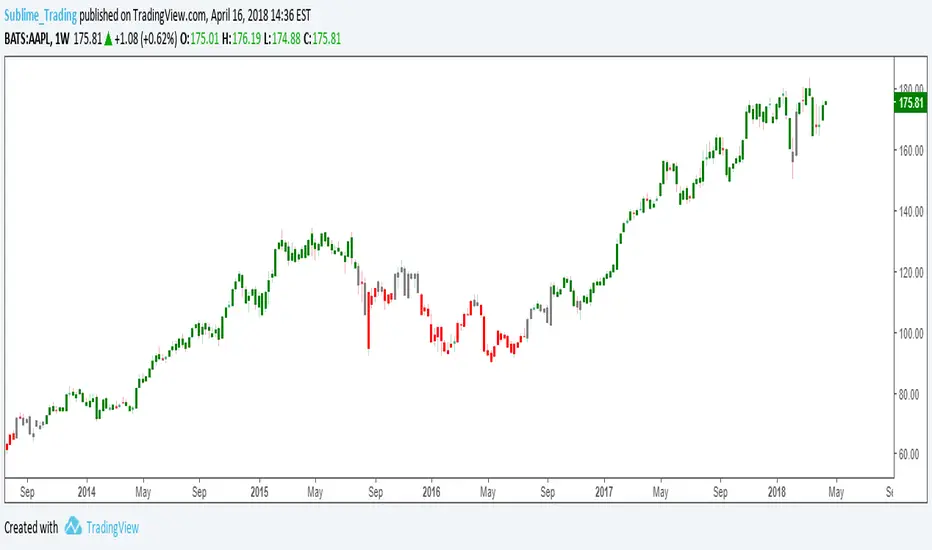
wTF50This is a customized trend filter that has several uses:
It helps identify trend direction, either bullish or bearish
It distinguishes between a pullback and a trend reversal
It helps identify areas where traders should stand aside
It highlights areas of consolidation
Wyszukaj w skryptach "bear"
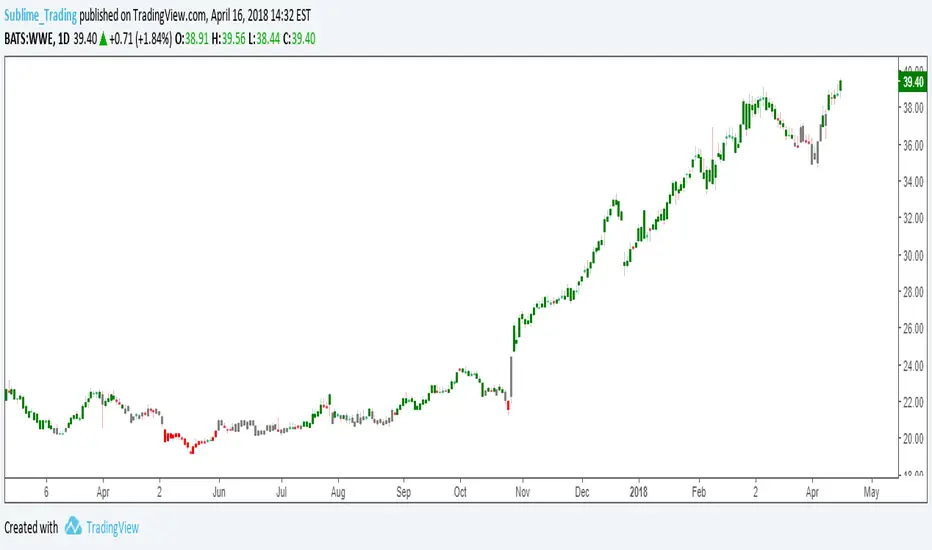
dTF50This is a customized trend filter that has several uses:
It helps identify trend direction, either bullish or bearish
It distinguishes between a pullback and a trend reversal
It helps identify areas where traders should stand aside
It highlights areas of consolidation
OBV divergence hidden and regular on both bearish and bullish.OBV (on balance volume) divergence indicator with hidden and regular signal on both bearish and bullish.
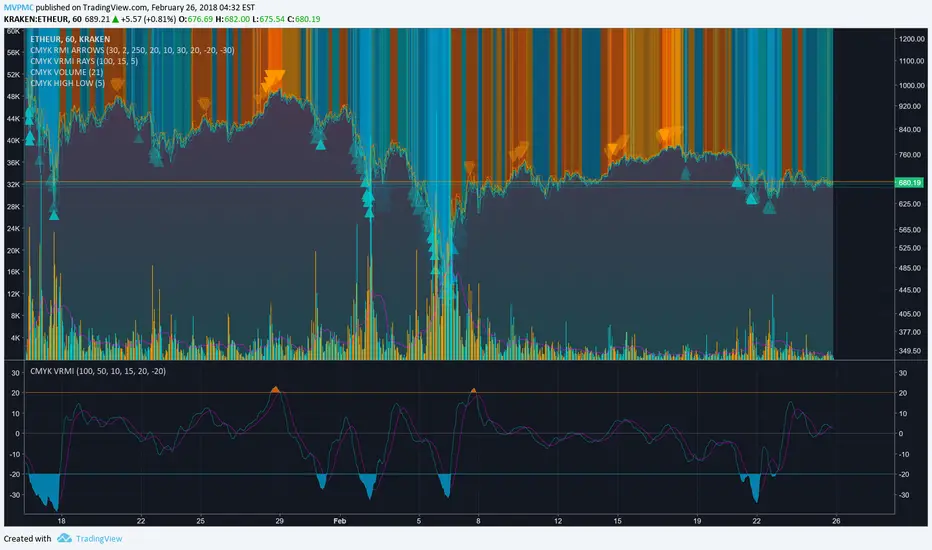
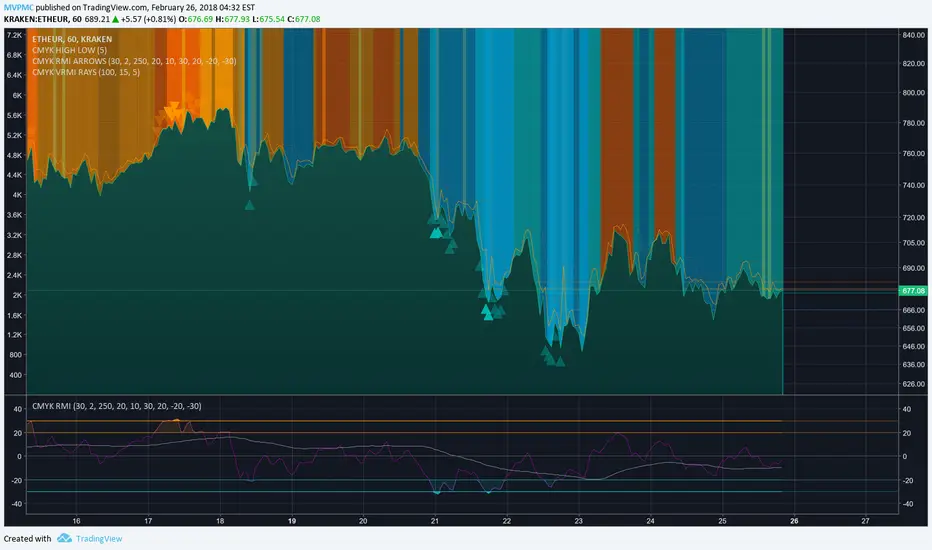
CMYK VRMI◊ Introduction
This script indicates the relative movement of price x volume.
◊ Origin
Based on 'The Relative Momentum Index' by Roger Altman : February, 1993 issue of Technical Analysis of Stocks & Commodities magazine.
While RSI counts up and down days from close to close, the Relative Momentum Index counts up and down days from the close relative to a close x number of days ago.
This results in an RSI that is smoother. The input has been changed to the change of a smoothed close multiplied by a smoothed volume.
The polarity of VRMI indicates bearish/bullish movement.
◊ Adjustments
CMYK color theme applied.
◊ Usage
VRMI indicates the force the market moves with.
◊ Future Prospects
-
◊ ◊ ◊ ◊ ◊ ◊ ◊ ◊ ◊ ◊ ◊ ◊ ◊ ◊ ◊ ◊ ◊ ◊ ◊ ◊ ◊ ◊ ◊ ◊ ◊ ◊ ◊ ◊ ◊ ◊ ◊ ◊ ◊ ◊ ◊ ◊ ◊ ◊ ◊ ◊ ◊ ◊ ◊ ◊ ◊ ◊ ◊ ◊ ◊ ◊ ◊ ◊ ◊ ◊ ◊ ◊ ◊ ◊ ◊ ◊ ◊ ◊ ◊ ◊ ◊ ◊ ◊ ◊ ◊ ◊ ◊ ◊ ◊ ◊ ◊ ◊ ◊ ◊ ◊ ◊ ◊ ◊ ◊ ◊ ◊ ◊ ◊ ◊ ◊ ◊ ◊ ◊ ◊ ◊ ◊ ◊ ◊ ◊ ◊ ◊ ◊ ◊ ◊ ◊ ◊ ◊
CMYK VRMI RAYS ◊ Introduction
Introducing VRMI in this script, an RMI based on price movement and volume, to indicate bullish and bearish trends.
This script marks the background depending on RMI <> VRMI , VRMI polarity and large buy/sell sprees.
◊ Origin
Based on 'The Relative Momentum Index' by Roger Altman : February, 1993 issue of Technical Analysis of Stocks & Commodities magazine.
While RSI counts up and down days from close to close, the Relative Momentum Index counts up and down days from the close relative to a close x number of days ago.
This results in an RSI that is smoother.
In addition VRMI reacts quick, it is used to cut off latency from RMI, and it's polarity indicates the beginning and end of a trend.
Large buy sell sprees and detected in their proportion with an sma on the volume
◊ Adjustments
CMYK color theme applied.
◊ Usage
This indicator can be used to detect trends and mark reversals.
◊ Prospects
◊ ◊ ◊ ◊ ◊ ◊ ◊ ◊ ◊ ◊ ◊ ◊ ◊ ◊ ◊ ◊ ◊ ◊ ◊ ◊ ◊ ◊ ◊ ◊ ◊ ◊ ◊ ◊ ◊ ◊ ◊ ◊ ◊ ◊ ◊ ◊ ◊ ◊ ◊ ◊ ◊ ◊ ◊ ◊ ◊ ◊ ◊ ◊ ◊ ◊ ◊ ◊ ◊ ◊ ◊ ◊ ◊ ◊ ◊ ◊ ◊ ◊ ◊ ◊ ◊ ◊ ◊ ◊ ◊ ◊ ◊ ◊ ◊ ◊ ◊ ◊ ◊ ◊ ◊ ◊ ◊ ◊ ◊ ◊ ◊ ◊ ◊ ◊ ◊ ◊ ◊ ◊ ◊ ◊ ◊ ◊ ◊ ◊ ◊ ◊ ◊ ◊ ◊ ◊ ◊ ◊
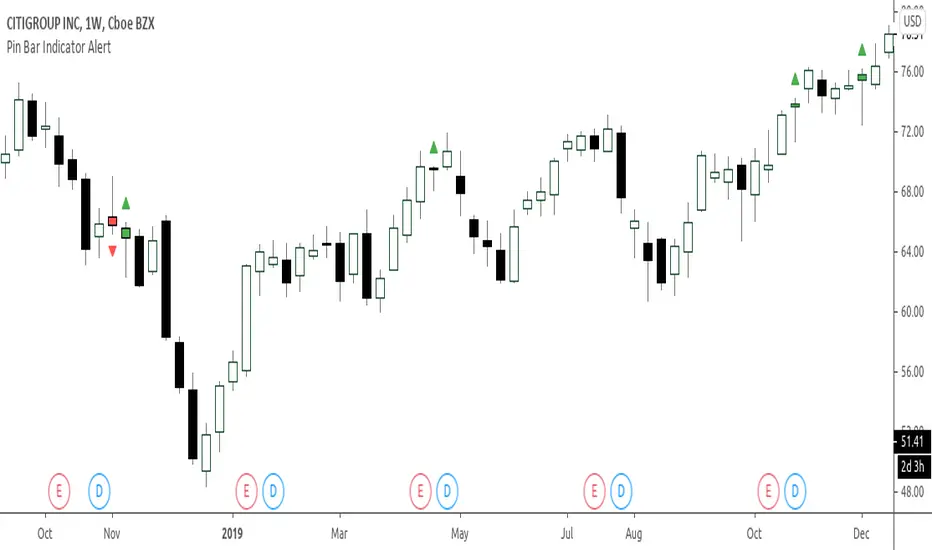
Bullish and Bearish Engulfing Patterns auto detectionThis simple indicator detects automatically most important bullish and bearish candlestick patterns formations. Used to locate potential supply and demand imbalances.
Copyright 2017 Alfonso Moreno www.set-and-forget.com
Super Envolvente (Bullish y Bearish)Identificador de Super-envolventes (SE), se encarga de darle un color verde a la SE alzista (Bullish) verde y rojo a la bajista (Bearish).
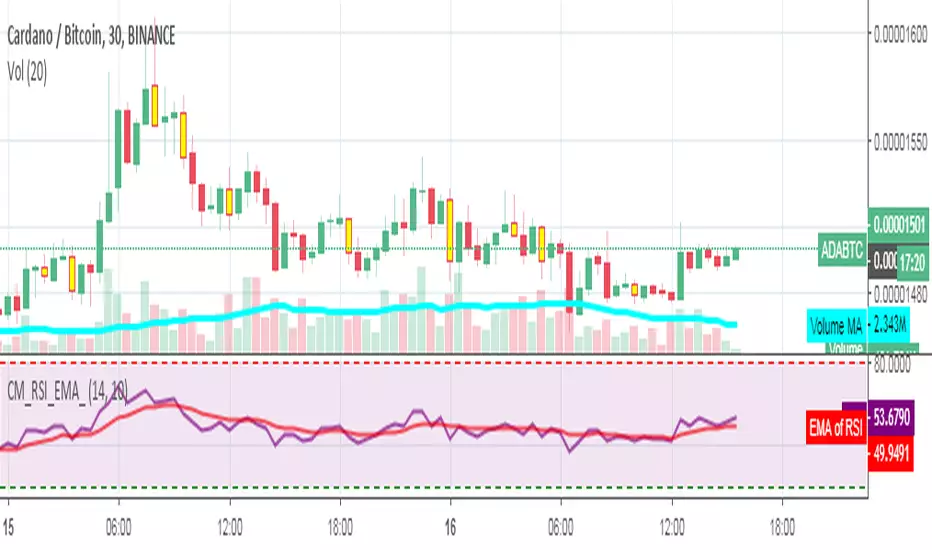
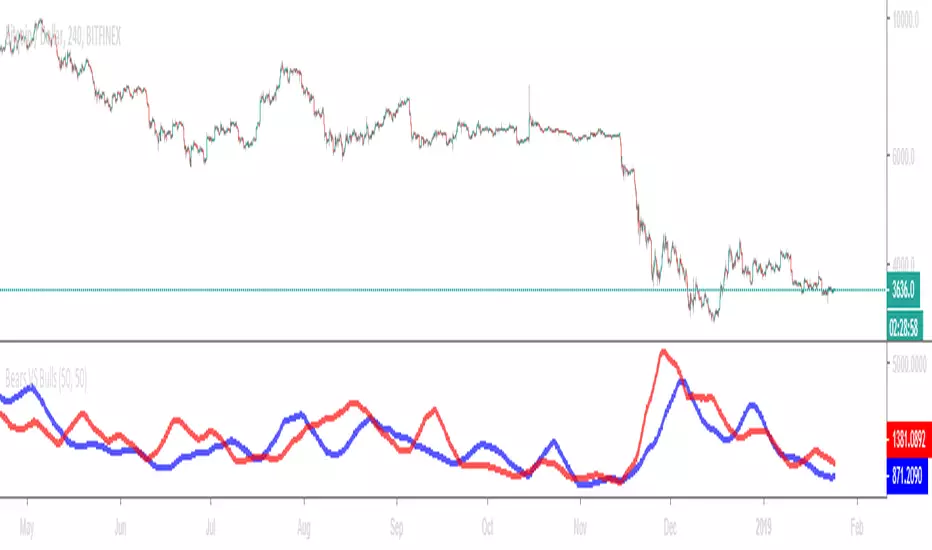
Bears VS BullsThis indicator will work on ANY instrument.
The red line is a moving average of ONLY sellers in the market.
The blue line is a moving average of ONLY buyers in the market.
The period or "length" of the individual moving averages can be adjusted in the indicator settings.
The default, it is set to 50.
Buying and selling trends often provide indications of market moves such as the most recent bottom in Cryptocurrencies.
Feel free to comment and share any indicator concepts or ideas for content you would like to see added to the Technical Indicator Bundle on www.kenzing.com
Bearish Trailing stopIt is a trailing SL. Works very well. Good good very good. Looks like my description needs more, so here is more random text.
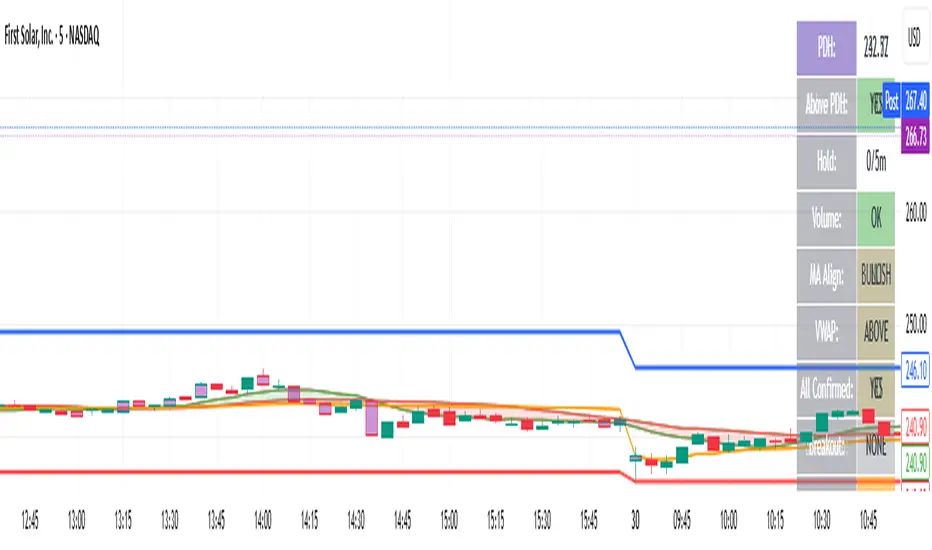
bearish Price Below PDL - Complete Multi-Confirmation Alert🎯 KEY IMPROVEMENTS:
1. Enhanced Alert Visibility:$jmoskyhigh
✅ HUGE triangle down marker with "SELL" text
✅ Alert title: "SELL SIGNAL - PDL BREAKDOWN CONFIRMED"
✅ Prominent info panel with red theme
✅ Clear "SELL ALERT: TRIGGERED" status
2. Better Visual Feedback:
Red frame around info panel
Larger shapes and markers
Color-coded confirmations (green = OK, red = FAIL)
Progress percentage displayed
Breakdown price label
3. Complete Alert System:
Main Alert: "SELL SIGNAL - PDL BREAKDOWN CONFIRMED"
Early Warning: "PDL Breakdown Started - Monitoring"
Reset Alert: "Confirmation Lost - Breakdown Reset"
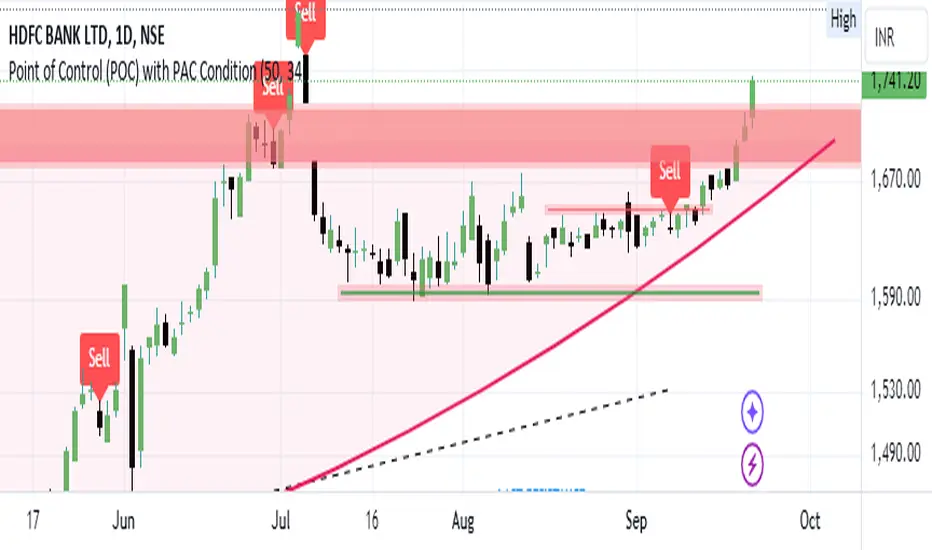
Bearish signal using Point of Control (POC) with PAC by guruThis indicator code helps traders identify potential sell opportunities using several important technical indicators:
Point of Control (POC) – This is the price level where the most volume was traded over the past several days.
Previous Day's Low – This shows the lowest price reached during the previous day.
PAC (Price Action Channel) EMA – These are two moving averages (one based on the low price and one based on the close price) that help determine if the price is trending within a certain range.
Volume SMA – This is a 3-day simple moving average (SMA) of volume, which helps filter out signals based on market activity.
What the Script Does:
Point of Control (POC):
The script looks at the last 50 days (configurable) and calculates which price level had the highest trading volume.
It then plots a red line on the chart at the POC level. This is important because it helps identify areas where there was strong market interest in the past.
Volume Moving Average:
The script calculates a 3-day SMA of volume, but it excludes the current day to avoid premature signals based on today’s trading.
The volume SMA is used to ensure there’s enough market activity (with a threshold set to 25 units) before triggering a sell signal.
Price Action Channel (PAC) EMA:
The PAC consists of two exponential moving averages (EMAs):
The PAC Low EMA: This is based on the low prices over the last 34 periods (configurable).
The PAC Close EMA: This is based on the closing prices over the last 34 periods.
These EMAs help determine if the price is trending above or below certain price levels.
Sell Signal Logic: The script checks three conditions before displaying a "Sell" signal:
Price Below POC and Previous Day’s Low:
The close price must be below both the Point of Control (POC) and the previous day's low.
Volume SMA Above 25:
The 3-day volume SMA must be greater than 25. This ensures the signal only triggers when there’s enough trading volume in the market.
Today’s Low is Above PAC EMAs:
Today's low price must be above both the PAC low EMA and the PAC close EMA. This prevents sell signals when prices are already significantly below the PAC, indicating possible exhaustion in the downtrend.
If all three conditions are met, the script will display a red "Sell" label on the chart, signaling a potential selling opportunity.
No Sell Signal if Price Reverses:
If the price crosses back above the POC or the previous day's low, the script will remove the sell signal and reset for a new opportunity.
Summary of Conditions:
For the script to display a "Sell" label:
The close price must be below the Point of Control (POC) and the previous day’s low.
The 3-day volume SMA (excluding today) must be greater than 25 units.
The low price of the current day must be above both the PAC low EMA and the PAC close EMA.
If these conditions are met, a red sell label appears on the chart as a potential signal for a short (sell) trade.
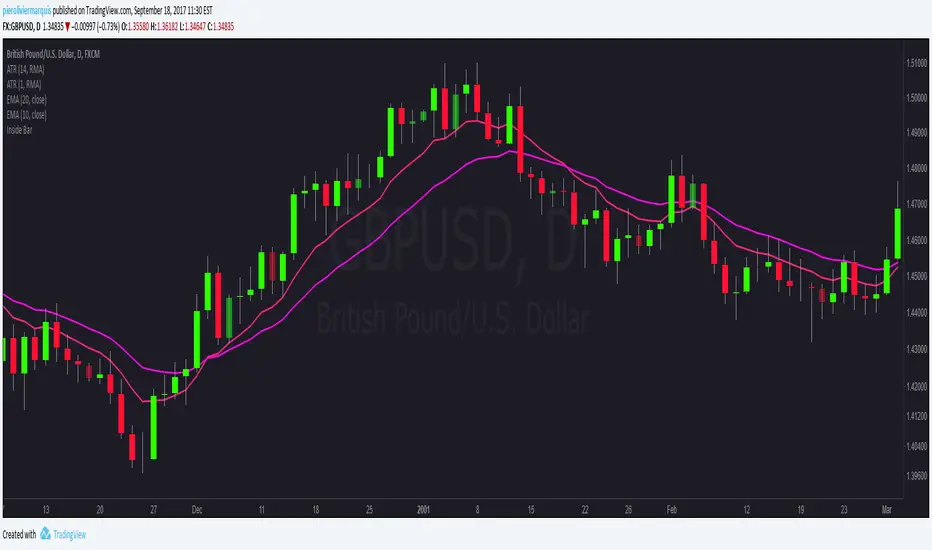
Bearish FS Continuation S1BB - baby bar / inside bar
DF - downflow, meaning 20MA below 50MA
EXE - execution bar, indicator to short
Mainly to identify execution bar for shorting using inside bar identification and force top
Guneet-ScalperBearish trend candle color change to red with sell print
Bullish trend candle color change to green with buy print
thanks
jas toor
Global OrderFlow CVD Div (USDT+USD + Multi-OI) [TheActualSnail]Global OrderFlow CVD Div (USDT+USD + Multi-OI)
Global OrderFlow CVD Div is a multi-venue order flow proxy that aggregates CVD (Cumulative Volume Delta) from several exchanges (USDT perpetuals + USD spot) and prints pivot-based divergence labels on the price chart. Optionally, it can filter those divergence labels using Open Interest (OI) trend for extra confluence.
This is designed as a “global read” of participation: perps for positioning, spot for real flow, and OI for leverage context.
What this indicator shows
1) Delta (Orderflow proxy)
Because true bid/ask orderflow isn’t available natively in Pine for most markets, this script uses an intrabar OHLCV proxy:
If intrabar close > open → volume counted as “buy”
If intrabar close < open → volume counted as “sell”
If doji → it falls back to close vs previous close
This happens on a Lower TF (intrabar timeframe), then sums intrabar volume inside each chart candle.
2) CVD (Cumulative Volume Delta)
CVD is the cumulative sum of Delta:
Positive CVD suggests net aggressive buying (proxy)
Negative CVD suggests net aggressive selling (proxy)
You can plot:
AVG CVD (aggregated signal)
Optionally each exchange’s CVD separately (debug / comparison)
3) Divergence labels (pivot-based)
The script marks divergences at confirmed pivots:
Regular Bullish Divergence (Bull Div)
Price makes a Lower Low
CVD makes a Higher Low
Regular Bearish Divergence (Bear Div)
Price makes a Higher High
CVD makes a Lower High
Optional:
Hidden Bullish Divergence (trend continuation type)
Price makes a Higher Low
CVD makes a Lower Low
Hidden Bearish Divergence (trend continuation type)
Price makes a Lower High
CVD makes a Higher High
All labels are drawn at the pivot candle (the pivot is confirmed after Pivot length bars).
Inputs & settings explained
Calculation
Lower TF for intrabars
Sets the timeframe used to build the intrabar delta proxy (ex: 30s / 1m / 3m).
Smaller = more precise, but heavier CPU.
Delta mode
Delta = raw (buy vol − sell vol)
Delta % = delta normalized by total intrabar volume (helps when mixing sources with different volume scales)
CVD reset
Controls when CVD is reset back to 0:
None = continuous cumulative
Daily / Weekly / Monthly = resets at timeframe boundary
Fixed time = resets at a specific hour/min in your chart’s timezone
Session (regular) = uses TradingView’s regular session start
Fixed time hour / min (only used when reset = Fixed time)
CVD Sources (USDT perps + USD spot)
Each source has two controls:
✅ Checkbox = enable/disable that venue in the aggregation
Symbol picker = the actual TradingView symbol used
Defaults include:
USDT perps (Binance/Bybit/OKX/Bitget)
USD spot (Binance USD, Coinbase USD, optionally Kraken/Bitstamp)
Blend method
Average = normalizes by number of enabled sources (recommended for “global” confluence)
Sum = adds them directly (can overweight high-volume venues)
Tip: If a symbol is invalid on your TradingView plan/region, just disable it or change it to a valid ticker.
Open Interest (Perps only)
OI is optional and used as a divergence “filter” (not required).
Enable OI filter = turn OI logic on/off
Per-exchange OI toggles + symbol pickers (Binance/Bybit/OKX/Bitget)
OI blend
Average = average OI from enabled sources (recommended)
Sum = summed OI
OI trend length
Lookback for rising/falling detection
Filter labels by OI
None = no filter
Require OI Rising = only show divergence labels when blended OI is rising
Require OI Falling = only show divergence labels when blended OI is falling
Note: Coinbase has no OI feed here, so OI is perps-only by design.
Divergences
Enable divergence labels = on/off
Pivot length = pivot strength (higher = fewer, stronger signals; lower = more signals)
Use wicks for pivots
ON = pivots use High/Low (more sensitive)
OFF = pivots use Close (more conservative)
Min CVD difference (filter)
Requires the CVD pivot value to differ from the previous CVD pivot by at least this amount.
Also show hidden divergences
Enables hidden divergence labels.
Visuals
Show AVG Delta histogram (pane) = plots aggregated delta columns
Show AVG CVD (pane) = plots the aggregated CVD line
Show each CVD (pane) = plots each venue’s CVD line (useful for checking alignment)
Show AVG OI (pane) = plots blended OI (if enabled)
Show zero line (pane) = plots the 0 baseline
Up/Bear colors = colors used for plots and labels
“Icons” you see in the Inputs panel
TradingView uses common UI controls:
✅ Checkbox → enable/disable a feature or a specific exchange/OI feed
🔽 Dropdown → choose modes like Reset type / Delta mode / Blend method / OI filter
🕒 Timeframe selector → choose Lower TF for intrabars
🎨 Color swatch → change label/plot colors
✏️ Symbol picker → choose the exact exchange ticker used by the script
How to use it (practical workflow)
Pick your sources
Keep 2–4 major venues enabled for clean signal (ex: Binance/Bybit/OKX + Coinbase).
If you see “Invalid symbol”, replace the symbol or turn that source off.
Set intrabar precision
Start with 1m lower TF.
If you need more detail and your chart is smooth, try 30s.
Tune divergence sensitivity
Pivot length 5–10 is a good range.
Use wicks ON for earlier signals; OFF for stricter confirmation.
Add confluence
Use the OI filter to avoid divergences that occur with the “wrong” leverage context.
Combine with HTF levels, market structure, liquidity zones, VWAP/POC/NPOC, etc.
Important notes / limitations
This is a proxy, not true bid/ask delta.
Different exchanges report volume differently; aggregation helps but won’t be perfect.
Pivots are confirmed, so labels appear after the pivot is formed (pivotLen bars later).
More enabled sources + smaller intrabar TF = heavier calculations.
Not financial advice
This indicator is for educational/informational purposes only and does not constitute financial advice. Markets are risky. Always validate signals with other confluences, use proper risk management, and make your own decisions.
Rasta Long/ShortRasta Long/Short
Rasta Long/Short is a rule-based, state-flip trading strategy designed for structural market analysis and systematic behavior study. The strategy models directional regime changes using the relationship between a fast EMA and a smoothed reference line, with optional higher-timeframe trend filtering and clearly defined risk boundaries.
The system operates as a binary state machine: price action is interpreted as either bullish or bearish based on crossover dynamics, and positions flip accordingly. The objective is not prediction, but consistent response to confirmed structural shifts in momentum.
Core Logic Overview
At its foundation, the strategy compares:
An EMA of the selected source, and
A smoothed version of that EMA (SMA / EMA / RMA / WMA selectable).
Crossovers between these two lines define directional transitions:
A crossover to the upside signals a bullish state.
A crossover to the downside signals a bearish state.
These transitions are treated as state changes, not discretionary signals, allowing the strategy to alternate cleanly between long and short exposure or operate in restricted modes.
Trade Modes
The strategy supports three execution modes:
Long Only – participates only in bullish regimes.
Short Only – participates only in bearish regimes.
Long + Short – flips continuously between both states.
This flexibility allows the same framework to be studied across different asset classes, market conditions, and directional biases.
EMA 8/21 Trend Filter (Optional)
An optional EMA 8 / EMA 21 filter can be enabled to gate bullish entries only, while bearish logic remains ungated. This asymmetric design reflects the reality that many markets exhibit different behavior on the upside versus the downside.
An adaptive release mechanism is included:
If the EMA 8/21 filter flips bullish while the internal state is already bullish, the strategy can enter immediately rather than waiting for a new crossover.
This helps reduce missed transitions during strong trend resumptions.
Execution Model
Signals are evaluated in real time with per-bar locking to prevent duplicate actions.
A bar-close backup path is included to ensure structural flips are not missed.
Position management enforces one active position at a time.
All flips are handled explicitly (long → short → long) to maintain clean state transitions.
Risk Management
Risk is handled through independent fixed stop-loss levels for long and short positions, defined as a percentage of entry price. These stops are:
Direction-specific
Always active once a position is open
Visualized directly on the chart (optional)
The strategy does not rely on profit targets or curve-fitting logic. Risk control is explicit and transparent.
Visual Structure
To support visual analysis, the strategy includes:
EMA and smoothed reference plots
Optional colored “fog” between lines to highlight directional state
Optional structural “DNA rungs” drawn between the EMA and smoothed line to visualize compression, expansion, and regime shifts
Optional labels marking state transitions
All visual elements can be enabled or disabled independently.
Intended Use
This script is provided as a research and educational framework for studying trend structure, state transitions, and systematic execution logic. It is suitable for:
Market structure analysis
Strategy behavior comparison across assets and timeframes
Educational review of state-based trading systems
It is not a prediction tool and makes no claims regarding profitability or performance.
Notes
Results will vary by market, timeframe, and configuration.
Users are encouraged to study behavior across different conditions rather than relying on a single configuration.
All parameters are fully adjustable to support experimentation and learning.
{WH-L} AO 5D{WH} AO 5D – FastInd is an advanced Awesome Oscillator (AO)–based tool enhanced with ADX/DI filtering and optional volatility (BBWP) analysis. It is designed to identify momentum shifts with real market strength, reduce false signals, and provide a clean multi-timeframe context.
What it does
Main AO histogram (columns): calculates the Awesome Oscillator (SMA(hl2, 5) − SMA(hl2, slow)), with a configurable slow length (default 34).
ADX/DI strength filter: AO bars are color-coded according to ADX state (bullish, bearish, or ranging), helping distinguish strong impulse crosses from weak or noisy moves.
Multi-timeframe AO + ADX:
You can lock AO and ADX to a specific timeframe.
Optionally overlays an AO from the previous timeframe to confirm higher-context momentum.
Index mode (CryptoCap): allows AO/ADX calculations on BTC.D, USDT.D, TOTAL2, or TOTAL3 instead of the current symbol.
Optional volatility (BBWP): displays Bollinger Band Width Percentile as a secondary histogram in the same pane, with configurable gradient colors and opacity.
Regular divergences: detects and marks classic bullish and bearish divergences using pivot logic (left/right bars and range fully configurable).
How to read it (trading logic)
Strong bullish cross: AO crosses above zero and ADX is aligned and strong (green/blue) on both the current and the previous timeframe.
Strong bearish cross: AO crosses below zero and ADX is aligned and strong (red/blue) on both timeframes.
Multi-TF confirmation: when the main AO cross is confirmed by the previous-TF AO, false signals are significantly reduced.
Volatility context (BBWP): helps determine whether a signal occurs during compression or expansion, improving timing for breakouts or trend continuation.
Integrated table
A compact table shows TF / ADX for the active timeframe and, if enabled, the previous timeframe, including arrows (↑/↓) to indicate whether ADX strength is increasing or decreasing.
Built-in alerts
🟢 Bullish AO + ADX Cross
🔴 Bearish AO + ADX Cross
(Alerts trigger only when the AO zero-line cross is confirmed by aligned ADX conditions.)
MoonRush V2📌 MoonRush V2 – Trend, EMA, ATR & RSI Toolkit
MoonRush V2 is a technical analysis indicator designed to help traders visualize
market trend, volatility-based price zones, RSI extremes, and trade planning levels
by combining multiple analytical tools into a single, configurable indicator.
This indicator is for educational and analytical purposes only.
It does not provide financial advice or guarantee trading results.
🔹 1. EMA Trend System
MoonRush V2 uses a dual EMA system as its primary trend detection method:
Fast EMA (default: 38)
Slow EMA (default: 62)
Optional EMA smoothing to reduce market noise
Trend Definition
Bullish Trend: Fast EMA crosses above Slow EMA
Bearish Trend: Fast EMA crosses below Slow EMA
If no crossover occurs, the previous trend state is maintained
The indicator can optionally:
Color EMA lines
Color price bars
Apply background shading
Fill the area between EMAs
All visual elements can be enabled or disabled via the ALL SWITCH panel.
🔹 2. Trend Visualization
To improve chart readability:
Green color represents bullish conditions
Red color represents bearish conditions
“BULL” and “BEAR” labels appear on EMA crossovers
This allows traders to quickly identify the prevailing market direction.
🔹 3. River System (ATR-Based Zones)
The River System is a volatility-based price zone framework built using:
An EMA as the central reference line
Long-period ATR to reflect broader market volatility
The system generates:
Support levels: S1 / S2 / S3
Resistance levels: R1 / R2 / R3
These levels are displayed as filled zones:
Green zones indicate support areas
Red zones indicate resistance areas
They are intended to highlight areas where price may react or consolidate.
🔹 4. RSI Extreme Visualization
MoonRush V2 integrates RSI analysis to identify extreme market conditions:
Multiple Oversold levels (e.g., 20 / 30 / 40)
Multiple Overbought levels (e.g., 60 / 70 / 80)
When RSI reaches extreme values:
Diamond and circular markers appear
Signals are aligned with outer River levels (S3 / R3)
This helps visualize potential exhaustion or pullback zones.
🔹 5. Overbought / Oversold Area Boxes
When RSI remains:
Above the Overbought threshold → a red price box is drawn
Below the Oversold threshold → a green price box is drawn
These boxes dynamically expand based on price highs and lows,
highlighting price regions associated with RSI extremes directly on the chart.
🔹 6. Multi-Timeframe Trend Dashboard
A built-in table displays trend and RSI information across multiple timeframes:
Chart timeframe
1m / 5m / 15m / 30m
1h / 4h / 1D
For each timeframe, the table shows:
Trend direction (Bullish / Bearish) based on EMA alignment
RSI value
Color coding:
Green background = RSI above 50
Red background = RSI below 50
This feature supports top-down and multi-timeframe analysis.
🔹 7. Entry Reference (EMA Crossover)
Reference signals are generated when:
EMA crossover occurs → BUY reference
EMA crossunder occurs → SELL reference
These signals are visual references only and are not automated trade orders.
🔹 8. TP / SL Projection (ATR-Based)
The indicator can project potential trade management levels using ATR:
Entry reference price
Take Profit levels (TP1 / TP2 / TP3)
Optional Stop Loss level
All levels are volatility-adjusted and extend forward on the chart
to assist with risk and reward planning.
🔹 9. Event & Statistics Table
MoonRush V2 includes an informational event table that tracks:
Number of signals generated per day
Win / Loss outcomes (based on TP or SL interactions)
Daily win rate
Drawdown of the most recent signal
Maximum drawdown for the day
The data resets automatically each day
and is displayed as a readable message table on the chart.
⚠️ Disclaimer
MoonRush V2 is a technical analysis tool for educational use only.
It does not constitute financial advice or investment recommendations.
Users should test, adjust parameters, and manage risk according to their own strategy.
Lele-Trend Market AnalysisThis is a TradingView Pine Script indicator for analyzing futures trading trends. Here's what it does:
Core Functionality:
Analyzes market trends using multiple technical indicators on a customizable timeframe
Displays trend strength classifications from "Neutral" to "Super Bullish/Bearish"
Key Indicators Used:
EMAs: 7, 21, 50, and 200-period exponential moving averages to identify trend direction
RSI: Relative Strength Index (14-period default) for momentum
ADX: Average Directional Index (14-period) to measure trend strength
VWAP: Volume Weighted Average Price for intraday levels
Parabolic SAR: For trend reversals and stop-loss placement
Trend Classification Logic:
Bullish: When 7 EMA > 21 EMA, price > VWAP, RSI > 50, ADX > 22
Bearish: When 7 EMA < 21 EMA, price < VWAP, RSI < 50, ADX > 22
Upgrades to "Very" or "Super" based on price position relative to 50 and 200 EMAs
Visual Features:
Plots all indicators on the chart with color-coded lines
Shows percentage and price difference labels on each candle
Dashboard table in the top-right displaying all indicator values and current trend status
It's essentially a comprehensive trend-following system that combines multiple timeframe analysis with strength classification.
TS vs vela anterior V6This indicator highlights **Turtle Soup (TS)** setups by comparing **the current candle to the previous one**—and it only triggers **once the candle is fully closed**, so it doesn’t “paint and disappear” while the bar is still forming.
**What it detects**
* **TS Bear (bearish):**
Price *breaks above the previous candle’s high* (liquidity grab), then closes **bearish**, returning back below that prior high.
→ Concept: “fake breakout up, then reversal.”
* **TS Bull (bullish):**
Price *breaks below the previous candle’s low* (liquidity grab), then closes **bullish**, back above that prior low.
→ Concept: “fake breakdown down, then rebound.”
**Strict vs Flexible mode (the indicator switch)**
* ✅ **Allow close outside the previous range (ON):** more flexible.
The close can finish outside the prior candle’s range. Useful in fast, impulsive moves.
* ❌ **Allow close outside the previous range (OFF):** stricter.
The close must finish **inside** the previous candle’s range (cleaner signals, usually fewer of them).
**The key feature**
* Signals are plotted **only after the candle closes on your current timeframe**.
If you’re on M15, it confirms at the M15 close. If you’re on H1, at the H1 close.
Result: more reliable signals and less “indicator drama.”
**What it’s good for**
* Spotting potential **quick reversals** right after a sweep of highs/lows.
* Identifying areas where price often reacts due to **liquidity runs**.
**Practical note**
This isn’t a magic button—signals work best with context (trend, key levels, range/session timing, market structure). Fine-tune strict vs flexible per asset/timeframe and you’ll go from “random dots” to “useful tells.”