LPC Rebate HunterLPC Rebate Hunter Version 1.3.5
From Static to Dynamic Momentum: Replaced the rigid RSI filter with a Multi-Engine Oscillator (WaveTrend, MFI, or RSI), allowing for smoother cycle detection.
From "Pivots" to "Smart Structure": The liquidity engine now detects Swing Failure Patterns (SFP)—identifying when price "pokes" a level to trap traders before reversing—and automatically cleans up mitigated zones.
Choppy Market Protection: Added an ADX (Average Directional Index) integration to strictly filter out signals during flat/sideways markets.
Risk Management Layer: Introduced a Smart Trailing Stop (ATR-based Chandelier Exit) to help traders manage active positions objectively.
Visual Overhaul: Features a modern gradient trend cloud and a fully adaptive "Heads-Up Display" (HUD) that provides real-time market stats.
Wstęgi i Kanały

Arden SMC OTEThis indicator represents a comprehensive trading system based on Smart Money Concepts (SMC) and Optimal Trade Entry (OTE). The script's key feature is the built-in "Liquidity Trap" filter, which protects the trader from entering positions where the price is highly likely to hunt for stop losses before making the true move.
Key Features:
1. Automatic OTE Search: The indicator identifies market structure (Swing Highs/Lows) on the selected timeframe and draws a Fibonacci grid. Entry is based on the 0.62 level, and the target is the -0.27 extension (or a fixed Risk:Reward ratio).
2. "Liquidity Trap" Filter (Smart Logic):
The algorithm scans the chart for Equal Highs (EQH) and Equal Lows (EQL), based on precise candle body touches.
Protection Logic: If a liquidity zone (EQH/EQL) is located between your entry point and your Stop Loss, the indicator cancels the signal. This saves you from situations where the market maker first "sweeps" liquidity (hits your stop) and only then moves in the desired direction.
3. Flexible Risk Management:
3 Stop Loss modes (Conservative behind the swing, Aggressive behind 0.88 Fib, or ATR-based).
Take Profit selection (Structure-based or fixed RR).
4. SMC Filters:
Equilibrium: Checks if the price is in the Discount zone (for buys) or Premium zone (for sells).
Structure Size: Filters out structures that are too small (noise) using ATR.
How to read the chart:
Grey zones/lines: Your potential trade (Entry, Stop, Take Profit).
Orange boxes: Liquidity Zones (EQH/EQL). If they appear, it means orders have accumulated there.
Labels: "ENTRY 🚀" — entry triggered, "TP HIT" — target reached.
Disclaimer:
This indicator is an assistive tool. Always check the higher timeframe context yourself.
Liquidity Filter Settings
❌ Block on Liquidity (EQH/EQL): The main checkbox. If enabled, the script checks: "Is there an orange liquidity box right before my stop loss?". If yes — no signal is generated.
Show Liquidity Zones: Toggle the visibility of the orange boxes.
Touch Count (cNum): How many times the price must hit the exact same level (body-to-body) for it to count as liquidity. Usually 2 (Double Top/Bottom).
Gap Count (bars): Minimum distance (in bars) between touches.
Confirmation Bars: How many candles must pass after the touch for the zone to be confirmed and drawn.

SEE + RSI Signal with Dual Invalidationrsi mcd and see close signal. when a candle closes below rsi, see and macd the script prints a tiny circle


MaruMaroo's Multi-MA & BB & Ichimoku매매할 때 가장 기본적으로 세팅하는 이동평균선, 볼린저 밴드, 일목균형표를 스크립트 하나로 합쳤습니다.
무료 계정이라 지표 개수 제한(3개) 때문에 불편하셨거나, 이것저것 추가해서 차트 지저분해지는 거 싫으신 분들 쓰시면 됩니다. 복잡한 거 싹 빼고 딱 필요한 기능만 넣어서 최적화했습니다.
7줄 이동평균선 (Rainbow MA): 단기부터 장기까지 7개 라인을 한 번에 보여줍니다. 설정에서 단순(SMA), 지수(EMA)뿐만 아니라 가중(WMA), 거래량가중(VWMA) 등으로 바꿀 수 있습니다.
헷갈림 방지 라벨: 이평선이 많으면 뭐가 60일선이고 120일선인지 헷갈리는데, 선 끝자락에 숫자(기간)가 뜨도록 해서 보기 편하게 만들었습니다. (글자 크기도 키워둠)
볼린저 밴드 & 일목균형표: 표준편차 1, 2배수 밴드랑 일목 구름대까지 다 포함되어 있습니다.
커스텀: 안 쓰는 기능은 설정에서 체크 해제하면 깔끔하게 사라집니다. 입맛대로 세팅해서 쓰세요.
I combined the most essential trading indicators into a single script to keep the chart clean and bypass the indicator limit.
If you are tired of switching between indicators or have a cluttered screen, this "All-in-One" setup is for you. It includes everything you need for trend and volatility analysis.
7 Moving Averages: Covers short to long-term trends (Rainbow setup). You can switch types between SMA, EMA, SMMA, WMA, and VWMA in the settings.
Smart Labels: Added labels at the end of each MA line so you can instantly see which line corresponds to which period (e.g., 20, 60, 120).
Bollinger Bands & Ichimoku: Includes Double Bollinger Bands (StdDev 1 & 2) and the full Ichimoku Cloud system.
Fully Customizable: You can toggle each component ON or OFF in the settings.

RSI + EMA Dynamic Zones + Volume + Divergence (with RSI 50 line)RSI + EMA Dynamic Zones + Volume + Divergence (with RSI 50 line)

UNDETECTED FX - PSYCHOLOGIC LEVELSThis indicator automatically plots major 250-pip psychological levels on XAUUSD and highlights the price zones around them. These levels act as strong reaction points where liquidity, reversals, and institutional activity commonly occur.
What the Indicator Does
✔ Plots every 250-pip level starting from a user-defined base (e.g., 4050 → 4075 → 4100 → 4125 → …)
✔ Each level is represented by a thick black horizontal line for maximum visual clarity
✔ Around every 250-pip level, the indicator draws a liquidity zone
Top of zone: +200 pips
Bottom of zone: –200 pips
(configured as ± zoneHalf in settings)
✔ Uses extend: both, so levels stretch across the entire chart and stay fixed, no matter how far you scroll
✔ Zones are filled with a customizable color for clear premium/discount visualization
✔ The indicator never repaints and requires no updates after drawing — all levels are fixed on their price coordinates
Why It’s Useful
🔹 Helps quickly identify institutional levels where gold often reacts
🔹 Acts as a framework for scalping, intraday trading, and swing bias
🔹 Makes it easy to spot liquidity sweeps, rejections, and premium/discount areas
🔹 Clearly shows market structure breaks around key psychological levels
🔹 Forces discipline by creating predefined, fixed levels for trading decisions
Best Use Case
XAUUSD scalpers
Intraday traders who rely on precision entries
Traders who use psychological levels, liquidity grabs, or smart-money concepts
Anyone wanting a clean, non-cluttered chart with high-impact levels only


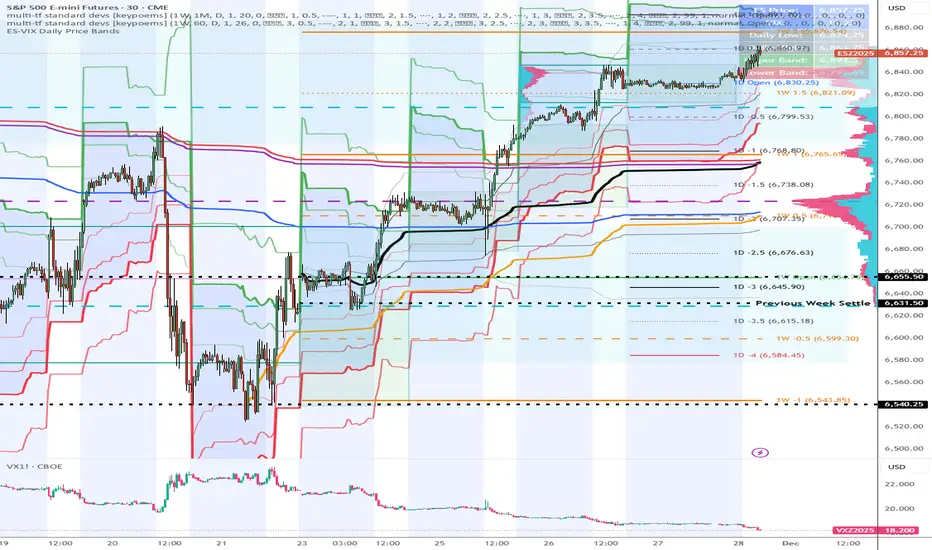
ES-VIX Daily Price Bands - Inner and OuterES-VIX Daily Price Bands
This indicator plots dynamic intraday price bands for ES futures based on real-time volatility levels measured by the VIX (CBOE Volatility Index). The bands evolve throughout the trading day, providing volatility-adjusted price targets.
Formulas:
Upper Band = Daily Low + (ES Price × VIX ÷ √252 ÷ 100)
Lower Band = Daily High - (ES Price × VIX ÷ √252 ÷ 100)
The calculation uses the square root of 252 (trading days per year) to convert annualized VIX volatility into an expected daily move, then scales it as a percentage adjustment from the current day's extremes.
Features:
Real-time band calculation that updates throughout the trading session
Upper band (green) extends from the current day's low
Lower band (red) contracts from the current day's high
Inner upper band (green) at 50% of expected move
Inner lower band (red) at 50% of expected move
Middle Inner upper band (green) at 80% of expected move
Middle Inner lower band (red) at 80% of expected move
Outer upper band (green) at 150% of expected move
Outer lower band (red) at 150% of expected move
Shaded zone between bands for visual clarity
Information table displaying:
Current ES price and VIX level
Running daily high and low
Current upper and lower band values
ADX Breakout Enhanced Signal🥋 Trading Dojo – ADX Breakout Enhanced Signal
This indicator combines the trend-strength power of the ADX with dynamic breakout-based signals, designed for traders who want more frequent and higher-probability entries on timeframes like 1 hour.
The core logic focuses on:
📌 1. Trend Strength Detection with ADX
The indicator evaluates whether the market is showing a strong directional trend using an optimized ADX.
When ADX rises above the configured threshold, the system interprets that price has enough momentum to validate an entry.
📌 2. Breakout Entry Logic
It identifies points where price breaks recent highs or lows, confirming the start or continuation of movement.
This breakout-based approach produces more entries than traditional ADX strategies alone.
📌 3. Clear and Simple Signals
🟩 Long when price breaks a recent high with strong trend confirmation.
🟥 Short when price breaks a recent low with strong trend confirmation.
📌 4. Built-In Automated Alerts
The indicator automatically generates JSON alerts ready for use with automation tools such as trading bots, webhooks, BingX, 3Commas, Discord bots, and more.
🎯 Purpose of the Indicator
To provide more frequent, well-distributed, and momentum-validated entries, while maintaining simplicity and speed — perfect for real-time decision-making.
Perfect For:
Intraday trading
1h, 30m, and 15m timeframes
Breakout-based strategies
Automated trading systems

BullTrading Axis Ribbon (MTF)BullTrading Axis Ribbon (MTF)
BullTrading Axis Ribbon 是一条「高周期主轴 + 自适应包络带」的趋势彩带,用来刻画价格围绕关键均衡轴的磁吸区、扩散区与趋势方向。
• 主轴(Axis Ribbon):使用更高时间级别的价格数据,在当前周期上映射一条「日内趋势中轴」。默认适合在 3m / 5m 图上调用 15m 主轴。
• 中枢区(Core Zone):主轴上下的窄区间,用彩带填充显示。当价格在中枢区震荡时,代表围绕均衡轴的磁吸与盘整。
• 外圈带(Outer Band):位于中枢之外的扩展区,用于观察顺势扩张与「过热」区域,可选线框或填充显示。
• 颜色逻辑:
• 轴线彩带根据趋势方向与中枢状态变色:上升(绿色)、下降(红色)、中枢磁吸(黄色)、整理(灰色)。
• 左下角状态灯同步给出当前轴向状态(上涨 / 下跌 / 中枢 / 整理)。
使用建议
• 在 3m / 5m 作为短周期信号时,用 Axis Ribbon 作为「大级别方向过滤」与「高概率回踩区域」参考。
• 价格长时间贴着外圈带运行,可视为顺势加速或过热区;频繁回到中枢,则倾向震荡与均值回归。
• 指标本身不直接给出买卖点,更适合与你已有的进场离场系统配合,用于方向过滤和环境判断。
本指标仅用于技术研究与图表分析,不构成任何投资建议或交易信号,请根据自身风险承担能力独立决策。
BullTrading Axis Ribbon (MTF)
BullTrading Axis Ribbon is a trend ribbon built from a higher-timeframe core axis + adaptive envelope bands.
It depicts the magnet zone, expansion zone and trend direction of price around a key equilibrium axis.
• Axis (Axis Ribbon): Uses higher-timeframe price data to project an “intraday trend spine” onto the current chart. By default it works well using a 15m axis on 3m / 5m charts.
• Core Zone: A narrow band above and below the axis, displayed as a filled ribbon. When price oscillates inside the Core Zone, it reflects magnet behavior and consolidation around the equilibrium axis.
• Outer Band: An extended area outside the Core Zone, used to observe trend extension and potential “overheated” zones. It can be shown as simple lines or as a filled band.
• Color Logic:
• The axis ribbon color changes with trend direction and core state: uptrend (green), downtrend (red), core/magnet (yellow), ranging/flat (gray).
• A status lamp in the bottom-left corner simultaneously shows the current axis state (Up / Down / Core / Flat).
Usage Suggestions
• When using 3m / 5m as your signal timeframe, treat Axis Ribbon as a higher-timeframe bias filter and as a reference for high-probability pullback areas.
• If price rides along the Outer Band for an extended period, it can be interpreted as trend acceleration or a potential overheated zone; if price frequently returns to the Core Zone, the market tends to be ranging with mean-reversion behavior.
• The indicator itself does not directly generate entry/exit signals. It is best used together with your existing entry/exit systems, as a tool for directional filtering and market-regime assessment.
This indicator is intended solely for technical research and chart analysis.
It does not constitute investment advice or a trading signal. Please make independent decisions according to your own risk tolerance.

XAUUSD 9/1 and 6/4 zone lane chart (BUY zone and SELL zone)XAUUSD 9/1 and 6/4 zone lane chart (BUY zone and SELL zone)

Daily Open Range - TatoshiDisplays a daily open range for both current and previous days. Gives users the flexibility to adjust the number of minutes that the daily open range is determined by. I personally use the first 30 minutes, but adjust at your discretion.
Another GOAT of a indicator. I don't use as much as my monthly open inidcator but for trading lower time frames, this allows the user to easily set their bias for the day and extremely simple to build a strategy around.

Trinity Adaptive Volatility BandsThis is an update on this script. www.tradingview.com and author: www.tradingview.com and full credit to him for his wonderful source code and making it also available here.
What stayed the same (core idea & logic):
Adaptive volatility bands around a central basis
Basis can be SMA / EMA / ALMA / KAMA / VWMA
Volatility source can be ATR / Stdev / Range
Adaptive multiplier that widens bands in strong trends
TTM-style squeeze detection (Bollinger inside Keltner)
Expansion detection
Trend-state tracking (bullish vs bearish coloring)
Long/short signals when price crosses the basis while basis is sloping
Beautiful gradient fill concept
What Changed:
1. Fixed → now both upper and lower zones always glow with the correct trend color (cyan in bull, magenta in bear)
2. Replaced with dynamic proportional steps (always exactly 10 equal layers regardless of band width) → perfect glow every time
3. Used switch … => syntax in some places that caused compile errors in v6. Replaced all with clean if / ternary or proper switch without arrows
4. Long/short trend state used => inside if (syntax error). Fixed to trend := 1 / trend := -1
5. Added fully grouped settings with clear names and tooltips explaining every single option
6. Made every color 100% customizable (bull, bear, neutral, squeeze bg, expansion bg)
7. Added optional blue & pink background tint so you instantly see the squeeze fire without needing another indicator
8. Added visible BUY/SELL triangles with text on chart which can be disabled
Summary of Trinity Adaptive Volatility Bands
This indicator is a highly visual, smart, and fully self-contained volatility band system that combines the best ideas from Bollinger Bands, Keltner Channels, ALMA/KAMA, and the famous TTM Squeeze into one clean, glowing package. It dynamically widens and narrows the bands according to real-time trend strength, paints the entire area between the bands with a beautiful 10-layer gradient (cyan in uptrends, magenta in downtrends), and instantly tells you when the market is extremely quiet (squeeze) or exploding into a big move (expansion).
It is designed for swing traders, day traders, and scalpers who want a single indicator that shows trend direction, volatility state, and high-probability entries without needing ten other tools on the chart.
How to read and use it
The thick middle line (Basis) is an adaptive moving average (default ALMA – very smooth and low-lag).
→ When it is cyan = confirmed uptrend
→ When it is magenta = confirmed downtrend
→ Gray = neutral / ranging
The glowing area around the basis is the adaptive volatility envelope.
The stronger the trend, the wider the bands become automatically (no manual tweaking needed most of the time).
Long signal (green triangle + “BUY”): price closes above the basis while the basis itself is rising → fresh bullish momentum confirmed.
Short signal (red triangle + “SELL”): price closes below the basis while the basis is falling → fresh bearish momentum confirmed.
Blue subtle background = Squeeze is ON
This means volatility has collapsed to extreme lows (Bollinger Bands are inside Keltner Channel).
Statistically one of the highest-probability setups for a big move in either direction. Prepare, do NOT trade the chop inside the squeeze.
Pink/red flash background = Expansion just started
The squeeze has fired, volatility is exploding, and a strong directional move is usually already underway. This is often where the real money is made.
Best ways to trade it
Classic breakout: wait for a squeeze (blue background) → enter on the first strong close outside the bands in the direction of the new trend color.
Trend continuation: after a squeeze fires, simply take every pullback to the basis in the direction of the dominant color (cyan = long only, magenta = short only).
Aggressive scalping: enter immediately on the BUY/SELL triangles with tight stop below/above the opposite band.
Filter with higher timeframe: use the same indicator on 4H/Daily to only take 1H or lower signals that agree with the bigger trend color.
Quick settings tips
Leave everything at defaults → works fantastic on almost any market and timeframe.
Want tighter bands? → lower “Base Multiplier” to 1.5–1.8.
Want even smoother basis? → keep ALMA selected and raise “ALMA Sigma” to 8–10.
Trading very choppy markets? → turn “Enable Adaptive Bands” OFF for fixed-width classic behavior.
Want it to match your chart theme? → change Bullish/Bearish colors in the “Colors” group.
In short: when the chart glows cyan and price is above the basis → be long-biased. When it glows magenta and price is below → be short-biased. Blue background = get ready. Pink flash = the move is on. That’s really all you need to know to trade profitably with this indicator.

PersonsPivots-UpdatedThe script was written by another script writer and it worked fine with Futures, Forex and ETFs but had a Runtime error for stocks so I had a coder friend do a debug

Weekly Open Range - TatoshiDisplays a weekly open range for both current and previous weeks. Gives users the flexibility to adjust the number of hours that the weekly open range is determined by. I personally use the first 3 hours, but play around with it.
A GOAT of a indicator, allows the user to easily set their bias for the week and extremely simple to build a strategy around.

Monthly Open Range - TatoshiDisplays a monthly open range for both current and previous months. Gives users the flexibility to adjust the number of hours that the monthly open range is determined by. I personally use the first 10 hours, but play around with it.
A GOAT of a indicator, allows the user to easily set their bias for the month and extremely simple to build a strategy around.

ES-VIX Daily Price Bands - Inner bands (80% and 50%)ES-VIX Daily Price Bands
This indicator plots dynamic intraday price bands for ES futures based on real-time volatility levels measured by the VIX (CBOE Volatility Index). The bands evolve throughout the trading day, providing volatility-adjusted price targets.
Formulas:
Upper Band = Daily Low + (ES Price × VIX ÷ √252 ÷ 100)
Lower Band = Daily High - (ES Price × VIX ÷ √252 ÷ 100)
The calculation uses the square root of 252 (trading days per year) to convert annualized VIX volatility into an expected daily move, then scales it as a percentage adjustment from the current day's extremes.
Features:
Real-time band calculation that updates throughout the trading session
Upper band (green) extends from the current day's low
Lower band (red) contracts from the current day's high
Inner upper band (green) at 50% of expected move
Inner lower band (red) at 50% of expected move
Middle Inner upper band (green) at 80% of expected move
Middle Inner lower band (red) at 80% of expected move
Shaded zone between bands for visual clarity
Information table displaying:
Current ES price and VIX level
Running daily high and low
Current upper and lower band values

ES-VIX Daily Price Bands - Inner bandsES-VIX Daily Price Bands
This indicator plots dynamic intraday price bands for ES futures based on real-time volatility levels measured by the VIX (CBOE Volatility Index). The bands evolve throughout the trading day, providing volatility-adjusted price targets.
Formulas:
Upper Band = Daily Low + (ES Price × VIX ÷ √252 ÷ 100)
Lower Band = Daily High - (ES Price × VIX ÷ √252 ÷ 100)
The calculation uses the square root of 252 (trading days per year) to convert annualized VIX volatility into an expected daily move, then scales it as a percentage adjustment from the current day's extremes.
Features:
Real-time band calculation that updates throughout the trading session
Upper band (green) extends from the current day's low
Lower band (red) contracts from the current day's high
Inner upper band (green) at 50% of expected move
Inner lower band (red) at 50% of expected move
Shaded zone between bands for visual clarity
Information table displaying:
Current ES price and VIX level
Running daily high and low
Current upper and lower band values

ES-VIX Daily Price BandsES-VIX Daily Price Bands
This indicator plots dynamic intraday price bands for ES futures based on real-time volatility levels measured by the VIX (CBOE Volatility Index). The bands evolve throughout the trading day, providing volatility-adjusted price targets.
Formulas:
Upper Band = Daily Low + (ES Price × VIX ÷ √252 ÷ 100)
Lower Band = Daily High - (ES Price × VIX ÷ √252 ÷ 100)
The calculation uses the square root of 252 (trading days per year) to convert annualized VIX volatility into an expected daily move, then scales it as a percentage adjustment from the current day's extremes.
Features:
Real-time band calculation that updates throughout the trading session
Upper band (green) extends from the current day's low
Lower band (red) contracts from the current day's high
Shaded zone between bands for visual clarity
Information table displaying:
Current ES price and VIX level
Running daily high and low
Current upper and lower band values

@Complete Squeeze Cycle Detector v2.0 FINALDescription:
The Complete Squeeze Cycle Detector identifies and tracks the full lifecycle of squeeze formations, from pre-squeeze consolidation through active squeeze periods to squeeze completion. The indicator systematically detects the characteristic conditions that precede and accompany squeeze events.
The indicator monitors multiple factors associated with squeeze development including:
• Volatility compression relative to recent volume activity
• Elevated market stress conditions as measured by VIX levels
• Momentum compression through rate of change measurements across multiple time periods
• Alignment of multiple exponential moving averages indicating consolidation
The squeeze cycle is classified into three distinct phases: Pre-Squeeze Setup, Active Squeeze, and Squeeze Complete. Each phase is identified based on threshold levels of multiple compression metrics, with adjustable sensitivity settings to control the strictness of detection.
The indicator provides visual identification of each phase through labels, background coloring, and an optional dashboard, allowing users to distinguish between the preparation phase where volatility contracts, the active squeeze phase where compression reaches critical levels, and the completion phase where the squeeze releases and directional movement resumes.
This systematic approach enables users to identify squeeze formations throughout their complete development cycle rather than focusing only on the breakout phase.

SmartMoneyConcept ProFlow StrategySmartMoneyConcept ProFlow is a complete SMC-based algo built for trending markets and clean volatility phases – especially on crypto pairs like BTC, ETH and perpetual futures.
It combines:
• Smart Money swing structure (BOS / CHoCH)
• Dynamic Support & Resistance levels
• Order Block–style gap detection
• Volatility normalization (ATR / Range / BBWidth)
• SuperTrend trend filter
• ATR & Volume-based exits, TP lock and session control
The goal: fewer random trades, more focused entries when structure + volatility + trend are in sync.
1. Core Idea
Smart Structure Levels (S/R)
– The strategy builds dynamic support/resistance using swing highs/lows.
– Breakouts above resistance or below support, with enough volatility (filter), become primary trade signals.
BOS / CHoCH Engine
– Tracks Break of Structure (BOS) and Change of Character (CHoCH).
– BOS up/down help define the current trend bias.
– CHoCH highlights potential reversals after a confirmed BOS in the opposite direction.
Order Block Gap Logic
– Detects displacement candles with gaps (based on ATR) to approximate OB-style “impulsive moves”.
– Bullish gaps can add confluence for long entries, bearish gaps for shorts.
Volatility-Aware Entries
– Uses normalized volatility (via ATR, Range or BBWidth).
– Filters out breakouts in dead, low-vol environments and focuses on moves with real expansion.
2. Trend & Risk Management Stack
SuperTrend Filter
– Optional “Only With SuperTrend Direction” to restrict entries to the current ST trend.
– ST flips can also force exits if you want to exit as soon as the main trend changes.
ATR-Based Stops & Trails
– ATR distance check to avoid ultra-tight stops that get chopped instantly.
– Three modes:
• StopOnly – classic fixed ATR stop.
• TrailOnly – trailing ATR-style stop.
• StopAndTrail – initial fixed stop that later trails with price.
Volume-Based Exits (Optional)
– Exit on extremely low volume (move losing participation).
– Or on opposite volume spikes (strong counter-pressure against your position).
– Or use Both for a more active volume management.
TP Lock Logic
– When unrealized profit reaches a chosen value, the position is closed and a “lock” can be applied.
– Use this lock to:
• block same-direction re-entries for that side, or
• allow them again depending on your preference.
3. Anti-Churn & Session Control
Anti-Churn Controls
– Minimum bars between entries.
– Cooldown after an ATR exit.
– Limit of max entries per bar.
Session Filter
– Restrict trading to a specific hourly window (e.g. main market session).
– Option to force close positions outside your active session.
– Handy for intraday traders who don’t want overnight or low-liquidity exposure.
4. SmartMoney Preset Modes
Preset Mode:
• EtherFlux – more flexible, for general breakout & volatility trading.
• SmartMoney – SMC-focused preset:
– Adjusted length, volatility filter and ATR settings.
– Option to disable exits from the strategy side (for manual risk control).
Switching presets automatically tunes multiple internal parameters so you don’t have to micromanage every input each time.
5. Visual Layer
This script has a complete visual suite to help you “read the tape”:
– Bar Colors by position and SuperTrend bias.
– Support / Resistance dots and lines (stepline style).
– Order Block markers (bullish / bearish gap labels).
– BOS / CHoCH labels to track structure shifts in real-time.
– Liquidation Zones (visual only)
• Approximate long and short liquidation areas based on assumed leverage.
• Shaded zones on the chart for quick liquidity map.
– Status Labels
• Session status (ACTIVE / OFF / DISABLED).
• Current position (LONG / SHORT / FLAT).
• TP Lock status (longs locked / shorts locked / no lock).
All visuals are designed for dark charts but also work on light themes with minor tweaks.
6. Quick Input Guide
• Levels Period & Volatility Filter – main structure sensitivity and breakout quality.
• Volatility Method – ATR / Range / BBWidth normalization for the vol filter.
• ATR Stop & Management – core risk rules: ATR multiplier, stop/trail mode, min ATR distance.
• SuperTrend Settings – trend bias and ST-flip exits.
• SmartMoney Preset – quick switch between EtherFlux and SmartMoney tuning.
• Volume Exits – low volume / opposite spike / both.
• Session Filter – hour-based trading window + optional forced flat outside session.
• Follow-Signal Mode – flip from long→short or short→long when signal reverses (signal-based rotation).
• TP Lock – secure profits at a fixed amount and optionally block same-direction re-entries.
• Liq Zones – visual only, for liquidity map (no direct trade logic).
How to Use (My Suggestion)
Start on 15m–4H charts for liquid pairs (BTC, ETH, majors).
Choose your preset:
– EtherFlux for more general breakout + vol trading.
– SmartMoney if you want stricter SMC behaviour.
Turn on SuperTrend + ATR stops for cleaner risk management.
Forward-test in replay / paper trading before using real capital.
Use the visual BOS/CHoCH + Liq Zones as context , not as blind signals.
Important
This is a backtest & research tool . It is not financial advice and does not guarantee profits. Always combine it with your own risk management, position sizing, and forward-testing before going live. Trading leveraged products and crypto can result in partial or full loss of capital.

Futures-Spot Round NumbersFutures-Spot Round Numbers
This indicator displays round number levels for Gold Futures on your spot chart, automatically adjusting for the price spread between futures and spot markets.
