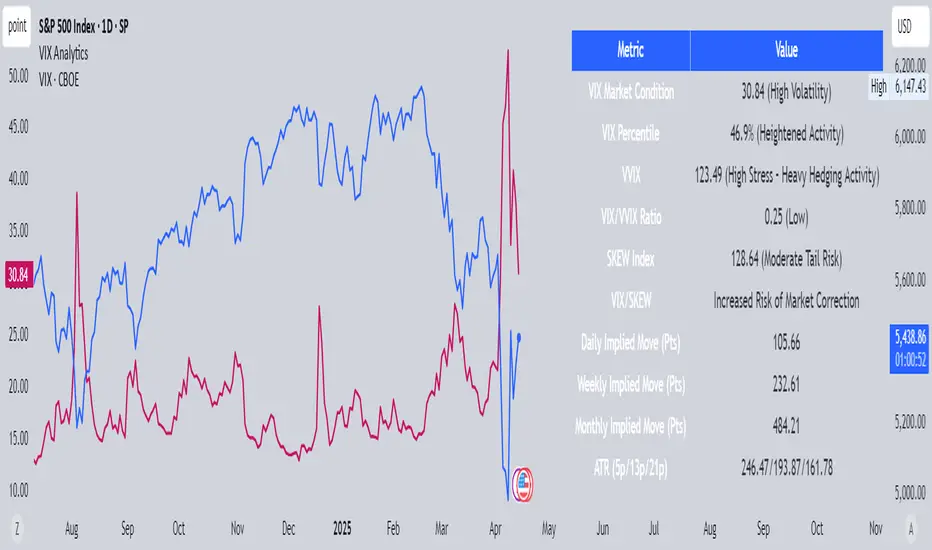
BKLevelsThis displays levels from a text input, levels from certain times on the previous day, and high/low/close from previous day. The levels are drawn for the date in the first line of the text input. Newlines are required between each level
Example text input:
2024-12-17
SPY,606,5,1,Lower Hvol Range,FIRM
SPY,611,1,1,Last 20K CBlock,FIRM
SPY,600,2,1,Last 20K PBlock,FIRM
SPX,6085,1,1,HvolC,FIRM
SPX,6080,2,1,HvolP,FIRM
SPX,6095,3,1,Upper PDVR,FIRM
SPX,6060,3,1,Lower PDVR,FIRM
For each line, the format is ,,,,,
For color, there are 9 possible user- configurable colors- so you can input numbers 1 through 9
For line style, the possible inputs are:
"FIRM" -> solid line
"SHORT_DASH" -> dotted line
"MEDIUM_DASH" -> dashed line
"LONG_DASH" -> dashed line
Wyszukaj w skryptach "spx"
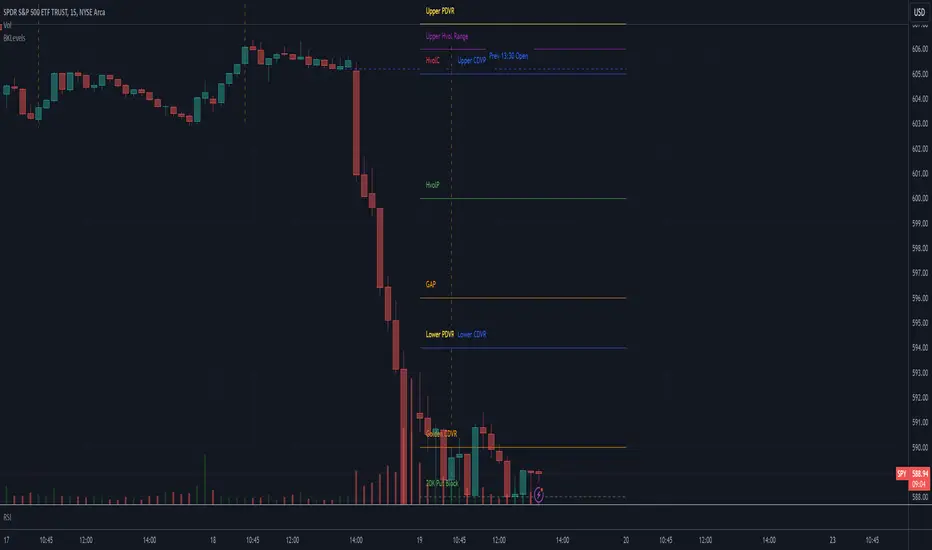
Correlation Coefficient [Giang]### **Introduction to the "Correlation Coefficient" Indicator**
#### **Idea behind the Indicator**
The "Correlation Coefficient" indicator was developed to analyze the linear relationship between Bitcoin (**BTCUSD**) and other important economic indices or financial assets, such as:
- **SPX** (S&P 500 Index): Represents the U.S. stock market.
- **DXY** (Dollar Index): Reflects the strength of the USD against major currencies.
- **SPY** (ETF representing the S&P 500): A popular trading instrument.
- **GOLD** (Gold price): A traditional safe-haven asset.
The correlation between these assets can help traders understand how Bitcoin reacts to market movements of traditional financial instruments, providing opportunities for more effective trading decisions.
Additionally, the indicator allows users to **customize asset symbols for comparison**, not limited to the default indices (SPX, DXY, SPY, GOLD). This flexibility enables traders to tailor their analysis to specific goals and portfolios.
---
#### **Significance and Use of Correlation in Trading**
**Correlation** is a measure of the linear relationship between two data series. In the context of this indicator:
- **The correlation coefficient ranges from -1 to 1**:
- **1**: Perfect positive relationship (both increase or decrease together).
- **0**: No linear relationship.
- **-1**: Perfect negative relationship (one increases while the other decreases).
- **Use in trading**:
- Identify **strong relationships or unusual divergences** between Bitcoin and other assets.
- Help determine **market sentiment**: For example, if Bitcoin has a negative correlation with DXY, traders might expect Bitcoin to rise when the USD weakens.
- Provide a foundation for hedging strategies or investments based on inter-asset relationships.
---
#### **Components of the Indicator**
The "Correlation Coefficient" indicator consists of the following key components:
1. **Main Data (BTCUSD)**:
- The closing price of Bitcoin is used as the central asset for calculations.
2. **Comparison Data**:
- Users can select different asset symbols for comparison. By default, the indicator supports:
- **SPX**: Stock market index.
- **DXY**: Dollar Index.
- **SPY**: Popular ETF.
- **GOLD**: Gold price.
3. **Correlation Coefficients**:
- Calculated between BTC and each comparison index, based on a Weighted Moving Average (WMA) over a user-defined period.
4. **Graphical Representation**:
- Displays individual correlation coefficients with each comparison index, making it easier for traders to track and analyze.
---
#### **How to Analyze and Use the Indicator**
**1. Identify Key Correlations:**
- Observe the correlation lines between BTC and the indices to determine positive or negative relationships.
- Example:
- If the **Correlation Coefficient (BTC-DXY)** sharply declines to -1, this indicates that when USD strengthens, Bitcoin tends to weaken.
**2. Analyze the Strength of Correlations:**
- **Strong Correlations**: If the coefficient is close to 1 or -1, the relationship between the two assets is very clear.
- **Weak Correlations**: If the coefficient is near 0, Bitcoin may be influenced by other factors outside the compared index.
**3. Develop Trading Strategies:**
- Use correlations to predict Bitcoin's price movements:
- If BTC has an inverse relationship with **DXY**, traders might consider selling BTC when the USD strengthens.
- If BTC and **SPX** are strongly correlated, traders can monitor the stock market to predict Bitcoin's trend.
**4. Evaluate Changes Over Time:**
- Use different timeframes (daily, weekly) to track the correlation's fluctuations.
- Look for unusual signals, such as a breakdown or shift from positive to negative relationships.
---
#### **Conclusion**
The "Correlation Coefficient" indicator is a powerful tool that helps traders analyze the relationship between Bitcoin and major financial indices. The ability to customize asset symbols for comparison makes the indicator flexible and suitable for various trading strategies. When used correctly, this indicator not only provides insights into market sentiment but also supports the development of intelligent trading strategies and optimized profits.
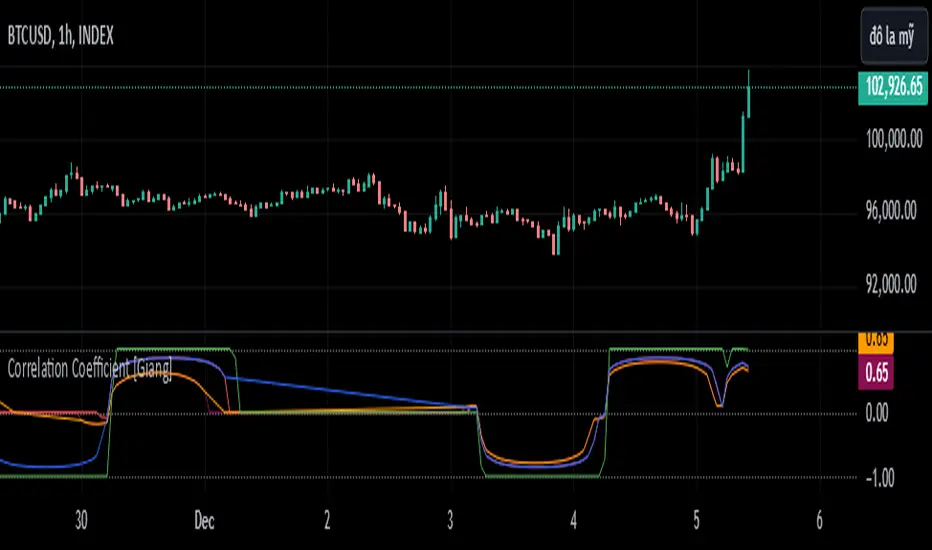
Scaled Historical ATR [SS]Hello again everyone,
This is the Scaled ATR Range indicator. This was done in response to an article/analysis I posted regarding the expected high and range on SPX. I would encourage you to read it here:
Essentially, I took SPX data, scaled it to correct for inflation, then calculated the ATR for Bullish years to get our average range to expect and our close range to expected.
I accomplished this analysis using Excel; however, I figured Pinescript would handle this type of task more elegantly, and I was correct!
This indicator is the result.
What it does:
This indicator permits the analyst to select a historic period in time. The indicator will then scale the period into returns and convert the range to a corrected range based on the current position of the ticker. How it does this is by converting the returns of the historic period selected, then multiplying the returns by the current period open, to ensure that the range amounts are corrected for inflation and natural growth of a ticker.
I say analyst because this indicator is intended to be used by both professional and recreational analysts, to give them an easy way to:
a) Scale historic data and correct it based on the current rate; and
b) Offer insight into a ticker’s ATR and behaviour during bullish and bearish periods.
Prior to this indicator, the only way to do this would be manually or the use of statistical software.
How to use?
The indicator’s use is quite simple. Once launched, the indicator will ask the user to input a timeframe period that the user is interested in assessing. In the main chart above, I chose SPX between 1995 and 2001.
The user can further filter down the data using the settings menu. In the settings menu, there is an option to filter by “All”, “Bullish Periods” or “Bearish Periods”.
Filtering by “All”
Filtering by “All” will include all candles selected within the timeframe. This includes both bearish and bullish candles. It will give you the averaged out range for the entire period of time, including both bearish and bullish instances.
Filtering by “Bullish”
Filtering by “Bullish” will omit any red candles from the analysis. It will only return the ATR ranges for green, bullish candles.
Filtering by “Bearish”
Inverse to filtering by Bullish, if you filter by Bearish, it will only include the red, bearish candles in the analysis.
My suggestion? If you are trying to determine t he likely outcome of a bullish year, filter by Bullish instances. If you want the likely outcome of a bearish year, filter by Bearish.
Other features of the Indicator:
The indicator will display the current period statistics. In the main chart above, you can see that the current ranges for this year are displayed. This allows you to do a side by side comparison of the current period vs. the historic period you are looking at. This can alert you to further upside, further downside and the anticipated close range. It can also alert you to whether or not we are following a similar trajectory as the historical periods you are looking at.
As well, the indicator will list target prices for the current period based on the historical periods you are looking at. This helps to put things into perspective.
Concluding Remarks
And that is the indicator in a nutshell! I encourage you to read the article I linked above to see how you may use it in an analysis. This would be the best example of a real world application of this indicator!
Otherwise, I hope you enjoy and, as always, safe trades!
[dharmatech] Area Under Yield Curve : USThis indicator displays the area under the U.S. Treasury Securities yield curve.
If you compare this to SP:SPX , you'll see that there are large periods where they are inversely related. Other times, they track together. When the move together, watch out for the expected and eventual divergence.
By default, this indicator will show up in a separate pane. If you move it to an existing pane (e.g. along side SP:SPX ) you'll need to move it to a different price scale.
The area under the yield curve is a quick way to see if the overall yield curve moved up or down. Generally speaking, increasing yields isn't good for markets, unless there is some other stimulus going on simultaneously.
The following treasury securities are used in this calculation:
FRED:DGS1MO (1 month)
FRED:DGS3MO (3 month)
FRED:DGS6MO (6 month)
FRED:DGS1 (1 year)
FRED:DGS2 (2 year)
FRED:DGS3 (3 year)
FRED:DGS5 (5 year)
FRED:DGS7 (7 year)
FRED:DGS10 (10 year)
FRED:DGS20 (20 year)
FRED:DGS30 (30 year)

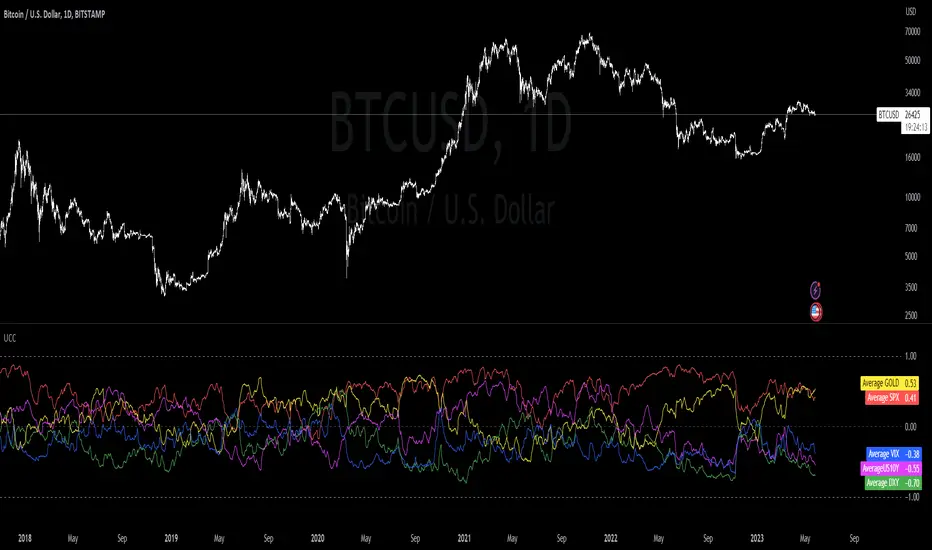
Ultimate Correlation CoefficientIt contains the Correlations for SP:SPX , TVC:DXY , CURRENCYCOM:GOLD , TVC:US10Y and TVC:VIX and is intended for INDEX:BTCUSD , but works fine for most other charts as well.
Don't worry about the colored mess, what you want is to export your chart ->
TradingView: How can I export chart data?
and then use the last line in the csv file to copy your values into a correlation table.
Order is:
SPX
DXY
GOLD
US10Y
VIX
Your last exported line should look like this:
2023-05-25T02:00:00+02:00 26329.56 26389.12 25873.34 26184.07 0 0.255895534 -0.177543633 0.011944815 0.613678565 0.387705043 0.696003298 0.566425278 0.877838156 0.721872645 0 -0.593674719 -0.839538073 -0.662553817 -0.873684242 -0.695764534 -0.682759656 -0.54393749 -0.858188808 -0.498548691 0 0.416552489 0.424444345 0.387084882 0.887054782 0.869918437 0.88455388 0.694720993 0.192263269 -0.138439783 0 -0.39773255 -0.679121698 -0.429927048 -0.780313396 -0.661460134 -0.346525721 -0.270364046 -0.877208139 -0.367313687 0 -0.615415111 -0.226501775 -0.094827955 -0.475553396 -0.408924242 -0.521943234 -0.426649404 -0.266035908 -0.424316191
The zeros are thought as a demarcation for ease of application :
2023-05-25T02:00:00+02:00 26329.56 26389.12 25873.34 26184.07 0 -> unused
// 15D 30D 60D 90D 120D 180D 360D 600D 1000D
0.255895534 -0.177543633 0.011944815 0.613678565 0.387705043 0.696003298 0.566425278 0.877838156 0.721872645 -> SPX
0
-0.593674719 -0.839538073 -0.662553817 -0.873684242 -0.695764534 -0.682759656 -0.54393749 -0.858188808 -0.498548691 -> DXY
0
0.416552489 0.424444345 0.387084882 0.887054782 0.869918437 0.88455388 0.694720993 0.192263269 -0.138439783 -> GOLD
0
-0.39773255 -0.679121698 -0.429927048 -0.780313396 -0.661460134 -0.346525721 -0.270364046 -0.877208139 -0.367313687 -> US10Y
0
-0.615415111 -0.226501775 -0.094827955 -0.475553396 -0.408924242 -0.521943234 -0.426649404 -0.266035908 -0.424316191 -> VIX
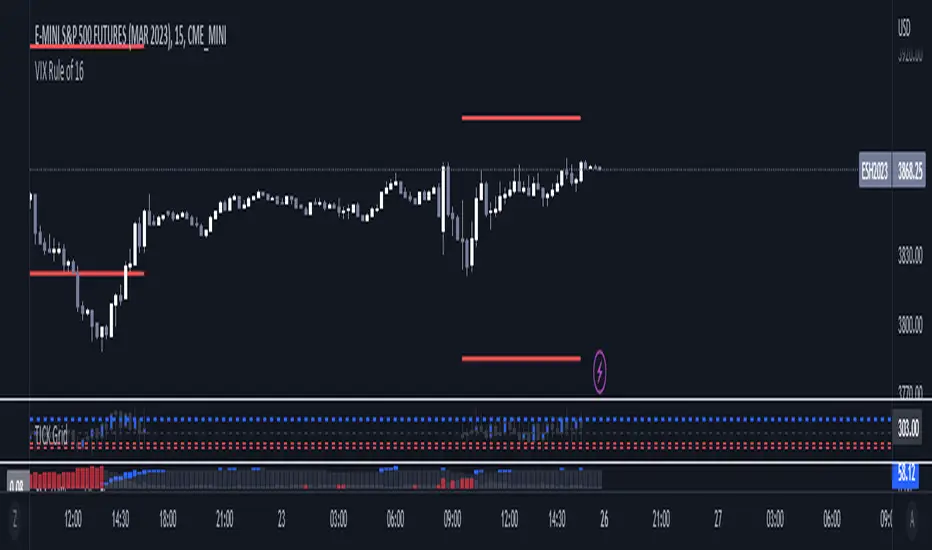
VIX Rule of 16There’s an interesting aspect of VIX that has to do with the number 16. (approximately the square root of the number of trading days in a year).
In any statistical model, 68.2% of price movement falls within one standard deviation (1 SD ). The rest falls into the “tails” outside of 1 SD .
When you divide any implied volatility (IV) reading (such as VIX ) by 16, the annualized number becomes a daily number
The essence of the “rule of 16.” Once you get it, you can do all sorts of tricks with it.
If the VIX is trading at 16, then one-third of the time, the market expects the S&P 500 Index (SPX) to trade up or down by more than 1% (because 16/16=1). A VIX at 32 suggests a move up or down of more than 2% a third of the time, and so on.
• VIX of 16 – 1/3 of the time the SPX will have a daily change of at least 1%
• VIX of 32 – 1/3 of the time the SPX will have a daily change of at least 2%
• VIX of 48 – 1/3 of the time the SPX will have a daily change of at least 3%
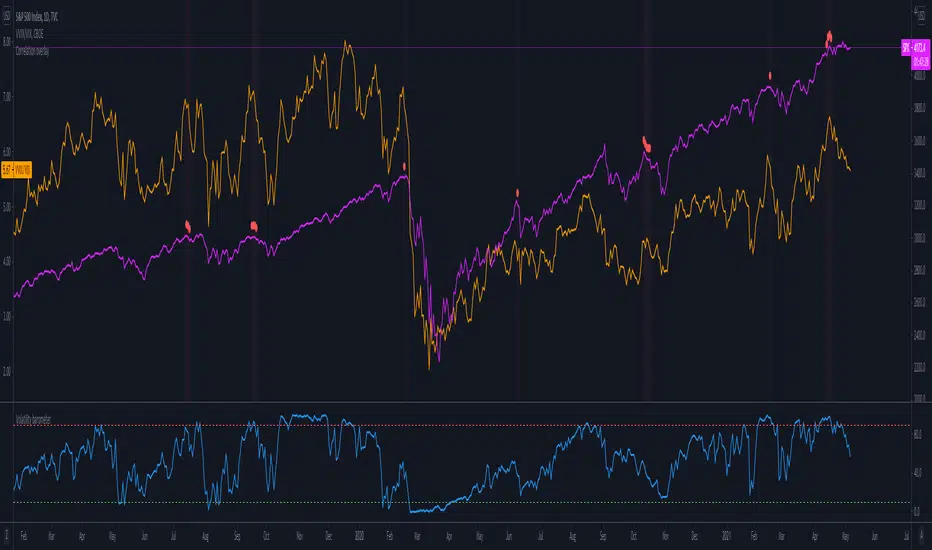
Volatility barometerIt is the indicator that analyzes the behaviour of VIX against CBOE volaility indices (VIX3M, VIX6M and VIX1Y) and VIX futures (next contract to the front one - VX!2). Because VIX is a derivate of SPX, the indicator shall be used on the SPX chart (or equivalent like SPY).
When the readings get above 90 / below 10, it means the market is overbought / oversold in terms of implied volatility. However, it does not mean it will reverse - if the price go higher along with the indicator readings then everything is fine. There is an alarming situation when the SPX is diverging - e.g. the price go higher, the readings lower. It means the SPX does not play in the same team as IVOL anymore and might reverse.
You can use it in conjunction with other implied volatility indicators for stronger signals: the Correlation overlay ( - the indicator that measures the correlation between VVIX and VIX) and VVIX/VIX ratio (it generates a signal the ratio makes 50wk high).
VIX-VXV-Ratio-Buschi
English:
This script shows the ratio between the VIX (implied volatility of SPX options over the next month) and the VXV (implied volatility of SPX options over the next three months). Since in normal "Contango" mode, the VXV should be higher than the VIX, the crossing under 1.0 or maybe 0.95 after a volatility spike could be a sign for a calming market or at least a calming volatility.
Deutsch:
Dieses Skript zeigt das Verhältnis zwischen dem VIX (implizite Volatilität der SPX-Optionen über den nächsten Monat) und dem VXV (implizite Volatilität der SPX-Optionen über die nächsten drei Monate). Da im normalen "Contango"-Modus der VXV höher als der VIX liegen sollte, kann das Abfallen unter 1,0 oder 0,95 nach einer Volatilitätsspitze ein Anzeichen für einen ruhiger werdenden Markt oder zumindest eine ruhiger werdende Volatilität sein.

Macro Return ForecastWhen the macro environment was similar, what annualized return did the market usually deliver next?
Before using the indicator, make sure your chart is set to any US-market symbol (SPX, QQQ, DIA, etc.).
This requirement is simple: the indicator pulls macro series from US data (yields, TIPS, credit spreads, breadth of US indices).
Because these series are independent from the chart’s price series, the chart symbol itself does not affect the internal calculations.
Any US symbol works, and the output of the model will be identical as long as you are on a US asset with daily, weekly or monthly timeframe.
The plotted price does not matter: the macro engine is fully exogenous to the chart symbol.
1. What the indicator does relative to selected assets
In the settings you choose which market you want to analyze:
- S&P500
- Nasdaq or NQ100
- Dow Jones
- Russell 2000
- US-wide (VTI)
- S&P500 sectors (XLF, XLY, XLP, etc.)
For each one, the indicator loads:
- Its internal breadth series (percentage of constituents above MA200)
- Its price history to compute forward log-returns at multiple horizons
- Its regime position relative to its own MA200 (for bull/bear filtering)
This means the tool is not tied to the chart symbol you display.
If your chart is SPX but the indicator setting is “S&P500 Technology”, the expected return projection is computed for the Technology sector using its own data, not the chart’s data.
You can therefore:
- Visualize macro-driven expected returns for any major US index or sector.
- Compare how different parts of the market historically reacted to similar macro states.
- Switch assets instantly to see which segment historically behaved better in comparable macro conditions.
The indicator becomes an analyzer of macro sensitivity, not a chart-dependent indicator.
2. Method overview
The model answers a statistical question:
“When macro conditions looked like they do today, what forward annualized return did this asset usually deliver?”
To do this it combines four macro pillars:
- Market breadth of the selected asset
- Yield curve slope (US 10Y minus 2Y)
- US credit spread (high yield minus gov)
- US real rate (TIPS 10Y)
It normalizes each metric into a 0–100 score, groups similar historical states into bins, and examines what the asset did next across six horizons (from ~9 months to ~5 years).
This produces a historical map connecting macro states to realized forward returns.
It is not a forecast model.
It is a conditional-distribution estimator: it tells you what has historically happened from similar setups.
3. Why this produces useful insights on assets
For any chosen asset (SPX, Nasdaq, sectors…), the indicator computes:
- Its forward return distribution in similar macro states.
- How often these states occurred (n).
- Whether the macro environment that preceded positive returns in the past resembles today’s.
- Whether the asset tends to be more sensitive or more resilient than the broad index under given macro configurations.
- Whether a given sector historically benefited from specific yield-curve, credit or real-rate environments.
This lets you answer questions such as:
- Does this sector usually outperform in an inverted yield curve environment?
- Does the Nasdaq historically recover strongly after breadth collapses?
- How did the S&P500 behave historically when real rates were this high?
- Is today’s credit-spread environment typically associated with positive or negative forward returns for this index?
These insights are not predictions but statistical context backed by past market behavior.
4. Why the technique is robust (and why it matters)
The engine uses strict, non-optimistic data processing:
- Winsorization of returns to neutralize extreme outliers without deleting information.
- Shrinkage estimators to avoid overfitting when bins contain few occurrences.
- Adaptive or static bounds for scaling macro indicators, ensuring comparability across cycles.
- Inverse-variance weighting of horizons with penalties for horizon redundancy.
- HAC-style adjustments to reduce autocorrelation bias in return estimation.
Each method aims to prevent artificial inflation of expected-return values and to keep the estimator stable even in unusual macro states.
This produces a result that is not “optimistic”, not curve-fit, not dependent on chart tricks, and not sensitive to isolated historical anomalies.
5. What you get as a user
A single clean line:
Expected Annual Return (%)
This line reflects how the chosen asset historically performed after macro environments similar to today’s.
The color gradient and confidence indicator (n) show the density of comparable episodes in history.
This makes the output extremely simple to read:
- High, stable expectation: historically supportive macro environment.
- Low or negative expectation: historically weaker environments.
- Low confidence: the macro state is rare and historical comparisons are limited.
The tool therefore adds context, not signals.
It helps you understand the environment the asset is currently in, based on how markets behaved in similar conditions across US market history.

US & EU Banking Basket Analysis (Dual Sentiment + Forecast) betaThis is “THE BANKING DECISION ENGINE”.
Some say "'Banks lead the way'"
(As always use in combination with other trading instruments and market awareness information).
US & EU Banking Basket Analysis (Dual Sentiment + Forecast)
One indicator for the big banking sector! – both sides of the Atlantic
– just add to your chart.
WHAT IT DOES
• Pulls live data from 14 major US and EU banks (JPM, BAC, GS, HSBC, Santander, Deutsche Bank, ING, Barclays etc.)
• Instantly compares strength/weakness between American and European banking sectors
• Shows you TWO separate real-time sentiment lines on your chart: • Blue/Purple line = US banking sentiment • Green/Red line = European banking sentiment
• Combines moving-average momentum, volume + RSI confirmation, major indices (DJI, SPX, NASDAQ, DAX), DXY direction, and ultra-fast 1-second “Volatility Pulse” technology
• Gives you forward-looking tools so you’re not just reacting:
→ Statistical price prediction cloud (looks back 200 bars for similar sentiment situations and shows the average outcome) → Purple prediction bar + exact target price (shows where price is expected to be N bars ahead) → 15-minute “Pulse Forecast” dotted line (second-beat momentum projection) → Optional EUR/USD forecast line when on EUR/USD chart (because currency moves the banks hard)
──────────────────────── VISUAL ENHANCEMENTS YOU GET
• Clean split sentiment lines that never overlap (zoom-proof)
• Glowing fill + permanent “US” / “EU” tags
• Tiny bar labels (EUs / USm etc.) showing exactly how many banks are firing buy/sell right now
• Full banking watchlist table (top-right) with live prices, % change and instant signals
• Major index ticker (DJI, SPX, NASDAQ, DAX) with exploding alerts
• Supply/demand zones, previous daily range, high-volume “V” signals and more
──────────────────────── PERFECT FOR
• Trading any bank stock (US or EU)
• Trading XLF, KBE, EUFN or banking ETFs
• Trading EUR/USD while watching how the banking sector reacts
• Scalping, intraday, swing – works from 1-minute up to daily
One indicator. Both continents. Zero clutter. Maximum edge.
(Works on any chart: apply it to JPM, SAN, EURUSD, SPX… it auto-detects the region and adjusts)
Ready when you are. Let’s go banking. 🚀 “Carefully and responsibly of course”.
Quick Guide to What You’re Seeing on the Chart
Dual Sentiment Lines (the two thick glowing lines in the middle of the screen)
• Upper line (Blue → Purple → Orange) → US banking sector sentiment
• Bright purple = strong US bullish
• Light blue-purple = moderate/mild US bullish
• Orange = bearish US sentiment
• Lower line (Green → Lime → Red) → European banking sector sentiment
• Lime/green = strong EU bullish
• Darker green = moderate EU bullish
• Red = bearish EU sentiment
These two lines are deliberately split vertically so they never cross or confuse each other, no matter how much you zoom.
Tiny labels on the candles (EUs, USm, EUw, etc.)
• Show exactly how many banks in each region are flashing buy or sell right now
• “7 EUs” = all 7 European banks are strong buy
• “4 USm” = 4 US banks are medium-strength buy
• Appear only when the “Show Bar/Plot Labels” toggle is on
Purple vertical bar on the far right + label
• Your statistical price target (default 5 bars ahead)
• Box height = expected price move
• Label shows exact target price + % average historical move (or “Fallback” if using sentiment-based projection)
Faint cloud in front of the current price
• Prediction cloud showing the probable price zone in the next few bars
• Green cloud = historically price went up from similar sentiment
• Red cloud = historically price went down
Dotted horizontal line + target label
• Daily barometer – shows the exact same statistical target as the purple bar, just drawn as a line for cleaner view
White dotted line (15-minute Pulse Forecast)
• Ultra-short-term momentum projection (usually 10-30 min ahead) based on 1-second “pulse” data from all major indices
• Appears only when the pulse is strong enough
Top-right table
• Live watchlist of all 14 banks + instant signal summary
• Green/red dot = volume+RSI confirmation
• S Buy / M Buy / W Buy etc. = MA-based signal strength
Bottom-center index ticker
• Real-time % change of DJI, S&P 500, NASDAQ, DAX
• !!! / !! / ! = explosion alerts (bigger move = more exclamation marks)
Other helpful layers (toggle on/off in settings)
• Previous day’s high/low range (teal shaded area)
• Supply/demand zones (green/red boxes)
• High-volume “V” markers
• DXY (USD strength) arrows
Like a masterpiece. Not just another isolated chart indicator.
Final note: Trading instruments such as this consist of historical data behind the current seconds and minutes, therefore do not guarantee prediction, forecast profit results or guarantee protection from financial losses such as in whipsaw downturns in long positions or whipsaw market swings in short positions. This decision engine is intended for use in combination with user discretion.

QQQ TimingThis is a trend-following position trading strategy designed for the QQQ and the leveraged ETF QLD (ProShares Ultra QQQ). The primary goal is to capture multi-month holds for maximal profit.
Key Instruments & Performance
The strategy performs best with QLD, which yields far superior results compared to QQQ.
TQQQ (triple-leveraged) results in higher drawdowns and is not the optimal choice.
Important: The system is not intended for use with other indexes, individual stocks, or investments (like crypto or gold), as performance can vary widely.
Buy Signals
The strategy's signals are rooted in the S&P 500 Index (SPX), as testing showed it provides more reliable triggers than using QQQ itself.
Primary Buy Signal (Credit to IBD/Mike Webster): The SPX triggers a buy when its low closes above the 21-day Exponential Moving Average (EMA) for three consecutive days.
Refinement with Downtrend Lines: During corrective or bear periods, results and drawdowns can be significantly improved by incorporating downtrend lines. These lines connect lower highs. The strategy waits for the price to close above a drawn downtrend line before executing a buy. This refinement can modify the primary signal, either by allowing for an earlier entry or, in some cases, completely nullifying a false signal until the trend change proves itself.
Risk Management & Exit Strategy
Initial Buy Risk: A 3.7% stop loss is applied immediately upon the initial entry.
Initial Exit Rule: An exit is required if the QQQ's low drops below the 50-day Simple Moving Average (SMA).
Note: The 3.7% stop often provides protection when the initial buy occurs below the 50-day SMA. However, if QQQ is already trading above its 50-day SMA at the time of the SPX signal (indicating relative strength), historically, it has been better to use the 50-day SMA rule to give the position more room to run.
Trend Exit (Profit-Taking): To stay in a strong trend for the optimal amount of time, the long position is exited when a moving average crossover to the downside is triggered, based around the 107-day Simple Moving Average (SMA).

26 EMA Reversal LogicThis indicator identifies two distinct price behaviours on the daily charts of SPY, SPX, QQQ, or IXIC, using the 26-period EMA as a reference. It plots one signal per downtrend — either a yellow circle (bearish continuation) or a green circle (bullish reversal) — and locks further signals until price closes above the 26 EMA.
The yellow circles are when we close below the 26-day EMA and the next day we make a lower low.
The green circles are when we close below the 26-day EMA and the next day we actually open higher and that low is never revisited.
Symbol Restriction
Only works on: SPY, SPX, QQQ, IXIC
On any other symbol, the script will display an error and stop.
Timeframe Restriction
DAILY chart only — will show an error on any other timeframe.
Core Logic: Two-Candle Pattern Detection
Both signals start with the same Day 1 condition:
Day 1: The candle closes below the 26 EMA
From there, Day 2 determines the signal:
Yellow Circle (Bearish Continuation)
Plotted BELOW the Day 2 candle
Conditions:
Day 1 closed below the 26 EMA
Day 2 makes a lower low than Day 1’s low → low < low Interpretation:
Price is weakening — pushing to new lows below the EMA.
Confirms downward momentum.
Green Circle (Bullish Reversal / Failed Breakdown)
Plotted ABOVE the Day 2 candle
Conditions:
Day 1 closed below the 26 EMA
Day 2 opens higher than Day 1’s close → open > close
Day 2’s low never revisits Day 1’s low → low >= low Interpretation:
Buyers defend the prior low with a higher open — classic false breakdown.
Suggests a potential reversal higher.
One Signal Per Downtrend (Lock & Reset)
After either a yellow or green circle is plotted, no more circles appear
Prevents clutter — focuses on first meaningful reaction
Reset Rule:
Lock is released only when price closes above the 26 EMA
Best Used On
Daily timeframe
SPY, SPX, QQQ, IXIC only
With trend, volume, or broader market context

The Slick Strategy ReadinessThe Slick Strategy Readiness
Purpose
This is a readiness checklist, not an auto-trader. It supports the method from “The Slick Strategy: A Unique Profitable Options Trading Method.” The idea: each Monday, if conditions are READY, sell a 10-point wide SPX put credit spread with the short strike ~30 points below Monday’s open and hold to Friday’s close.
How the decision works
• Timing mode (choose one):
– Strict: Monday OPEN vs Friday SMAs (non-repainting on daily)
– Mid: Monday OPEN vs Monday SMAs (uses same day; repaints on daily)
• Core rules (always applied):
1) Price ≥ 200-SMA
2) 10-SMA ≥ 20-SMA
3) Core pause: if price is below both 10 & 20 while still above 200 → PAUSE
• Optional context pauses (only if “Apply context pauses” = ON):
– September: Price > 200 and (10 or 20 above price) → PAUSE
– Short week: Price > 200 and Price > 20 and (10 above price) → PAUSE
– Short week + Mon/Fri holiday + late-week major event and price above both 10 & 20 → PAUSE
If “Apply context pauses” is OFF, context rows are informational only and do not change the decision.
What you see on the chart
• Background tint: green = READY, red = PAUSED (by default, only on Mondays).
• Status bubble (last bar): shows “GOOD TO GO” or “PAUSED” on Mondays.
• PCS weekly reference line (strike helper):
– Level = Monday open − offset (default 30 pts; adjustable; optional rounding).
– Current week: orange = GOOD TO GO, gray = PAUSED; appears at start of Monday’s bar and extends through the week.
– Past weeks: green = win (Friday close ≥ that week’s level), red = loss, purple = skipped by core rules.
• SMA plots: optional 10/20/200 with fill between 10 & 20.
Readiness table (top-right by default)
Two columns: Check / Now (✓ or ✗). Rows: Price ≥ 200-SMA; 10-SMA ≥ 20-SMA; Price ≥ 10-SMA; Price ≥ 20-SMA; any enabled context rows; Core READY; Core PAUSE (price < 10 & 20 while >200); Final decision; optional Weekly PCS level.
Inputs (what to tweak)
• Source, SMA 10/20/200 lengths
• Plot SMAs, Fill between 10 & 20
• Only evaluate/tint on Mondays (on by default)
• Decision timing (Strict or Mid)
• Apply context pauses (and individual context flags)
• Table position/size/padding/border
• PCS helper: show current week’s line, show previous weeks’ lines, offset (pts), rounding increment & method, start only on Mondays, show Weekly PCS level in table
How to use (quick steps)
1) Add to SPX on Daily.
2) Pick timing: Strict (no repaint) or Mid (uses Monday SMAs).
3) Optionally enable Apply context pauses and relevant context flags.
4) On Monday’s open:
– If bubble says GOOD TO GO, consider selling a 10-wide SPX PCS with short strike ~30 pts below Monday’s open (adjust offset/rounding as desired).
– If PAUSED, skip this week.
5) Hold to Friday’s close; past weeks color green/red by result; purple indicates skipped.
Notes
This indicator does not place orders. Results depend on fills, fees, slippage, and risk management. Options trading involves risk; trade responsibly.

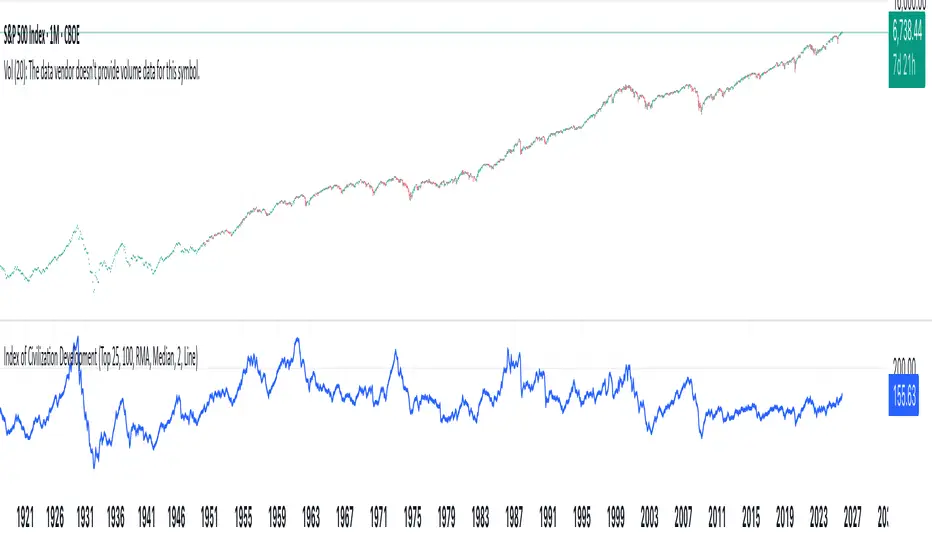
Index of Civilization DevelopmentIndex of Civilization Development Indicator
This Pine Script (version 6) creates a custom technical indicator for TradingView, titled Index of Civilization Development. It generates a composite index by averaging normalized stock market performances from a selection of global country indices. The normalization is relative to each index's 100-period simple moving average (SMA), scaled to a percentage (100% baseline). This allows for a comparable "development" or performance metric across diverse markets, potentially highlighting trends in global economic or "civilizational" progress based on equity markets.The indicator plots as a single line in a separate pane (non-overlay) and is designed to handle up to 40 symbols to respect TradingView's request.security() call limits.Key FeaturesComposite Index Calculation: Fetches the previous bar's close (close ) and its 100-period SMA for each selected symbol.
Normalizes each: (close / SMA(100)) * 100.
Averages the valid normalizations (ignores invalid/NA data) to produce a single "Index (%)" value.
Symbol Selection Modes:Top N Countries: Selects from a predefined list of the top 50 global stock indices (by market cap/importance, e.g., SPX for USA, SHCOMP for China). Options: Top 5, 15, 25, or 50.
Democratic Countries: ~38 symbols from democracies (e.g., SPX, NI225, NIFTY; based on democracy indices ≥6/10, including flawed/parliamentary systems).
Dictatorships: ~12 symbols from authoritarian/hybrid regimes (e.g., SHCOMP, TASI, IMOEX; scores <6/10).
Customization:Line color (default: blue).
Line width (1-5, default: 2).
Line style: Solid line (default), Stepline, or Circles.
Data Handling:Uses request.security() with lookahead enabled for real-time accuracy, gaps off, and invalid symbol ignoring.
Runs calculations on every bar, with max_bars_back=2000 for historical depth.
Arrays are populated only on the first bar (barstate.isfirst) for efficiency.
Predefined Symbol Lists (Examples)Top 50: SPX (USA), SHCOMP (China), NI225 (Japan), ..., BAX (Bahrain).
Democratic: Focuses on free-market democracies like USA, Japan, UK, Canada, EU nations, Australia, etc.
Dictatorships: Authoritarian markets like China, Saudi Arabia, Russia, Turkey, etc.
Usage TipsAdd to any chart (e.g., daily/weekly timeframe) to view the composite line.
Ideal for macro analysis: Compare democratic vs. authoritarian performance, or track "top world" equity health.
Potential Limitations: Relies on TradingView's symbol availability; some exotic indices (e.g., KWSEIDX) may fail if not supported. The 40-symbol cap prevents errors.
Interpretation: Values >100 indicate above-trend performance; <100 suggest underperformance relative to recent averages.
This script blends financial data with geopolitical categorization for a unique "civilization index" perspective on global markets. For modifications, ensure symbol tickers match TradingView's format.
Market Sentiment Overlay: PCCE + VIX Zones📊 Market Sentiment Suite: PCCE + VIX
Track fear & greed in real time using Put/Call Ratio and VIX percentile.
Spot potential tops and bottoms before they form — ideal for SPX/SPY swing traders.Identify fear, greed, and turning points in the market.
This script combines the CBOE Put/Call Ratio (PCCE) with the VIX volatility index percentile to visualize crowd sentiment and highlight potential market tops and bottoms.
🔍 Key Features
Dual-indicator design: PCCE + normalized VIX percentile
Color-coded zones for Greed (<0.6) and Fear (>1.2)
Automatic alert signals when sentiment reaches extremes
Live sentiment table displaying real-time PCCE and VIX data
Works seamlessly on SPX, SPY, QQQ, or any major index
🧠 How to Use
When PCCE > 1.2 and VIX percentile > 80%, fear is extreme → possible market bottom
When PCCE < 0.6 and VIX percentile < 20%, greed is extreme → possible market top
Perfect for contrarian traders, sentiment analysts, and swing traders
✨ Best Timeframe: Daily
⚙️ Markets: SPX / SPY / QQQ / Global Indexes
📈 Type: Contrarian Sentiment Indicator

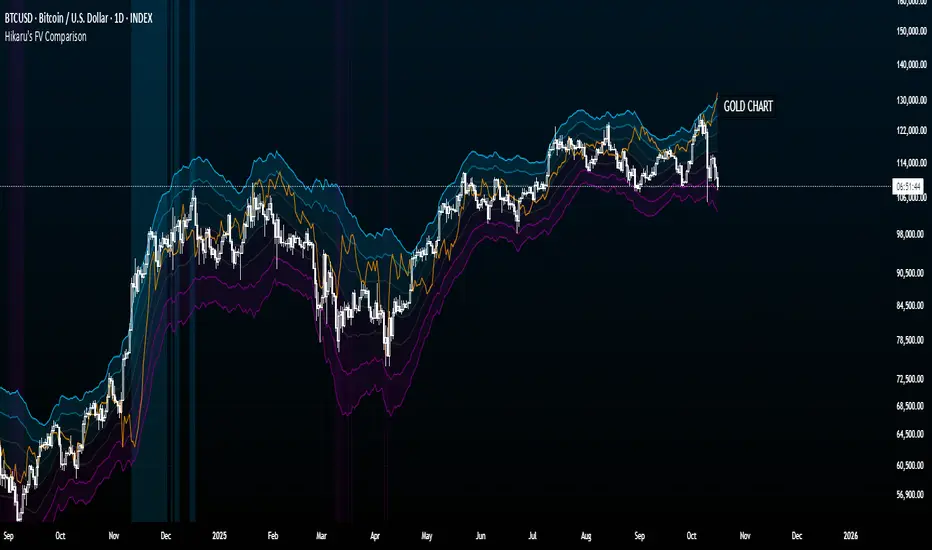
Hikaru's FV Comparison
Hikaru's FV Comparison allows you to compare any two assets using Hikaru Bands. This indicator shows where your comparison asset sits within its own bands while you're viewing another chart. Perfect for spotting divergences between correlated markets - see if SPX is overbought while BTC isn't, or check if ETH and SOL are aligned in their band positions.
The orange line (customizable color) represents the comparison asset's relative position mapped to your current chart's Hikaru Bands. When the comparison asset touches its lower extreme band, the line appears at your chart's lower extreme. When it's overbought, the line moves to the corresponding overbought zone on your chart.
█ FEATURES
Comparison Symbol Selection
• Choose any symbol to compare against your current chart (default: CRYPTO:ETHUSD)
• Works with stocks, crypto, forex, indices, or any TradingView symbol
• Confirmation dialog on first load to select your comparison asset
Visual Clarity
• Customizable comparison line color (default: orange) for easy visibility
• Grey line indicates periods with no data available for the comparison symbol
• Single clean line overlay - no clutter, just the essential information
Full Hikaru Bands Customization
All original Hikaru Bands features are included:
• 10 component indicators: EMA Spread, CCI, BB%, Crosby Ratio, Sharpe Ratio, ROC, Z-Score, PGO, RSI, and Omega Ratio
• Multiple color schemes: Extremes, VAMS Style, Copper, Ocean, Washed Out, Neon, Warm, Cool
• Adjustable normalization lookback, basis length, band multiplier, and smoothing
█ HOW TO USE
Setting Up
1 — Add the indicator to your chart. A dialog will prompt you to select a comparison symbol.
2 — Choose the asset you want to compare (e.g., TVC:SPX to compare with the S&P 500).
3 — Adjust the comparison line color in the Style settings if needed (it's at the top for easy access).
Interpreting the Comparison Line
• When the line is near your chart's upper bands: The comparison asset is in its overbought zone
• When the line is near your chart's lower bands: The comparison asset is in its oversold zone
• When the line is near the middle basis: The comparison asset is trading near its equilibrium
• Grey line: No historical data available for the comparison asset during that period
Trading Applications
• Divergence Detection: Spot when correlated assets are moving in opposite band directions
• Correlation Confirmation: Verify that related markets are showing similar strength or weakness
• Leading Indicators: Watch for one asset reaching extremes before the other follows
• Risk Assessment: Check if macro indices like SPX are overbought when considering crypto longs
█ EXAMPLES
ETH vs SOL
Compare Ethereum against Solana to see if they're aligned. If ETH is at its lower bands but SOL shows (via the comparison line) at its upper bands, this divergence might indicate a rotation between the two assets.
Crypto vs GOLD
Compare your crypto chart against TVC:GOLD (GOLD Index) to see money flow correlations.
█ DISCLAIMER
This tool is designed for technical analysis and should not be used as a standalone signal for trading.
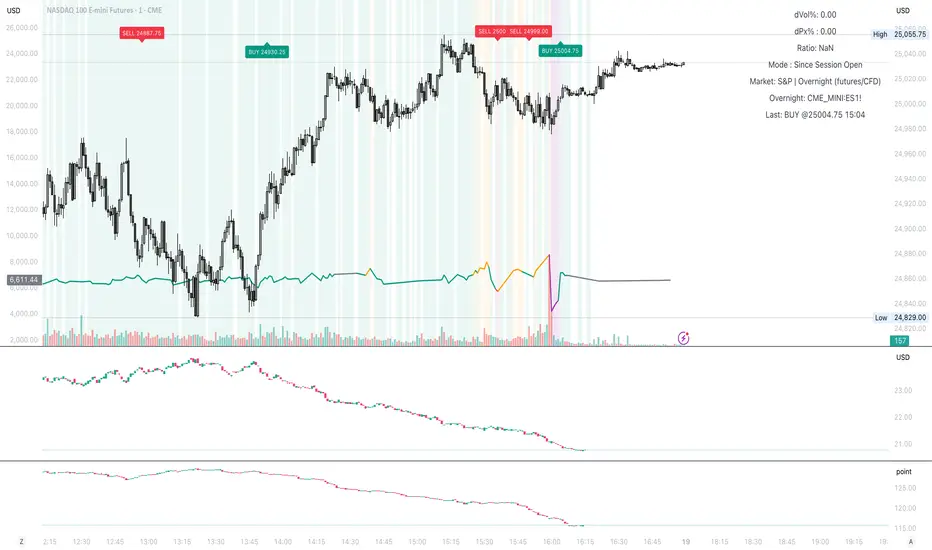
Vol-Sensitivity Ratio: dVIX% / dSPX%Vol-Sensitivity Ratio: dVIX% / dSPX%
Hey guys — I built a custom TradingView indicator to track how reactive the VIX is to SPX moves.
It’s basically a quick visual on market fear vs. complacency, and how volatility responds in real time.
How It Works
Calculates the ratio of VIX % change ÷ SPX % change
Shows color-coded zones for market behavior:
🔴 SPX & VIX rising → Bearish divergence
🟠 Weak VIX response → Complacency
🟩 Normal inverse → Healthy market
🟣 Extreme ratio → Volatility stress
How to Use
Add the script to your TradingView chart
Choose mode → Since Session Open (intraday) or From Prior Close (swing)
Watch the ratio line, color bands, and mini dashboard (shows dVIX%, dSPX%, and ratio)
It also supports alerts for when the market enters stress, divergence, or complacency zones.
Why I Made It
@HEK often talks about VIX, VVIX, and volatility dynamics during trading.
That got me thinking about how to actually quantify the relationship instead of just “watching” it.
thanks to chatgpt I was able to turn into a visual
Now I’ll be forward-testing it in live markets and on a few prop accounts to see how useful it is in real-time conditions.
Feel free to try it out, tweak it, and share feedback or observations. Would love to see how it performs for others too.
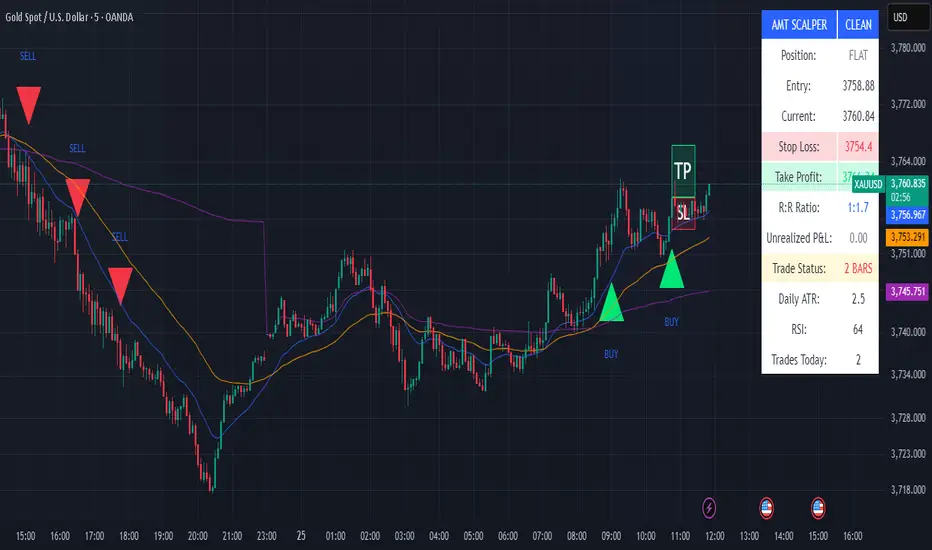
Elite Momentum Scalper🎯 Perfect For
Scalpers Who Want:
Quick In-and-Out Trades: Designed for 1-15 minute timeframes but works very well on the higer timeframes. Especiall Designed for : Indices ie NAS100 SPX in the New York Session but does work in London session also.
High Win Rate: Multiple confirmations reduce false signals
Consistent Risk: Same risk per trade, every trade
Clean Charts: No indicator spaghetti, just clear signals
Best Markets: Indices ie NAS100 SPX New York Session
Forex Majors: EUR/USD, GBP/USD, USD/JPY
Precious Metals: XAU/USD (Gold), XAG/USD (Silver)
Crypto: BTC/USD, ETH/USD (works 24/7)
Indices: SPX, NAS, DAX during active sessions
Optimal Timeframes:
Primary: 5-minute, 15-minute charts
Works On: Any timeframe (auto-adjusts)
Session-Aware: Best during London/NY overlap
🚨 Built-in Alerts
Never miss a trade:
Entry Alerts: "LONG ENTRY at 1.2345 SL: 1.2300 TP: 1.2400"
Exact Levels: Includes entry, stop, and target prices
Mobile Friendly: Works with TradingView mobile alerts
💡 Pro Tips for Best Results
Setup Recommendations:
Start Conservative: Begin with 1% risk per trade
Respect Sessions: Best results during London/NY hours
Don't Override: Let the cooldown system work
Monitor Dashboard: Keep an eye on daily trade count
Backtest First: Test on historical data before live trading
Risk Management:
Never risk more than you can afford to lose
Use proper position sizing (built-in calculator)
Respect the stop losses (they're there for a reason)
Monitor during high-impact news events
🏆 Why The Elite One?
Based on Fabio Valentini's proven #1 scalper methodology, this isn't just another indicator—it's a complete trading system that:
✅ Eliminates Guesswork: Exact entry, stop, and target levels
✅ Manages Risk: Built-in position sizing and risk management
✅ Prevents Overtrading: Smart cooldown system
✅ Adapts to Markets: ATR-based levels adjust to volatility
✅ Saves Time: All information in one clean dashboard
✅ Works Anywhere: Any market, any timeframe
✅ Stays Clean: No chart clutter, just actionable signals
Join thousands of traders who've upgraded their scalping game with the world's #1 scalper's methodology, refined into institutional-grade precision with retail-friendly execution.
⚠️ Important Disclaimers
Past performance does not guarantee future results
Trading involves substantial risk of loss
Test thoroughly on demo accounts first
Consider broker spreads in your calculations
Not financial advice - trade at your own risk
📈 Ready to Transform Your Trading?
Add The Elite One to your chart and experience the difference that professional-grade trading tools based on proven scalping methodology can make.
Remember: The best traders don't just follow signals—they understand their tools. Take time to learn the system, backtest thoroughly, and always trade responsibly.
Happy Trading! 🚀
The Elite One - Based on Fabio Valentini's #1 Scalper Methodology ⚡️
SMR - Simple Market Recap📊 Simple Market Recap (SMR)
🎯 A comprehensive market overview tool displaying price changes, percentage movements, and status indicators for multiple financial instruments across customizable timeframes with intelligent data synchronization.
━━━━━━━━━━━━━━
📋 OVERVIEW
The Simple Market Recap indicator provides a professional market analysis dashboard that displays key performance metrics for major financial instruments. This educational tool features intelligent asset selection, automatic dark mode detection, comprehensive period analysis with bilingual support, and advanced data synchronization ensuring accurate price data regardless of the current chart symbol.
Perfect for:
Market overview analysis and educational study
Multi-asset performance comparison and research
Weekly, daily, and monthly market recap visualization
Educational purposes and market trend analysis
━━━━━━━━━━━━━━
🚀 KEY FEATURES & ENHANCEMENTS
🌙 Intelligent Dark Mode Detection
Automatic chart background color analysis and adaptation
Dynamic color scheme adjustment for optimal visibility
Enhanced contrast ratios for both light and dark themes
Professional appearance across all chart backgrounds
📊 Comprehensive Asset Coverage
Major Forex Pairs: EURUSD, GBPUSD, AUDUSD, NZDUSD, USDCHF, USDJPY, USDCAD
Indices & Dollar: DXY (US Dollar Index), SPX (S&P 500)
Commodities: XAUUSD (Gold), USOIL (Crude Oil)
Bonds: US10Y (10-Year Treasury)
Cryptocurrencies: BTCUSDT, ETHUSDT
Selective asset display with individual on/off controls
Fixed asset order: DXY, EURUSD, GBPUSD, AUDUSD, NZDUSD, USDCHF, USDCAD, USDJPY, XAUUSD, USOIL, SPX, US10Y, ETHUSDT, BTCUSDT
⏰ Flexible Timeframe Analysis
Multiple Periods: Daily (1D), Weekly (1W), Monthly (1M)
Time Selection: Current Period or Previous Period analysis
Dynamic Titles: Automatic report naming with dates and periods
Historical Comparison: Compare current vs previous period performance
📈 Enhanced Data Visualization
Professional table with adaptive row count based on selected assets
Color-coded price movements: Enhanced green for positive, bright red for negative
Status emojis: ↗️ Up, ↘️ Down, ↔️ Sideways, ❓ No data
Smart price formatting based on asset type and price level
Improved contrast colors for better visibility in all lighting conditions
🔄 Advanced Data Synchronization
Symbol-Independent Accuracy: Correct data display regardless of current chart symbol
Real-Time Security Requests: Direct data fetching from specific instrument sources
Cross-Asset Reliability: Accurate price data for all monitored assets simultaneously
Data Integrity: No cross-contamination between different financial instruments
━━━━━━━━━━━━━━
🎨 PROFESSIONAL TABLE LAYOUT
Adaptive Design Features:
Automatic dark mode detection and color adaptation
Enhanced contrast ratios for better readability
Professional color scheme with clear data separation
Responsive design for all screen sizes and themes
Comprehensive Data Display:
Dynamic Title Row: Period-specific report titles with dates
Asset Column: Selected financial instruments
Open/Close Prices: Period opening and closing values
Change Percentage: Color-coded performance indicators
Pips Movement: Precise pip calculations for each asset
Status Indicators: Visual emoji representations of trend direction
Visual Design Features:
Merged title cells for clean header presentation
Asset-specific price formatting for optimal readability
Color-coded positive/negative movements
Professional table borders and spacing
━━━━━━━━━━━━━━
⚙️ ADVANCED CUSTOMIZATION
Timeframe Controls:
Report Period selection: Daily, Weekly, or Monthly analysis
Time Selection toggle: Current vs Previous period comparison
Dynamic row count based on active asset selection
Automatic title generation with period-specific formatting
Asset Selection:
Individual toggle controls for each supported asset
Major forex pairs with complete coverage
Cryptocurrency and precious metals options
Index and commodity instrument support
Display Options:
9 table positioning options across the entire chart
5 text size levels from Tiny to Huge for optimal visibility
Language selection between English and Vietnamese
Automatic theme adaptation for all chart backgrounds
━━━━━━━━━━━━━━
⚠️ EDUCATIONAL & ANALYTICAL PURPOSE
This indicator is designed exclusively for educational market analysis and research purposes .
📚 Educational Applications:
Understanding multi-asset market performance correlation
Studying period-based price movements and trends
Analyzing market volatility across different timeframes
Learning to read and interpret market recap data
📊 Analysis Capabilities:
Market overview visualization for educational study
Multi-timeframe performance comparison research
Historical period analysis and trend identification
Cross-asset correlation studies and market research
🚨 Important Disclaimer: This tool provides educational market data visualization only and does NOT generate trading signals or investment advice. All data is for learning and analysis purposes. Users must conduct independent research and consult financial professionals before making any investment decisions.
━━━━━━━━━━━━━━
🛠️ SETUP & CONFIGURATION
Quick Start Guide:
Add the indicator to your chart from the indicators library
Select your preferred language (English or Vietnamese)
Choose your desired reporting timeframe (Daily, Weekly, or Monthly)
Select Current Period or Previous Period for analysis
Toggle on/off specific assets you want to monitor
Adjust table position and text size for optimal viewing
Advanced Configuration:
Customize asset selection based on your analysis needs
Configure timeframe settings for different market studies
Set up language preferences for your region
Fine-tune display options for your screen setup
Optimize table positioning for your chart layout
Theme Optimization:
Indicator automatically detects your chart theme
Colors adapt automatically for optimal contrast and readability
No manual adjustments required for theme changes
Professional appearance maintained across all backgrounds
━━━━━━━━━━━━━━
🔧 TECHNICAL SPECIFICATIONS
Performance & Reliability:
Pine Script v6 with optimized data retrieval
Real-time updates with minimal CPU and memory usage
No repainting or lookahead bias in calculations
Stable performance across all timeframes and instruments
Universal Compatibility:
Works with all TradingView chart types and instruments
Compatible with mobile and desktop platforms
Supports all timeframes with period-specific analysis
Cross-platform functionality with consistent behavior
Data Precision:
High-precision floating-point calculations
Asset-specific formatting and pip calculations
Real-time price data from multiple exchanges
Accurate percentage and movement calculations
Advanced Features:
Automatic chart background detection and color adaptation
Dynamic table sizing based on active asset selection
Intelligent price formatting for different asset classes
Professional status indicators with emoji visualization
━━━━━━━━━━━━━━
📋 VERSION HISTORY
v1.7 - Enhanced Data Synchronization & Color Improvements
Fixed critical data synchronization issue - accurate data regardless of current chart symbol
Enhanced data retrieval system with symbol-specific security requests
Improved color scheme: brighter red for negative values, enhanced contrast
Fixed asset order: DXY, EURUSD, GBPUSD, AUDUSD, NZDUSD, USDCHF, USDCAD, USDJPY, XAUUSD, USOIL, SPX, US10Y, ETHUSDT, BTCUSDT
Optimized price formatting with proper decimal display and leading zeros
Enhanced calendar-based time calculations for accurate period reporting
Improved pip calculations for different asset classes
Professional color coding with adaptive contrast for all themes
Previous Versions:
v1.6 - Data accuracy improvements and bug fixes
v1.5 - Enhanced market analysis with flexible timeframes
v1.4 - Professional table layout and bilingual support
Earlier versions - Core market data display functionality development
━━━━━━━━━━━━━━
Author: tohaitrieu
Version: 1.7
Category: Market Analysis / Educational Overview
Language Support: English, Vietnamese
License: Educational Use Only
This indicator is provided exclusively for educational and analytical purposes to help users understand market overview concepts and multi-asset analysis. It features automatic theme adaptation, flexible timeframe analysis, enhanced data synchronization, and comprehensive market data visualization for the most accurate and informative educational experience. It does not provide trading signals or investment advice. Always conduct thorough research and consider professional guidance before making financial decisions.

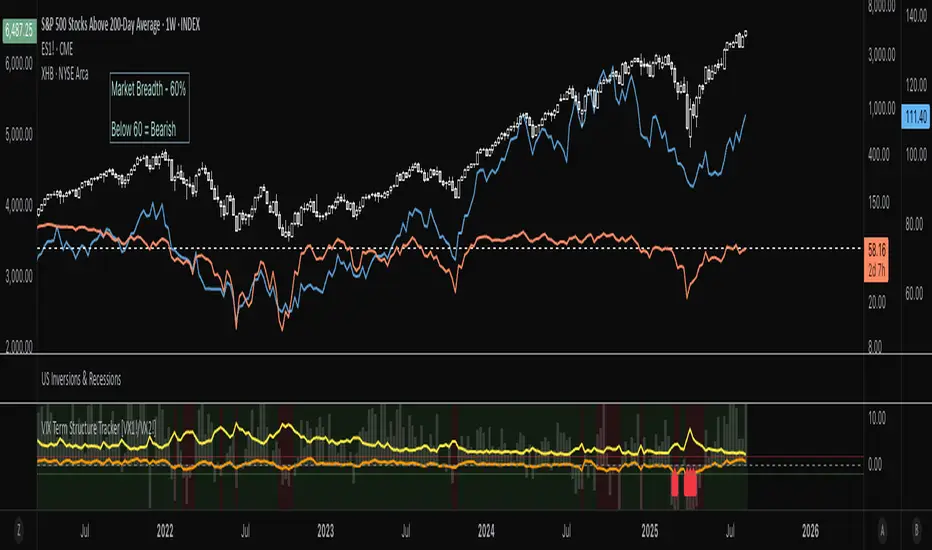
VIX Term Structure Tracker [VX1!/VX2!]1. Data Preparation
The script starts by fetching four key data series on a daily ("D") timeframe:
VIX (CBOE:VIX): The spot VIX index, a real-time measure of market expectations of future volatility.
VX1! (CBOE:VX1!): The price of the front-month (nearest to expiration) VIX futures contract.
VX2! (CBOE:VX2!): The price of the next-month VIX futures contract.
SPX (SP:SPX): The S&P 500 Index, which serves as a benchmark for the overall market.
2. Term Structure and Market Psychology
The core of the indicator lies in analyzing the relationship between the futures prices.
term_slope = vx2 - vx1: This calculates the difference between the next-month and front-month VIX futures prices.
Contango: If vx2 > vx1, the slope is positive, and the market is in contango. This is the "normal" state, where traders expect volatility to be lower in the future. The script colors this background a light green.
Backwardation: If vx2 < vx1, the slope is negative, and the market is in backwardation. This is a rare state indicating elevated fear. It means traders are willing to pay a premium for short-term protection against volatility, implying that an increase in fear is imminent. The script colors this background a light red.
3. Roll Yield Calculation
roll_yield = ((vx1 - vix) / days_to_expiry) * 100: This calculates the estimated return (or loss) from rolling a futures position from the spot VIX to the front-month future. This is a key metric for understanding the cost of holding VIX futures. A negative roll yield means it is expensive to hold a long VIX position.
4. Equilibrium and Z-Score
This section of the code provides a statistical measure to determine how extreme the current term structure is compared to its historical average.
avg_slope = ta.sma(term_slope, 252): This calculates the one-year simple moving average of the term structure slope.
z_score: This is the most powerful part of the indicator. It measures how many standard deviations the current term_slope is from its one-year average.
A Z-score of +2 or higher indicates the market is in an extreme state of contango (complacency), where volatility is abnormally low.
A Z-score of -2 or lower indicates an extreme state of backwardation (fear), where there's an abnormal surge in short-term volatility expectations.
5. Visualizations & Signals
The script presents a comprehensive view of these metrics on the chart.
plot(term_slope): Shows a blue line representing the VIX term structure slope.
bgcolor(...): Visually highlights periods of contango (light green) and backwardation (light red).
plot(roll_yield): Displays a column chart showing the roll yield, indicating the cost or benefit of holding VIX futures.
plot(z_score): Shows an orange line representing the Z-score, with horizontal lines at +2 and -2 to highlight extreme conditions.
plotshape(...): These are your trading signals. A red arrow pointing up (shape.labelup) appears at the bottom of the chart when the Z-score drops below -2 (extreme backwardation), and a green arrow pointing down (shape.labeldown) appears at the top when the Z-score goes above +2 (extreme contango).
6. Interpretation and Trading Signals
The script provides a clear framework for interpreting market sentiment:
Extreme Backwardation Signal (Red Arrow Up): When the Z-score falls to -2 or below, it signals a period of extreme market fear. This is often an excellent contrarian signal for buying the VIX (or related products) and/or for caution in long equity positions.
Extreme Contango Signal (Green Arrow Down): When the Z-score rises to +2 or above, it signals a period of extreme market complacency. This can be a contrarian signal for selling the VIX (or related products) and/or for potential short-term weakness in the S&P 500.
The VIX/SPX Risk Ratio also provides a good visual of volatility relative to the S&P 500, with an increasing ratio signaling a rising risk environment.
Ultimately, this indicator provides a powerful way to visualize the VIX futures term structure and use statistical analysis (Z-score) to find high-probability signals of extreme market sentiment.
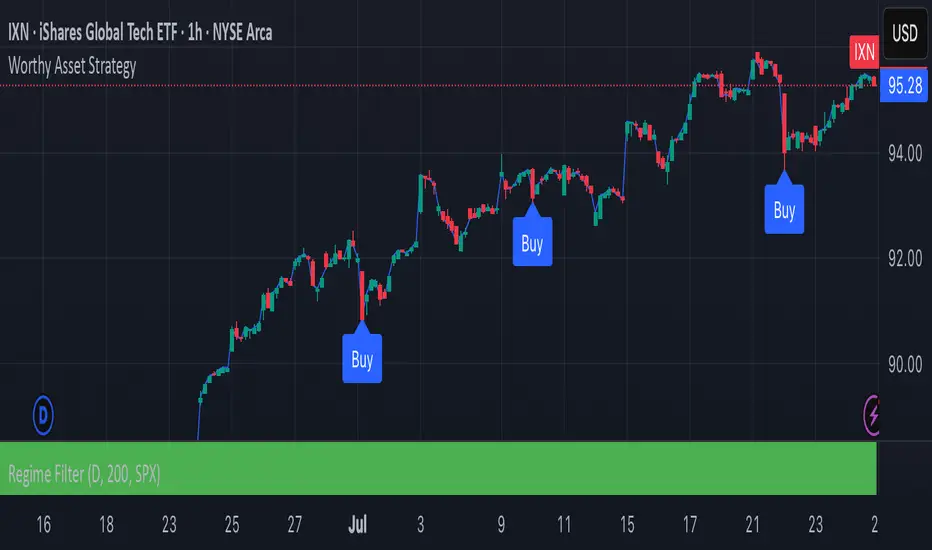
Worthy Asset StrategyThis strategy is designed with a two-part philosophy: a regime filter and a value-based accumulation approach.
🟩 Regime Filter:
If the S&P 500 (SPX) is trading above its 200-period EMA, a green background is shown below the chart, signaling a favorable market regime.
If the SPX is below the 200 EMA, the background turns red, indicating a less favorable environment.
📉 Buy Signals:
Buy signals are generated by red candles that drop a certain percentage from their open — essentially treating these pullbacks as discount opportunities.
The idea is to accumulate more of a selected asset when it becomes temporarily cheaper.
💎 Philosophy & Execution:
I only apply this strategy to assets I’ve personally researched and believe to be fundamentally valuable.
If a Buy signal occurs and the SPX is trading above its 200 EMA (i.e., the background is green), I enter the position.
Once in the trade, I follow this logic:
If the position reaches +1.5% profit, I sell it.
If it doesn’t reach profit and goes into a loss, I simply hold.
I don’t sell at a loss because I believe in the long-term value of the asset.
If the price drops further, I accumulate more — aiming to lower my average cost and eventually exit at a profit once the asset recovers.
This approach is based on the mindset of treating drawdowns as discounts, not danger.
"The more it drops, the more I accumulate — because I see value, not risk."
This is still a work in progress, and I’m actively refining it over time.
⚠️ Note: The sell logic is not yet visible on the chart and will be added in a future update.
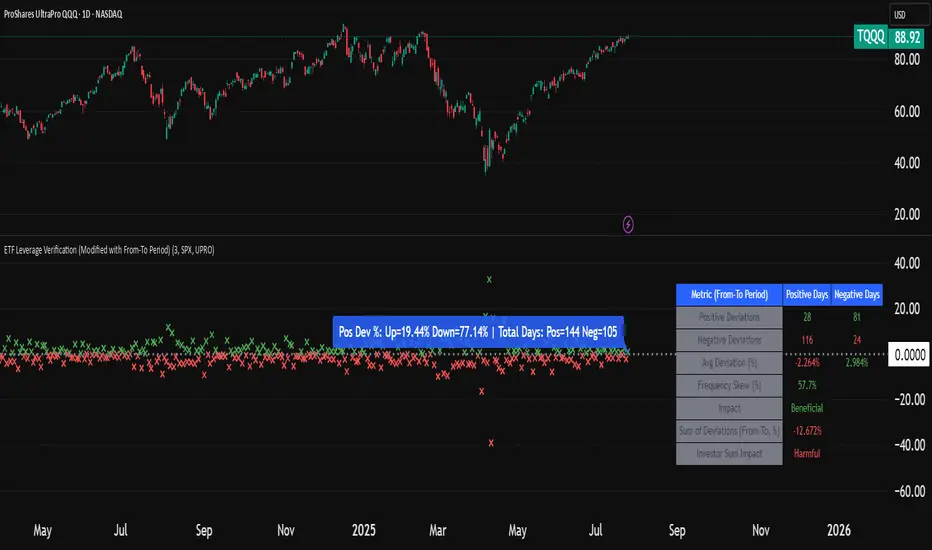
ETF Leverage VerificationDo leveraged ETFs really return what they promise?
Do they return the exact 2x or 3x? Or a slightly different multiple?
How much do they deviate from the promised leverage multiples?
Do these deviations impact investors in a positive or negative manner?
These are the questions that I want to answer with this indicator.
The ETF Leverage Verification indicator challenges the conventional understanding of leveraged ETFs by measuring how they actually perform versus their theoretical targets.
Instead of assuming leveraged ETFs perfectly track their target multiple, this indicator quantifies the real-world behavior by comparing the expected returns versus the actual results on every trading day.
Key Features
Measures actual versus expected performance of leveraged ETFs
Tracks deviation patterns across thousands of trading days
Identifies asymmetric behavior in up versus down markets
Quantifies beneficial "cushioning effect" during market declines
Provides statistical summary of performance patterns
Works with any leverage factor (2x, 3x, -1x, etc.)
Compatible with all leveraged ETFs (equity, bond, commodity, volatility)
How to Use the Indicator
Enter the Expected Leverage Factor (default: 2.0)
Select the Base Asset (underlying index, e.g., SPX)
Select the Leveraged Asset (leveraged ETF, e.g., SSO)
Understanding the Results
Green markers: Days when the ETF outperformed its expected multiple
Red markers: Days when the ETF underperformed its expected multiple
Data Table:
Positive Deviations: Count of days with better-than-expected performance
Negative Deviations: Count of days with worse-than-expected performance
Avg Deviation: Average magnitude of deviation from expected returns
Frequency Skew: Difference between beneficial deviations in down vs. up markets
Impact: Overall assessment of pattern benefit to investors
Summary Label:
Percentage of positive deviations in up and down markets
Total sample size for statistical significance
Key Patterns to Look For
Positive Deviation in Negative Days:
This occurs when a leveraged ETF falls less than expected during market declines. For example, if SPX falls 1% and a 2x ETF falls only 1.8% (instead of the expected 2%), this creates a +0.2% deviation. This pattern is beneficial as it provides downside protection.
Negative Deviation in Positive Days:
This happens when a leveraged ETF rises less than expected during market advances. For example, if SPX rises 1% and a 2x ETF rises only 1.9% (instead of the expected 2%), this creates a -0.1% deviation. This pattern reduces upside performance.
Frequency Skew:
The most critical metric that measures how much more frequently beneficial deviations occur in down markets compared to up markets. A higher positive skew indicates a stronger asymmetric pattern that helps long-term performance.
Mathematical Background
The indicator computes the deviation between expected and actual performance:
Deviation = Actual Return - Expected Return
Where:
Expected Return = Base Asset Return × Leverage Factor
The deviation is then categorized into four possible outcomes:
Positive deviation on positive market days
Negative deviation on positive market days
Positive deviation on negative market days
Negative deviation on negative market days
In short, more positive deviations are good for investors.
Please feel free to criticize. I'm happy to improve the indicator.
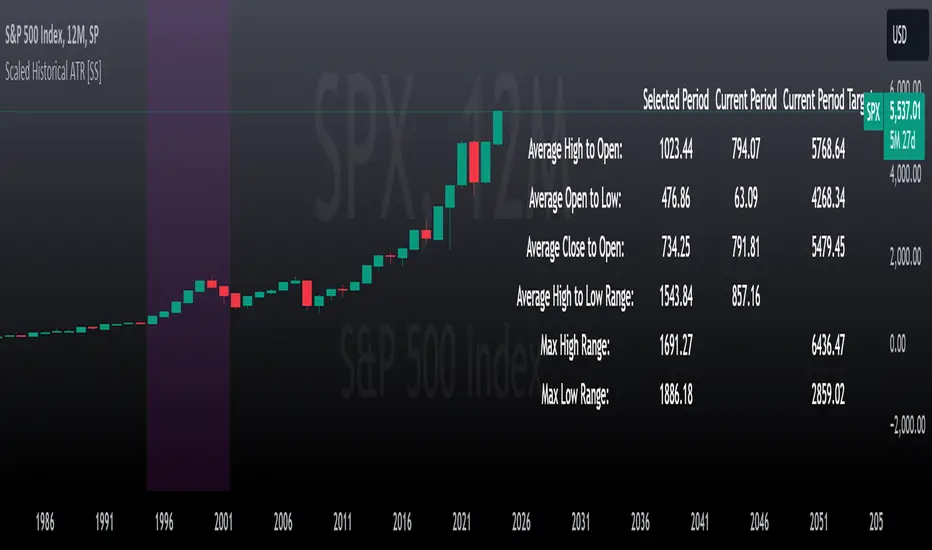
VIX AnalyticsThis script is designed to serve traders, analysts, and investors who want a real-time, comprehensive view of market volatility, risk sentiment, and implied movements. It combines multiple institutional-grade volatility indices into one clear dashboard and interprets them with actionable insights — directly on your chart.
🔍 Features Included
🟦VIX (CBOE Volatility Index)
Measures market expectation of 30-day S&P 500 volatility.
Color-coded interpretation ranges:
Under 13: Extreme Complacency
15–20: Stable Market
20–30: Moderate Risk
30–40: High Volatility
Over 40: Panic
🟪 VVIX (Volatility of Volatility Index)
Tracks the volatility of VIX itself.
Interpreted as a risk gauge of how aggressively traders are hedging volatility exposure.
Under 80: Market Complacency
80–100: Normal Environment
100–120: Caution — Rising Volatility of Volatility
Over 120: High Stress — Elevated Hedging Activity
🟨 SKEW Index
Measures the perceived tail risk of the S&P 500 — i.e., the probability of a black swan event.
Below 110: Potential Complacency
120–140: Moderate Tail Risk
Above 140: High Tail Risk
🧮 VIX/VVIX Ratio
Gauges relative fear levels between expected volatility and the volatility of volatility.
Under 0.5: Low Ratio — VVIX Overextended
Over 0.9: High Ratio — VIX Leading
📈 VIX Percentile (1-Year Range)
Shows where the current VIX sits relative to its 1-year high/low.
Under 20%: Volatility is Cheap
Over 70%: Fear is Elevated — Reversal Possible
📉 SPX Implied Point Moves
Projects expected moves in SPX using VIX-derived volatility:
Daily
Weekly
Monthly
Helps size positions or define expected price ranges based on volatility regime.
📊 ATR Values (5, 13, 21 periods)
Traditional volatility using historical prices.
Provided alongside implied data for comparison.
🧠 Unique Logic & Interpretation Layer
This script doesn’t just show raw data — it interprets it. It reads the relationship between VIX, VVIX, and SKEW to highlight:
When market volatility may be underpriced
When hidden tail risks are forming
When to be cautious of volatility expansions
How current implied movement compares to past realized volatility
✅ Use Cases
Day traders: Know when volatility is low or expanding before scalping or swinging.
Options traders: Identify whether implied volatility is cheap or expensive.
Portfolio managers: Gauge when hedging is in demand and adjust exposure.
Risk managers: Crosscheck if current volatility aligns with macro risk events.
⚙️ Settings
Customizable table placement: Move the dashboard to any corner of your chart.
No repainting or lag: Data updates in real-time using official CBOE and SPX feeds.