CRT Finder (WanHakimFX)📈 Liquidity Grab Indicator with MTF Confluence & Alerts
🔍 Overview:
The Liquidity Grab Indicator is designed to detect precise moments when price sweeps liquidity — either by wicking below recent lows (bullish LQH) or above recent highs (bearish LQL) — followed by a clear rejection. It combines this logic with multi-timeframe confirmation and trend filters, making it a powerful tool for identifying high-probability reversal setups.
⚙️ How It Works:
✅ Liquidity Sweep Logic (LQH / LQL)
Bullish (LQH):
Current candle wicks below the previous low
Closes above the previous candle body
Confirms potential bullish reversal
Bearish (LQL):
Current candle wicks above the previous high
Closes below the previous candle body
Confirms potential bearish reversal
✅ Additional Conditions:
Must occur during London or New York sessions.
Requires trend confluence:
LQH = Price must be above SMMA 60/100/200
LQL = Price must be below SMMA 60/100/200
🧠 Multi-Timeframe Confluence:
The indicator scans for LQH/LQL sweeps across:
Daily
4H
1H
30M
15M
If a sweep occurs on any of these timeframes, an alert is triggered and a triangle marker appears on the chart for real-time visual confluence.
📊 Visual Features:
Green/Red labels for active timeframe sweeps.
Dotted wick lines to show liquidity zones from the previous candle.
Colored triangle markers for MTF sweep alerts.
🛠 Strategy Usage:
This indicator is best used as a trigger tool in a confluence-based strategy:
Use higher-timeframe MTF LQH/LQL markers for directional bias.
Wait for matching sweep on your entry timeframe (e.g., M1/M5).
Enter on confirmation candle or break of structure.
Target imbalances, FVGs, or previous highs/lows.
Risk-managed entries using sweep candle's high/low as stop.
📢 Alerts:
✅ Bullish Sweep (LQH) on any timeframe
✅ Bearish Sweep (LQL) on any timeframe
Wyszukaj w skryptach "mtf"

EMA/SMA Ribbon Pro (AUTO HTF + Labels)This indicator is a multi-timeframe (MTF) moving average ribbon that dynamically adjusts to the next highest timeframe. It provides a visual representation of market trends by stacking multiple EMAs and SMAs with customizable color fills and labels.
Features
✅ Multi-Timeframe (MTF) Support: Automatically detects the next highest time frame or allows for manual selection
✅ Customizable Moving Averages: Supports EMA and SMA with different lengths for flexible configuration
✅ Ribbon Visualization: Smooth color transitions between different moving averages for better trend identification
✅ Crossover Labels: Detects bullish and bearish EMA/SMA crossovers and marks them on the chart
✅ Price Labels & Timeframe Display: Displays moving average values to the right of the price axis with customizable label padding and colors
How It Works
Select the HTF mode: Manual or automatic
Choose EMA/SMA lengths to create different ribbons
Enable/disable price labels for each moving average
Customize colors and transparency for ribbons and labels
Crossover labels appear when faster moving averages cross slower ones and vice versa
Use Cases
📌 Trend Identification: Identify bullish and bearish trends using multiple EMAs and SMAs
📌 Support & Resistance Zones: MAs can act as dynamic support and resistance levels
📌 Reversal & Confirmation Signals: Watch for MTF crossovers to confirm trend changes
Customization
🔹 Standard EMA Lengths: 6, 8, 13, 21, 34, 48, 100, 200, 300, 400
🔹 SMA Lengths: 48, 100, 200
🔹 Color Adjustments: Set custom colors for bullish/bearish ribbons
🔹 Crossovers: Enable/disable custom crossover pairs (e.g., 100/200 EMA, 200 EMA/SMA).
This indicator is perfect for traders who rely on multi-timeframe confluence while seeking to enhance their market analysis and decision-making process.
As always, by combining EMA/SMA Ribbon with other tools, traders ensure that they are not relying on a single indicator. This layered approach can reduce the likelihood of false signals and improve overall trading accuracy.
As always, be sure to use any indicator with price action and volume indicators for better trade confirmation!

Enhanced Buy/Sell Pressure, Volume, and Trend Bar analysisEnhanced Buy/Sell Pressure, Volume, and Trend Bar Analysis Indicator
Overview
This indicator is designed to help traders identify buy and sell pressure, volume changes, and overall trend direction in the market. It combines multiple concepts like price action, volume, and trend analysis, candlestick anaysis to provide a comprehensive view of market dynamics. The visual elements are intuitive, making it suitable for traders at different levels. This indicator works together with Enhanced Pressure MTF Screener which is a screener based of this indicator to make it easier to see Bullish/Bearish pressures and trend across multiple timeframes.
Image below: is the Enhanced Buy/Sell Pressure, Volume, and Trend Bar Analysis with the Enhanced Pressure MTF Screener indicator both active together.
Key Features
1.Buy/Sell Pressure Identification
Buy Pressure: Calculated based on price movement where the close price is higher than the opening price.
Sell Pressure: Calculated when the closing price is equal to or lower than the opening price.These pressures help you understand whether buyers or sellers are more dominant for each bar.
2.Volume Analysis
Normalized Volume: Volume data is normalized, making it easier to compare volume levels over different periods.
Volume Histogram: The volume is also presented as a histogram for easy visualization, showing whether the current volume is higher or lower compared to the average.
3.Simplified Coloring Option
You can choose to simplify the coloring of bars to reflect the dominant pressure: green for bullish pressure and red for bearish pressure. This makes it visually easier to identify who is in control. When simplified coloring is disabled, the bars' colors will represent the combined effect of buy and sell pressure.
4.Heikin-Ashi Candles for Pressure Calculation
The indicator includes an option to use Heikin-Ashi candles instead of traditional candles to calculate buy and sell pressure. Heikin-Ashi candles are known for smoothing out price action and providing a clearer trend representation.
5.Trend Background Coloring
This feature uses exponential moving averages (EMAs) to determine the trend:
Short-Term EMA vs. Long-Term EMA: When the short-term EMA is above the long-term EMA, the trend is considered bullish, and vice versa.
The background color changes based on the identified trend: green for an uptrend and red for a downtrend. This feature helps visualize the overall market direction at a glance.
6.Signals for Key Price Actions
The indicator plots various symbols to signal important price movements:
Bullish Close (▲): Indicates a strong upward movement where the close price crosses above the open.
Bearish Close (▼): Indicates a downward movement where the close price falls below the open.
Higher High (•): Highlights new highs compared to previous bars, useful for confirming an uptrend.
Lower Low (•): Highlights lower lows compared to previous bars, which can indicate a downtrend or bearish pressure.
Calculations Explained
1.Buy and Sell Pressure Calculation
The buy pressure is determined by the price range (high - low) if the closing price is above the opening price, indicating an increase in value.
The sell pressure is similarly calculated when the closing price is equal to or below the opening price.
The indicator uses the Average True Range (ATR) for normalization. Normalizing helps you compare pressure across different periods, regardless of market volatility.
2.Volume Normalization
Volume Normalization: To make volume comparable across different periods, the indicator normalizes it using the Simple Moving Average (SMA) of volume over a user-defined length.
Volume Histogram: The histogram provides a clear representation of volume changes compared to the average, making it easier to spot unusual activity that may indicate market shifts.
3.Combined Pressure Calculation
The indicator calculates a combined pressure value by subtracting sell pressure from buy pressure.
When combined pressure is positive, buying is dominant, and when negative, selling is dominant. This helps in visually understanding the ongoing momentum.
4.Trend Calculation
The indicator uses two EMAs to determine the trend:
Short-Term EMA (default 14-period) to capture recent price movements.
Long-Term EMA (default 50-period) to provide a broader trend perspective.
By comparing these EMAs on a higher timeframe, the indicator can identify whether the trend is up or down, making it easier for traders to align their trades with the larger market movement.
Inputs and Customization
The indicator provides several options for customization, allowing you to adjust it to your preferences:
SMA Length: Determines the lookback period for moving averages and volume normalization. A longer length provides more smoothing, whereas a shorter length makes the indicator more responsive.
Buy/Sell/Volume Colors: Customize the colors used to represent buying, selling, and volume to suit your preferences.
Heikin Ashi Option: Toggle between using Heikin Ashi or traditional OHLC (Open-High-Low-Close) candles for pressure calculations.
Trend Timeframe and EMA Periods: You can choose different timeframes and EMA periods for trend analysis to suit your trading strategy.
How to Use This Indicator
Identifying Market Momentum: Use the buy/sell pressure columns to see which side (buyers or sellers) is in control. Positive pressure combined with green color indicates strong buying, while red indicates selling.
Volume Confirmation: Check the volume area plot and histogram. High volume coupled with strong pressure is a sign of conviction, meaning the current move has backing from market participants.
Trend Identification: The trend background color helps identify the overall trend direction. Trade in the direction of the trend (e.g., take long positions during a green background).
Signal Indicators: The plotted symbols like "Bullish Close" and "Bearish Close" provide visual signals of key price actions, useful for timing entry or exit points.
Practical use Example
Scenario: The market is consolidating, and you see alternating green and red bars.
Action: Wait for a consistent sequence of green bars (buy pressure) along with a green background (uptrend) to consider going long, although you can go long without having a green background, the background adds confirmation layer.
Scenario: The market has several bearish closes (red ▼ symbols) accompanied by increasing volume.
Action: This could indicate strong selling pressure. If the background also turns red, it might be a good time to exit long positions or consider shorting.
Higher timeframe pressure and volume: Another way to use the indicator is to check buy/sell volume and pressure of the higher timeframe say weekly or daily or any timeframe you consider higher, once you’ve identified or feel confident in which direction the bar is going along with the full picture of trend, you can go to the lower timeframe and wait for it to sync with the higher timeframe to consider a long or a short. It is also easier to see when markets sync up by also applying the Enhanced Pressure MTF Screener which works in companion to this indicator.
Visual Cues and Interpretation
Combined Pressure Plot: The green and red column plot at the bottom of the chart represents the dominance between buying and selling. Tall green bars signify strong buying, while tall red bars indicate selling dominance.
Trend Background: Helps visualize the overall direction without manually drawing trend lines. When the background turns green, it generally indicates that the shorter-term moving average has crossed above the longer-term average—a sign of a bullish trend.
To Summarize shortly
The Enhanced Buy/Sell Pressure, Volume, and Trend Bar Analysis Indicator is an advanced but simple tool designed to help traders visually understand market dynamics. It combines different aspects of market analysis of candle pressure from buyers and sellers, volume confirmation, and trend identification into a single view, which can assist both new and experienced traders in making informed trading decisions.
This indicator:
Saves time by simplifying market analysis.
Provides clear visual cues for buy/sell pressure, volume, and trend.
Offers customizable settings to suit individual trading styles.
Always, I am happy to share my creations with you all for free. If you guys have cool ideas you would like to share, or suggestions for improvements the comment is below and I hope this overview gave an idea of how to use the indicator :D

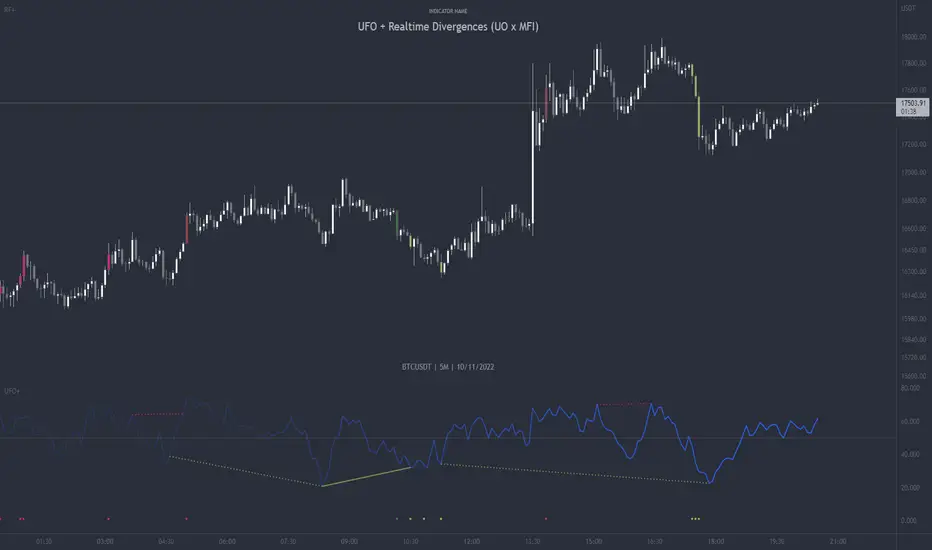
UFO + Realtime Divergences (UO x MFI)UFO + Realtime Divergences (UO x MFI) + Alerts
The UFO is a hybrid of two powerful oscillators - the Ultimate Oscillator (UO) and the Money Flow Index (MFI)
Features of the UFO include:
- Optional divergence lines drawn directly onto the oscillator in realtime.
- Configurable alerts to notify you when divergences occur, as well as centerline crossovers.
- Configurable lookback periods to fine tune the divergences drawn in order to suit different trading styles and timeframes.
- Background colouring option to indicate when the oscillator has crossed its centerline.
- Alternate timeframe feature allows you to configure the oscillator to use data from a different timeframe than the chart it is loaded on.
- 2x MTF triple-timeframe Stochastic RSI overbought and oversold confluence signals painted at the top of the panel for use as a confluence for reversal entry trades.
The core calculations of the UFO+ combine the factory settings of the Ultimate Oscillator and Money Flow Index, taking an average of their combined values for its output eg:
UO_Value + MFI_Value / 2
The result is a powerful oscillator capable of detecting high quality divergences, including on very low timeframes and highly volatile markets, it benefits from the higher weighting of the most recent price action provided by the Ultimate Oscillators calculations, as well as the calculation of the MFI, which incorporates volume data. The UFO and its incorporated 2x triple-timeframe MTF Stoch RSI overbought and oversold signals makes it well adapted for low timeframe scalping and regular divergence trades in particular.
The Ultimate Oscillator (UO)
Tradingview describes the Ultimate Oscillator as follows:
“The Ultimate Oscillator indicator (UO) is a technical analysis tool used to measure momentum across three varying timeframes. The problem with many momentum oscillators is that after a rapid advance or decline in price, they can form false divergence trading signals. For example, after a rapid rise in price, a bearish divergence signal may present itself, however price continues to rise. The Ultimate Oscillator attempts to correct this by using multiple timeframes in its calculation as opposed to just one timeframe which is what is used in most other momentum oscillators.”
You can read more about the UO and its calculations here
The Money Flow Index ( MFI )
Investopedia describes the True Strength Indicator as follows:
“The Money Flow Index ( MFI ) is a technical oscillator that uses price and volume data for identifying overbought or oversold signals in an asset. It can also be used to spot divergences which warn of a trend change in price. The oscillator moves between 0 and 100. Unlike conventional oscillators such as the Relative Strength Index ( RSI ), the Money Flow Index incorporates both price and volume data, as opposed to just price. For this reason, some analysts call MFI the volume-weighted RSI .”
You can read more about the MFI and its calculations here
The Stochastic RSI (relating to the built-in MTF Stoch RSI feature)
The popular oscillator has been described as follows:
“The Stochastic RSI is an indicator used in technical analysis that ranges between zero and one (or zero and 100 on some charting platforms) and is created by applying the Stochastic oscillator formula to a set of relative strength index ( RSI ) values rather than to standard price data. Using RSI values within the Stochastic formula gives traders an idea of whether the current RSI value is overbought or oversold. The Stochastic RSI oscillator was developed to take advantage of both momentum indicators in order to create a more sensitive indicator that is attuned to a specific security's historical performance rather than a generalized analysis of price change.”
You can read more about the Stochastic RSI and its calculations here
How do traders use overbought and oversold levels in their trading?
The oversold level, that is when the Stochastic RSI is above the 80 level is typically interpreted as being 'overbought', and below the 20 level is typically considered 'oversold'. Traders will often use the Stochastic RSI at an overbought level as a confluence for entry into a short position, and the Stochastic RSI at an oversold level as a confluence for an entry into a long position. These levels do not mean that price will necessarily reverse at those levels in a reliable way, however. This is why this version of the Stoch RSI employs the triple timeframe overbought and oversold confluence, in an attempt to add a more confluence and reliability to this usage of the Stoch RSI .
What are divergences?
Divergence is when the price of an asset is moving in the opposite direction of a technical indicator, such as an oscillator, or is moving contrary to other data. Divergence warns that the current price trend may be weakening, and in some cases may lead to the price changing direction.
There are 4 main types of divergence, which are split into 2 categories;
regular divergences and hidden divergences. Regular divergences indicate possible trend reversals, and hidden divergences indicate possible trend continuation.
Regular bullish divergence: An indication of a potential trend reversal, from the current downtrend, to an uptrend.
Regular bearish divergence: An indication of a potential trend reversal, from the current uptrend, to a downtrend.
Hidden bullish divergence: An indication of a potential uptrend continuation.
Hidden bearish divergence: An indication of a potential downtrend continuation.
How do traders use divergences in their trading?
A divergence is considered a leading indicator in technical analysis , meaning it has the ability to indicate a potential price move in the short term future.
Hidden bullish and hidden bearish divergences, which indicate a potential continuation of the current trend are sometimes considered a good place for traders to begin, since trend continuation occurs more frequently than reversals, or trend changes.
When trading regular bullish divergences and regular bearish divergences, which are indications of a trend reversal, the probability of it doing so may increase when these occur at a strong support or resistance level . A common mistake new traders make is to get into a regular divergence trade too early, assuming it will immediately reverse, but these can continue to form for some time before the trend eventually changes, by using forms of support or resistance as an added confluence, such as when price reaches a moving average, the success rate when trading these patterns may increase.
Typically, traders will manually draw lines across the swing highs and swing lows of both the price chart and the oscillator to see whether they appear to present a divergence, this indicator will draw them for you, quickly and clearly, and can notify you when they occur.
Setting alerts.
With this indicator you can set alerts to notify you when any/all of the above types of divergences occur, on any chart timeframe you choose.
Configurable pivot period.
You can adjust the default pivot lookback values to suit your prefered trading style and timeframe. If you like to trade a shorter time frame, lowering the default lookback values will make the divergences drawn more sensitive to short term price action.
Disclaimer: This script includes code from the stock UO and MFI by Tradingview as well as the Divergence for Many Indicators v4 by LonesomeTheBlue.
VWAP Suite█ OVERVIEW
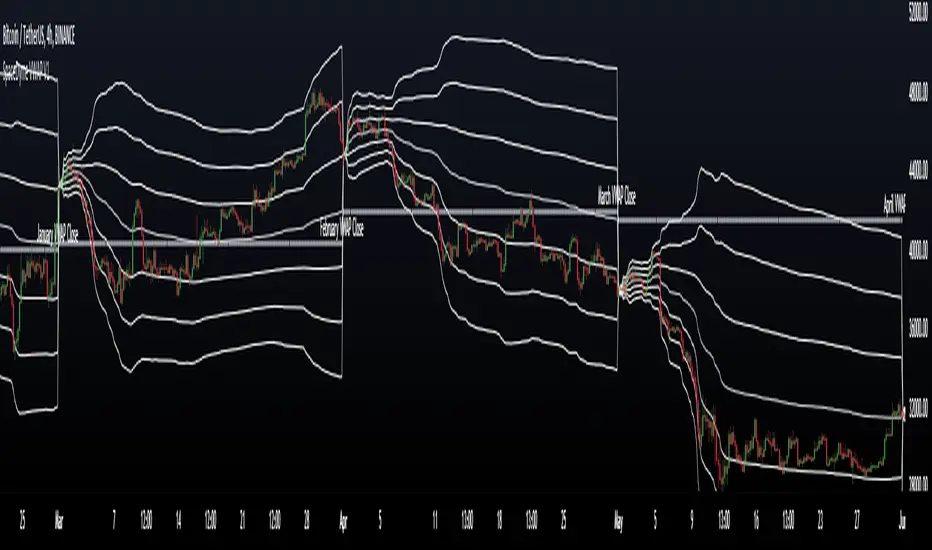
This indicator is an attempt to bring all VWAP functionalities under one umbrella suite, the existing VWAPs are great and this was made to provide all functionalities. (pending more updates as well)
█ FEATURES
Multiple VWAPs MTF
Individual Band configuration
Previous vwap closes
Date tracking of previous closes
MTF Options
Enabling the other VWAPS with any timeframe will allow the user to use the "VWAP Anchor" setting to choose what HTF Vwap to be displayed
"Prev Close"
This setting enables all historical closes to be displayed with extension
"Track Dates"
Can be used to keep date information of 2 previous closes and further back
█ HOW TO USE IT
The indicator is quite straight forward in its application, as you would expect of a normal VWAP.
At the top of the settings pane the indicator has some functionality that would control the VWAPs globally, e.g. disabling show bands disables all bands for all the VWAPs.
Each VWAP has individual settings that can be controlled such as coloring, which bands enabled, previous closes, labelling...
█ SUGGESTION
My suggestion for clarity is to use 1 VWAP with bands, and a 2nd with no bands + Previous close enabled at a higher timeframe
█ LIMITATIONS OF PINE (Please read)
I see many users going on different indicators with MTF in mind and trying to use it for LTF data e.g. 1hour chart, and selecting 5min in chart settings.
This is not recommended by the team themselves and should be noted for use always use HTF: www.tradingview.com
To understand how to use VWAP please refer to some education that can be found for free online
Heres an example of a trader using the tool himself: www.youtube.com
█ Future Updates:
Previous Close Line extensions
Previous Highs and Lows of VWAP mapped out for users
Suggestions Welcome!
Adaptive Ehlers Deviation Scaled Moving Average (AEDSMA)AEDSMA INTRODUCTION
This indicator is a functional enhancement to “Ehlers Deviation Scaled Moving Average (EDSMA / DSMA)”. I’ve used Volume Breakout and Volatility for dynamic length adaption and further Slope too for trend evaluation.
EDSMA was originally developed by John F. Ehlers (Stocks & Commodities V. 36:8: The Deviation-Scaled Moving Average).
IDEA PLACEMENT
I’ve traded almost every kind of market with different volatility conditions using Moving Averages. It was too much of a hassle to select and use different MA length depending upon market trend. So, the journey started with adapting Moving Averages with another parameter and that’s how “MZ SAMA ” came into being where Slope was used to adapt Adaptive Moving Average with trend change. The problem was still pretty much the same as SAMA might not be effective on every market condition. Hence, I worked on Volume to adapt Moving Averages accordingly. I cane up with “MZ RVSI ” which I used in “MZ DVAMA ” to adapt dynamic length in Adaptive Moving Average and also used “MZ RVSI " alongside Slope as confirmation of trend changes.
Meanwhile, I started using DVAMA methodology on different types on Moving Averages that allow dynamic length for example Hull Moving Average, Linear Regression Curve, SMA, WMA, TMA and many more. All of my tested Mas showed too much flexibility because of volume based Adaptive length.
I came across a script of “Adaptive Hull Moving Average” which pretty much used the similar methodology as DVAMA but when I looked into its depth, its volume oscillator wasn’t working at all and only volatility based dynamic length was used. It was an interesting idea so, I decided to use Volume and Volatility alongside for better results but was nearly impossible to achieve what I wanted using only Hull Moving Average.
I had been using EDSMA in “MA MTF Cross Strategy” and “MZ SRSI Strategy V1.0” previously. It was the perfect choice when comparing to usage of slope on it. DSMA works perfectly as support and resistance as its Deviation Scaled. So, I tried using it to adapt dynamic length based on Volume and Volatility and I wasn’t disappointed. It worked like a charm when I adapted dynamic length between 50 and 255.
DYNAMIC LENGTH BENEFITS
Dynamic length adaption methodology works in a way of adapting Relatively Lower Length leading toward overfitting if trend is supported by Volume and Volatility . Similarly, adapting Relatively Higher Length leading toward underfitting if trend isn’t supported by Volume and Volatility .
Dynamic length adaption makes Moving Average to work better for both Bull and Bear-runs avoiding almost every fake break-in and breakouts. Hence, adaptive MA becomes more reliable for breakout trading.
MA would be more useful as it would adapt almost every chart based on its Volume and Volatility data.
DYNAMIC COLORS AND TREND CORRELATION
I’ve used dynamic coloring to identify trends with more detail which are as follows:
Lime Color: Strong Uptrend supported by Volume and Volatility or whatever you’ve chosen from both of them.
Fuchsia Color: Weak uptrend only supported by Slope or whatever you’ve selected.
Red Color: Strong Downtrend supported by Volume and Volatility or whatever you’ve chosen from both of them.
Grey Color: Weak Downtrend only supported by Slope or whatever you’ve selected.
Yellow Color: Possible reversal indication by Slope if enabled. Market is either sideways, consolidating or showing choppiness during that period.
SIGNALS
Green Circle: Market good for long with support of Volume and Volatility or whatever you’ve chosen from both of them.
Red Circle: Market good to short with support from Volume and Volatility or whatever you’ve chosen from both of them.
Yellow Cross: Market either touched top or bottom ATR band and can act as good TP or SL.
EDSMA EVELOPE/BANDS: I’ve included ATR based bands to the Adaptive EDSMA which act as good support/resistance despite from main Adaptive EDSMA Curve.
DEFAULT SETTINGS
I’ve set default Minimum length to 50 and Maximum length to 255 which I’ve found works best for almost all timeframes but you can change this delta to adapt your timeframe accordingly with more precision.
Dynamic length adoption is enabled based on both Volume and Volatility but only one or none of them can also be selected.
Trend signals are enabled based on Slope and Volume but Volatility can be enabled for more precise confirmations.
In “ RVSI ” settings TFS Volume Oscillator is set to default but others work good too especially Volume Zone Oscillator. For more details about Volume Breakout you can check “MZ RVSI Indicator".
ATR breakout is set to be positive if period 14 exceeds period 46 but can be changed if more adaption with volatility is required.
EDSMA super smoother filter length is set to 20 which can be increased to 50 or more for better smoothing but this will also change slope results accordingly.
EDSMA super smoother filter poles are set to 2 because found better results with 2 instead of 3.
FURTHER ENHANCEMENTS
So far, I’ve seen better results with Volume Breakout and Volatility but other parameters such as Linear Slope of Particular MA, MACD, “MZ SRSI ”, a Conditional Uptrend MA or simply KDJ can also be used for dynamic length adaption.
I haven't yet gotten used to pine script arrays so, defining and using conditional operators is pretty much lazy programming for me. Would be great redefining everything through truth matrix instead of using if-else conditions.

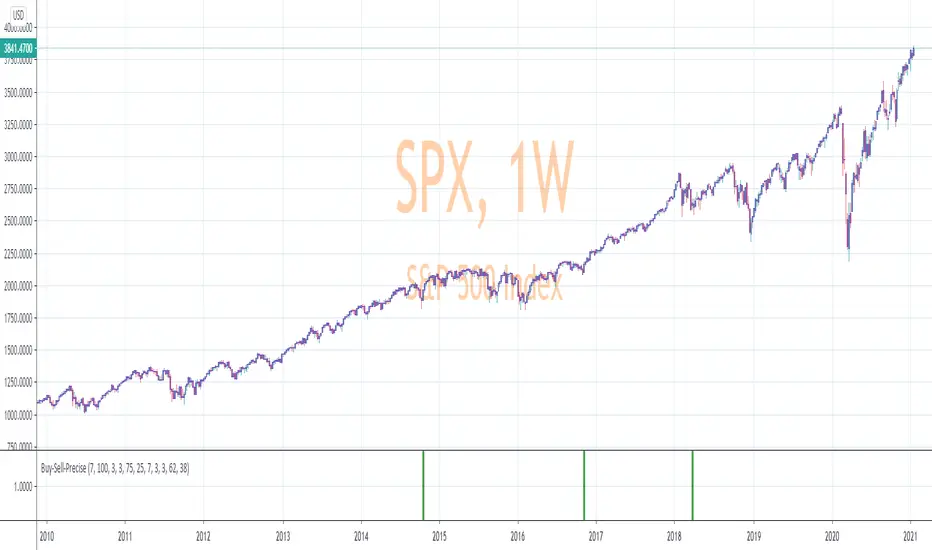
Precise_SignalThis signal combines a portion of Chris Moody's 2014 SlingShot and my 2017 MTF Indicators. Both of our prior scripts over indicated Buy and Sell Points. This signal indicates a buy or sell point much less than our prior scripts did but with absolute precision.
I would say it is 100% accurate, but that is because I am yet to find a timeframe and symbol where the Buy signal failed to see the equity move up or the Sell signal failed to see the equity move down over the next 5 bars. I have tested 2000 charts so far. To be safe, I would rather state this indicator is accurate nearly 100% of the time.
The indicator is made up of 2 main portions and both of them have to agree on a buy or sell in order to indicate such with a vertical green or maroon bar beneath the chart. If there is a failure to agree, nothing is signaled.
Indicator 1 combines a stochastic of a 3 hour chart and a daily chart to determine when the stochastics are in agreement on direction. When there is agreement, both of them MUST cross from a buy state to a sell state and vice versa at exactly the same time. This is difficult to achieve and it is already rare for this occurrence to produce a signal. When a signal is produce it is combine with Chris Moody's 2014 SlingShot Indicator which conservatively determines Buy and Sell signals based on EMAs and market direction. Signals from his SlingShot are infrequent.
BUY Signal
When my MTF signals Buy at the same time that the SlingShot signals a Buy, a vertical green bar will appear in the window containing this script. The vertical bar is based on the close price of the equity and is only final when the close price is final. A BUY signal means the equity will move up potentially as early as the next bar and achieve a higher value from the close price on the signal bar.
SELL Signal
Likewise, a sell signal from the MTF at the same time as a sell signal from the SlingShot will create a maroon bar in the window containing this script. The vertical bar is based on the close price of the equity and is only final when the close price is final. A SELL signal means the equity will move down potentially as early as the next bar and achieve a lower value from the close price on the signal bar.
The default values for this script are hard-coded into this script. You can edit any of the value you would like to play with other timeframes, stochastic, and moving average lengths.
I have played with these values and have hard-coded the ones that are most accurate. Please let me know if you find others that work.
Hopefully this becomes an extra tool in your technical trading toolkit.
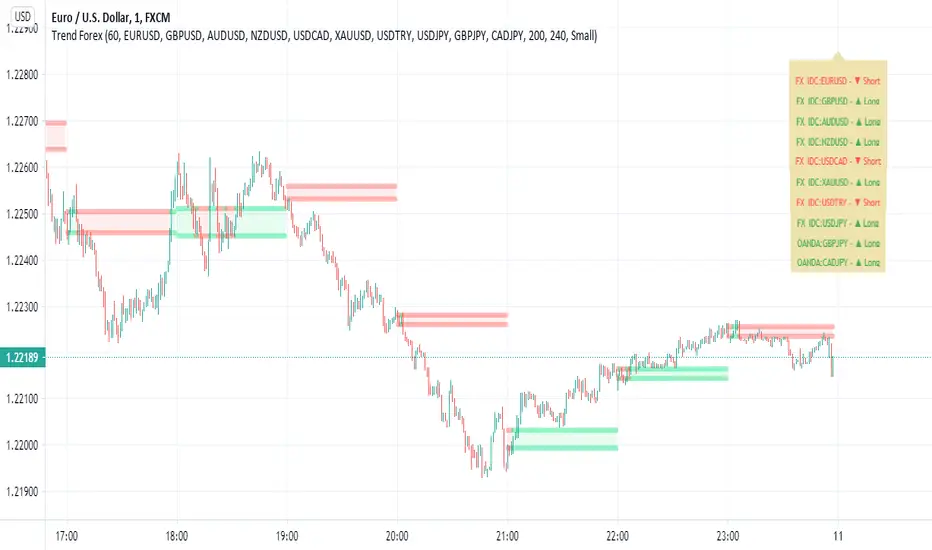
Trend Forexby request of a friend I just made this fast
using screen script taken from
this is a helper for those who play forex
it set on 1 hour non repainting candles MTF
we use it on 1-5 min chart.
you can play with the MTF to be 30 min or lower /higher etc
control of xcreen is by F for height (set to 240 min) you can change to other
its just for fast screening of things you like to see faster/ i suggest to attach to it other indicator if you plan to use it to make decision better
30 min mtf candles on 1 min chart
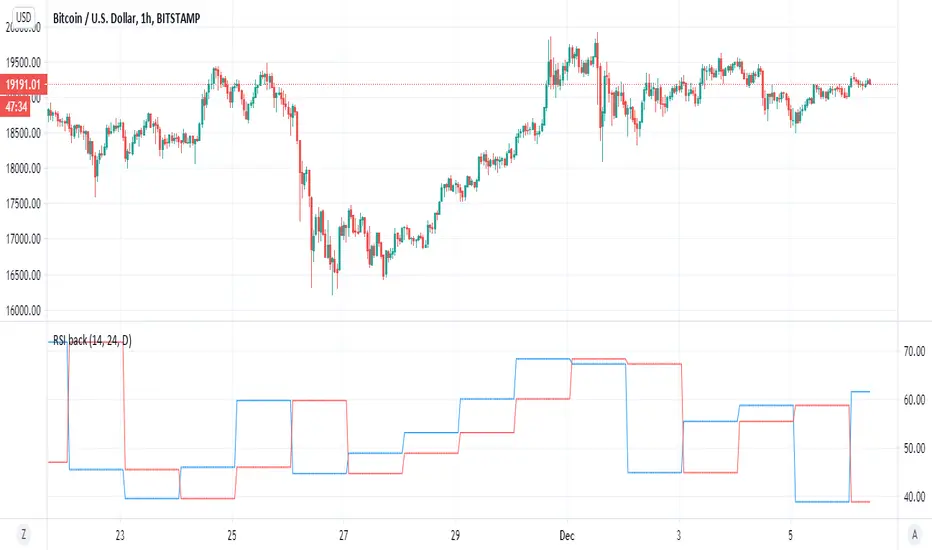
RSI backsimple indicator that based on difference between current RSI and past RSI (historic)
so lets say if take 1 hour chart then in a day there are 24 hour
so our RSI back if we put close will be the rsi of 24 hour before and this we compare it to the current rsi
if the current is above the past one then the signal is bullish , and vice versa. (similar logic to system of buy that based on close yesterday compare open of today)
so to this logic we can add no security MTF to make it nicer
blue line is current MTF RSI , red line is historic RSI based on the number of candles we choose
when blue over red is bullish ,red over blue is bearish
same on 4 hour mTF '1 hour chart and 24 candle back
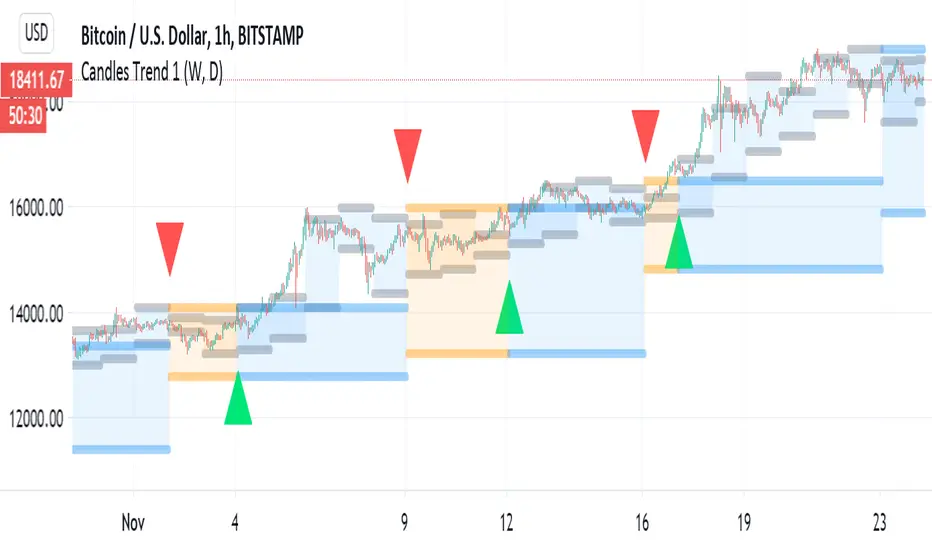
Candles Trend 1ok so i republish this indicator again. first version had some repaint issue so it been removed
here the script does not suppuse to have this issue
so it basic 1 day MTF candles over 1 week MTF candles
blue color is bullish , orange is berrish
the signal and alert are produced by the crossing of the daily over the weekly close (in the case of the weekly it non security type of MTF.
for stocks I use 1 week over 1 month MTF on lower TF
Security issuesource of code of no repaint by Duyck
source of code fix by i Think Quansium ( please correct me if i am wrong) ,great reading I have to say
please read what he suggest . i try his way but sadly it did not work as i wish . that why i change to this soulution
docs.google.com
Here i just took the great work of this two folks (amazing geniuses)
and try to combine them so the non repaint, no security source of the close MTF will look exact as the repaint one.
so this soultion try to create realible source with no security that look exact as the repaint source with the security
all thanks to the above authors
I just put here so maybe someone in the TV comunity move forward the issue how to fix the security issue
and by that we can create great indicators if it fix
so the no repaint named no security (red color)
repaint is green color
as you see they aligh very nice with no different
sadly if I try to put barmerge on this solution does not work (need to find why??)
so maybe you have better solutions?
I hope thios would help coders to make better MTF until TV fix the issue with security

VolumeS as stochv1just to show a concept . I use volume S to make it as stoch and add to it MTF function
B=buy
S=sell
D=down
if you do not like the MTF fuction just remove it from code or put the time frame of graph to be exact as MTF one
I did not add alert as it just a concept idea , to make it more complex it easy if you add more indicators to it and then compare the signals
have fun

Infinity Signal - Momentum ConsensusInfinity Signal — Momentum Consensus is a multi-timeframe momentum classification framework that aggregates Stochastic RSI readings from five timeframes (1H, 4H, 1D, 1W, 1M) into a single, readable view.
The script is designed to help users assess momentum alignment, disagreement, and regime strength across timeframes. It is intended for context and structure, not as a standalone signal generator or predictive system.
What This Script Displays
1) Composite Momentum Pane (MTF Composite %K)
For each timeframe, the script computes a standard Stochastic RSI using higher-timeframe data via request.security() with no lookahead.
A composite momentum line is created by taking a simple average of the five %K values and applying smoothing. This produces a single oscillator that reflects aggregate momentum behavior across timeframes.
Overbought and oversold reference levels are shown for context.
2) Multi-Timeframe Consensus Table
A table summarizes the Stoch RSI state for each timeframe using optional bars-back anchors (allowing the table to be locked to a specific historical bar).
For each timeframe, the table classifies:
Direction: Bull / Bear / Mix (based on %K vs %D)
Zone: Overbought / Oversold / Mid (based on %K level)
Timeframes are combined using fixed weights to produce:
Bull vs Bear percentage balance
A dominant bias label
A simple alignment grade reflecting agreement strength across higher and lower timeframes
This table is designed to reduce single-timeframe bias by making agreement and disagreement across the stack immediately visible.
3) Mini MTF Oscillator (Anchored Summary)
An additional oscillator plot displays the anchored average %K across all five timeframes, along with a short smoothed signal line.
This provides a compact visual summary of the table’s combined momentum state.
4) Projection Clone and Timing Annotations (Optional)
An optional projection feature copies a selected historical segment of the composite momentum curve (defined by start/end bars-back) and shifts it forward in time.
Optional normalization rescales the copied segment to the recent oscillator range for visual comparability.
When projected segments contain internal cross-events, optional annotations may appear in the indicator pane:
vertical dotted timing markers
small directional arrows at the approximate crossing level
These annotations highlight timing reference points inside the projected pattern. They are not trade signals or predictions.
How to Use
Use the composite momentum line to observe whether momentum is strengthening or weakening across multiple timeframes.
Use the table to confirm whether higher-timeframe momentum aligns with lower-timeframe momentum or shows disagreement.
Use bars-back anchors to study historical alignment at specific points in time.
Use the projection clone as a pattern comparison and rhythm study tool, not as a forecast.
Notes and Limitations
Projection patterns are visual references and may not repeat.
Table weights and grades represent a classification framework, not universal truth.
Projection markers and arrows indicate internal timing events within the projected pattern; they are not buy or sell commands.
This script does not predict price, guarantee outcomes, or provide financial advice.

PSAR Laboratory [DAFE]PSAR Laboratory : The Ultimate Adaptive Trailing Stop & Reversal Engine
23 Advanced Algorithms. Adaptive Acceleration. Smart Flip Logic. Parabolic SAR Reimagined.
█ PHILOSOPHY: WELCOME TO THE LABORATORY
The standard Parabolic SAR, created by the legendary J. Welles Wilder Jr., is a tool of beautiful simplicity. But in today's complex, algorithm-driven markets, its simplicity is its fatal flaw. Its fixed acceleration and rigid flip logic cause it to fail precisely when you need it most: it whipsaws in choppy conditions and gives back too much profit in strong trends.
The PSAR Laboratory was not created to be just another PSAR. It was engineered to be the definitive evolution of Wilder's original concept. This is not an indicator; it is a powerful, interactive research environment. It is a sandbox where you, the trader, can move beyond the static "one-size-fits-all" approach and forge a PSAR that is perfectly adapted to your specific market, timeframe, and trading style.
We have deconstructed the very DNA of the Parabolic SAR and rebuilt it from the ground up, infusing it with modern quantitative techniques. The result is an institutional-grade suite of 23 distinct, mathematically diverse algorithms that dynamically control every aspect of the PSAR's behavior.
█ WHAT MAKES THIS A "LABORATORY"? THE CORE INNOVATIONS
This tool stands in a class of its own. It is a collection of what could be 23 separate indicators, all seamlessly integrated into one powerful engine.
The 23 Algorithm Engine: This is the heart of the Laboratory. Instead of one rigid formula, you have a library of 23 unique mathematical engines at your command. These algorithms are not simple tweaks; they are complete re-imaginings of how the PSAR should behave, based on concepts from information theory, digital signal processing, fractal geometry, and institutional analysis.
Truly Adaptive Acceleration (AF): The standard PSAR's "gas pedal" (the AF) is dumb; it accelerates at a fixed rate. Our algorithms make it intelligent. The AF can now speed up in clean, trending environments to lock in profits, and automatically slow down in choppy, chaotic conditions to avoid whipsaws.
Advanced Flip Confirmation Logic: Say goodbye to noise-driven flips. You are no longer at the mercy of a single wick touching the SAR. The Laboratory provides multiple layers of flip confirmation, including requiring a bar close beyond the SAR, a volume spike to validate the reversal, or even a multi-bar confirmation .
Comprehensive Noise Filtering Core: In a revolutionary step, you can apply one of over 30 advanced signal processing filters directly to the SAR output itself. From ultra-low-lag filters like the Hull MA and DAFE Spectral Laguerre to adaptive filters like KAMA and FRAMA , you can surgically remove noise while preserving the responsiveness of the core signal.
Integrated Performance Engine: How do you know which of the 23 algorithms is best for your market? You test it. The built-in Performance Dashboard is a comprehensive backtesting and analytics engine that tracks every trade, providing real-time data on Win Rate, Profit Factor, Max Drawdown, and more. It allows you to scientifically validate your chosen configuration.
█ A GUIDED TOUR OF THE ALGORITHMS: 23 PATHS TO AN EDGE
b]These 23 algorithms are not simple settings; they are distinct mathematical philosophies for how a Parabolic SAR should adapt to the market. They are grouped into three primary categories: those that adapt the Acceleration Factor (AF) , those that enhance the Extreme Point (EP) detection, and those that redefine the Flip Logic .
CATEGORY A: ACCELERATION FACTOR (AF) ADAPTATION
These algorithms dynamically change the "gas pedal" of the PSAR.
1. Volatility-Scaled AF
Core Concept: Treats volatility as market friction. The PSAR should be more forgiving in high-volatility environments.
How It Works: It calculates a Volatility Ratio by comparing the short-term ATR to the long-term ATR. If current volatility is high (ratio > 1), it reduces the AF Step. If volatility is low (ratio < 1), it increases the AF Step to trail tighter.
Ideal Use Case: The best all-rounder. Excellent for any market, especially those with clear shifts between high and low volatility regimes (like indices and crypto).
2. Efficiency Ratio (ER) AF
Core Concept: The PSAR should accelerate aggressively in clean, efficient trends and slow down dramatically in choppy, inefficient markets.
How It Works: It uses Kaufman's Efficiency Ratio (ER), which measures the net directional movement versus the total price movement. A high ER (near 1.0) signifies a pure trend, triggering a high AF multiplier. A low ER (near 0.0) signifies chop, triggering a low AF multiplier.
Ideal Use Case: Markets that alternate between strong trends and sideways chop. It is exceptionally good at surviving ranging periods.
3. Shannon Entropy AF
Core Concept: Uses Information Theory to measure market disorder. The PSAR should be conservative in chaos and aggressive in order.
How It Works: It calculates the Shannon Entropy of recent price changes. High entropy means the market is unpredictable ("chaotic"), causing the AF to slow down. Low entropy means the market is organized and trending, causing the AF to speed up.
Ideal Use Case: Advanced traders looking for a mathematically pure way to distinguish between a tradable trend and random noise.
4. Fractal Dimension (FD) AF
Core Concept: Measures the "jaggedness" or complexity of the price path. A smooth path is a trend; a jagged, space-filling path is chop.
How It Works: It calculates the Fractal Dimension of the price series. An FD near 1.0 is a smooth line (high AF). An FD near 1.5 is a random walk (low AF).
Ideal Use Case: Visually identifying the moment a smooth trend begins to break down into chaotic, unpredictable movement.
5. ADX-Gated AF
Core Concept: Uses the classic ADX indicator to confirm the presence of a trend before allowing the PSAR to accelerate.
How It Works: If the ADX value is above a "Strong" threshold (e.g., 25), the AF accelerates normally. If the ADX is below a "Weak" threshold (e.g., 15), the AF is "frozen" and will not increase, preventing the SAR from tightening up in a non-trending market.
Ideal Use Case: For classic trend-following purists who trust the ADX as their primary regime filter.
6. Kalman AF Estimator
Core Concept: A sophisticated signal processing algorithm that predicts the "true" optimal AF by filtering out price "noise."
How It Works: It treats the PSAR's AF as a state to be estimated. It makes a prediction, then corrects it based on how far the actual price deviates. It's like a GPS constantly refining its position. The "Process Noise" input controls how fast it thinks the AF can change, while "Measurement Noise" controls how much it trusts the price data.
Ideal Use Case: Smooth, high-inertia markets like commodities or major forex pairs. It creates an incredibly smooth and responsive AF.
7. Volume-Momentum AF
Core Concept: A trend's acceleration is only valid if confirmed by both volume and price momentum.
How It Works: The AF will only increase if a new Extreme Point is made on above-average volume AND the Rate of Change (ROC) of the price is aligned with the trend's direction.
Ideal Use Case: Any market with reliable volume data (stocks, futures, crypto). It's excellent for filtering out low-conviction moves.
8. Garman-Klass (GK) AF
Core Concept: Uses a more advanced, statistically efficient measure of volatility (Garman-Klass, which uses OHLC data) to adapt the AF.
How It Works: It modulates the AF based on whether the current GK volatility is higher or lower than its historical average. Unlike the standard Volatility-Scaled algo, it tends to slow down more in high volatility and speed up less in low volatility, making it more conservative.
Ideal Use Case: Traders who want a volatility-adaptive model that is more focused on risk reduction during volatile periods.
9. RSI-Modulated AF
Core Concept: The RSI can identify points of potential trend exhaustion or strong momentum.
How It Works: If a trend is bullish but the RSI enters the "Overbought" zone, the AF slows down, anticipating a pullback. Conversely, if the RSI is in the strong momentum mid-range (40-60), the AF is boosted to trail more aggressively.
Ideal Use Case: Mean-reversion traders or those who want to automatically loosen their trail stop near potential exhaustion points.
10. Bollinger Squeeze AF
Core Concept: A Bollinger Band Squeeze signals a period of volatility compression, often preceding an explosive breakout.
How It Works: When the algorithm detects that the Bollinger Band Width is in a "Squeeze" (below a certain historical percentile), it boosts the AF in anticipation of a fast move, allowing the PSAR to catch the breakout quickly.
Ideal Use Case: Breakout traders. This algorithm primes the PSAR to be maximally responsive right at the moment a breakout is most likely.
11. Keltner Adaptive AF
Core Concept: Keltner Channels provide a robust measure of a trend's "normal" volatility channel.
How It Works: When price is trading strongly outside the Keltner Channel, it's considered a powerful trend, and the AF is boosted. When price falls back inside the channel, it's considered a consolidation or pullback, and the AF is slowed down.
Ideal Use Case: Trend followers who use channel breakouts as their primary confirmation.
12. Choppiness-Gated AF
Core Concept: Uses the Choppiness Index to quantify whether the market is trending or consolidating.
How It Works: If the Choppiness Index is below the "Trend" threshold (e.g., 38.2), the AF is boosted. If it's above the "Range" threshold (e.g., 61.8), the AF is significantly reduced.
Ideal Use Case: A more responsive alternative to the ADX-Gated algorithm for distinguishing between trending and ranging markets.
13. VIDYA-Style AF
Core Concept: Uses a Chande Momentum Oscillator (CMO) to create a variable-speed acceleration factor.
How It Works: The absolute value of the CMO is used to create a dynamic smoothing constant. Strong momentum (high absolute CMO) results in a faster, more responsive AF. Weak momentum results in a slower, smoother AF.
Ideal Use Case: Momentum traders who want their trailing stop's speed directly tied to the momentum of the price itself.
14. Hilbert Cycle AF
Core Concept: Uses Ehlers' Hilbert Transform to extract the dominant cycle period of the market and synchronizes the PSAR with it.
How It Works: It dynamically adjusts the AF based on the detected cycle period (shorter cycles = faster AF) and can also modulate it based on the current phase within that cycle (e.g., accelerate faster near cycle tops/bottoms).
Ideal Use Case: Markets with clear cyclical behavior, like commodities and some forex pairs.
CATEGORY B: EXTREME POINT (EP) ENHANCEMENT
These algorithms make the detection of new highs/lows more intelligent.
15. Volume-Weighted EP
Core Concept: A new high or low is more significant if it occurs on high volume.
How It Works: It can be configured to only accept a new EP if the volume on that bar is above average. It can also "weight" the EP by volume, pushing it further out on high-volume bars.
Ideal Use Case: Filtering out weak, low-conviction price probes in markets with reliable volume.
16. Wavelet Filtered EP
Core Concept: Uses wavelet decomposition (a signal processing technique) to separate the underlying trend from high-frequency noise.
How It Works: It calculates a smoothed, wavelet-filtered version of the price. A new EP is only registered if the actual high/low significantly exceeds this smoothed baseline, effectively ignoring minor noise spikes.
Ideal Use Case: Noisy markets where small, insignificant wicks can cause the AF to accelerate prematurely.
17. ATR-Validated EP
Core Concept: A new EP should represent a meaningful move, not just a one-tick poke.
How It Works: It requires a new high/low to exceed the previous EP by a minimum amount, defined as a multiple of the current ATR. This ensures only volatility-significant advances are counted.
Ideal Use Case: A simple, robust way to filter out "noise" EPs and slow down the AF's acceleration in choppy conditions.
18. Statistical EP Filter
Core Concept: A new EP is only valid if the price change that created it is statistically significant.
How It Works: It calculates the Z-Score of the bar's price change relative to recent history. A new EP is only accepted if its Z-Score exceeds a certain threshold (e.g., 1.5 sigma), meaning it was an unusually strong move.
Ideal Use Case: For quantitative traders who want to ensure their trailing stop only tightens in response to statistically meaningful price action.
CATEGORY C: FLIP LOGIC & CONFIRMATION
These algorithms change the very rules of when and why the PSAR reverses.
19. Dual-PSAR Gate
Core Concept: Uses two PSARs—one fast and one slow—to confirm a reversal.
How It Works: A flip signal for the main PSAR is only considered valid if both the fast (sensitive) PSAR and the slow (structural) PSAR have flipped. This acts as a powerful trend filter.
Ideal Use Case: An excellent method for reducing whipsaws. It forces the PSAR to wait for both short-term and longer-term momentum to align before signaling a reversal.
20. MTF Coherence PSAR
Core Concept: Do not flip against the higher timeframe macro trend.
How It Works: It pulls PSAR data from two higher timeframes. A flip is only allowed if the new direction does not contradict the trend on at least one (or both) of those higher timeframes. It also boosts the AF when all timeframes are aligned.
Ideal Use Case: The ultimate tool for multi-timeframe traders who want to ensure their entries and exits are in sync with the bigger picture.
21. Momentum-Gated Flip
Core Concept: A reversal is only valid if it is supported by a significant surge of momentum.
How It Works: A price cross of the SAR is not enough. The script also requires the Rate of Change (ROC) to exceed a certain threshold for a set number of bars, confirming that there is real force behind the reversal.
Ideal Use Case: Filtering out weak, drifting reversals and only taking signals that are initiated with explosive power.
22. Close-Only PSAR
Core Concept: Wicks are noise; the bar's close is the final decision.
How It Works: This algorithm modifies the flip logic to ignore wicks. A flip only occurs if one or more bars close beyond the SAR line.
Ideal Use Case: One of the most effective and simple ways to reduce false signals from volatile wicks. A fantastic default choice for any trader.
23. Ultimate PSAR Consensus
Core Concept: The highest conviction signal comes from the agreement of multiple, diverse mathematical models.
How It Works: This is the capstone algorithm. It runs a "vote" between a selection of the top-performing algorithms (e.g., Volatility-Scaled, Efficiency Ratio, Dual-PSAR). A flip is only signaled if a majority consensus is reached. It can even weight the votes based on each algorithm's recent performance.
Ideal Use Case: For traders who want the absolute highest level of confirmation and are willing to accept fewer, but more robust, signals.
█ PART II: THE NOISE FILTERING CORE - The Shield
This is a revolutionary feature that allows you to apply a second layer of signal processing directly to the SAR line itself, surgically removing noise before the flip logic is even considered.
FILTER CATEGORIES
Basic Filters (SMA, EMA, WMA, RMA): The classic moving averages. They provide basic smoothing but introduce significant lag. Best used for educational purposes.
Low-Lag Filters (DEMA, TEMA, Hull MA, ZLEMA): A family of filters designed to reduce the lag inherent in basic moving averages. The Hull MA is a standout, offering a superb balance of smoothness and responsiveness.
Adaptive Filters (KAMA, VIDYA, FRAMA): These are "smart" filters. They automatically adjust their smoothing level based on market conditions. They will be very smooth in choppy markets and become highly responsive in trending markets.
Advanced DSP & DAFE Filters: This is the pinnacle of signal processing.
Ehlers Filters (SuperSmoother, 2-Pole, 3-Pole): Based on the work of John Ehlers, these use digital signal processing techniques to remove high-frequency noise with minimal lag.
Gaussian & ALMA: These use a bell-curve weighting, giving the most importance to recent data in a smooth, non-linear fashion.
DAFE Spectral Laguerre: A proprietary, non-linear filter that uses a feedback loop and adapts its "gamma" based on volatility, providing exceptional tracking in all market conditions.
How to Choose a Filter
Start with "None": First, find an algorithm you like with no filtering to understand its raw behavior.
Introduce Low Lag: If you are getting too many whipsaws from noise, apply a short-length Hull MA (e.g., 5-8). This is often the best solution.
Go Adaptive: If your market has very distinct trend/chop regimes, try an Adaptive KAMA .
Maximum Purity: For the smoothest possible output with excellent responsiveness, use the DAFE Spectral Laguerre or Ehlers SuperSmoother .
█ THE VISUAL EXPERIENCE: DATA AS ART
The PSAR Laboratory is not just functional; it is beautiful. The visualization engine is designed to provide you with an intuitive, at-a-glance understanding of the market's state.
Algorithm-Specific Theming: Each of the 23 algorithms comes with its own unique, professionally designed color palette. This not only provides visual variety but allows you to instantly recognize which engine is active.
Dynamic Glow Effects: For many algorithms, the PSAR dots will emit a soft "glow." The brightness and color of this glow are not random; they are tied to a key metric of the active algorithm (e.g., trend strength, volatility, consensus), providing a subtle, visual cue about the health of the trend.
Adaptive Volatility Bands: Certain algorithms will display dynamic bands around the PSAR. These are not standard deviation bands; their width is controlled by the specific logic of the active algorithm, showing you a visual representation of the market's expected range or energy level.
Secondary Reference Lines: For algorithms like the Dual-PSAR or MTF Coherence, a secondary line will be plotted on the chart, giving you a clear visual of the underlying data (e.g., the slow PSAR, the HTF trend) that is driving the decision-making process.
█ THE MASTER DASHBOARD: YOUR MISSION CONTROL
The comprehensive dashboard is your unified command center for analysis and performance tracking.
Engine Status: See the currently selected Algorithm, the active Noise Filter, the Trend direction, and a real-time progress bar of the current Acceleration Factor (AF).
Algorithm-Specific Metrics: This is the most powerful section. It displays the key real-time data from the currently active algorithm. If you're using "Shannon Entropy," you'll see the Entropy score. If you're using "ADX-Gated," you'll see the ADX value. This gives you a direct, quantitative look under the hood.
Performance Readout: When enabled, this section provides a full breakdown of your backtesting results, including Win Rate, Profit Factor, Net P&L, Max Drawdown, and your current trade status.
█ DEVELOPMENT PHILOSOPHY
The PSAR Laboratory was born from a deep respect for Wilder's original work and a relentless desire to push it into the 21st century. We believe that in modern markets, static tools are obsolete. The future of trading lies in adaptation. This indicator is for the serious trader, the tinkerer, the scientist—the individual who is not content with a black box, but who seeks to understand, test, and refine their edge with surgical precision. It is a tool for forging, not just following.
The PSAR Laboratory is designed to be the ultimate tool for that evolution, allowing you to discover and codify the rules that truly fit you.
█ DISCLAIMER AND BEST PRACTICES
THIS IS A TOOL, NOT A STRATEGY: This indicator provides a sophisticated trailing stop and reversal signal. It must be integrated into a complete trading plan that includes risk management, position sizing, and your own contextual analysis.
TEST, DON'T GUESS: The power of this tool is its adaptability. Use the Performance Dashboard to rigorously test different algorithms and settings on your chosen asset and timeframe. Find what works, and build your strategy around that data.
START SIMPLE: Begin with the "Volatility-Scaled AF" algorithm, as it is a powerful and intuitive all-rounder. Once you are comfortable, begin experimenting with other engines.
RISK MANAGEMENT IS PARAMOUNT: All trading involves substantial risk. The backtesting results are hypothetical and do not account for slippage or psychological factors. Never risk more capital than you are prepared to lose.
"I don't think traders can follow rules for very long unless they reflect their own trading style. Eventually, a breaking point is reached and the trader has to quit or change, or find a new set of rules he can follow. This seems to be part of the process of evolution and growth of a trader."
— Ed Seykota, Market Wizard
Taking you to school. - Dskyz, Trade with Volume. Trade with Density. Trade with DAFE

Dow-Granville Sync SuiteEnglish Description (English Section)
Name: Dow-Granville Sync Suite
The Dow-Granville Sync Suite is an analysis tool that integrates trend determination based on Dow Theory with price positioning relative to the 20SMA (Simple Moving Average) across multiple timeframes (MTF).
It is designed to organize information across various timeframes, allowing users to understand the status from higher to lower timeframes without switching charts.
Multi-Timeframe Dow Analysis Analyzes highs and lows for each timeframe to determine the current trend state (Bullish, Bearish, or Consolidation).
SMA Position Analysis Determines whether the price is above or below the 20SMA for all timeframes. This is used to identify price positioning based on Granville's Law.
Synchronization Signals Displays ★ icons on the chart when the Dow direction and SMA position align across 4 or 5 consecutive timeframes.
Status Dashboard Displays a summary table on the right side of the screen showing the trend status for each timeframe.
Squeeze Detection Detects low volatility periods caused by the convergence of highs and lows, indicating them with specific markers on the chart.
Check the trend direction of higher timeframes, such as Daily or 4-Hour charts, on the right-hand dashboard.
Use the synchronization signals (★) on lower timeframes, when they align with the higher timeframe trend, as a reference for decision-making.
This tool is intended as an analytical aid and does not constitute investment advice.
Results based on historical data do not guarantee future performance.
日本語説明文 (Japanese Section)
名称:Dow-Granville Sync Suite
【概要】 Dow-Granville Sync Suiteは、ダウ理論によるトレンド判定と、20SMA(単純移動平均線)に対する価格の位置関係を、複数の時間軸(MTF)で統合して表示する解析ツールです。
各時間軸の情報を整理し、チャートを切り替えることなく上位足から下位足までの状態を把握することを目的としています。
【主な機能】
マルチタイムフレーム・ダウ分析 各時間軸の高値・安値を参照し、現在のトレンド(上昇・下降・保合い)を自動で判定します。
SMA位置解析 価格が20SMAの上にあるか下にあるかを全時間軸で判定します。これはグランビルの法則における価格の偏りを把握するために利用します。
同調シグナル 4つ、または5つの連続した時間軸において、ダウの方向とSMAに対する位置関係がすべて一致した際に、チャート上に★印を表示します。
ステータス・ダッシュボード 画面右側に、各時間軸のトレンド状況を一覧表で表示します。
スクイーズ検知 高値・安値の収束によるボラティリティの低下を検知し、チャート上にマークを表示します。
【使い方】
右側のダッシュボードで、日足や4時間足などの上位足のトレンド方向を確認します。
下位足において、上位足と同方向の同調シグナル(★)が発生した際の状態を、判断の材料として利用します。
【免責事項】
本ツールは分析の補助を目的としたものであり、投資助言ではありません。
過去のデータによる結果は、将来の利益を保証するものではありません。

Donchian Channels (Multi Time Frame) x 3)📊 MTF Donchian Channels Pro — Triple Timeframe Structure
MTF Donchian Channels Pro is a professional-grade multi-timeframe market structure indicator designed to help traders visualize trend, momentum, and execution zones on a single chart.
This tool allows you to plot up to three independent Donchian Channels, each with its own configurable timeframe and lookback length, giving you instant insight into multi-timeframe alignment and breakout conditions.
By stacking higher, medium, and lower timeframe channels, traders can eliminate noise, improve timing, and trade in the direction of dominant market structure.
🔧 Key Features
✅ Up to 3 independent Donchian Channels
✅ Individual timeframe selection for each channel
✅ Adjustable lookback length per channel
✅ Optional show/hide per channel
✅ Midline (basis) for structure reference
✅ Clean visual fills for fast interpretation
✅ Works on all markets and timeframes
🎯 How to Use
This indicator is designed to support multi-timeframe trading systems.
Example configuration:
• Channel 1 → Lower timeframe (Execution)
• Channel 2 → Medium timeframe (Momentum)
• Channel 3 → Higher timeframe (Structure)
Long Bias Example
Price above higher timeframe channel
Pullback into mid timeframe range
Breakout on lower timeframe channel
Short Bias Example
Price below higher timeframe channel
Retrace into structure
Breakdown on execution timeframe
When all channels align, probability increases.
📈 Best Use Cases
✔ Futures Scalping
✔ Options Day Trading
✔ Forex & Crypto
✔ Swing Trading
✔ Prop Firm Evaluations
✔ Trend-Following Systems
⚠️ Risk Disclaimer
This indicator is a market structure visualization tool and does not provide financial advice. Always use proper risk management and confirm with your own strategy.

SMC Precision Master# SMC Precision Master - Professional Smart Money Analysis
## Overview
SMC Precision Master combines Smart Money Concepts (SMC) methodology with institutional trading tools to create a multi-factor confluence system for discretionary trading. This indicator integrates Order Blocks, Fair Value Gaps, Premium/Discount zones, Market Structure, Ichimoku Cloud, Fibonacci retracements, and Previous Day levels into a unified analytical framework.
---
## Why This Combination? (Mashup Justification)
**The Problem with Single Indicators:**
- Order Blocks alone may trigger in Premium zones (low probability buy zones)
- Fair Value Gaps without supply/demand context lack directional bias
- Premium/Discount zones alone don't provide precise entry levels
- Market Structure can break repeatedly in ranging conditions
**The Solution - Multi-Factor Confluence:**
This mashup creates a **filtering system** where multiple independent factors must align before highlighting high-probability setups. Each component validates the others:
1. **Market Structure** (BOS/MSS/CHoCH) → Determines allowed trade direction
2. **Premium/Discount Zones** → Validates institutional buy/sell context
3. **Order Blocks + FVG** → Identifies precise entry zones with overlap
4. **Fibonacci OTE** → Targets the 61.8-78.6% optimal entry range
5. **Ichimoku Cloud** → Confirms higher timeframe trend alignment
6. **Previous Day Levels** → Adds ICT reference points for bias
**Result:** The indicator only shows high-confluence setups where 3-5 factors simultaneously confirm, significantly reducing false signals compared to using components separately.
---
## How It Works - Technical Methodology
### Order Block Detection (3-Criteria System)
**Criterion 1 - Pattern:**
- Bullish OB: Bearish candle (close < open) before upward impulse
- Bearish OB: Bullish candle (close > open) before downward impulse
**Criterion 2 - Impulse Validation:**
- Standard Mode: Impulse high > OB high (bullish) or low < OB low (bearish)
- Strict Mode: Impulse must fully engulf OB candle
**Criterion 3 - Volatility Filter:**
Displacement = |Impulse Close - OB extremity|
Minimum Required = ATR(14) × Multiplier (default 0.5)
Valid if: Displacement ≥ Minimum
**Mitigation:** OBs tracked until price reaches 50% midpoint (Close or Wick-based).
---
### Fair Value Gap Calculation
**Detection Logic:**
Bullish FVG:
Gap = Current Low - High
Valid if: Gap > ATR(14) × 0.3 AND no candle overlap
Bearish FVG:
Gap = Low - Current High
Valid if: Gap > ATR(14) × 0.3 AND no candle overlap
**Visualization:** 13 layered boxes per FVG to emphasize liquidity void depth.
**Mitigation:** FVG removed when price fully crosses the gap zone.
---
### Premium/Discount Zones
**Calculation:**
Range Source (configurable):
Daily: request.security("D", high/low)
Weekly: request.security("W", high/low)
Monthly: request.security("M", high/low)
Trailing: Updates on each BOS
5-Zone Fibonacci Mode:
Strong Premium: 78.6% - 100%
Premium: 61.8% - 78.6% (OTE zone)
Equilibrium: 38.2% - 61.8%
Discount: 23.6% - 38.2%
Strong Discount: 0% - 23.6%
**Purpose:** Institutional context - buy in Discount, sell in Premium.
---
### Market Structure (BOS/MSS/CHoCH)
**Logic:**
Swing Detection: ta.pivothigh/pivotlow with adjustable length (default 10)
BOS (Break of Structure):
Price breaks last swing high in uptrend = continuation
Price breaks last swing low in downtrend = continuation
MSS (Market Structure Shift):
BOS occurs opposite to current trend = reversal signal
CHoCH (Change of Character):
Price touches but doesn't break previous swing = early warning
---
### Ichimoku Cloud (Multi-Timeframe)
**Calculation:**
Tenkan = (9-high + 9-low) / 2
Kijun = (26-high + 26-low) / 2
Senkou A = (Tenkan + Kijun) / 2
Senkou B = (52-high + 52-low) / 2
MTF: request.security() for higher timeframe if specified
Cloud color: Green if Senkou A ≥ B, Red otherwise
**Filter:** Price above cloud = bullish, below = bearish, in cloud = neutral.
---
### Fibonacci Auto-Retracement
**Method:**
SwingHigh = ta.highest(high, 80)
SwingLow = ta.lowest(low, 80)
Range = SwingHigh - SwingLow
Levels: 0%, 23.6%, 38.2%, 50%, 61.8%, 78.6%, 100%
OTE Zone Box: 61.8% - 78.6% projected forward
---
### Previous Day Levels (ICT)
**Calculation:**
PDH = request.security("D", high, lookahead=on)
PDL = request.security("D", low, lookahead=on)
PDM = (PDH + PDL) / 2
Daily Bias:
Close > PDM = Bullish
Close < PDM = Bearish
Break PDH/PDL = Strong bias confirmation
---
## Dashboard - Real-Time Confluence Tracking
Displays current market state:
- **Trend:** Current structure (Bullish/Bearish/Neutral)
- **HTF Bias:** Higher timeframe direction
- **OB:** Active Order Block status
- **FVG:** Active Fair Value Gap status
- **OB+FVG:** Confluence confirmation (✓ = overlap)
- **P/D Zone:** Current Premium/Discount position
- **Fib OTE:** Inside 61.8-78.6% zone or not
- **Daily Bias:** ICT daily directional bias
- **RSI(14):** Oversold/Neutral/Overbought
- **Ichimoku:** Price position vs cloud
---
## How to Use
### Trading Workflow
**1. Market Context (Dashboard Check)**
- Identify trend direction (Trend + HTF Bias)
- Check Premium/Discount position
- Verify daily bias alignment
**2. Zone Identification**
- Locate active Order Blocks matching trend
- Check for FVG overlap (OB+FVG = ✓)
- Verify zone is in correct P/D area (LONG = Discount, SHORT = Premium)
**3. Entry Confirmation**
- Price enters identified OB zone
- Preferably within Fibonacci OTE zone
- Ichimoku cloud alignment (if enabled)
- Structure break in entry direction
**4. Risk Management**
- Stop: Outside OB zone + buffer
- Target: Opposite P/D zone or next OB
- Risk: 1-2% per trade maximum
---
## Settings Adjustment by Timeframe
**M1-M5 Scalping:**
- Swing Length: 5-7
- OB Filter: ATR 0.3x
- P/D Mode: Daily Range
**M15-H1 Day Trading:**
- Swing Length: 10 (default)
- OB Filter: ATR 0.5x (default)
- P/D Mode: Daily Range
**H4-D1 Swing Trading:**
- Swing Length: 15-20
- OB Filter: ATR 0.7-1.0x
- P/D Mode: Weekly/Monthly Range
---
## Key Features
✅ Anti-repaint: All signals confirmed on bar close
✅ Configurable filters: ATR/CMR for OB validation
✅ Multi-mode P/D: Daily/Weekly/Monthly/Trailing
✅ MTF Ichimoku: Use higher timeframe cloud on lower TF
✅ Complete alerts: BOS, OB formation, CHoCH
✅ Memory management: Auto-cleanup of old zones
---
## Important Notes
- This is an analytical tool, not a signal generator
- Requires understanding of SMC concepts
- Always use proper risk management
- Backtest before live trading
- No indicator guarantees profits
---
## Technical Specifications
- Pine Script™ v6
- Overlay: Yes
- Max Boxes: 500 | Max Lines: 150 | Max Labels: 150
- Repainting: No (barstate.isconfirmed)
---
© 2025-2026

Auto Supply and Demand and ICT ExecutionsAuto Supply and Demand and ICT Executions is a professional-grade technical analysis suite designed to automate the visualization of institutional market structure and "Smart Money" execution signals. By combining automated Supply/Demand zoning with key ICT (Inner Circle Trader) concepts, this indicator provides a complete roadmap for identifying high-probability reversal and continuation setups on any timeframe.
Core Features:
Auto Supply & Demand Zones:
Automatically identifies and plots active Supply (Red) and Demand (Green) zones based on significant market structure pivots.
Persistent Logic: Zones remain active on the chart until price "mitigates" (closes beyond) them, ensuring you never miss a retest of a key level.
ATR Clutter Filter: Uses an Average True Range (ATR) algorithm to prevent zones from overlapping, keeping your chart clean and readable.
ICT Execution Signals (MSS):
Market Structure Shifts (MSS): Automatically detects valid shifts in market structure when price breaks a key structural high or low following a liquidity sweep.
Instant Signal Labels: clearly labels breakout points with "MSS ↑" (Bullish) or "MSS ↓" (Bearish) tags.
Auto Risk/Reward Projections:
Upon detecting an MSS signal, the indicator instantly projects a Risk/Reward (R:R) Box (default 1:2) anchored to the breakout candle.
This provides immediate, visual Take Profit (Green) and Stop Loss (Red) targets, allowing for instant trade assessment without manual measuring.
Multi-Timeframe (MTF) Confluence:
Projects Higher Timeframe (HTF) Zones (default: 15-minute) directly onto your current chart.
This allows you to align your lower-timeframe entries (e.g., 1-minute) with the dominant institutional trend without switching screens.
Institutional Concepts:
Liquidity Sweeps: Highlights "Stop Hunt" pivots where price briefly breaches a recent swing high/low to trap traders before reversing.
Fair Value Gaps (FVG): Visualizes historical price imbalances (gaps) where aggressive institutional buying or selling occurred.
Silver Bullet Session: Automatically highlights the high-probability 10:00 AM - 11:00 AM NY trading window.
How to Trade with This Indicator:
Identify Structure: Wait for price to approach a Supply or Demand Zone (especially if it overlaps with an MTF Zone).
Confirm the Sweep: Look for the "Sweep" label, indicating liquidity has been grabbed.
Execute on Signal: Enter the trade when the "MSS" label appears, confirming the reversal.
Manage the Trade: Use the automated R:R Box to set your Stop Loss and Take Profit levels.

ATR Volatility RegimeATR Volatility Regime
A volatility classification indicator that uses ATR (Average True Range) percentile ranking to identify LOW , NORMAL , HIGH , or EXTREME volatility conditions.
Displayed as a separate pane oscillator (0–100 scale) with colored zones.
━━━━━━━━━━━━━━━━━━━━━━━━━━━━━━
💡 WHY THIS INDICATOR?
Most volatility indicators show raw ATR — a number without context. Is ATR = 50 high or low? Depends on the asset and recent history.
This indicator answers: "Is current volatility high or low for THIS asset, right now?"
What it adds over standard ATR:
Percentile context — Compares current ATR to its own history
Regime classification — Actionable labels instead of raw numbers
Visual zones — Instant read without interpretation
Optional MTF — Lock to a fixed timeframe while viewing another
Auto-adapts — Works on any asset without manual threshold tuning
━━━━━━━━━━━━━━━━━━━━━━━━━━━━━━
📐 CORE CONCEPTS
ATR (Average True Range)
Measures volatility in price units — how much an asset typically moves per bar. Directionless (magnitude only, not direction).
Calculation:
True Range = the greatest of:
High − Low (current bar's range)
|High − Previous Close| (gap up captured)
|Low − Previous Close| (gap down captured)
ATR = Moving average of True Range over N bars (default: 14)
Percentile Rank (Pctl)
Answers: "What percentage of historical values is the current value greater than?"
Pctl = 0% → Lowest ATR in lookback period (extreme compression)
Pctl = 50% → Median ATR (typical volatility)
Pctl = 100% → Highest ATR in lookback period (extreme expansion)
━━━━━━━━━━━━━━━━━━━━━━━━━━━━━━
🎯 WHAT IT DOES
Classifies current volatility into four regimes:
LOW (< 25th percentile) — Compression, breakout likely brewing
NORMAL (25th–50th percentile) — Typical market conditions
HIGH (50th–75th percentile) — Elevated volatility, use caution
EXTREME (> 75th percentile) — Rare expansion, tighten stops or stay flat
━━━━━━━━━━━━━━━━━━━━━━━━━━━━━━
📊 DISPLAY COMPONENTS
Oscillator Line (0–100)
ATR percentile rank over time. Color matches regime:
Blue = LOW
Gray = NORMAL
Orange = HIGH
Red = EXTREME
Zone Backgrounds
Colored bands at threshold levels for instant visual reference.
Status Label
VOL — Current regime
ATR — Raw ATR value (for stop sizing)
Pctl — Percentile rank (0–100%)
TF — Active timeframe (chart or fixed)
━━━━━━━━━━━━━━━━━━━━━━━━━━━━━━
📈 HOW TO USE
LOW Volatility (Pctl < 25%):
Market compressed — "calm before the storm"
Watch for breakout setups
Pctl = 0% often precedes significant moves
NORMAL Volatility (Pctl 25–50%):
Typical conditions
Standard position sizing and stops
HIGH Volatility (Pctl 50–75%):
Elevated movement — reduce size
Widen stops to avoid noise
EXTREME Volatility (Pctl > 75%):
Rare, intense conditions
Avoid new entries or tighten risk
━━━━━━━━━━━━━━━━━━━━━━━━━━━━━━
⚙️ SETTINGS
ATR Settings:
ATR Length (default: 14) — Period for ATR calculation
Percentile Lookback (default: 100) — Bars for percentile ranking
Timeframe:
Use Fixed Timeframe (default: off) — Lock calculation to specific TF
Fixed Timeframe (default: D) — TF to use when fixed mode enabled
Thresholds:
Low Threshold (default: 25)
High Threshold (default: 50)
Extreme Threshold (default: 75)
Display:
Show Zone Background — Toggle colored fills
Show Status Label — Toggle info label
━━━━━━━━━━━━━━━━━━━━━━━━━━━━━━
📋 SUGGESTED LOOKBACK BY ASSET
Crypto — 100 bars (fast regime shifts)
Stocks — 252 bars (one trading year)
Forex — 100–150 bars
Commodities — 150–200 bars (seasonal patterns)
━━━━━━━━━━━━━━━━━━━━━━━━━━━━━━
🔔 ALERTS
Vol → EXTREME
Vol → HIGH
Vol → LOW
Vol exits HIGH
━━━━━━━━━━━━━━━━━━━━━━━━━━━━━━
💡 PRACTICAL APPLICATIONS
Stop-Loss Sizing:
Use raw ATR for stops. Example: Stop = Entry − (1.5 × ATR)
Position Sizing:
Reduce size when percentile is HIGH or EXTREME.
Entry Filtering:
LOW regime = prepare for breakout
EXTREME regime = avoid new entries
━━━━━━━━━━━━━━━━━━━━━━━━━━━━━━
📝 NOTES
Works on any timeframe — adapts to chart or locks to fixed TF
ATR is non-directional — magnitude only
Percentile auto-adapts to each asset's volatility profile
Not a standalone signal — combine with trend/regime filters
━━━━━━━━━━━━━━━━━━━━━━━━━━━━━━
🏷️ TAGS
volatility, ATR, average-true-range, percentile, regime, risk-management, position-sizing, swing-trading, MTF

ABCD Strategy (v7 Ready)//@version=6
indicator("ABCD Strategy v7 – MTF S/R Filter", overlay=true, max_lines_count=300, max_labels_count=300)
//━━━━━━━━━━━━━━━━━━━━━
// INPUTS
//━━━━━━━━━━━━━━━━━━━━━
pivotLen = input.int(5, "Swing Strength", minval=2)
bcMin = input.float(0.618, "BC Min Fib")
bcMax = input.float(0.786, "BC Max Fib")
cdMin = input.float(1.272, "CD Min Extension")
cdMax = input.float(1.618, "CD Max Extension")
htfTF = input.timeframe("240", "Higher Timeframe (S/R)")
srLookback = input.int(200, "HTF S/R Lookback")
srTolerance = input.float(0.002, "S/R Zone Tolerance (0.2%)")
showSR = input.bool(true, "Show HTF S/R Zones")
showTargets = input.bool(true, "Show Targets")
//━━━━━━━━━━━━━━━━━━━━━
// HIGHER TF SUPPORT / RESISTANCE
//━━━━━━━━━━━━━━━━━━━━━
htfHigh = request.security(syminfo.tickerid, htfTF, ta.highest(high, srLookback))
htfLow = request.security(syminfo.tickerid, htfTF, ta.lowest(low, srLookback))
srHighZoneTop = htfHigh * (1 + srTolerance)
srHighZoneBottom = htfHigh * (1 - srTolerance)
srLowZoneTop = htfLow * (1 + srTolerance)
srLowZoneBottom = htfLow * (1 - srTolerance)
//━━━━━━━━━━━━━━━━━━━━━
// DRAW HTF ZONES
//━━━━━━━━━━━━━━━━━━━━━
if showSR
box.new(bar_index - 5, srHighZoneTop, bar_index + 5, srHighZoneBottom,
bgcolor=color.new(color.red, 85), border_color=color.red)
box.new(bar_index - 5, srLowZoneTop, bar_index + 5, srLowZoneBottom,
bgcolor=color.new(color.green, 85), border_color=color.green)
//━━━━━━━━━━━━━━━━━━━━━
// SWING DETECTION
//━━━━━━━━━━━━━━━━━━━━━
ph = ta.pivothigh(high, pivotLen, pivotLen)
pl = ta.pivotlow(low, pivotLen, pivotLen)
var float A = na
var float B = na
var float C = na
var float D = na
var int Ab = na
var int Bb = na
var int Cb = na
var int Db = na
if not na(pl)
A := B
Ab := Bb
B := C
Bb := Cb
C := low
Cb := bar_index
if not na(ph)
A := B
Ab := Bb
B := C
Bb := Cb
C := high
Cb := bar_index
//━━━━━━━━━━━━━━━━━━━━━
// ABCD LOGIC
//━━━━━━━━━━━━━━━━━━━━━
ab = math.abs(B - A)
bc = math.abs(C - B)
bcFib = bc / ab
validBC = bcFib >= bcMin and bcFib <= bcMax
bull = C > B
cdMinPrice = bull ? C - bc * cdMin : C + bc * cdMin
cdMaxPrice = bull ? C - bc * cdMax : C + bc * cdMax
inDzone = low <= cdMaxPrice and high >= cdMinPrice
//━━━━━━━━━━━━━━━━━━━━━
// MTF STRUCTURE FILTER
//━━━━━━━━━━━━━━━━━━━━━
nearResistance = close <= srHighZoneTop and close >= srHighZoneBottom
nearSupport = close <= srLowZoneTop and close >= srLowZoneBottom
structureOK =
(bull and nearSupport) or
(not bull and nearResistance)
//━━━━━━━━━━━━━━━━━━━━━
// FINAL D CONFIRMATION
//━━━━━━━━━━━━━━━━━━━━━
if validBC and inDzone and structureOK
D := close
Db := bar_index
//━━━━━━━━━━━━━━━━━━━━━
// TARGETS
//━━━━━━━━━━━━━━━━━━━━━
tp1 = bull ? D + math.abs(D - C) * 0.382 : D - math.abs(D - C) * 0.382
tp2 = bull ? D + math.abs(D - C) * 0.618 : D - math.abs(D - C) * 0.618
//━━━━━━━━━━━━━━━━━━━━━
// DRAW PATTERN
//━━━━━━━━━━━━━━━━━━━━━
if not na(D)
line.new(Ab, A, Bb, B, width=2, color=color.blue)
line.new(Bb, B, Cb, C, width=2, color=color.orange)
line.new(Cb, C, Db, D, width=2, color=color.green)
label.new(Db, D, "D (HTF CONFIRMED)", style=label.style_label_down, color=color.yellow)
if showTargets
line.new(Db, tp1, Db + 12, tp1, color=color.green)
line.new(Db, tp2, Db + 12, tp2, color=color.teal)
alertcondition(validBC and inDzone and structureOK,
"ABCD v7 Confirmed",
"ABCD Pattern confirmed at Higher-Timeframe Support/Resistance — wait for price action.")

ABCD Strategy (v6 Ready)//@version=6
indicator("ABCD Strategy v7 – MTF S/R Filter", overlay=true, max_lines_count=300, max_labels_count=300)
//━━━━━━━━━━━━━━━━━━━━━
// INPUTS
//━━━━━━━━━━━━━━━━━━━━━
pivotLen = input.int(5, "Swing Strength", minval=2)
bcMin = input.float(0.618, "BC Min Fib")
bcMax = input.float(0.786, "BC Max Fib")
cdMin = input.float(1.272, "CD Min Extension")
cdMax = input.float(1.618, "CD Max Extension")
htfTF = input.timeframe("240", "Higher Timeframe (S/R)")
srLookback = input.int(200, "HTF S/R Lookback")
srTolerance = input.float(0.002, "S/R Zone Tolerance (0.2%)")
showSR = input.bool(true, "Show HTF S/R Zones")
showTargets = input.bool(true, "Show Targets")
//━━━━━━━━━━━━━━━━━━━━━
// HIGHER TF SUPPORT / RESISTANCE
//━━━━━━━━━━━━━━━━━━━━━
htfHigh = request.security(syminfo.tickerid, htfTF, ta.highest(high, srLookback))
htfLow = request.security(syminfo.tickerid, htfTF, ta.lowest(low, srLookback))
srHighZoneTop = htfHigh * (1 + srTolerance)
srHighZoneBottom = htfHigh * (1 - srTolerance)
srLowZoneTop = htfLow * (1 + srTolerance)
srLowZoneBottom = htfLow * (1 - srTolerance)
//━━━━━━━━━━━━━━━━━━━━━
// DRAW HTF ZONES
//━━━━━━━━━━━━━━━━━━━━━
if showSR
box.new(bar_index - 5, srHighZoneTop, bar_index + 5, srHighZoneBottom,
bgcolor=color.new(color.red, 85), border_color=color.red)
box.new(bar_index - 5, srLowZoneTop, bar_index + 5, srLowZoneBottom,
bgcolor=color.new(color.green, 85), border_color=color.green)
//━━━━━━━━━━━━━━━━━━━━━
// SWING DETECTION
//━━━━━━━━━━━━━━━━━━━━━
ph = ta.pivothigh(high, pivotLen, pivotLen)
pl = ta.pivotlow(low, pivotLen, pivotLen)
var float A = na
var float B = na
var float C = na
var float D = na
var int Ab = na
var int Bb = na
var int Cb = na
var int Db = na
if not na(pl)
A := B
Ab := Bb
B := C
Bb := Cb
C := low
Cb := bar_index
if not na(ph)
A := B
Ab := Bb
B := C
Bb := Cb
C := high
Cb := bar_index
//━━━━━━━━━━━━━━━━━━━━━
// ABCD LOGIC
//━━━━━━━━━━━━━━━━━━━━━
ab = math.abs(B - A)
bc = math.abs(C - B)
bcFib = bc / ab
validBC = bcFib >= bcMin and bcFib <= bcMax
bull = C > B
cdMinPrice = bull ? C - bc * cdMin : C + bc * cdMin
cdMaxPrice = bull ? C - bc * cdMax : C + bc * cdMax
inDzone = low <= cdMaxPrice and high >= cdMinPrice
//━━━━━━━━━━━━━━━━━━━━━
// MTF STRUCTURE FILTER
//━━━━━━━━━━━━━━━━━━━━━
nearResistance = close <= srHighZoneTop and close >= srHighZoneBottom
nearSupport = close <= srLowZoneTop and close >= srLowZoneBottom
structureOK =
(bull and nearSupport) or
(not bull and nearResistance)
//━━━━━━━━━━━━━━━━━━━━━
// FINAL D CONFIRMATION
//━━━━━━━━━━━━━━━━━━━━━
if validBC and inDzone and structureOK
D := close
Db := bar_index
//━━━━━━━━━━━━━━━━━━━━━
// TARGETS
//━━━━━━━━━━━━━━━━━━━━━
tp1 = bull ? D + math.abs(D - C) * 0.382 : D - math.abs(D - C) * 0.382
tp2 = bull ? D + math.abs(D - C) * 0.618 : D - math.abs(D - C) * 0.618
//━━━━━━━━━━━━━━━━━━━━━
// DRAW PATTERN
//━━━━━━━━━━━━━━━━━━━━━
if not na(D)
line.new(Ab, A, Bb, B, width=2, color=color.blue)
line.new(Bb, B, Cb, C, width=2, color=color.orange)
line.new(Cb, C, Db, D, width=2, color=color.green)
label.new(Db, D, "D (HTF CONFIRMED)", style=label.style_label_down, color=color.yellow)
if showTargets
line.new(Db, tp1, Db + 12, tp1, color=color.green)
line.new(Db, tp2, Db + 12, tp2, color=color.teal)
alertcondition(validBC and inDzone and structureOK,
"ABCD v7 Confirmed",
"ABCD Pattern confirmed at Higher-Timeframe Support/Resistance — wait for price action.")

ABCD Strategy (v7 Ready)//@version=6
indicator("ABCD Strategy v7 – MTF S/R Filter", overlay=true, max_lines_count=300, max_labels_count=300)
//━━━━━━━━━━━━━━━━━━━━━
// INPUTS
//━━━━━━━━━━━━━━━━━━━━━
pivotLen = input.int(5, "Swing Strength", minval=2)
bcMin = input.float(0.618, "BC Min Fib")
bcMax = input.float(0.786, "BC Max Fib")
cdMin = input.float(1.272, "CD Min Extension")
cdMax = input.float(1.618, "CD Max Extension")
htfTF = input.timeframe("240", "Higher Timeframe (S/R)")
srLookback = input.int(200, "HTF S/R Lookback")
srTolerance = input.float(0.002, "S/R Zone Tolerance (0.2%)")
showSR = input.bool(true, "Show HTF S/R Zones")
showTargets = input.bool(true, "Show Targets")
//━━━━━━━━━━━━━━━━━━━━━
// HIGHER TF SUPPORT / RESISTANCE
//━━━━━━━━━━━━━━━━━━━━━
htfHigh = request.security(syminfo.tickerid, htfTF, ta.highest(high, srLookback))
htfLow = request.security(syminfo.tickerid, htfTF, ta.lowest(low, srLookback))
srHighZoneTop = htfHigh * (1 + srTolerance)
srHighZoneBottom = htfHigh * (1 - srTolerance)
srLowZoneTop = htfLow * (1 + srTolerance)
srLowZoneBottom = htfLow * (1 - srTolerance)
//━━━━━━━━━━━━━━━━━━━━━
// DRAW HTF ZONES
//━━━━━━━━━━━━━━━━━━━━━
if showSR
box.new(bar_index - 5, srHighZoneTop, bar_index + 5, srHighZoneBottom,
bgcolor=color.new(color.red, 85), border_color=color.red)
box.new(bar_index - 5, srLowZoneTop, bar_index + 5, srLowZoneBottom,
bgcolor=color.new(color.green, 85), border_color=color.green)
//━━━━━━━━━━━━━━━━━━━━━
// SWING DETECTION
//━━━━━━━━━━━━━━━━━━━━━
ph = ta.pivothigh(high, pivotLen, pivotLen)
pl = ta.pivotlow(low, pivotLen, pivotLen)
var float A = na
var float B = na
var float C = na
var float D = na
var int Ab = na
var int Bb = na
var int Cb = na
var int Db = na
if not na(pl)
A := B
Ab := Bb
B := C
Bb := Cb
C := low
Cb := bar_index
if not na(ph)
A := B
Ab := Bb
B := C
Bb := Cb
C := high
Cb := bar_index
//━━━━━━━━━━━━━━━━━━━━━
// ABCD LOGIC
//━━━━━━━━━━━━━━━━━━━━━
ab = math.abs(B - A)
bc = math.abs(C - B)
bcFib = bc / ab
validBC = bcFib >= bcMin and bcFib <= bcMax
bull = C > B
cdMinPrice = bull ? C - bc * cdMin : C + bc * cdMin
cdMaxPrice = bull ? C - bc * cdMax : C + bc * cdMax
inDzone = low <= cdMaxPrice and high >= cdMinPrice
//━━━━━━━━━━━━━━━━━━━━━
// MTF STRUCTURE FILTER
//━━━━━━━━━━━━━━━━━━━━━
nearResistance = close <= srHighZoneTop and close >= srHighZoneBottom
nearSupport = close <= srLowZoneTop and close >= srLowZoneBottom
structureOK =
(bull and nearSupport) or
(not bull and nearResistance)
//━━━━━━━━━━━━━━━━━━━━━
// FINAL D CONFIRMATION
//━━━━━━━━━━━━━━━━━━━━━
if validBC and inDzone and structureOK
D := close
Db := bar_index
//━━━━━━━━━━━━━━━━━━━━━
// TARGETS
//━━━━━━━━━━━━━━━━━━━━━
tp1 = bull ? D + math.abs(D - C) * 0.382 : D - math.abs(D - C) * 0.382
tp2 = bull ? D + math.abs(D - C) * 0.618 : D - math.abs(D - C) * 0.618
//━━━━━━━━━━━━━━━━━━━━━
// DRAW PATTERN
//━━━━━━━━━━━━━━━━━━━━━
if not na(D)
line.new(Ab, A, Bb, B, width=2, color=color.blue)
line.new(Bb, B, Cb, C, width=2, color=color.orange)
line.new(Cb, C, Db, D, width=2, color=color.green)
label.new(Db, D, "D (HTF CONFIRMED)", style=label.style_label_down, color=color.yellow)
if showTargets
line.new(Db, tp1, Db + 12, tp1, color=color.green)
line.new(Db, tp2, Db + 12, tp2, color=color.teal)
alertcondition(validBC and inDzone and structureOK,
"ABCD v7 Confirmed",
"ABCD Pattern confirmed at Higher-Timeframe Support/Resistance — wait for price action.")

Accumulation/Distribution Oscillator [MarkitTick]💡 This script presents a statistically normalized evolution of the classic Accumulation/Distribution (A/D) indicator, designed to transform unbounded volume flow into a bounded, actionable oscillator. By integrating Relative Volume (RVOL) weighting and Z-Score standardization, this tool isolates genuine institutional buying and selling pressure from market noise, offering a clear view of volume momentum regimes.
✨ Originality and Utility
The standard Accumulation/Distribution line is a cumulative total of volume flow, which often results in an unbounded line that drifts indefinitely with price trends. This makes it difficult for traders to identify overextended conditions or specific turning points.
This script solves that problem through a three-stage quantitative process:
Smart Volume Weighting: Instead of treating all volume equally, this indicator amplifies the impact of high-volume nodes using a Relative Volume (RVOL) filter. This ensures that significant institutional activity carries more weight than low-liquidity chopping.
Detrending: It subtracts a smoothed average (using ALMA, EMA, or others) from the raw A/D line to create a raw oscillator.
Normalization: Finally, it applies a Z-Score calculation to normalize the data. This bounds the oscillator around a zero mean, allowing for the application of Bollinger Bands to detect statistical extremes (2 or 3 standard deviations).
🔬 Methodology and Concepts
The calculation logic follows a strict quantitative pipeline:
● Money Flow Multiplier (MFM)
The core engine is the classic MFM calculation, which determines the location of the Close relative to the High-Low range. A Close near the High results in +1, while a Close near the Low results in -1.
● Advanced Volume Filtering
Before accumulation, the volume is processed through two filters:
RVOL Multiplier: If the current bar's volume exceeds its simple moving average (`rvol_len`), the volume is multiplied by a user-defined factor (`rvol_mult`). This emphasizes breakout candles.
Candle Strength (Optional): If enabled, weight is increased based on how close the price closes to the absolute high or low, rewarding decisive candle shapes.
● Z-Score Standardization
The script calculates the "Raw Oscillator" by subtracting a moving average (Signal Line) from the cumulative A/D Line. It then calculates the Z-Score of this raw value over a lookback period (`z_len`).
Formula: Z = (Value - Mean) / Standard Deviation
🎨 Visual Guide
The indicator renders a complex data set into an easy-to-read interface:
• The Oscillator (Line & Histogram)
The primary output is the Z-Score value.
Teal Histogram/Line: Represents Bullish momentum (Accumulation). Darker Teal indicates accelerating momentum (`osc > previous`), while lighter Teal indicates decaying momentum.
Red Histogram/Line: Represents Bearish momentum (Distribution). Darker Red indicates accelerating selling pressure, while lighter Red indicates exhaustion.
Gray: If the Trend Filter (200 EMA) or VWAP Filter is enabled and the signal opposes the trend, the histogram turns Gray to indicate a low-probability counter-trend signal.
• Bollinger Bands (Blue Bands)
These bands wrap around the oscillator line.
Upper Band: Usually set to +2 Standard Deviations. When the oscillator pierces this band, accumulation is statistically extreme (potential mean reversion or strong breakout).
Lower Band: Usually set to -2 Standard Deviations. Indicates statistically extreme distribution.
• Divergences
The script automatically detects and plots structural divergences:
Green Lines/Labels: Bullish Divergence. Price makes a Lower Low while the Oscillator makes a Higher Low.
Red Lines/Labels: Bearish Divergence. Price makes a Higher High while the Oscillator makes a Lower High.
• Multi-Timeframe (MTF) Dashboard
Located in the top right, this table displays the momentum status (BULL/BEAR) of the oscillator across three user-defined timeframes (default: 60min, 240min, Daily), allowing for fractal trend analysis.
📖 How to Use
This tool is best used for identifying trend exhaustion and hidden volume strength.
1. Trend Continuation
In a strong uptrend, look for the Histogram to remain Teal and above the Zero line. A pullback to the Zero line that bounces back up suggests buyers are stepping in to defend the trend.
2. Statistical Extremes
When the oscillator line breaks outside the Bollinger Bands, volume flow is significantly deviated from the norm.
If price is ranging, this often signals a reversal (Reversion to Mean).
If price is breaking out, this confirms strong impulse participation.
3. Divergence Reversals
A divergence is a leading signal. If price is pushing new highs but the A/D Oscillator fails to make a new high (Red Divergence Line), it indicates that the volume supporting the move is drying up, often preceding a correction.
⚙️ Inputs and Settings
● Oscillator Settings
Smoothing Type/Length: Choose between ALMA, EMA, SMA, etc., to smooth the A/D line. ALMA is default for its zero-lag properties.
ALMA Offset/Sigma: Fine-tune the responsiveness of the Arnaud Legoux Moving Average.
● Quant Filters
RVOL Lookback & Multiplier: Determines the threshold for "High Volume." Default is 1.5x average volume.
Z-Score Lookback: The period used to establish statistical significance (Default: 100).
Use VWAP/Trend Filter: Logical switches to gray out signals that contradict the macro trend (200 EMA) or the intraday mean (VWAP).
● Dashboard
Customize the three timeframes displayed in the MTF table to match your trading horizon (e.g., Scalpers might use 5m, 15m, 1h).
🔍 Deconstruction of the Underlying Scientific and Academic Framework
This indicator relies on the Law of Supply and Demand quantified through Standard Score (Z-Score) Statistics .
Standard Accumulation/Distribution is derived from the work of Marc Chaikin, positing that the proximity of the close to the high/low on high volume indicates the "smart money" flow. However, raw cumulative data suffers from heteroscedasticity (varying variance).
By applying Z-Score normalization:
Z = (x - μ) / σ
We transform the data into a standard normal distribution. This allows us to apply probability theory to volume analysis. A value of +2.0 is not merely "high"; it represents a volume flow intensity that falls within the top 2.2% of the data set (assuming normal distribution), providing a mathematically robust definition of "Overbought" or "Oversold" volume conditions.
⚠️ Disclaimer
All provided scripts and indicators are strictly for educational exploration and must not be interpreted as financial advice or a recommendation to execute trades. I expressly disclaim all liability for any financial losses or damages that may result, directly or indirectly, from the reliance on or application of these tools. Market participation carries inherent risk where past performance never guarantees future returns, leaving all investment decisions and due diligence solely at your own discretion.
