OPEN-SOURCE SCRIPT
Zaktualizowano 🔥 SMC Reversal Engine v3.5 – Clean FVG + Dashboard
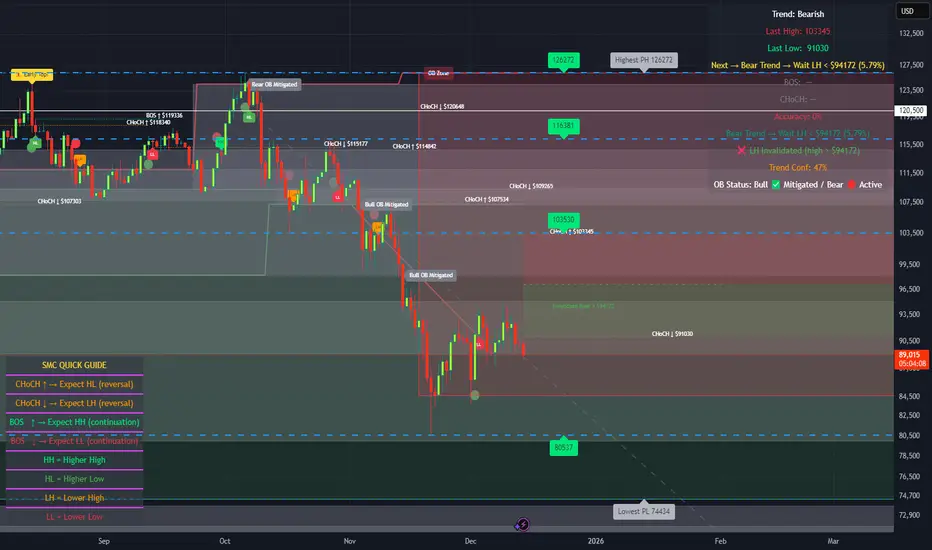
SMC Reversal Engine v3.5 – Clean FVG + Dashboard
The SMC Reversal Engine is a precision-built Smart Money Concepts tool designed to help traders understand market structure the single most important foundation in reading price action. It reveals how institutions move liquidity, where structure shifts occur, and how Fair Value Gaps (FVGs) align with these changes to signal potential reversals or continuations.
Understanding How It Works
At its core, the script detects CHoCH (Change of Character) and BOS (Break of Structure)—the two key turning points in institutional order flow. A CHoCH shows that the market has reversed intent (for example, from bearish to bullish), while a BOS confirms a continuation of the current trend. Together, they form the backbone of structure-based trading.
To refine this logic, the engine uses fractal pivots clusters of candles that confirm swing highs and lows. Fractals filter out noise, identifying points where price truly changes direction. The script lets you set this sensitivity manually or automatically adapts it depending on the timeframe. Lower fractal sensitivity captures smaller intraday swings for scalpers, while higher sensitivity locks onto major swing structures for swing and position traders.
The dashboard gives you a real-time reading of the trend, the last high and low, and what the market is likely to do next—for example, “Expect HL” or “Wait for LH.” It even tracks the accuracy of these structure predictions over time, giving an educational feedback loop to help you learn price behavior.
Fair Value Gaps and Tap Entries
Fair Value Gaps (FVGs) mark moments when price moves too quickly, leaving inefficiencies that institutions often revisit. When price taps into an FVG, it often acts as a high-probability entry zone for reversals or continuations. The script automatically detects, extends, and deletes old FVGs, keeping only relevant zones visible for a clean chart.
Traders can enable markTapEntry to visually confirm when an FVG gets filled. This is a simple but powerful trigger that often aligns with CHoCH or BOS moments.
Recommended Settings for Different Traders
For Scalpers, use a lower HTF structure such as 1 minute or 5 minutes. Keep Auto Fractals on for faster reaction, and limit FVG zones to 2–3. This gives you a clean, real-time reflection of order flow.
For Intraday Traders, 15-minute to 1-hour structure gives the perfect balance between reactivity and stability. Fractal sensitivity around 3–5 captures the most actionable levels without excessive noise.
For Swing Traders, use 4-hour, 1-day, or even 3-day structure. The chart becomes smoother, showing higher-order CHoCH and BOS that define true institutional transitions. Combine this with EMA confirmation for higher conviction.
For Position or Macro Traders, select Weekly or Monthly structure. The dynamic label system expands automatically to keep more historical BOS/CHoCH points visible, allowing you to see long-term shifts clearly.
Educational Value
This indicator is built to teach traders how to see structure the way professionals and smart money do. You’ll learn to recognize how markets transition from one phase to another from accumulation to manipulation to expansion. Each CHoCH or BOS helps you decode where liquidity is being taken and where new intent begins.
The included SMC Quick Guide explains each structural cue right on your chart. Within days of using it, you’ll start noticing patterns that reveal how price really moves, instead of guessing based on indicators.
Settings and How to Use Them
Everything in the SMC Reversal Engine is designed to adapt to your trading style and help you read structure like a professional.
When you open the Inputs Panel, you’ll see sections like Fractal Settings, FVG Settings, Buy/Sell Confirmation, and Educational Tools.
Under Fractal Settings, you can choose the higher timeframe (HTF) that defines structure—from minutes to weeks. The Auto Fractal Sensitivity option automatically adjusts how tight or wide swing points are detected. Lower sensitivity captures short-term fluctuations (great for scalpers), while higher values filter noise and isolate major swing highs and lows (perfect for swing traders).
The Fair Value Gap (FVG) options manage imbalance zones—the footprints of institutional orders. You can show or hide these zones, extend them into the future, and control how long they remain before auto-deletion. The Mark Entry When FVG is Tapped option places a small label when price revisits the gap—a potential entry signal that aligns with smart money logic.
EMA Confirmation adds a layer of confluence. The script can automatically scale EMA lengths based on timeframe, or you can input your preferred values (for example, 9/21 for intraday, 50/200 for swing). Require EMA Crossover Confirmation helps filter false moves, keeping you trading only with aligned momentum.
The Educational section gives traders visual reinforcement. When enabled, you’ll see tags like HH (Higher High), HL (Higher Low), LH (Lower High), and LL (Lower Low). These show structure shifts in real time, helping you learn visually what market structure really means. The Cheat Sheet panel summarizes each term, always visible in the corner for quick reference.
Early Top Warnings use wick size and RSI divergence to signal when price may be overextended—a useful heads-up before potential CHoCH formations.
Finally, the Narrative and Accuracy System translates structure into simple English—messages like Trend Bullish → Wait for HL or BOS Bearish → Expect LL. Over time, you can monitor how accurate these expectations have been, training your pattern recognition and confidence.
Pro Tips for Getting the Most Out of the SMC Reversal Engine
1. Start on Higher Timeframes First: Begin on the 4H or Daily chart where structure is cleaner and signals have more weight. Then scale down for entries once you grasp directional intent.
2. Use FVGs for Context, Not Just Entries: Observe how price behaves around unfilled FVGs—they often act as magnets or barriers, offering insight into where liquidity lies.
3. Combine With HTF Bias: Always trade in the direction of your higher timeframe trend. A bullish weekly BOS means lower timeframes should ideally align bullishly for optimal setups.
4. Clean Charts = Clear Mind: Use Minimal Mode when focusing on price action, then toggle the educational tools back on to review structure for learning.
5. Don’t Chase Every CHoCH or BOS: Focus on significant breaks that align with broader context and liquidity sweeps, not minor fluctuations.
6. Accuracy Rate Is a Feedback Tool: Use the accuracy stat as a reflection of consistency—not a trade trigger.
7. Build Narrative Awareness: Read the on-chart narrative messages to reinforce structured thinking and stay disciplined.
8. Practice Replay Mode: Step through past structures to visually connect CHoCH, BOS, and FVG behavior. It’s one of the best ways to train pattern recognition.
Summary
* Detects CHoCH and BOS automatically with fractal precision
* Identifies and manages Fair Value Gaps (FVGs) in real time
* Displays a smart dashboard with accuracy tracking
* Adapts label visibility dynamically by timeframe
* Perfect for both learning and trading with institutional clarity
This tool isn’t about predicting the market—it’s about understanding it. Once you can read structure, everything else in trading becomes secondary.
The SMC Reversal Engine is a precision-built Smart Money Concepts tool designed to help traders understand market structure the single most important foundation in reading price action. It reveals how institutions move liquidity, where structure shifts occur, and how Fair Value Gaps (FVGs) align with these changes to signal potential reversals or continuations.
Understanding How It Works
At its core, the script detects CHoCH (Change of Character) and BOS (Break of Structure)—the two key turning points in institutional order flow. A CHoCH shows that the market has reversed intent (for example, from bearish to bullish), while a BOS confirms a continuation of the current trend. Together, they form the backbone of structure-based trading.
To refine this logic, the engine uses fractal pivots clusters of candles that confirm swing highs and lows. Fractals filter out noise, identifying points where price truly changes direction. The script lets you set this sensitivity manually or automatically adapts it depending on the timeframe. Lower fractal sensitivity captures smaller intraday swings for scalpers, while higher sensitivity locks onto major swing structures for swing and position traders.
The dashboard gives you a real-time reading of the trend, the last high and low, and what the market is likely to do next—for example, “Expect HL” or “Wait for LH.” It even tracks the accuracy of these structure predictions over time, giving an educational feedback loop to help you learn price behavior.
Fair Value Gaps and Tap Entries
Fair Value Gaps (FVGs) mark moments when price moves too quickly, leaving inefficiencies that institutions often revisit. When price taps into an FVG, it often acts as a high-probability entry zone for reversals or continuations. The script automatically detects, extends, and deletes old FVGs, keeping only relevant zones visible for a clean chart.
Traders can enable markTapEntry to visually confirm when an FVG gets filled. This is a simple but powerful trigger that often aligns with CHoCH or BOS moments.
Recommended Settings for Different Traders
For Scalpers, use a lower HTF structure such as 1 minute or 5 minutes. Keep Auto Fractals on for faster reaction, and limit FVG zones to 2–3. This gives you a clean, real-time reflection of order flow.
For Intraday Traders, 15-minute to 1-hour structure gives the perfect balance between reactivity and stability. Fractal sensitivity around 3–5 captures the most actionable levels without excessive noise.
For Swing Traders, use 4-hour, 1-day, or even 3-day structure. The chart becomes smoother, showing higher-order CHoCH and BOS that define true institutional transitions. Combine this with EMA confirmation for higher conviction.
For Position or Macro Traders, select Weekly or Monthly structure. The dynamic label system expands automatically to keep more historical BOS/CHoCH points visible, allowing you to see long-term shifts clearly.
Educational Value
This indicator is built to teach traders how to see structure the way professionals and smart money do. You’ll learn to recognize how markets transition from one phase to another from accumulation to manipulation to expansion. Each CHoCH or BOS helps you decode where liquidity is being taken and where new intent begins.
The included SMC Quick Guide explains each structural cue right on your chart. Within days of using it, you’ll start noticing patterns that reveal how price really moves, instead of guessing based on indicators.
Settings and How to Use Them
Everything in the SMC Reversal Engine is designed to adapt to your trading style and help you read structure like a professional.
When you open the Inputs Panel, you’ll see sections like Fractal Settings, FVG Settings, Buy/Sell Confirmation, and Educational Tools.
Under Fractal Settings, you can choose the higher timeframe (HTF) that defines structure—from minutes to weeks. The Auto Fractal Sensitivity option automatically adjusts how tight or wide swing points are detected. Lower sensitivity captures short-term fluctuations (great for scalpers), while higher values filter noise and isolate major swing highs and lows (perfect for swing traders).
The Fair Value Gap (FVG) options manage imbalance zones—the footprints of institutional orders. You can show or hide these zones, extend them into the future, and control how long they remain before auto-deletion. The Mark Entry When FVG is Tapped option places a small label when price revisits the gap—a potential entry signal that aligns with smart money logic.
EMA Confirmation adds a layer of confluence. The script can automatically scale EMA lengths based on timeframe, or you can input your preferred values (for example, 9/21 for intraday, 50/200 for swing). Require EMA Crossover Confirmation helps filter false moves, keeping you trading only with aligned momentum.
The Educational section gives traders visual reinforcement. When enabled, you’ll see tags like HH (Higher High), HL (Higher Low), LH (Lower High), and LL (Lower Low). These show structure shifts in real time, helping you learn visually what market structure really means. The Cheat Sheet panel summarizes each term, always visible in the corner for quick reference.
Early Top Warnings use wick size and RSI divergence to signal when price may be overextended—a useful heads-up before potential CHoCH formations.
Finally, the Narrative and Accuracy System translates structure into simple English—messages like Trend Bullish → Wait for HL or BOS Bearish → Expect LL. Over time, you can monitor how accurate these expectations have been, training your pattern recognition and confidence.
Pro Tips for Getting the Most Out of the SMC Reversal Engine
1. Start on Higher Timeframes First: Begin on the 4H or Daily chart where structure is cleaner and signals have more weight. Then scale down for entries once you grasp directional intent.
2. Use FVGs for Context, Not Just Entries: Observe how price behaves around unfilled FVGs—they often act as magnets or barriers, offering insight into where liquidity lies.
3. Combine With HTF Bias: Always trade in the direction of your higher timeframe trend. A bullish weekly BOS means lower timeframes should ideally align bullishly for optimal setups.
4. Clean Charts = Clear Mind: Use Minimal Mode when focusing on price action, then toggle the educational tools back on to review structure for learning.
5. Don’t Chase Every CHoCH or BOS: Focus on significant breaks that align with broader context and liquidity sweeps, not minor fluctuations.
6. Accuracy Rate Is a Feedback Tool: Use the accuracy stat as a reflection of consistency—not a trade trigger.
7. Build Narrative Awareness: Read the on-chart narrative messages to reinforce structured thinking and stay disciplined.
8. Practice Replay Mode: Step through past structures to visually connect CHoCH, BOS, and FVG behavior. It’s one of the best ways to train pattern recognition.
Summary
* Detects CHoCH and BOS automatically with fractal precision
* Identifies and manages Fair Value Gaps (FVGs) in real time
* Displays a smart dashboard with accuracy tracking
* Adapts label visibility dynamically by timeframe
* Perfect for both learning and trading with institutional clarity
This tool isn’t about predicting the market—it’s about understanding it. Once you can read structure, everything else in trading becomes secondary.
Informacje o Wersji
Update — Standardized Multi-Timeframe Smart ModeThis update introduces automatic standardized presets for consistent multi-timeframe SMC analysis designed especially for weekly option traders and structured swing setups.
What’s New
Added an auto-detection system that adjusts key parameters dynamically based on your active chart timeframe:
1D Tactical Mode (HTF 3D): short-term structure tracking for weekly entries (Fractal 5, EMA 9/21, FVG 60 bars).
3D Swing Mode (HTF 5D): medium-term bias confirmation (Fractal 7, EMA 21/50, FVG 80 bars).
1W Macro Mode (HTF 12D): long-term structure insight for overall market direction (Fractal 9, EMA 34/89, FVG 120 bars).
This ensures that your structure, FVGs, and EMAs stay aligned to the appropriate higher-timeframe context automatically.
⚙️ Why It was done
Many traders manually adjust their fractal sensitivity, EMA pairs, and FVG lifespan each time they switch between daily or higher-timeframe charts.
This standardization removes that friction and locks your analysis into a consistent, rules-based system perfect for top-down strike planning if yr doing covered calls on a weekly basis on Sundays or structured weekly setups.
Manual Control Still Available
You can still toggle off auto-mode at any time:
Uncheck Auto Fractal Sensitivity
Uncheck Auto EMA Lengths
Uncheck Auto Max Narrative Labels
Once disabled, the script reverts to your manual custom inputs, giving full flexibility for experimental or intraday setups.
Informacje o Wersji
🔥 SMC Reversal Engine v3.5 — Update NotesThe v3.5 release focuses on clarity, usability, and actionable information without cluttering the chart.
New Features & Enhancements:
1. Prediction Accuracy Engine
Track how often the model correctly predicts new structure:
Confirms HL, LH, HH, LL predictions based on CHoCH/BOS sequences
Displays a real-time accuracy rate with confidence levels (e.g. 85.71% (High 🟢))
Shows the last successful prediction (e.g. ✅ HH Confirmed at $1.0945)
This helps build confidence in trend-following setups, and gives feedback on the model's reliability.
2. Anticipation Message Improved
Clearer anticipation label on chart and in the dashboard:
Before:
→ “Trend Bullish → Wait for HL”
Now:
→ “Trend Bullish → Wait for HL above $416.60”
This makes the expected structure actionable with real price context.
3. Dashboard Row Updates
"Next:" row now shows exact price reference, e.g.
→ "Look for HL above $416.60"
New Row:
"Last Prediction: ✅ HL Confirmed at $413.22"
Dashboard supports toggle for ZigZag, minimal mode, and prediction accuracy via input settings.
4. Optional ZigZag Toggle
You can now control whether the ZigZag structure lines are drawn:
🔘 Show ZigZag Lines (input)
Helps keep the chart clean while still tracking structure internally.
5. Codebase Cleanups & UI Polish
Dynamic narrative label (Anticipate) now auto-hides in Minimal Mode
Cleaner label offsets
Accurate $-based formatting for swing points
Predictive label memory cleanup (no overflow)
Modular inputs for greater flexibility
⚙️ Settings Tips:
Minimal Mode: Hides dashboard & clutter for clean replay or trading views
Show Prediction Accuracy: Turn it on to see performance tracking
Dashboard Position: Choose your preferred corner
Example Use Cases:
Intraday reversal trades off CHoCH + HL
Swing trades that wait for HH or LL confirmation
Algorithmic backtesting of structure-based signals
Visual aid for structure-based journaling
Next Planned Features:
🔔 Alert when predictions confirm (e.g. HL confirmed → notify)
📊 Dashboard-enhanced mode stats per session
🧠 Optional confidence-based trade filters
Informacje o Wersji
Summary of Key Improvements:🔧 What’s New
Structural Prediction Accuracy
Tracks how often HL/HH/LH/LL expectations are correctly fulfilled. Displays:% accuracy
confidence level (e.g. Very High) and a label at the exact confirmed point
Toggle: Show Prediction Accuracy Rate
Next Structure Expectation (w/ Price)
The “Next: Look for HL” label now includes target price levels like:
"Look for HL above $398.25"
Makes it tangible, not just theoretical.
Last Correct Prediction Line
New table row shows the last confirmed structural prediction, e.g.:
"HH Confirmed at $402.15"
So users know what just played out.
Optimized ZigZag Drawing Logic
Smarter updates: Only redraws on new pivots
Directional coloring: green for upswings, red for downswings
Efficient full redraw on barstate.islast
Toggle: Show ZigZag Lines
Cleaner Chart Mode
Minimal Mode toggle added
Prevents overload during backtests
Table + labels hidden for focus
Informacje o Wersji
🛠️ What’s NewHTF Structure Fix
Resolved an issue where HTF pivots (especially on 4H charts) could misalign due to delayed swing recognition. BOS and CHoCH events are now properly synced across all timeframes.
Refined Swing Logic
We’ve tightened the BOS/CHoCH detection logic to eliminate false triggers and improve label accuracy. Swings are cleaner, more reliable, and better reflect real structural shifts.
Prediction Tracking
You can now see how often the system’s structural predictions — like “expect HL” or “expect LH” — play out correctly. It’s calculated in real-time and visible on the dashboard.
Optional Pivot-Based Buy/Sell Signals
For traders who prefer reversal-style entries, there’s now a toggle to switch from EMA cross-based signals to pivot-based setups.
Improved Table Layout & Cleanup
Dashboard tables have more intuitive labels, better color coding, and improved memory cleanup for dynamic performance.
Optimized Tap Detection for FVG Zones
The system now cleans tapped FVGs more efficiently, minimizing chart clutter and keeping zones relevant.
Coming Next – Work in Progress
This is still a work in progress, but here’s what’s in focus next:
Core SMC Engine Priorities:
to build a lean but powerful SMC system, focusing on three core areas:
FVG + OB Zone Detection & Visual Marking
Highlight areas of institutional interest with clean, accurate boxes that dynamically update.
Structure Confluence (BOS/CHoCH + HTF Swings)
Strengthen signals by requiring alignment between LTF structure changes and HTF zones.
Liquidity & Trust Filters
Add logic to validate entries only when clean rejections or wick-based retests occur — with volume confirmation as an optional layer.
This focused foundation already outperforms many bulky “all-in-one” SMC tools — with much less noise and better clarity.
Once these core systems are solid, we’ll expand further by refining:
• Dashboards
• Swing labeling
• Entry signal precision
• Multi-tier structure memory
🧠 A Note on Fractals
The script now includes dynamic fractal sensitivity, adjusting automatically to the chosen HTF for optimal swing detection. This means you’ll see different pivot spacing on 15m vs. 4H vs. Daily charts — all optimized for your selected view.
For advanced users, manual sensitivity control is still available. If you prefer more control, here’s a simple rule of thumb:
Use 3–5 for intraday (1m–15m)
Use 5–7 for 1H–4H
Use 8+ for Daily and above
But if Auto is on, all of that is handled all for you.
Thanks for using the SMC Reversal Engine built for precision, speed, and smart confluence. Stay tuned for more high-conviction updates.
Informacje o Wersji
🔥 SMC Reversal Engine v3.5 — Cleaner, Smarter, SharperThis update delivers a dramatically improved charting experience with smarter clustering, cleaner visuals, and deeper structure logic — all without cluttering your screen.
What’s New
Smarter Support/Resistance Zones. Support and resistance are now automatically clustered using nearby pivot levels. Each zone displays: 🔢 How many times it’s been hit
How far it is from price (as a %) Fading based on age and strength
This means you see the most relevant zones at a glance while older or weaker ones fade into the background.
Labels have also been redesigned. Instead of bulky boxes, the script now shows lightweight white text directly beside each zone. You can optionally hide S/R labels or suppress clutter from zones with fewer than X hits.
Structure Logic Upgrades
Anticipation Labels now give you actionable insight based on market structure:
“CHoCH Bull → Expect HL > $451.60 (1.2%)”
No more guessing what’s next the script helps you follow the playbook in real time.
CHoCH / BOS Refinement
You can now require inducement before a CHoCH/BOS is considered valid. This means price must sweep prior liquidity (a pivot high or low) before confirming structure filtering out false breaks and aligning with smart money behavior.
Liquidity Sweeps
Optional detection of bullish and bearish liquidity grabs:
🔻 Bearish = price sweeps above prior high then reverses
🔺 Bullish = price sweeps below a prior low then bounces
Each event is labeled on the chart and helps you identify traps and reversals.
Visual & UX Improvements
FVG Zones can now be filtered by trend direction, tapped (mitigated), or aged out after a custom number of bars.
Minimal Mode hides labels and cheat-sheets for ultra-clean setups.
Swing Labels (HH, HL, LH, LL) now show inducement markers if enabled.
Early Top Warnings detect potential exhaustion using RSI and wick behavior appearing as a ⚠️ “Early Top?” label, limited by cooldown.
Dashboard Improvements
The new dashboard panel now displays:
Trend direction (Bullish/Bearish)
Last key swing levels
Anticipation statement
CHoCH/BOS confirmation
Prediction accuracy (optional)
This gives you fast-glance market context without reading candles for hours.
🔧 How to Use
Everything is toggleable in the settings:
turn off visuals you don’t need
Adjust how strict inducement logic is
Filter FVGs by age, strength, or trend
Set how many S/R zones are allowed on screen
Use “Minimal Mode” for pure price action setups
🧰 What’s Coming Next
not done. Still in progress:
HTF Anchored Zones (monthly/weekly levels)
Auto Trendlines from swing memory
Fading Meter or color-based freshness indicator
Dynamic label positioning for overlap protection
✅ Work smarter not noisier.
✅ Updates will continue stay tuned.
Informacje o Wersji
Final revisionThis is the result of months of fixing, testing, and polishing. Zero repainting. Zero crashes. Works perfectly from 1-second scalping to monthly investing.
What’s new & why it’s now elite:
- Fixed ALL repainting issues (HTF lines, pivots, BOS/CHoCH)
- FVGs now delete cleanly, have tap lines, and support auto-entry arrows
- Smart Higher Low / Lower High tracking → shows the REAL structural level that matters (not some 2-year-old ghost)
- Trend invalidation lines with arrows → instantly see where the trend dies
- Prediction accuracy mini-chart + confirmation alerts
- Structure Shift detection (CHoCH + BOS in same move = massive momentum)
- Every single object is memory-managed → no lag, no crashes, even on 1-minute charts with 20k+ bars
- 100% beginner-friendly toggles (see below)
Togglable Options – What They Do (Dummy-Friendly):
Display Settings
• Minimal Mode → Hides everything except price action (great for clean screenshots)
• Show ZigZag → Draws the swing highs/lows that the whole SMC logic is based on
• Show HTF High/Low Lines → Red/green lines from your chosen higher timeframe (default 60min)
• Dashboard Position → Move the info box wherever you want
FVG Settings (Fair Value Gaps)
• Enable FVG Zones → Turn FVGs on/off
• Only FVGs in Trend Direction → Only shows bullish FVGs in uptrend and vice-versa (less noise)
• Auto-Enter on FVG Tap → Puts a green/red triangle when price taps a FVG (great for entries)
• Show FVG Fill → Colors the gap (turn off for cleaner chart)
• Show FVG Tap Line → Draws a little white dotted line on the exact tap price
• Max FVG per Direction → Keeps only the freshest 1–5 gaps so chart doesn’t get cluttered
Structure & Logic
• Require Inducement Before CHoCH/BOS? → Makes the indicator stricter and higher quality (recommended ON)
• Structure Shift Lookback → How many bars a BOS can be away from a CHoCH to count as a “shift” (bigger move)
Buy/Sell Signals
• Enable Buy/Sell Signals → Shows green/red arrows
• Use Pivot-based instead of EMA → Choose pure SMC entries (pivot lows/highs) or classic EMA crossover
Educational Stuff
• Show HH/HL/LH/LL Tags → Labels every swing (great for learning)
• Show SMC Quick Guide → Little cheat-sheet in the corner
• Show Anticipation Label → Big teal label saying what the market should do next
Early-Top Warning
• Enable Early-Top Warning → Yellow warning when price makes a huge wick + overbought RSI (distribution sign)
Premium/Discount Zones
• Show Premium/Discount → Colors the area above/below the midpoint of the current swing (red = expensive, green = cheap)
Performance
• All limits are adjustable so it never slows down your chart
This indicator is 100% free, non-repainting, and battle-tested on stocks, forex, crypto, futures, every timeframe.
If you like it smash that Boost button. It means the world.
Enjoy the edge,
— Your friendly neighborhood SMC nerd if you really enjoy the indicator Enjoy the indicator?
If it’s making you money or saving you time, feel free to say thanks with a coffee ☕
→ PayPal: paypal.me/maddogblewitt
→ Bitcoin→ bc1q4elmg8qhnjq95f6jj35sad34k76uxrhy9fj7s5
Every coffee keeps the updates coming and helps me keep this 100% free for everyone.
Zero pressure — just good vibes if you feel like it
Informacje o Wersji
Bug fix Release SummaryAfter months of fixing, testing, optimizing, and listening to traders, v3.5 is the cleanest, most powerful, and stable version yet. This release:
🔧 Addresses:
Repainting – Fully resolved on all BOS, CHoCH, pivots, and FVGs
Runtime errors – Fixed all array mismatch crashes and heavy resource loads
Clutter – Cleaner labels, efficient memory, dynamic visibility
Accuracy – New prediction confirmation logic + success tracking
Major Features:
Structural Intelligence:
Smart CHoCH / BOS Logic – Detects valid structure shifts with inducement and liquidity sweep filters
HL / LH / HH / LL Expectations – Predicts next logical structural move, with expiry and invalidation levels
Structure Shifts – Flags CHoCH + BOS in the same move = massive intent
Fair Value Gaps (FVGs):
Auto-detect, extend, and clean up after mitigation
Tap detection with optional auto-entry arrows
Trend-based FVG filtering for cleaner signals
Dashboard:
Real-time trend direction
Next expectation with actionable price level
Prediction Accuracy Tracker (% correct structure forecasts)
Last prediction result (e.g. ✅ HL Confirmed at $420.12)
Trend Confidence Score:
Combines EMA spread, structure frequency, and slope
Confidence readout for context filtering
⚠️ Early Warning System:
Wick traps + RSI deviation = “Early Top?” alerts before structure breaks
For All Traders:
Scalper to macro timeframes supported
Auto and manual fractal tuning
FVG, EMA, and label behavior adapts to your HTF automatically
Bonus Features:
Liquidity Sweep Labels – Marks key stops being taken
ZigZag Toggle – View underlying pivots cleanly
Premium / Discount Zones – Visual balance around swing midpoints
Structure Prediction Alerts (Coming Next)
Educational Focus:
Designed to teach structure the way smart money sees it
Visual swing tags (HH, HL, LH, LL)
On-chart cheat sheet and narrative feedback
Practice in replay mode to build price memory
What’s Next:
In progress
HTF Anchored Zones (Monthly/Weekly)
Auto Trendlines from swing memory
Entry signal filters based on trend confidence
Session-based accuracy + confluence dashboard stats
Final Thoughts:
This system is not about "signals" — it's about understanding market intent. Use it to:
Build directional bias
Validate breakouts
Train structure recognition
Test it. Learn from it. Use it. Structure is the truth.
Enjoy the edge,
— Your friendly neighborhood SMC nerd if you really enjoy the indicator Enjoy the indicator?
If it’s making you money or saving you time, feel free to say thanks with a coffee ☕
→ PayPal: paypal.me/maddogblewitt
→ Bitcoin→ bc1q4elmg8qhnjq95f6jj35sad34k76uxrhy9fj7s5
Every coffee keeps the updates coming and helps me keep this 100% free for everyone.
Zero pressure — just good vibes if you feel like it
Informacje o Wersji
latest debugInformacje o Wersji
What Changed in v3.61. Multi‑Mode Trendline System
Trendlines are now more flexible: You can draw Bullish, Bearish, or both trendlines at the same time.
New user toggle: Allow Bullish + Bearish Trendlines.
Useful in ranging markets or markets with overlapping structure.
2. Historical Trendline Accumulation
Trendlines can now be preserved over time instead of replaced on every new structure signal.
New setting: Preserve Historical Trendlines.
Use Max Trendlines to Keep to control visual clutter (default is 5 lines).
3. Dynamic Trendline Validation
Trendlines now react to price:
The script detects when a trendline is broken based on: Close crossing, or Wick crossing.
Broken lines are visually updated (gray and dashed) to clearly show structural invalidation.
Optional toggles for: Enable Trendline Validation
Trigger On (Close / Wick)
Highlight Broken Lines
Helps confirm when a trend structure is no longer valid.
4. Improved Trendline Styling
Preserved/historical trendlines are drawn with lighter opacity for context.
Newly drawn active lines are fully opaque.
Broken lines change style and color for clear identification.
5. UI Enhancements
New grouped inputs in the Trendlines settings:
Auto Trendlines from Swings
Only Draw if Trend Confidence > 70%
Allow Bullish + Bearish Trendlines
Preserve Historical Trendlines
Max Trendlines to Keep
Enable Trendline Validation
Trigger On (Close / Wick)
Highlight Broken Lines
6. Baseline Order Block Foundation
This version also introduces the logic for Higher Timeframe (HTF) Order Blocks:
You can now enable HTF order blocks in settings.
Order blocks are anchored from HTF pivots and stored with mitigation tracking.
This foundation will be expanded in future versions with enhanced confluence and interaction logic.
How to Use the New Features
Trendlines
Auto Trendlines from Swings
Turn on Auto Trendlines to enable automatic trendline drawing from swing high/low memory. These lines represent market structure support and resistance.
Only Draw if Trend Confidence > 70%
When this setting is enabled, trendlines are drawn only if the internal trend confidence score (based on EMA, structure events and slope) is above 70%. This reduces noise from weak trends.
Allow Bullish + Bearish Trendlines
ON: Both Bullish and Bearish trendlines will be drawn simultaneously.
OFF: Only the trendline matching the current dominant trend will appear.
Preserve Historical Trendlines
ON: Trendlines accumulate over time, giving a visual history of structure.
OFF: Only the most recent trendline(s) are shown.
Max Trendlines to Keep
Controls the maximum number of preserved trendlines visible on the chart. Lower values keep charts cleaner; higher values show more history.
Trendline Validation
Enable Trendline Validation
Activates break detection logic. The system evaluates whether price has violated a trendline based on your chosen mode.
Trigger On (Close / Wick)
Close: A close beyond the line is required to mark it broken.
Wick: Any price wick crossing the line triggers a break.
Highlight Broken Lines
When enabled, once a trendline is detected as broken, it will appear with a different style and color to signify invalidation.
Example Configurations
Trend Continuation
Use this setup when price is trending and you want clear active trendlines:
Auto Trendlines: ON
Only Draw if Trend Confidence > 70%: ON
Preserve Historical Trendlines: ON
Allow Both Trendlines: OFF
Trendline Validation: ON (Trigger On: Close)
Highlight Broken Lines: ON
This will show high-confidence trendlines and clearly mark shifts or breaks.
Range or Volatile Market
When price action is choppy:
Auto Trendlines: ON
Only Draw if Trend Confidence > 70%: OFF
Allow Bullish + Bearish Trendlines: ON
Preserve Historical Trendlines: ON
Trendline Validation: ON (Trigger On: Wick)
This setup displays both directional trendlines and picks up wick touches for early detection of invalidation.
Analysis or Replay Mode
For chart study or replaying structure evolution:
Preserve Historical Trendlines: ON
Max Trendlines to Keep: larger number (for more history)
Trendline Validation: ON
Trendlines act as “visual breadcrumbs” of structural changes over time.
Order Blocks – Foundation
This version introduces Higher Timeframe Order Blocks:
They are derived from HTF pivots (Weekly/Daily).
Order blocks are stored with mitigation flags and visual labels.
This sets up future expansions such as:
Confluence with FVG + trendlines
Break and mitigation tracking
Enhanced alert conditions for order block interactions
Users can enable or disable HTF order blocks in the settings panel.
Summary
Version 3.6 focuses on:
Better trendline drawing and validation
Visual clarity of structure shifts
Expanded UI controls for customization
Foundational order block logic for future upgrades
This release lays the groundwork for the next phases, including session liquidity zones, a confluence heatmap dashboard, smart Fibonacci, breaker blocks, multi-timeframe confluence scanning, and visual RR projection tools.
Informacje o Wersji
🔥 SMC Reversal Engine v3.6 (Phase 1 Complete)What’s New in This Version (The Big Upgrades)
This update takes the HTF Order Blocks to the next level with full mitigation tracking. Fresh bullish order blocks now show up as bright green zones and bearish ones as bright red zones. As soon as price closes through one of them, the zone instantly turns gray, gets labeled “Mitigated,” and stays on the chart so you can see exactly which institutional levels have already been taken out.
You’ll also get brand-new alerts the moment an order block gets mitigated – perfect for confirming real momentum. The dashboard now has an extra line at the bottom that tells you the current status of the latest order blocks at a glance: whether the bullish one is still active (shown as green “Active”) or already mitigated (shown as checkmark “Mitigated”), and the same for the bearish side.
On top of that, two powerful confluence alerts were added: one fires when a bullish Break of Structure (BOS) happens at the exact same time a bearish order block gets mitigated, and the other does the opposite for bearish BOS plus bullish order block mitigation. This is classic Smart Money confirmation and gives you extremely high-probability setups.
Overall, the visuals are cleaner: mitigated zones fade to gray, old labels get removed properly, and everything feels more professional.
How to Use This Indicator (Super Simple – Even If You’re Brand New)
Just add the script to any chart on any pair or timeframe. It works great on everything, but most people get the best results on 15-minute, 1-hour, or 4-hour charts. The default settings are already tuned really well, so you can start using it right away without changing anything.
The One Toggle Everyone Asks About: “Require Inducement Before CHoCH/BOS?”
This is the switch called “Require Inducement Before CHoCH/BOS?” and it’s turned ON by default.
In plain English: Inducement is when the big players fake out retail traders by quickly running the price past an old high or low to grab stop-losses, then immediately reverse. When this toggle is ON (which is recommended for most people), the script only counts a Change of Character (CHoCH) or Break of Structure (BOS) as real if that fake-out (inducement) happened first. This removes a huge amount of fake signals and gives much cleaner, higher-quality structure labels.
If you turn it OFF, every single break counts immediately, which means more signals but also more false ones.
Quick rule of thumb: Keep it ON if you’re a swing trader, position trader, or just want fewer but better setups. Turn it OFF if you’re scalping or day-trading aggressively and want every possible signal.
FVG Mitigation Settings (The Other Important One)
Under FVG Settings you’ll see “FVG Removal Method” with two choices: “wick” (default) or “close”.
“Wick” means the fair value gap disappears as soon as price even touches it with a candle wick – very sensitive and aggressive.
“Close” means it only disappears if a candle actually closes inside the gap – more conservative.
There’s also “Delay After Mitigation” (default 0 bars). Set this to 2–5 if you want the gap to stick around a few extra candles after being touched, which helps avoid deleting it on fake wicks.
Quick suggestions:
Aggressive entries → use “wick” and 0 delay.
Safer, higher-probability entries → use “close” and 2–3 bar delay.
Recommended Starting Settings for Different Trading Styles
Scalpers (1-minute to 15-minute charts): Turn Inducement filter OFF, use wick removal with 0 delay, set Higher Timeframe for Structure to “15” or “30”, and OB Timeframe to “D”. You’ll get lots of fast signals.
Day traders (15-minute to 1-hour charts): Keep Inducement filter ON, use wick removal with 0–2 bar delay, set Higher Timeframe to “60”, and OB Timeframe to “W”. This gives a nice balance of clean signals and enough opportunities.
Swing/position traders (4-hour to daily charts): Keep Inducement filter ON, use close removal with 2–3 bar delay, set Higher Timeframe to “240” or “D”, and OB Timeframe to “M” or “W”.
You’ll get only the highest-probability setups and can hold trades longer.
Pure ICT/SMC followers: Keep Inducement ON, wick removal with 0 delay, Higher Timeframe “60”, OB Timeframe “W” – classic style.
Simple Trading Rules (No Overthinking Needed)
Wait for an orange CHoCH label to appear (that’s the potential reversal signal). Then watch price pull back into a green FVG (for longs), a green order block zone, or the lower green discount area. Enter when price taps one of those zones – you’ll see a clear “FVG Tap” label or triangle marker. Put your stop below the invalidation line that’s drawn on the right side of the chart, and target the next higher high (or just trail your stop).
Or, if you turned on Buy/Sell signals, just follow the green and red arrows – they already filter for trend and EMA alignment.
If the chart ever feels too busy, go to the Performance section at the bottom and turn on Minimal Mode or Light Mode – everything still works perfectly, you just see less clutter.
That’s it – you’re now running one of the cleanest and most powerful SMC tools on TradingView. Enjoy the edge, and Phase 2 (session liquidity zones + confluence heatmap) drops next week if you want it. Go get those profits, legend! 🚀
Skrypt open-source
W zgodzie z duchem TradingView twórca tego skryptu udostępnił go jako open-source, aby użytkownicy mogli przejrzeć i zweryfikować jego działanie. Ukłony dla autora. Korzystanie jest bezpłatne, jednak ponowna publikacja kodu podlega naszym Zasadom serwisu.

Wyłączenie odpowiedzialności
Informacje i publikacje nie stanowią i nie powinny być traktowane jako porady finansowe, inwestycyjne, tradingowe ani jakiekolwiek inne rekomendacje dostarczane lub zatwierdzone przez TradingView. Więcej informacji znajduje się w Warunkach użytkowania.
Skrypt open-source
W zgodzie z duchem TradingView twórca tego skryptu udostępnił go jako open-source, aby użytkownicy mogli przejrzeć i zweryfikować jego działanie. Ukłony dla autora. Korzystanie jest bezpłatne, jednak ponowna publikacja kodu podlega naszym Zasadom serwisu.
Wyłączenie odpowiedzialności
Informacje i publikacje nie stanowią i nie powinny być traktowane jako porady finansowe, inwestycyjne, tradingowe ani jakiekolwiek inne rekomendacje dostarczane lub zatwierdzone przez TradingView. Więcej informacji znajduje się w Warunkach użytkowania.