OPEN-SOURCE SCRIPT
Zaktualizowano XT Basic MA Crossover
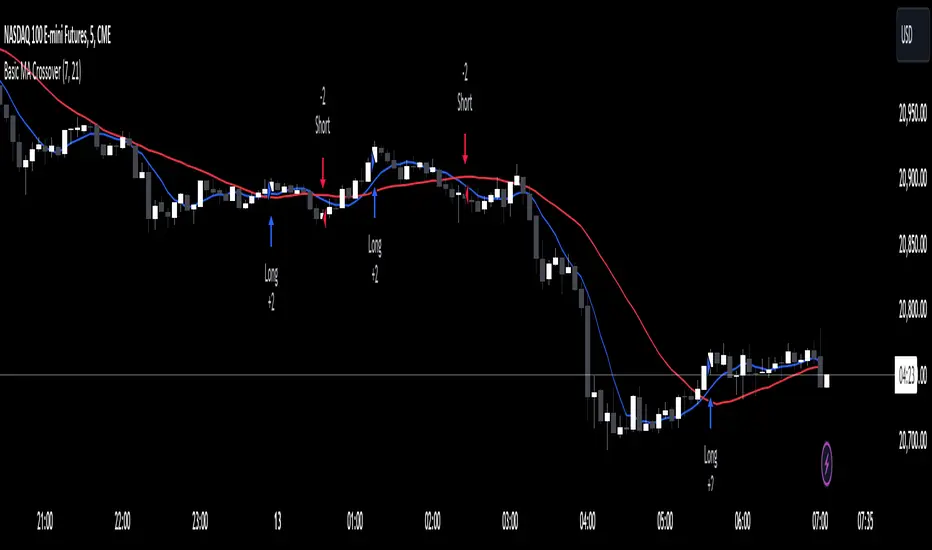
The XT Basic MA Crossover is designed to introduce the use of dynamic variables to your alert messages. Unlike the XT Up/Down Bar Indicator, which preloads the payload into the TradingView alert Message field, strategies do not support this functionality.
You will need to copy and paste into the message window for the alert to work using the strategy actions.
Example Alert Message:
```
key=Your CrossTrade Secret Key;
command=PLACE;
account=sim101;
instrument=ES 12-24;
action={{strategy.order.action}}
qty={{strategy.order.quantity}};
order_type=MARKET;
tif=DAY;
flatten_first=true;
```
You'll need to add your secret key to the message between = and ;
Correct: key=123456789123456789;
Incorrect: key=Your CrossTrade Secret Key123456789123456789;
You'll also need to add your webhook URL to the Notifications tab on the alert.
Visual Signals: The strategy is a simple moving average crossover using a 2 period MA to simulate a lot of frequent trades.
You can also add stops and targets to your strategy alerts by adding "take_profit" and "stop_loss" values to the message. This can be supplied as numerical values, percentages, or tick based values. Learn More.
If you need help: Here is a LINK to our TradingView alerts Help Doc.
Disclaimer: This indicator is designed and offered purely as an educational resource to showcase how to structure your alert messages. We do not suggest, advise, or recommend using this indicator in production with live capital.
You will need to copy and paste into the message window for the alert to work using the strategy actions.
Example Alert Message:
```
key=Your CrossTrade Secret Key;
command=PLACE;
account=sim101;
instrument=ES 12-24;
action={{strategy.order.action}}
qty={{strategy.order.quantity}};
order_type=MARKET;
tif=DAY;
flatten_first=true;
```
You'll need to add your secret key to the message between = and ;
Correct: key=123456789123456789;
Incorrect: key=Your CrossTrade Secret Key123456789123456789;
You'll also need to add your webhook URL to the Notifications tab on the alert.
Visual Signals: The strategy is a simple moving average crossover using a 2 period MA to simulate a lot of frequent trades.
You can also add stops and targets to your strategy alerts by adding "take_profit" and "stop_loss" values to the message. This can be supplied as numerical values, percentages, or tick based values. Learn More.
If you need help: Here is a LINK to our TradingView alerts Help Doc.
Disclaimer: This indicator is designed and offered purely as an educational resource to showcase how to structure your alert messages. We do not suggest, advise, or recommend using this indicator in production with live capital.
Informacje o Wersji
Removed the QTY input to simplify the scriptInformacje o Wersji
Updated to Pine Script V6Informacje o Wersji
Updated to provide inputs for the MA length and plotting on the chartInformacje o Wersji
Swapped the NT8 instrument format for the Pine Script {{ticker}} variable now that CrossTrade supports continuous contracts and will automatically convert the ticker into NT8s format.Skrypt open-source
W zgodzie z duchem TradingView twórca tego skryptu udostępnił go jako open-source, aby użytkownicy mogli przejrzeć i zweryfikować jego działanie. Ukłony dla autora. Korzystanie jest bezpłatne, jednak ponowna publikacja kodu podlega naszym Zasadom serwisu.

Wyłączenie odpowiedzialności
Informacje i publikacje nie stanowią i nie powinny być traktowane jako porady finansowe, inwestycyjne, tradingowe ani jakiekolwiek inne rekomendacje dostarczane lub zatwierdzone przez TradingView. Więcej informacji znajduje się w Warunkach użytkowania.
Skrypt open-source
W zgodzie z duchem TradingView twórca tego skryptu udostępnił go jako open-source, aby użytkownicy mogli przejrzeć i zweryfikować jego działanie. Ukłony dla autora. Korzystanie jest bezpłatne, jednak ponowna publikacja kodu podlega naszym Zasadom serwisu.
Wyłączenie odpowiedzialności
Informacje i publikacje nie stanowią i nie powinny być traktowane jako porady finansowe, inwestycyjne, tradingowe ani jakiekolwiek inne rekomendacje dostarczane lub zatwierdzone przez TradingView. Więcej informacji znajduje się w Warunkach użytkowania.