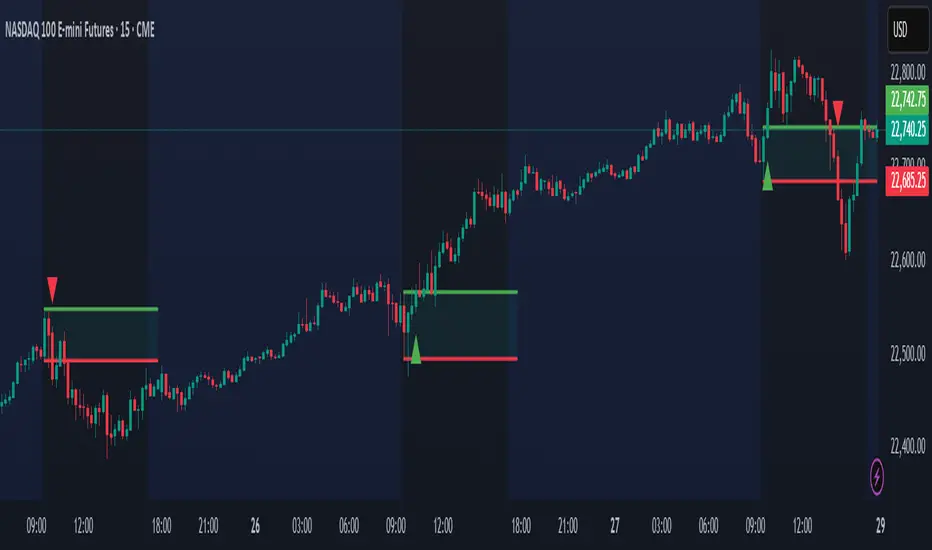
Ighodalo Gold - CRT (Candles are ranges theory)This indicator is designed to automatically identify and display CRT (Candles are Ranges Theory) Candles on your chart. It draws the high and low of the identified range and extends them until price breaks out, providing clear levels of support and resistance.
The Candles are Ranges Theory (CRT) concept was originally developed and shared by a trader named Romeotpt (Raid). All credit for the trading methodology goes to him. This indicator simply makes spotting these specific candles easier.
What is a CRT Candle & How Is It Used?
A CRT candle is a single candle that has both the highest high AND the lowest low over a user-defined period. It is identified by analysing a block of recent candles and finding the one candle that contains the entire price range of that block.
Once a CRT candle is formed, its high and low act as an accumulation range.
A break above or below this range is the manipulation phase.
A reclaim of the range (price closing back inside) signifies a potential distribution phase.
On higher timeframes, this sequence can be interpreted as:
Candle 1: Accumulation
Candle 2: Manipulation
Candle 3: Distribution
Reversal (Turtle Soup):
A sweep of the high or low, followed by a quick reclaim (price closing back inside the range), can signify a reversal. According to the theory’s originator, Romeo, this reversal pattern is called “turtle soup.”
After a bearish reversal at the high, the target becomes the CRT low.
After a bullish reversal at the low, the target becomes the CRT high.
How to Use This Indicator
The indicator is flexible and can be adapted to your trading style. The most important settings are:
Max Lookback Period: Number of past candles ("n") the indicator checks within to find a CRT.
CRT Timeframe:
Select a timeframe (e.g., 1H): The indicator will look at the higher timeframe you selected and plot the most recent CRT range from that timeframe onto your current chart. This is useful for multi-timeframe analysis.
Enable Overlapping CRTs:
False (unchecked): Shows only one active CRT range at a time. The indicator won’t look for a new one until the current range is broken.
True (checked): Constantly searches for and displays all CRT ranges it finds, allowing multiple ranges to appear on the chart simultaneously.
Disclaimer & Notes
-This is a visualisation tool and not a standalone trading signal. Always use it alongside your own analysis and risk management strategy.
-All credit for the "Candles are Ranges Theory" (CRT) concept goes to its creator, Romeotpt (Raid).
"On the journey to the opposite side of the range, price often provides multiple turtle soup entry opportunities. Follow their footprints." — Raid, 2025
Wyszukaj w skryptach "range"

Opening Range Suite by SBSniperOpening Range Suite
An all-in-one opening-range tool suite. It draws the 30-second, 5-minute, and 30-minute opening ranges for the AM session (09:30 NY). Each range is highlighted with a rectangle (high/low with midpoint) and can display a full pack of projection levels.
⸻
What it draws
• AM 09:30 ORs: 30s, 5m, 30m ranges.
• Midpoint line inside each box.
• Projections from the opening range (measured both High→Low and Low→High) at:
−0.5, −1, −1.5, −2, −2.5, −3, −3.5, −4.
• Text labels inside rectangles (fixed text):
AM — “OR 30sec / OR 5min / OR 30min”; PM — “PM 30sec / PM 5min / PM 30min”.
⸻
Smart behavior
• Today always extends to the current bar (so the current session’s box grows with price/time).
• Previous 5 days of each selected range are shown and, by default, extend to 12:00 NY for AM and 16:00 NY for PM (2.5h span).
Toggle available to extend previous 5 out to the current bar instead.
• Projection day cap: You choose how many recent days (including today) draw projection lines. This prevents chart clutter and avoids TradingView object limits.
• Weekend skip: Automatically ignores Saturdays and Sundays based on New York time.
• Single label toggle: Turn all labels on/off; styling and text are fixed for clarity and consistency.
⸻
How ranges are calculated
• The script anchors to New York local time and detects:
• AM session: 09:30 → grabs the 30s/5m/30m bar(s) that open at 09:30:00 NY.
• Each range uses the bar’s high/low, draws a rectangle spanning the selected time window, and plots the midpoint.
⸻
Notes & best practices
• The 30-second OR requires a symbol/data plan that provides 30-second bars. If your feed doesn’t have 30s, keep the 30s toggles off and use 5m/30m.
• Use on intraday charts. The tool relies on bar times to align with NY session opens.
• For non-US symbols or 24/7 markets, NY anchoring still works; just be aware that “open” is tied to 09:30 New York time.

12H Range (Body + Wicks)12H Range (Body + Wicks)
This indicator highlights the 12-hour candle ranges across any chart timeframe. Each 12H candle is split into its body and wicks, with customizable fill and border colors.
Features:
Draws the full 12H range (Open → Close for the body, High/Low for wicks).
Live updates as the current 12H candle forms.
Works on all chart timeframes.
Custom colors for bullish/bearish bodies and wicks.
Option to show only the current 12H block or keep a history of past ranges.
Lightweight performance with adjustable max bars to keep on chart.
Optional high/low guide lines for quick reference.
Use Cases:
Identify where price is trading relative to the current or past 12H session ranges.
Visualize intraday bias with clear body/wick separation.
Combine with your strategy to trade range reclaims, breaks, or reversals.
Tip: Change the reference timeframe input (default = 12H/720min) to quickly adapt for 4H, 6H, daily, etc.

Weekly Range ProjectionsWeekly Range Projections
Inspired by toodegrees' excellent "ICT Friday's Asian Range" indicator
This indicator is a modified and enhanced version of the original Friday's Asian Range indicator created by toodegrees. While studying their brilliant work, I realized the concept could be expanded beyond just Friday's Asian session to create a more versatile tool for weekly price projections.
What's New?
I've transformed the original concept into a fully customizable range projection tool that allows traders to:
Select Any Day of the Week - Not limited to just Fridays anymore
Define Custom Time Ranges - Set your own start and end times to capture any session (Asian, London, New York, or custom ranges)
Flexible Deviation Levels - Choose between 1-9 standard deviations instead of the fixed 5
Toggle Body/Wick Ranges - Show or hide body and wick projections independently
Updated to Pine Script v6 - Taking advantage of the latest Pine Script features
How It Works
The indicator captures the price range (body and/or wick) during your specified time window on your chosen day, then projects standard deviation levels from that range. These levels often act as significant support/resistance throughout the week.
Use Cases
Weekly Opening Range - Capture Monday's opening range for week-long projections
Session-Based Analysis - Define any session on any day for targeted analysis
Multi-Timeframe Projections - Create different instances for various time ranges
ICT Concepts - Perfect for traders following ICT methodologies with customizable ranges
Credits
Huge thanks to toodegrees for creating the original Friday's Asian Range indicator and sharing it with the community. Their clean code structure and innovative approach to range projections inspired this modification. The core logic and visual presentation style remain true to their original vision, with added flexibility for broader applications.
If you find this useful, please also check out toodegrees' original indicators - they create fantastic tools for the TradingView community!
Settings Guide
Range Settings - Choose your day and define start/end times
Range Type - Toggle body and/or wick ranges
Deviations - Select how many standard deviation levels to display
Styling - Customize colors and line styles for both range types
Alerts - Set up alerts for price crossing specific deviation levels
Remember to use this on 5-minute or 15-minute charts as intended by the original design.
Note: This indicator follows the Mozilla Public License 2.0

Open Range Breakout (ORB) with Alerts
🚀 ChartsAlgo – Open Range Breakout (ORB) with Alerts
The Open Range Breakout (ORB) Indicator by ChartsAlg is designed for intraday traders looking to capitalize on price movements after the market’s opening range. This tool is especially effective for futures (MNQ, MES) and high-volatility stocks or crypto where initial volatility sets the tone for the session.
This indicator identifies a user-defined opening range window, plots the high/low lines of that range, and visually alerts users when price breaks out above or below the range — with options to customize breakout repetitions, background fill, and alerts.
💡 What is an Open Range Breakout (ORB)?
The opening range represents the high and low established during the first few minutes of the trading session — usually 15 or 30 minutes. Many intraday strategies are based on the idea that breaking out of this initial range often signals strong momentum and trend continuation.
Traders often enter:
Long when price breaks above the range high.
Short when price breaks below the range low.
⚙️ How It Works
You define a session window (e.g., 09:30–09:45 EST).
The indicator tracks the high and low during this time.
Once the session ends, the high and low become your range breakout levels.
The indicator then:
Plots lines for visual clarity
Optionally fills background between the range
Triggers breakout signals if price crosses the levels
Provides alerts when breakouts occur
🛠️ Settings Breakdown
🔹 Session Settings
Range Session: Set your preferred window (e.g., 0930–0945). Can be premarket, first 30 mins, or any custom time.
Time zone: Use "America/New York" for EST (default) or change to "GMT+0" for international traders.
🔹 Breakout Settings
Bullish Breakout Signals: Number of allowed breakout alerts above the range.
Bearish Breakout Signals: Number of allowed breakout alerts below the range.
This prevents repeated alerts once breakout has been confirmed.
🔹 Display Settings
Show Background Fill: Fills area between high/low of the range for easier visual analysis.
Show Breakout Signals: Triangle markers plotted on the chart when breakouts happen.
Only Show Today’s Range: Keeps the chart clean by showing only the most current day’s range.
🔹 Color Settings
Range High/Low Line Colors: Choose any color for clarity.
Range Fill Color: Customize the highlight area for your chart style.
📊 Chart Features
Range High/Low Lines: Automatically plotted after range session ends.
Visual Fill Box: Optional background shading between the opening range.
Triangle Breakout Markers: Appear at the breakout candle.
Alerts: Can be used with TradingView’s alert system to notify you of breakouts in real-time.
🔔 Alerts
Two alert conditions are built in:
Bullish Breakout: Triggers when price breaks above the high of the range.
Bearish Breakout: Triggers when price breaks below the low of the range.
Example Alert Message:
📈 “Bullish Breakout above Open Range on AAPL!”
To activate:
Click “🔔 Alerts” on TradingView.
Set condition to this script.
Choose “ORB Breakout Up” or “ORB Breakout Down”.
Choose alert frequency and notification method.
⚠️ DISCLAIMER
ChartsAlgo tools are for informational and educational purposes only.
They are not financial advice or signals. Past performance does not guarantee future results. Use at your own risk and always implement solid risk management.
By using this indicator, you agree that you are solely responsible for any trades or decisions made based on the information provided.
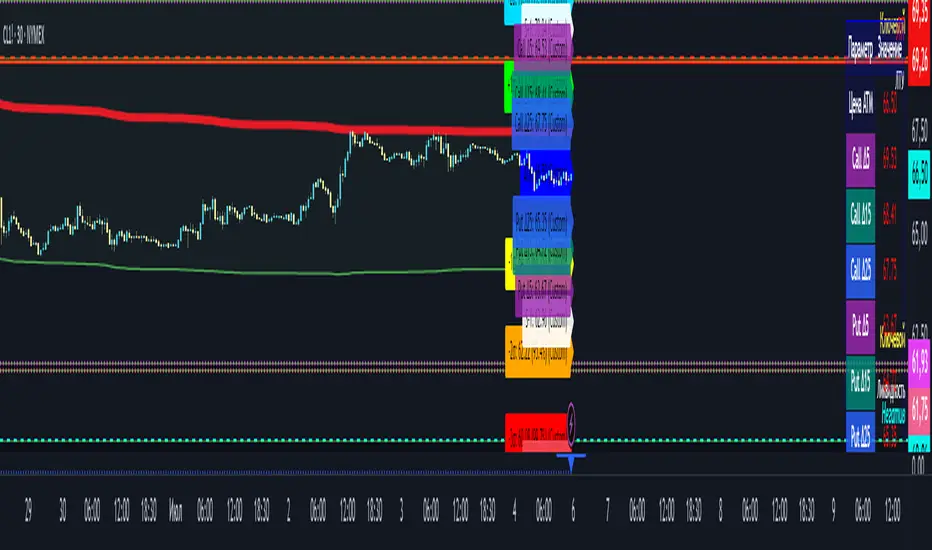
Option Range Projector PRO (with Alerts)Indicator Name: Option Range Projector PRO (with Alerts)
Short Description
This is a powerful and flexible tool for traders that visualizes expected price movement ranges based on option pricing principles and statistical deviations. The indicator plots standard deviation levels (Sigmas) and boundaries calculated from the price of an options Straddle, providing a unique insight into market volatility expectations.
It is ideal for options traders, as well as those who trade futures or spot assets and want to gain an edge by understanding where the market anticipates price boundaries on a specific date.
Core Concepts
The indicator is based on three key ideas:
Standard Deviation (Sigma, σ): In statistics, this is a measure of value dispersion. In trading, when applied to prices, standard deviation levels show the probable range within which the price is expected to remain until a specific date (expiration).
±1σ (1 Sigma): Approximately 68.2% probability that the price will stay within this range.
±2σ (2 Sigmas): Approximately 95.4% probability. These levels often act as strong support/resistance.
±3σ (3 Sigmas): Approximately 99.7% probability. Reaching these levels is a statistically rare event.
Implied Volatility (IV): This is a key component. IV is the market's forecast of the asset's future volatility. It is derived from current option prices and reflects how significant the price movements are expected to be by traders. The higher the IV, the wider the calculated ranges will be.
Straddle-Based Levels: A straddle is an options strategy involving the simultaneous purchase of a Call and a Put option with the same strike price and expiration date. The cost of this combination (Call + Put) directly reflects the market's expected price movement in points. Our indicator uses this value to construct alternative, highly accurate boundaries of the expected range.
Key Features
Flexible Expiration Choice: Easily switch between standard contracts (Weekly, Monthly, Quarterly) or set any custom number of days to expiration (DTE).
Dual Volatility Calculation Mode: Use automatic calculation based on historical data or enter a precise IV value manually (e.g., from your broker's terminal) for maximum accuracy.
Two Types of Predictive Levels: Visualize classic standard deviations (Sigmas) and/or levels calculated from the Straddle price for a comprehensive analysis.
Expiration Comparison: Enable the display of additional levels for a different expiration date to visually compare short-term and long-term market expectations.
"Greeks" Calculation: The indicator calculates and displays key option Greeks (Delta, Gamma, Theta, Vega), helping to deepen the understanding of an option position's characteristics.
Informative Table: All key data—ATM price, IV, DTE, level prices, Greeks, and option prices—are consolidated into one clear table for quick analysis.
Customizable Alerts: Get instant notifications directly in TradingView when the price crosses any of the important levels (±1σ, ±2σ, ±3σ).
Full Visual Customization: Control colors, line thickness, labels, and zone fills to adapt the indicator to your trading style.
How to Use (Settings)
Price Settings:
Auto-detect ATM Price: When enabled, the indicator will use the current closing price as the At-The-Money (ATM) price.
Manual ATM Price: If auto mode is disabled, you can set a precise ATM price manually.
Volatility Settings:
Auto-calculate IV: Calculates historical volatility over a specified period. Useful if you don't have access to real-time IV.
Manual IV Value: (Recommended for accuracy). Enter the Implied Volatility (IV) value for the desired strike from your brokerage terminal or analytical services here.
Expiration:
Contract Type: Choose one of the standard terms (Weekly, Monthly, Quarterly) or "Custom" to use a manual day input.
Days to Expiration: Active only for the "Custom" type.
Show Multiple Expirations: Enables a second set of levels with a different term for comparison.
Straddle Boundaries:
Use Manual Input: Allows you to enter the precise Call and Put Settle prices from the official exchange summary (e.g., from the CME website). This provides the most accurate boundaries based on real market prices.
Trading Ideas and Application
Mean Reversion Trading: The ±2σ and ±3σ levels often act as strong overbought/oversold zones. A price reaching these extreme values has a high statistical probability of reversing or correcting back towards the central ATM price.
Trend Confirmation and Breakouts: A confident close outside the ±1σ range can indicate the beginning of a strong directional move.
Risk Management: Use the levels to set stop-losses or determine profit targets. For example, when opening a trade near the +1σ level, you might consider a target at +2σ and place a stop-loss behind the ATM level.
Volatility Analysis: By comparing the width of the ranges for different expirations, you can assess how the market is pricing short-term versus long-term risks. A narrow range suggests low expectations, while a wide range indicates high ones.
Disclaimer: This indicator is an analysis tool and does not provide direct financial advice or trading signals. All trading decisions are your own. Use this indicator in conjunction with other analysis methods.
ATR RopeATR Rope is inspired by DonovanWall's "Range Filter". It implements a similar concept of filtering out smaller market movements and adjusting only for larger moves. In addition, this indicator goes one step deeper by producing actionable zones to determine market state. (Trend vs. Consolidation)
> Background
When reading up on the Range Filter indicator, it reminded me exactly of a Rope stabilization drawing tool in a program I use frequently. Rope stabilization essentially attaches a fixed length "rope" to your cursor and an anchor point (Brush). As you move your cursor, you are pulling the brush behind it. The cursor (of course) will not pull the brush until the rope is fully extended, this behavior filters out jittery movements and is used to produce smoother drawing curves.
If compared visually side-by-side, you will notice that this indicator bears striking resemblance to its inspiration.
> Goal
Other than simply distinguishing price movements between meaningful and noise, this indicator strives to create a rigid structure to frame market movements and lack-there-of, such as when to anticipate trend, and when to suspect consolidation.
Since the indicator works based on an ATR range, the resulting ATR Channel does well to get reactions from price at its extremes. Naturally, when consolidating, price will remain within the channel, neither pushing the channel significantly up or down. Likewise, when trending, price will continue to push the channel in a single direction.
With the goal of keeping it quick and simple, this indicator does not do any smoothing of data feeds, and is simply based on the deviation of price from the central rope. Adjusting the rope when price extends past the threshold created by +/- ATR from the rope.
> Features & Behaviors
- ATR Rope
ATR Rope is displayed as a 3 color single line.
This can be considered the center line, or the directional line, whichever you'd prefer.
The main point of the Rope display is to indicate direction, however it also is factually the center of the current working range.
- ATR Rope Color
When the rope's value moves up, it changes to green (uptrend), when down, red (downtrend).
When the source crosses the rope, it turns blue (flat).
With these simple rules, we've formed a structure to view market movements.
- Consolidation Zones
Consolidation Zones generate from "Flat" areas, and extend into subsequent trend areas. Consolidation is simply areas where price has crossed the Rope and remains inside the range. Over these periods, the upper and lower values are accumulated and averaged together to form the "Consolidation Zone" values. These zones are draw live, so values are averaged as the flat areas progress and don't repaint, so all values seen historically are as they would appear live.
- ATR Channel
ATR Channel displays the upper and lower bounds of the working range.
When the source moves beyond this range, the rope is adjusted based on the distance from the source to the channel. This range can be extremely useful to view, but by default it is hidden.
> Application
This indicator is not created to provide signals, or serve as a "complete" system.
(People who didn't read this far will still comment for signals. :) )
This is created to be used alongside manual interpretation and intuition. This indicator is not meant to constrain any users into a box, and I would actually encourage an open mind and idea generation, as the application of this indicator can take various forms.
> Examples
As you would probably already know, price movement can be fast impulses, and movement can be slow bleeds. In the screenshot below, we are using movements from and to consolidation zones to classify weak trend and strong trend. As you can see, there are also areas of consolidation which get broken out of and confirmed for the larger moves.
Author's Note: In each of these examples, I have outlined the start and end of each session. These examples come from 1 Min Future charts, and have specifically been framed with day trading in mind.
"Breakout Retest" or "Support/Resistance Flips" or "Structure Retests" are all generally the same thing, with different traders referring to them by different names, all of which can be seen throughout these examples.
In the next example, we have a day which started with an early reversal leading into long, slow, trend. Notice how each area throughout the trend essentially moves slightly higher, then consolidates while holding support of the previous zone. This day had a few sharp movements, however there was a large amount of neutrality throughout this day with continuous higher lows.
In contrast to the previous example, next up, we have a very choppy day. Throughout which we see a significant amount of retests before fast directional movements. We also see a few examples of places where previous zones remained relevant into the future. While the zones only display into the resulting trend area, they do not become immediately meaningless once they stop drawing.
> Abstract
In the screenshot below, I have stacked 2 of these indicators, using the high as the source for one and the low as the source for the other. I've hidden lines of the high and low channels to create a 4 lined channel based on the wicks of price.
This is not necessary to use the indicator, but should help provide an idea of creative ways the simple indicator could be used to produce more complicated analysis.
If you've made it this far, I would hope it's clear to you how this indicator could provide value to your trading.
Thank you to DonovonWall for the inspiration.
Enjoy!


Tight Range Display with Background🌟 Tight Range Transparency Display with Background
What Is This Indicator?
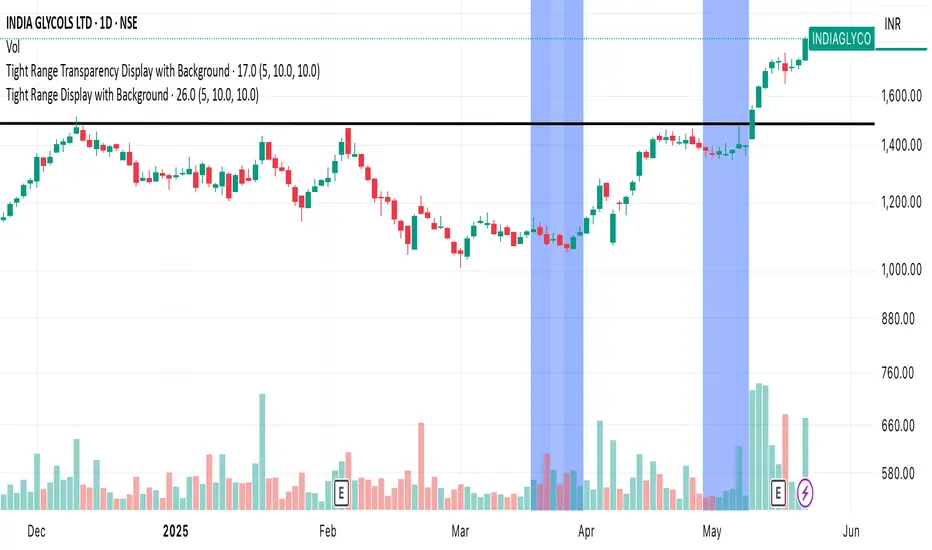
Hey traders! Ever wanted a simple way to spot those quiet, low-volatility moments in the market that often signal a big move is coming? The Tight Range Transparency Display with Background does exactly that! This indicator highlights periods where the price is moving in a tight range—think of it as the calm before the storm. It paints the chart background blue to show these zones, with the shade getting darker the tighter the range becomes. It’s like having a visual cue to say, “Hey, something might be brewing here!”
Why You’ll Love It
Spot Key Moments Easily: The blue background makes it super easy to see when the market is in a tight range, which often happens before breakouts or big trends.
Customizable Settings: You can tweak the range thresholds to match your trading style—whether you’re looking for super tight zones or slightly broader ones.
Visual Clarity: The background gets darker when the range is tighter, giving you a quick sense of how compressed the price action is.
Perfect for Any Market: Works on stocks, forex, crypto, or any chart you trade, across any timeframe.
How to Use It
Add It to Your Chart:
Just copy this script into TradingView’s Pine Editor and hit "Add to Chart." It’ll overlay right on your price chart.
Tweak the Settings:
Open the indicator settings and use the dropdown menus to pick your preferred "Tight Range %" and "Wide Range %." For example, set a Tight Range % of 2.0% to catch smaller ranges, or go higher like 10.0% for broader ones.
You can also adjust the ATR Period (default is 5) to make the indicator more or less sensitive to recent price swings.
Watch for the Blue Background:
When the price enters a tight range, the chart background turns blue. The darker the blue, the tighter the range—meaning a potential breakout could be closer!
Trade Smarter:
Use these tight range zones to prepare for potential breakouts. For example, if you see a dark blue background, it might be a good time to watch for a big price move.
Pair this with other tools like support/resistance levels or volume spikes to confirm your trades.
Who Is This For?
Swing Traders: Perfect for spotting consolidation zones before a big swing.
Breakout Traders: Tight ranges often lead to breakouts—use this to time your entries.
Smart Money Followers: If you’re into smart money concepts, tight ranges can signal accumulation or distribution phases.
Beginners & Pros Alike: It’s easy to use for new traders but powerful enough for seasoned pros.
Real-World Example
Imagine you’re trading a stock on a 1-hour chart. You notice the background turns blue, and it’s getting darker over a few bars. This tells you the price range is tightening—maybe the stock is consolidating after a big move. You check your other indicators, see a volume spike, and spot a breakout above resistance. Boom! You catch the next big trend, all because this indicator helped you focus on the right moment.
Tips for Best Results
Try Different Timeframes: Tight ranges on a 15-minute chart might signal short-term moves, while a daily chart could highlight bigger trends.
Adjust for Your Market: For volatile markets like crypto, you might want a higher Tight Range % (e.g., 10.0%). For calmer markets like forex, try a lower setting (e.g., 2.0%).
Combine with Other Tools: Use this alongside trendlines, moving averages, or volume indicators to confirm your setups.
Why I Made This
I created this indicator because I wanted a simple, visual way to spot those critical low-volatility zones without cluttering my chart. The dynamic background color makes it intuitive to see when the market is “coiling up” for a potential move. I hope it helps you find better trading opportunities just like it does for me!
Let’s Connect
If you find this indicator helpful, I’d love to hear about it! Drop a comment or a rating to let me know how it’s working for you. Got ideas to make it even better? Feel free to message me on TradingView—I’m always open to suggestions.
Published On
Date: May 22, 2025
Happy trading, and may your charts always be in your favor! 🚀
How to Publish on TradingView
Open Pine Editor:
On TradingView, open a chart and go to the Pine Editor tab at the bottom.
Paste the Code:
Copy the script you provided and paste it into the Pine Editor.
Compile:
Click "Add to Chart" to ensure it compiles without errors.
Publish:
Click the "Publish Script" button (paper plane icon) in the Pine Editor.
Select "Publish New Script."
Add the Description:
Title: "Tight Range Transparency Display with Background"
Description: Copy the content above into the description field.
Visibility: Choose "Public" to share with everyone (or "Invite-Only" for restricted access).
Tags: Add tags like "tight range", "breakout", "smart money", "volatility", "swing trading".
Screenshot: Add a screenshot of the indicator on a chart, showing the blue background during a tight range.
Submit:
Click "Publish" to submit. TradingView will review it and make it live if it meets their guidelines.
Additional Notes
Screenshot Tip: Use a chart where the blue background is clearly visible (e.g., during a consolidation period) to make the indicator’s effect stand out.
Engage with Users: After publishing, respond to comments and feedback to build a positive reputation on TradingView.
This content is designed to be approachable and engaging, helping traders understand the value of your indicator and encouraging them to try it out.
Judas Swing ICT 01 [TradingFinder] New York Midnight Opening M15🔵 Introduction
The Judas Swing (ICT Judas Swing) is a trading strategy developed by Michael Huddleston, also known as Inner Circle Trader (ICT). This strategy allows traders to identify fake market moves designed by smart money to deceive retail traders.
By concentrating on market structure, price action patterns, and liquidity flows, traders can align their trades with institutional movements and avoid common pitfalls. It is particularly useful in FOREX and stock markets, helping traders identify optimal entry and exit points while minimizing risks from false breakouts.
In today's volatile markets, understanding how smart money manipulates price action across sessions such as Asia, London, and New York is essential for success. The ICT Judas Swing strategy helps traders avoid common pitfalls by focusing on key movements during the opening time and range of each session, identifying breakouts and false breakouts.
By utilizing various time frames and improving risk management, this strategy enables traders to make more informed decisions and take advantage of significant market movements.
In the Judas Swing strategy, for a bullish setup, the price first touches the high of the 15-minute range of New York midnight and then the low. After that, the price returns upward, breaks the high, and if there’s a candlestick confirmation during the pullback, a buy signal is generated.
bearish setup, the price first touches the low of the range, then the high. With the price returning downward and breaking the low, if there’s a candlestick confirmation during the pullback to the low, a sell signal is generated.
🔵 How to Use
To effectively implement the Judas Swing strategy (ICT Judas Swing) in trading, traders must first identify the price range of the 15-minute window following New York midnight. This range, consisting of highs and lows, sets the stage for the upcoming movements in the London and New York sessions.
🟣 Bullish Setup
For a bullish setup, the price first moves to touch the high of the range, then the low, before returning upward to break the high. Following this, a pullback occurs, and if a valid candlestick confirmation (such as a reversal pattern) is observed, a buy signal is generated. This confirmation could indicate the presence of smart money supporting the bullish movement.
🟣 Bearish Setup
For a bearish setup, the process is the reverse. The price first touches the low of the range, then the high. Afterward, the price moves downward again and breaks the low. A pullback follows to the broken low, and if a bearish candlestick confirmation is seen, a sell signal is generated. This confirmation signals the continuation of the downward price movement.
Using the Judas Swing strategy enables traders to avoid fake breakouts and focus on strong market confirmations. The strategy is versatile, applying to FOREX, stocks, and other financial instruments, offering optimal trading opportunities through market structure analysis and time frame synchronization.
To execute this strategy successfully, traders must combine it with effective risk management techniques such as setting appropriate stop losses and employing optimal risk-to-reward ratios. While the Judas Swing is a powerful tool for predicting price movements, traders should remember that no strategy is entirely risk-free. Proper capital management remains a critical element of long-term success.
By mastering the ICT Judas Swing strategy, traders can better identify entry and exit points and avoid common traps from fake market movements, ultimately improving their trading performance.
🔵 Setting
Opening Range : High and Low identification time range.
Extend : The time span of the dashed line.
Permit : Signal emission time range.
🔵 Conclusion
The Judas Swing strategy (ICT Judas Swing) is a powerful tool in technical analysis that helps traders identify fake moves and align their trades with institutional actions, reducing risk and enhancing their ability to capitalize on market opportunities.
By leveraging key levels such as range highs and lows, fake breakouts, and candlestick confirmations, traders can enter trades with more precision. This strategy is applicable in forex, stocks, and other financial markets and, with proper risk management, can lead to consistent trading success.

Volumetric Toolkit [LuxAlgo]The Volumetric Toolkit is a complete and comprehensive set of tools that display price action-related analysis methods from volume data.
A total of 4 features are included within the toolkit. Symbols that do not include volume data will not be supported by the script.
🔶 USAGE
The volumetric toolkit puts a heavy focus on price action, returning support/resistance levels, ranges, volume divergences...etc.
The main premise between each feature is that volume has a direct relationship with market participants level of interest over a specific symbol, and that this interest is not constant over time.
Each individual feature is detailed below.
🔹 Ranges Of Interest
The Ranges Of Interest construct a range from a surge of high liquidity in the market. This range is constructed from the price high and price low of the candle with the associated significant liquidity.
The returned extremities can be used as support and resistance, with breakouts often being accompanied by significant liquidity as well, suggesting potential trend continuations.
The length setting associated with this feature determines how sensitive the range detection algorithm is to volume, with higher values requiring more significant volume in order to display a new range.
🔹 Impulses
Impulses highlight times when volume makes a new higher high while the price makes a new higher high or lower low, suggesting increased market participation.
When this occurs when the price makes a new higher high the impulse is considered bullish (green), if the price makes a new lower low the impulse is bearish (red).
Impulses occurring within an established trend opposite to it (e.g a bearish impulse on an uptrend) might be indicative of reversals.
The length setting works similarly to the previously described ranges of interest, with higher values requiring longer-term volume higher high and price higher high/lower low, highlighting more significant impulse and potentially longer-term reversals.
🔹 Levels Of Interest
Levels of interest display price levels of significant trading activity, contrary to the range of interest only the closing price is taken into account, also volume peaks are used to detect significant trading activity.
Note that this feature is subject to backpainting, that is lines are set retrospectively.
Users can determine the amount of most recent levels to display on the chart. These can be used as classical support/resistances.
🔹 Volume Divergence
We define volume divergence as a decreased market participation while a trend is still developing.
More precisely volume divergences are highlighted if volume makes a lower high while price is making a new higher high/lower low.
This can be indicative of a lack of further participation in the current trend, indicating a potential reversal.
Using higher length values will return longer-term divergences.
Note that this feature is subject to backpainting, that is lines are set retrospectively.
🔶 SETTINGS
🔹 Ranges Of Interest
Show Ranges Of Interest: Display Ranges Of Interest.
Length: Ranges Of Interest sensitivity to volume.
🔹 Impulses
Show Impulses: Display Ranges Of Interest.
Length: Impulses sensitivity to volume.
🔹 Levels Of Interest
Show: Determine if Levels Of Interest are displayed, and how many from the most recent.
Length: Level detection sensitivity to volume.
🔹 Volume Divergences
Show Divergences: Determine if Volume Divergences are displayed.
Length: Period for the detection of price tops/bottoms and volume peaks.

ICT Friday's Asian Range°This concept was engineered and taught by the Inner Circle Trader .
The goal of this script is to outline a potential draw on liquidity for the next trading week. It gives a parameter for ICT PD Arrays to be located above and below the marketplace and should be used in conjunction with the higher Timeframe Arrays as defined by ICT.
If there is a higher Timeframe array with a standard deviation confluence of the Friday Asian Range it is considered high probability for price to reach up/down to that level, and present a potential retracement or reversal.
The Asian Range is defined as the window of Time between 7PM to Midnight New York Time. In this case we will be only using the Friday's Asian Range which will take place on Thursday between these Times.
We have two ranges: a Body range made of the highest and lowest candle bodies, and a Wick range made by the highest and lowest candle wicks.
ICT teaches that we only want to apply this concept to the 5minute and 15minute chart.
THIS SCRIPT WILL NOT WORK ON ANY OTHER TIMEFRAME OUT OF THE BOX
Framework:
Visualization:
Example:
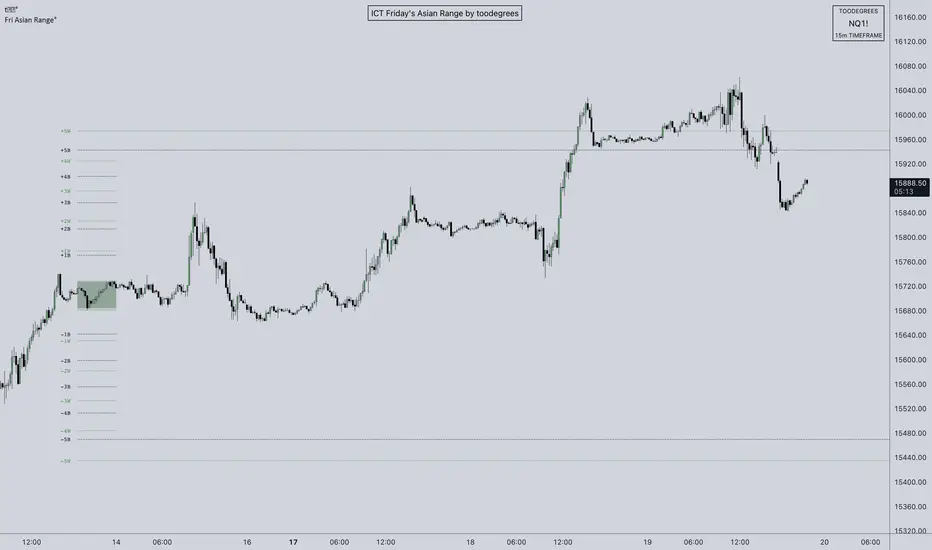
Auto-Zones (Fixed / Anchored Range)Title:
Auto-Zones (Fixed / Anchored Range) – Customizable Price Level Visualization
Description:
The Auto-Zones (Fixed / Anchored Range) indicator automatically plots key price levels based on a user-defined time range. It provides traders with a clear visual representation of average prices or fractions within a fixed or anchored range, helping to identify support, resistance, and potential breakout areas.
Key Features:
• Flexible Range Modes:
‣ Fixed Range – Plot averages only between a specific start and end date/time.
‣ Anchored – Plot averages from a start date/time extending indefinitely.
• Multiple Measurement Options:
‣ Loopback – Calculates averages over a set number of bars.
‣ Fraction – Divides the range into equal fractions for detailed zone mapping.
• Price Source Selection:
‣ Choose from Open, Close, High, Low, Midpoint, or High & Low for customized analysis.
• Automatic Zone Plotting:
‣ Lines are plotted at calculated averages or fractional levels, extended to the right for continuous reference.
• Fully Customizable Style:
‣ Line color and width are adjustable to suit chart preferences.
Inputs & Settings:
• Start/End Date & Time – Define the range for averaging or anchoring.
• Range Mode – Fixed or Anchored.
• Measurement Mode – Loopback bars or fractional divisions.
• Loopback Length – Number of bars for Loopback mode.
• Fractions – Number of levels for Fraction mode.
• Price Source – Determines which price data to use.
• Line Color & Width – Visual customization options.
Usage:
This indicator helps traders:
• Visualize key price levels for support/resistance analysis.
• Identify average price areas within a custom time range.
• Use fixed or anchored ranges for intraday, swing, or long-term analysis.
• Quickly see fractional zones for precise entry or exit planning.
Technical Notes:
• Anchored ranges extend indefinitely from the start date; adjust the start date to reset levels.
• Loopback mode averages only complete bar sets; fractional mode divides the total range into equal parts.
• Works best on standard OHLC charts; ensure proper date/time inputs for accurate plotting.

Trading Range Detector - [GonzaCam]Strict Market Structure
This indicator provides a highly disciplined approach to identifying Market Structure, Swing Points, and Trading Ranges. Unlike standard fractal indicators that simply look for high/low wicks, this script enforces a "Strict" set of rules combining Fractal Geometry, Candle Color, and Close Prices to filter out noise and identify high-probability structure levels.
It is designed for traders who need precise structural mapping (BOS) and want to avoid the "fake-outs" common with standard swing indicators.
Key Features
Strict Swing Detection : A 3-candle pattern is only valid if it meets three specific criteria:
Wick Fractal: The middle candle has the highest high (for Swing Highs) or lowest low (for Swing Lows).
Close Price Fractal: The Body (Close) of the middle candle must also be the highest/lowest of the pattern, preventing weak "wick-only" pivots.
Color Logic: Enforces specific color flows (e.g., Green → Red for tops) to ensure momentum has actually shifted.
Smart Range Tracking:
Active Range: Shows the current trading range (Top and Bottom) with thick, solid lines.
Historical Structure: Automatically archives broken levels as thin, dashed lines, creating a clean history of market structure.
"True Peak" Logic: When a Break of Structure (BOS) occurs, the script enters a "Seeking" phase. It intelligently tracks the Highest High (in a bearish break) or Lowest Low (in a bullish break) to ensure the new range is drawn from the true pivot, not just the first confirmed swing.
How It Works
1. Swing High Definition
A valid Swing High is confirmed when a 3-candle cluster appears with:
Middle Candle: Green Body.
Right Candle: Red Body.
Geometry: Middle Wick High > Left & Right Wicks AND Middle Close > Left & Right Closes.
Confirmation: Price must subsequently close below the low of the middle candle.
2. Swing Low Definition
A valid Swing Low is confirmed when a 3-candle cluster appears with:
Middle Candle: Red Body.
Right Candle: Green Body.
Geometry: Middle Wick Low < Left & Right Wicks AND Middle Close < Left & Right Closes.
Confirmation: Price must subsequently close above the high of the middle candle.
3. Range & BOS Logic
Break of Structure (BOS): Triggered when a candle closes outside the current Range Top or Bottom.
Seeking Phase: After a BOS, the script waits for a new opposing swing to form.
Example: If the market breaks UP (Bullish BOS), the script searches for the next confirmed Swing High.
Optimization: While seeking, it continuously updates to the Highest High reached, ensuring the Range Top is set at the absolute peak of the move.
Settings & Customization
Current Range Style: Customize the Color, Width, and Style (Solid/Dotted) of the active range lines.
Historical Swings Style: Customize the appearance of past structure levels to distinguish them from active price action.
Disclaimer.
This tool is for informational purposes only and does not constitute financial advice. Trading involves risk. Always use proper risk management

Scalping 4H Range + 50% This strategy is designed to capture high-probability reversals by exploiting "fakeouts" and liquidity sweeps that occur after the market's initial opening range.
How it Works:
The Range: The indicator automatically defines the High and Low of the first 4 hours of the trading session (typically the Asian/London overlap or New York Open).
The Setup: Instead of chasing breakouts, this strategy waits for a Failure to Break. It monitors for price to break out of the 4-hour range and then immediately close back inside.
The Signal:
BUY Signal: Price breaks below the Range Low (sweeping liquidity) but closes back inside the range.
SELL Signal: Price breaks above the Range High (sweeping liquidity) but closes back inside the range.
Trade Management:
Target: Trades target the opposing side of the range (e.g., a Buy at the Low targets the Range High).
Stop Loss: Placed at the extreme wick of the fakeout move to ensure a tight risk profile.
Equilibrium: A 50% Mid-Range line is provided to help secure partial profits or adjust stops to Breakeven.
How to Use This Indicator
1. Chart Setup
Timeframe: This strategy is optimized for the 5-Minute (M5) timeframe.
Asset Class: Works best on volatile pairs (Indices like US30/NAS100, or major Forex pairs like EURUSD/GBPUSD) where liquidity sweeps are common.
2. Session Configuration
Go to the indicator settings.
Session Input: Define the first 4 hours of your trading day (e.g., 0000-0400 for the New York midnight open or 0800-1200 for the London Open).
Note: The indicator automatically highlights this background in blue. No trades are taken during this formation phase.
3. Understanding the Visuals
Red Line: Range High (Resistance).
Green Line: Range Low (Support).
Grey Dotted Line: Mid-Range (50% Equilibrium).
4. Trading Rules The strategy does not trade breakouts; it trades false breakouts (fakeouts).
BUY Signal:
Price breaks below the Green Line.
Candle closes back above the Green Line.
Entry: On the close of the signal candle.
Stop Loss: Below the lowest wick of the breakout move.
Take Profit: Target the Red Line (Range High).
SELL Signal:
Price breaks above the Red Line.
Candle closes back below the Red Line.
Entry: On the close of the signal candle.
Stop Loss: Above the highest wick of the breakout move.
Take Profit: Target the Green Line (Range Low).
5. Management (Mid-Range)
When price hits the Grey Dotted Line (50%), it is recommended to move your Stop Loss to Breakeven or take partial profits.
Disclaimer: Trading involves a high risk of financial loss. This tool is provided for educational purposes only and does not constitute investment advice. Use of this tool is at your own risk. Pirate Pips ™ is not responsible for any losses incurred.

SMC Liquidity & Dealing Range [Blk0ut]SMC Liquidity & Dealing Range
- Concept -
This is a professional-grade Smart Money Concepts (SMC) toolkit designed for precision intraday trading. Unlike standard indicators that rely on static "Previous Day" ranges or lagging pivot points, this script features a Dynamic Dealing Range that adapts in real-time to market structure.
It identifies the valid structural range (Premium vs. Discount), automatically expands that range if price breaks out in real-time, and overlays significant liquidity pools (Internal/External) to help you frame high-probability setups.
- Key Features -
1. Dynamic Dealing Range (Real-Time Expansion)
Most structure indicators lag—they wait for a pivot to "confirm" (which takes bars) before moving the range.
This script is distinct: It anchors the Dealing Range to the last confirmed structure, BUT it actively monitors live price action.
Smart Expansion : If price makes a new High or Low after the confirmed pivot, the Dealing Range (and the Premium/Discount zones) automatically expands in real-time. You never have to wait for a candle close to see the true range.
2. Directional OTE (Golden Zone)
The script detects the current structural bias based on the sequence of pivots.
Bullish Structure: If the range is anchored by a Low, the script projects the Long OTE (61.8% - 78.6% Discount).
Bearish Structure: If the range is anchored by a High, the script projects the Short OTE (61.8% - 78.6% Premium).
3. Automated Liquidity Classification
The script plots key historical levels and classifies them dynamically:
Internal Liquidity: Levels trapped inside the current Dealing Range. (Targets for "fuel").
External Liquidity: Levels outside the Dealing Range. (Targets for stop runs).
Monitored Levels: PDH/PDL (Daily), PWH/PWL (Weekly), PMH/PML (Monthly), and Session Highs/Lows.
4. Smart Line Merging (Clustering)
To prevent chart clutter, the script uses a clustering algorithm. If multiple liquidity levels (e.g., Swing High + Previous Day High) exist within a tight price zone (default 1.5% of range), the script merges them into a single line with a combined label (e.g. PDH + Swing High).
Configuration Guide
Dealing Range (Structure)
Structure Type:
External (Swing): Uses larger lookback periods (Default: 50). Best for finding the overall "playing field" on 15m/1H charts.
Internal (Structure): Uses shorter lookback periods (Default: 20). Best for scalping sub-structure on 1m/5m charts.
Lookback Lengths: Fully customizable to match your trading style.
Note: Depending on the timeframes you use and your trading style you WILL have to play with the Lookback Lengths, and the selection of Internal vs. External structures!
General Settings
Forward / Backward Extension: Controls how far lines stretch across the screen.
Merge Threshold: Controls how aggressively the script combines overlapping lines.
Session Times
Pre-Market / After-Hours: Essential for futures/stock traders. Ensure these match your exchange times (e.g., 0400-0930 for NY Pre-Market).
How to Use
Check the Phase: Are we in Premium (Red) or Discount (Green)?
Identify Targets: Look for Internal Liquidity near the Equilibrium or OTE zones.
The Setup: A common SMC play is to wait for price to sweep Internal Liquidity, tap into the OTE zone, and then target the opposing External Liquidity.
Happy Trading! Don't be exit liquidity

Malama's Range BreakoutMalama's Range Breakout is a dynamic indicator designed to automatically detect periods of price consolidation (tight ranges) and generate actionable signals for breakouts or wick-based reversals.
Why It's Useful: Unlike fixed-time tools like Opening Range Breakouts (ORB), this indicator is Adaptive. It uses a volatility-adjusted threshold (ATR multiplier) to determine when a market is truly consolidating. This helps traders avoid false signals in choppy markets and focus on periods where volatility is compressing.
Key Features:
Adaptive Detection: Uses ATR over a user-defined lookback to find tight ranges automatically.
Preset Profiles: Quickly switch between optimized settings for:
Scalping: (Tight Ranges)
Intraday: (Normal Ranges)
Swing Trading: (Loose Ranges)
Options/Chop: (Extreme sideways movement)
Breakout Signals: Triggers "BUY/SELL" labels when price closes outside the box. Includes an optional Volume Filter to ignore low-momentum breakouts.
Wick Reversals: Detects "Fake-outs" where wicks probe the range boundary but fail to close outside, signaling a potential reversal back into the range.
How to Use:
Select a Profile: Choose "Normal" for standard day trading or "Tight" for scalping.
Wait for the Box: The indicator will draw an orange box when price consolidates.
Trade the Break: Wait for a confirmed close outside the box (Look for the "Malama BUY/SELL" label).
Watch for Rejection: If you see a "Wick" label, it means the breakout failed—be cautious or trade the reversal.
Settings:
Profile: Select your trading style (Scalping, Intraday, Swing).
Volume Filter: Require a volume spike to confirm breakouts (Recommended).
Wick Confirmation: Require a confirmation candle before signaling a wick reversal.

ES 30 Second Opening RangeOverview
Tracks opening ranges across three global futures sessions (RTH, Globex, Europe) using 30-second precision sampling. Provides high/low/mid levels, 15-point projection intervals, and breakout detection for range-based trading.
What Makes This Unique
30-Second Precision: Uses request.security_lower_tf() to sample the first 30 seconds of each session, capturing exact opening range high/low rather than relying on larger timeframe bars.
Multi-Session Tracking: Simultaneously monitors RTH (8:30 AM CT), Globex (5:00 PM CT), and Europe (2:00 AM CT) opening ranges with independent calculations for 24-hour futures coverage.
15-Point Projections: RTH-specific feature plots 5 extension levels above/below opening range at 15-point intervals (+15, +30, +45, +60, +75). Calibrated for ES futures point movement.
Adjustable Scalp Levels: Customizable +/- point lines from RTH range (default 4 points) for precise entry/exit management.
How It Works
Opening Range Calculation:
Session detection: hour(time, "America/Chicago") + minute(time) * 0.01
30s data request: request.security_lower_tf(syminfo.tickerid, "30S", high/low)
Range capture: ta.valuewhen(session_time == start_time AND second == 0, array.get(data, 0), 0)
Midpoint: (high + low) / 2
At each session start, the indicator captures the first 30-second bar's high and low, then plots these as persistent levels throughout the session.
15-Point Intervals (RTH only):
Level_up = RTH_high + (15 × n) where n = 1,2,3,4,5
Level_down = RTH_low - (15 × n)
Breakout Detection:
Break_up = ta.crossover(close, session_high)
Break_down = ta.crossunder(close, session_low)
Statistics:
Range width = session_high - session_low (displayed in table)
How to Use
Session-Based Levels: Each session's opening range represents institutional price discovery. Use as dynamic support/resistance throughout the day.
Breakout Trading: Visual signals mark opening range breakouts. Narrow ranges (<10 points ES) often precede larger moves.
15-Point Targets: After RTH breakout, use 15-point intervals as profit targets. Example: after +15 hit, next target is +30.
Gap Analysis: Compare overnight sessions to RTH. Gaps often fill toward RTH opening range.
Scalping: Adjustable point offset provides tight profit targets from range boundaries.
Key Settings
Session Toggles: Enable/disable RTH, Globex, Europe individually
15-Point Lines: RTH-only, off by default. Shows 5 levels above/below OR at 15-point intervals
Point Offset (4.0): Adjustable for tighter (2-3) or wider (6-8) scalp levels
Range Boxes: Optional visual highlighting with adjustable transparency
Statistics Table: Shows session high, low, range width
Why Protected Source
The 30-second data aggregation using request.security_lower_tf() with time-based session detection, 15-point interval projection system calibrated for ES futures, and multi-session concurrent tracking represent proprietary implementation methods.
Important Disclaimers
Not Financial Advice. Educational tool only.
Instrument Specific. 15-point intervals optimized for ES futures. Other instruments may need different sizes.
Session Accuracy. Captures first 30 seconds only. Data gaps or late opens may affect accuracy.
Historical Limitations. Opening range effectiveness varies by market regime and volatility.
Always use proper risk management. This provides reference levels, not trade signals.

IDWM Master StructureExecutive Summary
The IDWM Master Structure is a Multi-Timeframe (MTF) trading tool designed to force discipline by aligning traders with the "Parent" trend. It functions by locking onto the "Completed Auction" of a higher timeframe candle (like a Daily or Weekly bar) and projecting that structure onto your lower timeframe chart. Its primary goal is to define the "Dealing Range"—the hard boundaries where value was previously established—so you don't get lost in the noise of smaller price movements.
1. The Principle of Completed Auctions (Hierarchy)
Most technical indicators curve dynamically with every price tick. This script acts differently because it relies on "Settled Arguments." A closed Daily candle represents a finished battle between buyers and sellers; the High and Low are the historical results of that battle.
To enforce this, the script automatically selects a "Parent" timeframe based on your view:
Scalping (charts below 15 minutes) uses the 4-Hour Auction.
Intraday trading (15 minutes to 4 Hours) uses the Daily Auction.
Swing trading (Daily chart) uses the Weekly Auction.
2. Liquidity Pools & The Sticky Range
The High and Low lines drawn by the indicator are not just support and resistance; they represent Liquidity Pools. In market theory, stop-losses (Sell Stops below Lows, Buy Stops above Highs) accumulate at these edges.
Smart money often pushes price just past these lines to grab this liquidity (a "Stop Hunt") before reversing direction. To account for this, the script uses a "Sticky Range" mechanism. It refuses to redraw the box simply because price touched the line. Instead, it uses an Average True Range (ATR) Buffer. A new structure is only formed if the candle closes decisively outside the range plus this volatility buffer. This ensures you are trading real breakouts, not liquidity sweeps.
3. Internal Range Mechanics (Premium vs. Discount)
Inside the Master Box, the script applies Equilibrium Theory to help with trade location.
The most important internal line is the Equilibrium (EQ), which marks the exact 50% point of the range.
Premium Zone (Above EQ): Price is mathematically "expensive" relative to the recent range. Algorithms generally look to establish Short positions here.
Discount Zone (Below EQ): Price is considered "cheap." Algorithms generally look to establish Long positions here.
It also plots the Master Open, which acts as a "Line in the Sand." If price is currently trading above the Master Open, the higher timeframe candle is Green (Bullish), suggesting longs have a higher probability. If below, the candle is Red (Bearish).
4. Wick Theory (Failed Auctions)
The script places special emphasis on the wicks of the Master Candle because a wick represents a "Failed Auction"—a price level the market tried to explore but ultimately rejected.
The indicator highlights the background of the wick area (from the High to the Body). On a retest, these zones often act as supply or demand blocks because the market remembers the previous failure.
It also calculates the "Consequent Encroachment," which is the 50% midpoint of the wick. The rule of thumb here is that if a candle body can close past 50% of a wick, the rejection is nullified, and price will likely travel to fill the entire wick.
5. Energy Expansion (Breakout Targets)
Market energy transfers from Consolidation (inside the box) to Expansion (the breakout). When the price finally breaks the "Sticky Range" (confirming via the ATR buffer), the script projects where that energy will go.
It uses the height of the previous range to calculate Fibonacci extensions. Specifically, it targets the 1.618 Extension, often called the "Golden Ratio." This is a statistically significant level where expansion moves tend to exhaust themselves and reverse.
6. Safety Protocol: Live Detection
A dashboard monitors the state of the parent candle. If the text turns Magenta with a warning symbol, it means the Higher Timeframe candle is "Live" (still forming).
Trading off a live structure is considered higher risk because the "Auction" isn't finished—the High or Low can still shift. The safest approach is to trade when the dashboard indicates a standard, locked, historical structure.

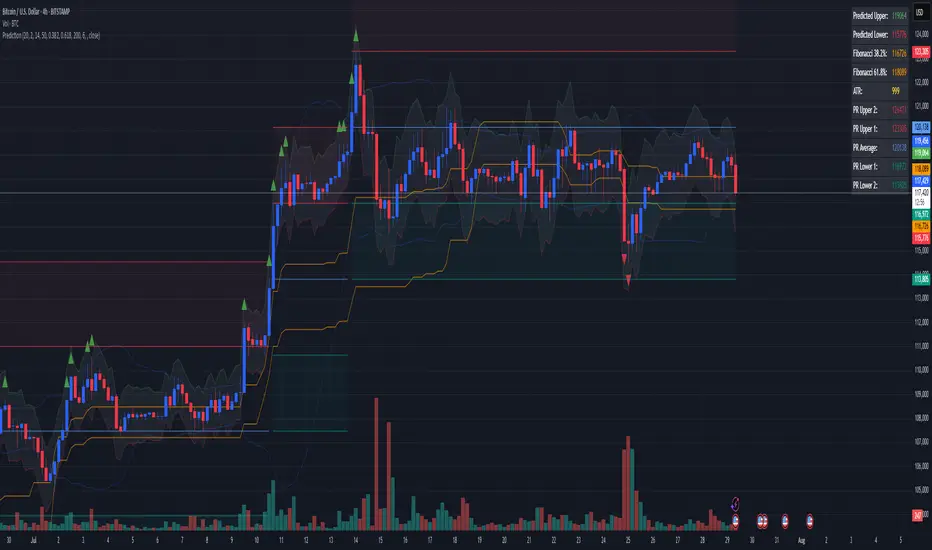
Combined Predictive Indicator### Combined Predictive Zones & Levels
This indicator is a powerful hybrid tool designed to provide a comprehensive map of potential future price action. It merges two distinct predictive models into a single, cohesive view, helping traders identify key levels of support, resistance, and areas of high confluence.
#### How It Works: Two Models in One
This script is built on two core components that you can use together or analyze separately:
**Part 1: Classic Range & Fibonacci Prediction**
This model uses classic technical analysis principles to project a potential range for the upcoming price action.
* **Highest High / Lowest Low:** It identifies the significant trading range over a user-defined lookback period.
* **Fibonacci Levels:** It automatically plots key Fibonacci retracement levels (e.g., 38.2% and 61.8%) within this range, which often act as critical support or resistance.
* **ATR & Average Range:** It calculates a "predicted" upper and lower boundary based on the average historical range and current volatility (ATR).
**Part 2: Advanced Predictive Ranges (Self-Adjusting Channels)**
This is a dynamic model that creates adaptive support and resistance zones based on a smoothed average price and volatility.
* **Dynamic Average:** It uses a unique moving average that only adjusts when the price moves significantly, creating a stable baseline.
* **ATR-Based Zones:** It projects multiple levels of support (S1, S2) and resistance (R1, R2) around this average, which widen and narrow based on market volatility. These zones often signal areas where price might stall or reverse.
#### Key Features:
* **Hybrid Model for Confluence:** The true power of this indicator lies in finding where the levels from both models overlap. A Fibonacci level aligning with a Predictive Range support zone is a much stronger signal.
* **Comprehensive Data Table:** A clean, on-chart table displays the precise values of all key predictive levels, allowing for quick reference and precise trade planning.
* **Multi-Timeframe (MTF) Capability:** The Advanced Predictive Ranges can be calculated on a higher timeframe, giving you a broader market context.
* **Fully Customizable:** All lengths, multipliers, and levels for both models are fully adjustable in the settings to fit any asset or trading style.
* **Clear Visuals:** All zones and levels are color-coded for intuitive and easy-to-read analysis.
#### How to Use:
1. Look for areas of **confluence** where multiple levels from both models cluster together. These are high-probability zones for price reactions.
2. Use the Predictive Range zones (S1/S2 and R1/R2) as potential targets for trades or as areas to watch for entries and exits.
3. Pay attention to the on-chart table for exact price levels to set limit orders or stop-losses.
**Disclaimer:** This script is an analytical tool for educational purposes and should not be considered financial advice. All trading involves risk. Past performance is not indicative of future results. Always use this indicator as part of a comprehensive trading strategy with proper risk management.
Feedback is welcome! If you find this tool useful, please leave a like.
Fundamental Fair Value RangeFundamental Fair Value Range (FFV Range)
Purpose:
This indicator aims to estimate a company's intrinsic fair value range based on its historical valuation patterns and current financial health. It analyzes multiple fundamental valuation metrics to provide a comprehensive perspective, helping traders identify potential overvaluation or undervaluation relative to the company's own historical norms.
How It Works:
Data Collection: The script gathers historical financial data for the company over a user-defined number of past quarters ( Number of Quarters to Average ). It retrieves key metrics like Earnings Per Share (EPS), Book Value Per Share (BVPS), Sales Per Share, Free Cash Flow (FCF) Per Share, Tangible Book Value Per Share (TBVPS), EBITDA, Operating Cash Flow (OCF) Per Share, Enterprise Value (EV), and Net Debt. It also pulls current TTM (Trailing Twelve Months) data, forward estimates (EPS, Sales), risk metrics (Debt-to-Equity, Altman Z-Score), and dividend yield.
Historical Ratio Calculation: For each of the past quarters where data is available, the script calculates standard valuation ratios (P/E, P/B, P/S, P/FCF, P/TBV, EV/EBITDA, P/CF) using the closing price at that time and the relevant financial data. Ratios are capped ( Maximum Ratio Cap ) to prevent extreme outliers from skewing results.
Central Tendency: The script calculates the historical central tendency (either the median or mean , selectable by the user) for each valuation ratio based on the collected historical data points. Median is generally preferred to reduce the impact of outliers, but the mean option is available.
Individual Metric Fair Values: Using the current financial data (TTM EPS, BVPS, Sales/Share, etc.) and the calculated historical average ratio , the script estimates a fair value based on each individual metric . For example:
P/E Fair Value = Current EPS * Historical Average P/E Ratio
P/S Fair Value = Current Sales Per Share * Historical Average P/S Ratio
(...and so on for P/B, P/FCF, P/TBV, and P/CF.)
Forward-Looking Adjustments & Blending:
P/E: Calculates fair value using both TTM EPS and Forward EPS estimates. These two values are then blended (averaged) to incorporate future expectations. If only one is available, that one is used.
EV/EBITDA: Calculates fair value based on TTM EBITDA and also based on estimated future EBITDA (derived from Sales Estimates and historical EBITDA margin). These are then blended . The calculation converts the Enterprise Value back to an estimated equity value per share by subtracting Net Debt.
P/S: Also calculates a forward-looking P/S fair value using Sales Estimates, which is considered alongside the TTM version when weighting.
Weighted Composite Fair Value:
The script combines the individual fair value estimates into a single composite value using a weighted average .
User-Defined Weights: You assign weights to each metric (P/E, P/S, P/FCF, P/B, P/TBV, EV/EBITDA, P/CF) via the script settings.
Dynamic Weighting: The weights for P/E, P/S, and P/FCF can be set differently depending on whether the company's current TTM EPS is positive or negative. This allows the model to emphasize sales or cash flow metrics more heavily for unprofitable companies, where P/E is less meaningful.
Risk Adjustment: The composite fair value is adjusted downwards (multiplied by 0.9 for each condition met) if:
Debt-to-Equity ratio exceeds 1.5 (indicating higher leverage risk).
Altman Z-Score is below 1.8 (indicating higher bankruptcy risk).
Dividend Adjustment: The risk-adjusted fair value is then potentially increased based on the company's dividend yield. The yield is added to the value (up to a maximum adjustment of 5% - MAX_DIV_ADJ ) to reflect the value returned to shareholders via dividends. Final Fair Value = Risk-Adjusted Value * (1 + Capped Dividend Yield) .
Confidence Range: A range is calculated around the Final Fair Value. This range is determined by the standard deviation of the individual fair value components that were actually used (had valid data and positive weights) in the composite calculation. A wider range suggests less agreement between the different valuation methods.
Valuation Signal: The script compares the current closing price to the calculated Final Fair Value and the Confidence Range, using Average True Range (ATR) based thresholds near the fair value:
Very Undervalued: Price is below the Lower Bound of the confidence range.
Undervalued: Price is below the Final Fair Value minus an ATR-based buffer.
Fairly Valued: Price is near the Final Fair Value (within the ATR buffer).
Overvalued: Price is above the Final Fair Value plus an ATR-based buffer.
Very Overvalued: Price is above the Upper Bound of the confidence range.
Features & Customization:
Multi-Metric Analysis: Incorporates P/E, P/B, P/S, P/FCF, P/TBV, EV/EBITDA, and P/CF.
Historical Basis: Choose Median or Mean for historical ratio calculation and set the lookback period (number of quarters).
Flexible Weighting: Customize the importance of each metric. Crucially, set different weights for P/E, P/S, and P/FCF based on profitability (EPS > 0 or EPS ≤ 0).
Forward Data Integration: Blends TTM and forward estimates for P/E and EV/EBITDA.
Risk & Dividend Adjustments: Automatically discounts for high debt/low Altman Z-score and premiums for dividend yield (capped).
Clear Visualization:
Plots the Final Fair Value line on the chart.
Plots the Upper and Lower Confidence Bounds (based on standard deviation).
Fills the area between bounds to show the Confidence Range.
Informative Data Table:
Displays the calculated fair value for key individual metrics, their historical average ratios, and current underlying financial values (like EPS, BVPS).
Shows risk metrics (Debt/Equity, Altman Z).
Clearly presents the Final Composite Fair Value, the Confidence Range, the current Valuation Signal (e.g., "Undervalued"), and the percentage difference between the current price and the fair value.
Simple/Full Mode: Option to display a condensed table with only the summary results or the full detailed breakdown.
Display Options: Adjust table position, text size, and switch between light/dark themes for better readability.
How to Use:
Apply the indicator to a stock chart on TradingView.
Configure Settings:
Go into the indicator settings ( Gear Icon ⚙️).
- Calculation Parameters: Set the Number of Quarters to Average (e.g., 20 for 5 years) and choose Use Mean Instead of Median if desired. Adjust Maximum Ratio Cap if needed.
- Valuation Weights: This is crucial. Adjust the weights based on the industry, company maturity, and your valuation philosophy. Consider giving higher weights to metrics commonly used for that sector. Use the separate weights for positive/negative EPS scenarios thoughtfully. For instance, for unprofitable tech stocks, you might assign zero weight to P/E and higher weights to P/S or EV/EBITDA (negative EPS weights).
- Display Options: Choose table mode, position, size, and theme.
Interpret the Output:
- Observe the plotted Fair Value line relative to the current price.
- Note the Confidence Range (shaded area). A wider range indicates more uncertainty or divergence between valuation methods.
- Check the Valuation status in the table (e.g., "Undervalued", "Overvalued").
- Use the % from Fair Value in the table for a quick gauge of deviation.
- Review the individual metric fair values in the full table mode to understand which factors are driving the composite value.
Considerations:
Historical Data Dependence: The model heavily relies on past valuation patterns repeating. Significant changes in a company's business model, market, or industry may make historical ratios less relevant.
Parameter Sensitivity: The calculated fair value is sensitive to the chosen weights and the historical lookback period. Experiment and use values that make sense for your analysis style and the specific stock.
Data Quality: The accuracy of the output depends entirely on the accuracy and availability of the underlying financial data provided by TradingView for the specific ticker. Data may be missing or contain errors for some stocks.
Not Financial Advice: This indicator provides a model-based estimation of fair value. It should be used as one tool among many in your investment decision-making process, not as a sole buy/sell signal. Always conduct thorough due diligence.

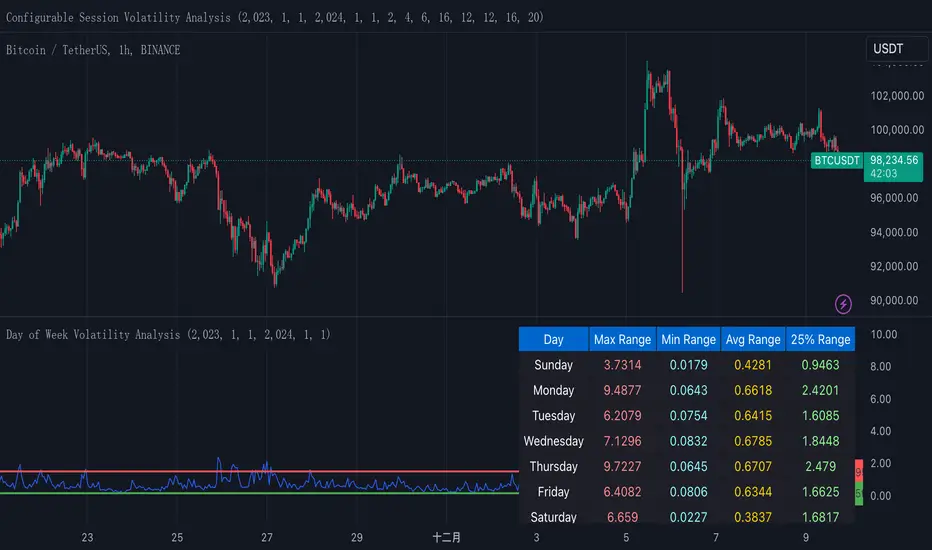
Normalized True Range - Grouped by WeekdaysThis indicator helps traders analyze daily volatility patterns across different days of the week by calculating normalized price ranges.
Unlike traditional volatility measures, it uses a normalized approach by dividing the daily range (high-low) by the midpoint price and multiplying by 100, providing a percentage-based measure that's comparable across different price levels. This normalization makes it particularly useful for comparing volatility patterns across different assets or time periods.
The indicator also includes a statistical overlay that highlights extreme volatility events. By calculating the 5th and 95th percentiles of the normalized ranges within your specified date range, it creates upper and lower bounds that help identify outlier days where volatility was exceptionally high or low.
These bounds appear as horizontal lines on the chart, making it easy to spot when current volatility breaks out of its historical norms.
The data is presented in both visual and tabular formats, with a comprehensive table showing the maximum, minimum, average, and 25th percentile ranges for each day of the week. This dual presentation allows traders to both quickly spot patterns visually and access detailed statistics for deeper analysis.
The user can customize the analysis period through simple date range inputs, making it flexible for different analytical timeframes.
Fibonacci Period Range [UkutaLabs]█ OVERVIEW
The Fibonacci Period Range Indicator is a powerful trading tool that draws levels of support and resistance that are based on key Fibonacci levels. The script will identify the high and low of a range that is specified by the user, then draw several levels of support and resistance based on Fibonacci levels.
The script will also draw extension levels outside of the specified range that are also based on Fibonacci levels. These extension levels can be turned off in the indicator settings.
Each level is also labelled to help traders understand what each line represents. These labels can be turned off in the indicator settings.
The purpose of this script is to simplify the trading experience of users by giving them the ability to customize the time period that is identified, then draw levels of support and resistance that are based on the price action during this time.
█ USAGE
In the indicator settings, the user has access to a setting called Session Range. This gives users control over the range that will be used.
The script will then identify the high and low of the range that was specified and draw several levels of support and resistance based on Fibonacci levels between this range. The user can also choose to have extension levels that display more levels outside of the range.
These lines will extend until the end of the current trading day at 5:00 pm EST.
█ SETTINGS
Configuration
• Display Mode: Determines the number of days that will be displayed by the script.
• Show Labels: Determines whether or not identifying labels will be displayed on each line.
• Font Size: Determines the text size of labels.
• Label Position: Determines the justification of labels.
• Extension Levels: Determines whether or not extension levels will be drawn outside of the high and low of the specified range.
Session
• Session Range: Determines the time period that will be used for calculations.
• Timezone Offset (+/-): Determines how many hours the session should be offset by.

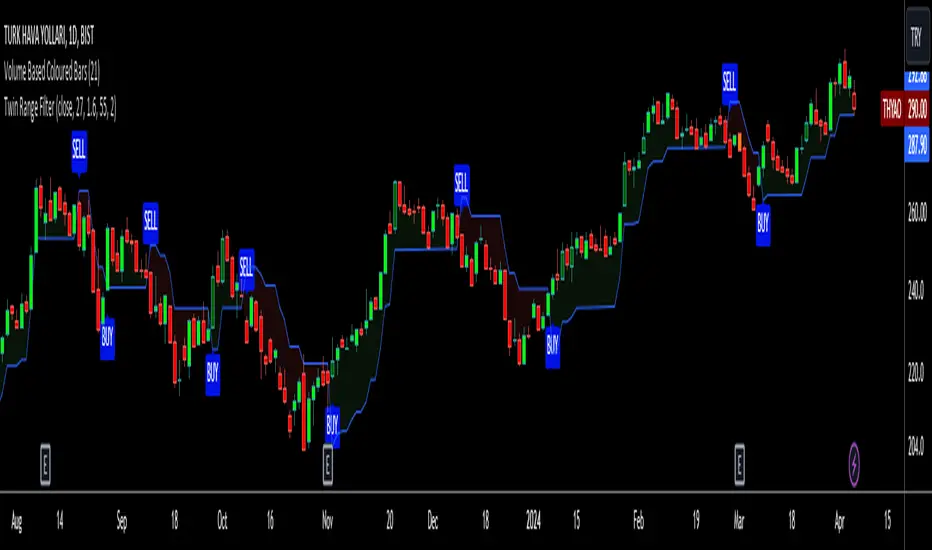
Twin Range Filter VisualizedVisulaized version of @colinmck's Twin Range Filter version on TradingView.
On @colinmck's Twin Range Filter version, you can only see Long and Short signals on the chart.
But in this version of TRF, users can visually see the BUY and SELL signals on the chart with an added line of TRF.
TRF is an average of two smoothed Exponential Moving Averages, fast one has 27 bars of length and the slow one has 55 bars.
The purpose is to obtain two ranges that price fluctuates between (upper and lower range) and have LONG AND SHORT SIGNALS when close price crosses above the upper range and conversely crosses below lower range.
I personally combine the upper and lower ranges on one line to see the long and short signals with my own eyes so,
-BUY when price is higher or equal to the upper range level and the indicator line turns to draw the lower range to follow the price just under the bars as a trailing stop loss indicator like SuperTrend.
-SELL when price is lower or equal to the lower range levelline under the bars and then the indicator line turns to draw the upper range to follow the price just over the bars in that same trailing stop loss logic.
There are also two coefficients that adjusts the trailing line distance levels from the price multiplying the effect of the faster and slower moving averages.
The default values of the multipliers:
Fast range multiplier of Fast Moving Average(27): 1.6
Slow range multiplier of fSlow Moving Average(55): 2
Remember that if you enlarge these multipliers you will enlarge the ranges and have less but lagging signals. Conversely, decreasing the multipliers will have small ranges (line will get closer to the price and more signals will occur)