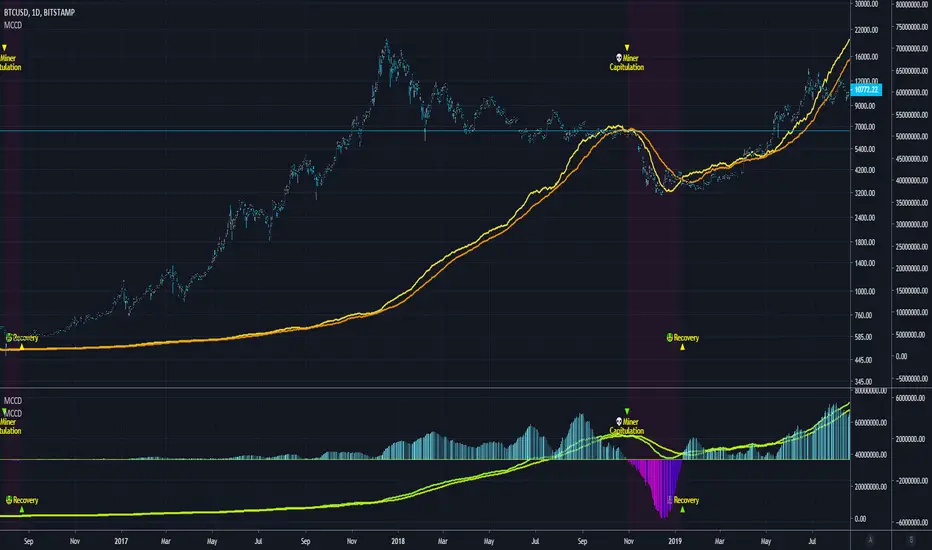
Power Law S/RBerger's article on the Power Law Model for Bitcoin is a compelling read and gives the best evidence so far of the diminishing case for retracing below $3000, of a slowing market on a log-log plot, and reducing but continued volatility.
After seeing it acts as support routinely in the last 10 years, I put together a quick little script that plots his midline curve for Bitcoin. You can change the intercept and slope but will need to do your own calculations for other curves.
I hope you all like it.
Wyszukaj w skryptach "bitcoin"
Crypto Prices InfoPanel V2Hello traders
Following the introduction of ByBit to TradingView ByBit on TradingView
I decided to upgrade my previous Bitcoin InfoPanel Bitcoin-Prices-InfoPanel/
Now it's more dynamic (thumbs up) but only work with Bitcoin, Ethereum and Litecoin . If you select any other asset than those 3, the script won't work
This is due to a technical limitation on TradingView because I can't do more than 40 security calls per script
If you don't know what the security function is, here's a reminder : Security documentation . If you don't know what is TradingView... I cannot do anything for you...
Now you can use this panel to have a very cool arbitrage view directly from TradingView and use the info to gamble between brokers (not financial advice)
See you all tomorrow for a huge update regarding the Strategy Builder. I'll show you how to connect it to a Backtest system
____________________________________________________________
Feel free to hit the thumbs up as it shows me that I'm not doing this for nothing and will motivate to deliver more quality content in the future.
- I'm an officially approved PineEditor/LUA/MT4 approved mentor on codementor. You can request a coaching with me if you want and I'll teach you how to build kick-ass indicators and strategies
Jump on a 1 to 1 coaching with me
- You can also hire for a custom dev of your indicator/strategy/bot/chrome extension/python
Moving Average Strategy of BiznesFilosofWhat is brilliant is simple! Therefore, this strategy works very well. It is configured on bitcoin. But you can use it for other tools. Only need to change the settings.
Remember that this is not a panacea, but only an assistant! You yourself have to choose which entry and exit points to choose.
In more detail about strategy on my channel in YouTube.
===
Что гениально, то просто! Потому, эта стратегия очень хорошо работает. Настроена она на биткоин. Но можно использовать и для других инструментов. Только нужно поменять настройки.
Помните, что это не панацея, а только помощник! Вы сами должны панимать, какие выбирать точки входа и выхода.
Более подробно про стратегию на моём канале в Ютуб.
Crypto Indicators #u9tusA set of low timeframe (LTF), medium timeframe (MTF), and high timeframe (HTF) indicators for use in crypto currencies / bitcoin.
Traditionally the 10, 20, 50, 100, and 200 SMAs are used in TA. With cryptos, I've found that the 8 EMA, 21, 55, and 128 SMAs backtest better, while no change in length was necessary for the 200. I wanted to combine all these into one indicator to easily add them to a chart layout, hence this script.
You can customize the length of each MA to your liking in the settings, or accept the defaults.
LTF Indicators:
8 EMA in blue hues, medium line stroke.
MTF Indicators:
21, 55 SMA in purple hues, medium line stroke.
HTF Indicators:
128, 200 SMA in yellow hues, thick line stroke.
Defaults are for daily timeframes and lower; suggest changing up the intervals for weekly and monthly to:
21 -> 30
55 -> 50
128 -> 100
$BTC, $ETH, #ALTS
twitter.com
(c) @jhaurawachsman 20190515
Stock to Flowthis study gives the option to plot the stock to flow
OR the number of blocks per month. (you must edit the code by deleting the //)
it should be used only on the monthly timeframe
idea credited to:
medium.com
200/150
This a variation to my 120/60 Trend Model for the daily chart on Bitcoin, which has quite reliably been determining the over all trend as well as low risk entries within a longer term trend. It's a combination of 150 & 220 SMA, used on the 1D chart. Once price closes below both SMAs trend is an early bearish signal, while the SMAs flipping to red is later but more reliable bearish signal. For bullish trend it is the same thing just the opposite. Once the "cloud" switches red trend is bearish while once it switches green it's bullish.
Bitcoin tends to get rejected by the cloud during bullish and bearish trends. Once Bitcoin pushes through the cloud the trend will typically reverse.
Bitcoin trading within or close to the cloud is generally a good long or short entries, depending on the color of the cloud (red: short & green: long).
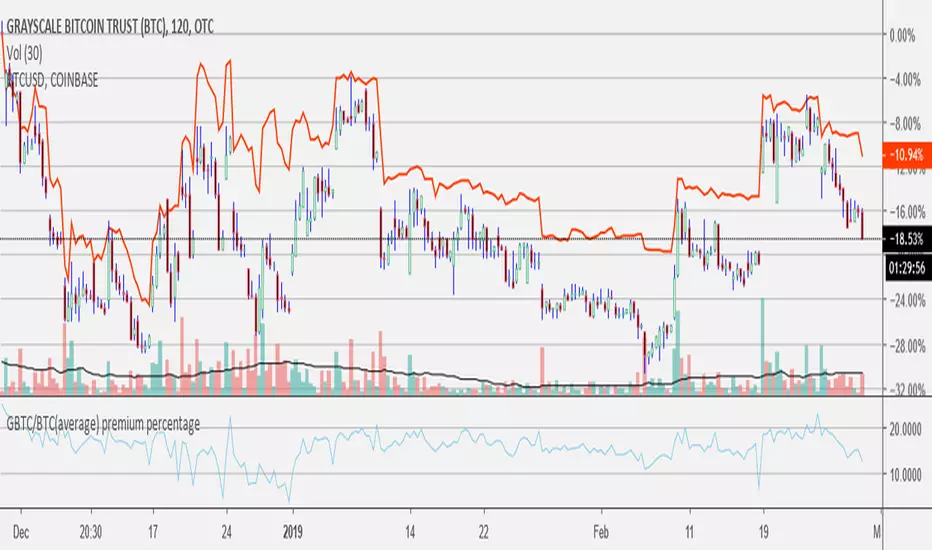
GBTC/BTC(average) premium percentageI updated the GBTC premium percentage indicator to the average bitcoin price (average between bitfinex, coinbase, bitstamp, bittrex, and gemini). I also left this new script open so you can update the amount of bitcoin per share because it is always changing. you can find the amount of bitcoin per share at grayscale.co half way down on the left.
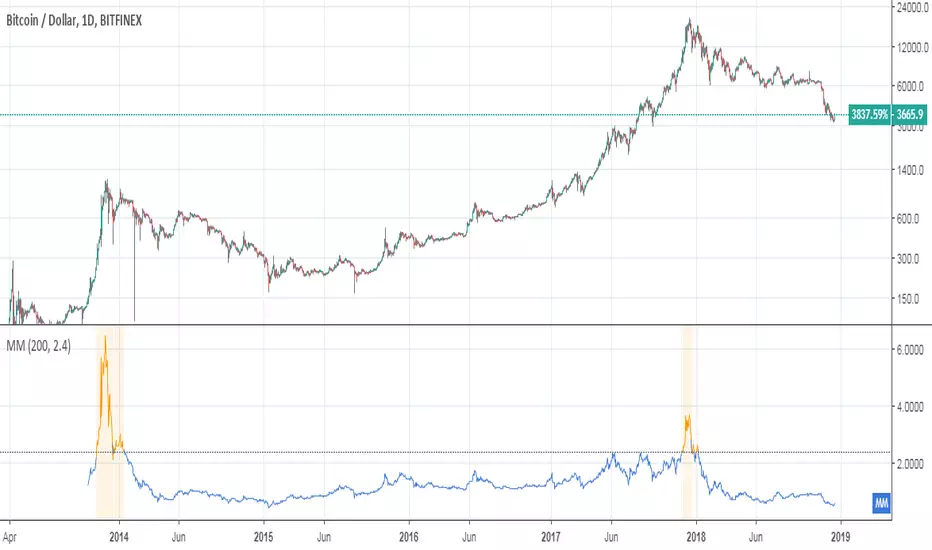
Mayer MultipleThis indicator was created by Trace Mayer as a way to analyze the price of Bitcoin in a historical context. Consider it as a kind of Volatility Ratio that was created by Jack Schwager for the securities.
To learn more about Mayer Multiple see:
charts.woobull.com
mayermultiple.info
www.theinvestorspodcast.com
Good luck!
RSI Cross by uykusuzpenguenRSI Cross Explanation;
It's simple,
When short-term RSI crossover long-term RSI ; BUY ( Green Area )
When short-term RSI crossunder long-term RSI ; SELL ( Red Area )
You can change RSI lenghts or moving average lenght on settings.
If you knew that, you would sell all your bitcoins at a price of $13.500 and not look back on 8th January.
Happy trading.
Mayer Multiple @ Current PriceThough this script is by me, the original idea comes from a podcast I heard where Trace Mayer talks about how he does crypto valuation. It is based on current price against the 200 day moving average. This indicator script will simply plot that value as a label overlayed on your trading view chart. Best long term results occur when acquiring BTC when the multiple is 2.4 or less. For more info, google "mayer multiple" This script/indicator is strictly for educational purposes. It is not exclusive to bitcoin.
To get the best look out of your charts I make the following changes.
1.Apply the indicator to your chart.
2. In the tools palette of trading view, when looking at a chart, click "Show Objects Tree" the icon displayed above the trash can.
In the objects tree panel, click the preferences icon for "Mayer Multiple @ Current Price"
Switch "scale" to "scale Left"
3. Then for your chart preferences (right click on chart background and select "Properties", and be sure the following are checked on the "Scales" tab
Left Axis
Right Axis
Indicator Last Value
Indicator Labels
Screenshots are not allowed in this view, so I can't post screenshots, but the view above is what it should look like when you are done.
For anyone who wants to see the code, here is the code of the script:
Use at will, and at your own risk.
//@version=3
// Created By Timothy Luce, inspired by Trace Mayer's 200 Day SMA cryptocurrency valuation method
study("Mayer Multiple @ Current Price", overlay=true)
currentPrice = close
currentDay = security(tickerid, "D", sma(close, 200))
mayerMultiple = currentPrice/currentDay
plot(mayerMultiple, color=#00ffaa, transp=100)
If you want to change the color, change this line: #00ffaa
HLC3This is a script I wrote years ago. Some people prefer a line instead of candles, the standard tradingview line is too simple, so I copied the line from bitcoinity.org. I added heiken ashi colors to it as well. If you don't want that you can configure that in the options, you get a yellow line instead. You can also configure the source there, you do not have to use hlc3.
BITFINEX BTCUSD shorts vs longsA simple script to get an RSI of BTCUSD SHORTS and LONGS on Bitfinex.
(Forked from an open sourced script)
Moving Average Price MultipleAuthor: Preston Pysh & Trace Mayer
Visit www.MayerMultiple.com to see current charts & explanation
Listen to Preston's Podcast: www.theinvestorspodcast.com
Follow Preston on Twitter: twitter.com
This indicator calculate the Price Multiple from Current Close Price vs 200 Day Moving Average.
Based on Preston's article:
+ The average Mayer Multiple is 1.44 for the history of Bitcoin.
+ Safe Buying Threshold is 2.4
rem sim v0.1every alt-coin has similarity.
cause of bitcoin.
always i want to delete that similarity and read the true(?) value of each coin.
and i made some script for that, but not good enough.
this one is different.
Rem Sim (rs) removes the similarity very effectively.
it make avg WaveTrend from nxt, strat, steem, ...
and that is the similarity
and it show true(?) WaveTrend without similarity.
so if the alt-coin move like other alt-coin, the WT almost 0.
sorry my bad english.
if you dont understand my english. just look at that chart.
also you can see source code.
--------
대부분의 알트가 어느정도 비슷한 차트를 가지는데, 그 유사성을 제거하면 어떤 모양인지 궁금해서 만들었어요.
전에 만들었던 비트코인의 영향력을 제거해주는 아이디어는 실제론 별 효용이 없는데 이건 좀 쓸만해보이네요.
웨이브트렌드의 모양으로 보여줍니다.
UCS Squeeze Momentum Overlay with AlertsAll credit to the great ucsgears. His original indicator is on this page:
I just remixed the visuals and added alerts when price is released from the squeeze. I find it works well on lower timeframes for Forex and Bitcoin. Suggestions for other instruments and timeframes are welcome! When adding alerts use 'On Condition' to get the fastest alerts.
Best used in conjunction with the USC_SQZ_Opt Ooscillator from this page:
Possibly useful tip: the squeeze code here is great for identifying ranging markets, and can be used with other indicators to stop alerts firing in choppy markets.
MAGNUS® CyclesThis indicator will help you if you struggle making any profit in bitcoin.
It generates very few signals with very nice profit potential ( around 100% this year ! ).
Perfect tool for longterm swing traders and new traders that need help figuring out the midterm trend.
Use it with these parameters only:
weekly: 13, 5, 12
daily: 92, 21, 96
RSI Open-Source IndicatorA simple open-source RSI indicator
using default settings.
No signals.
No predictions.
Lot Size & Risk Calculator All Pairs NEWLot Size & Risk Calculator All Pairs NEW
Description
Professional risk and position size calculator for traders working with various financial instruments.
Main difference from standard indicators:
Standard risk calculators only show basic Risk/Reward for the entire position. But in real trading, we often close positions partially at different take-profit levels, and the final Risk/Reward changes significantly with this approach! This indicator calculates weighted Risk/Reward taking into account position distribution across multiple take-profit levels.
Main features:
- Support for 4 instrument types: Forex, XAUUSD (gold), BTCUSD (bitcoin), US100 (NASDAQ index)
- Automatic position size calculation based on risk and stop-loss distance
- Multiple take-profit levels with customizable closing percentages
- Weighted Risk/Reward calculation considering position distribution
- Ability to adjust position distribution between take-profits to optimize final profit
- Display of total percentage growth of deposit from all take-profit levels
- 2 visualization options: colored fill between levels or lines
- Informative results panel in table format
Settings by groups:
Core Settings
- Currency: select instrument type (Forex, XAUUSD, BTCUSD, US100)
- Account Balance: trading account size in dollars
- Risk %: risk percentage from deposit (0.1-100%)
- Use Custom Contract Sizes: manual contract size configuration
Point Value Settings
- Use automatic point value calculation: automatic point value calculation
- Manual point value: manual point value input (for non-standard contracts)
Levels
- Entry Price: entry price (confirmation required on first use)
- Stop Price: stop-loss price
- Take-Profit Prices: take-profit prices (up to 3 levels)
- TP Close %: percentage of position closed at each take-profit level
Dashboard
- Show Targets Profit: display profit from take-profit levels
- Label Size: text size in the table
- Dashboard Position: table position on the chart
How to use:
Step 1: Initial setup (when first adding)
1. Enter entry price (Entry Price) - confirmation window will appear (click on desired bar)
2. Then enter stop-loss price (Stop Price) (click on desired bar)
3. Add first take-profit (TP1) (click on desired bar)
4. Second and third take-profits are added through checkboxes (click on the settings gear icon to open them)
Step 2: Instrument selection and risk configuration
1. In "Core" group, select your instrument type
2. Set account balance and risk percentage
Step 3: Position distribution configuration
1. Set TP Close % for each take-profit level (e.g.: TP1 - 33%, TP2 - 33%, TP3 - 34%)
2. Experiment with distribution! By changing closing percentages, you can:
- Increase/decrease final Risk/Reward
- Optimize risk/profit ratio
- Find the most comfortable position distribution for you
Step 4: Results analysis
1. Results table will show:
- Calculated position size (lots/contracts)
- Risk in monetary terms
- Risk/Reward for each take-profit level
- Weighted R:R considering position distribution
- Total potential profit from all take-profits
- Percentage growth of deposit - total profit percentage from all take-profit levels
Key features:
Position distribution adjustment
You can easily find optimal position distribution between take-profits:
- Aggressive approach: higher percentage on distant take-profit (higher profit potential)
- Conservative approach: higher percentage on near take-profit (faster profit taking)
- Balanced: even distribution for risk reduction
Weighted Risk/Reward
The indicator calculates not just simple R:R for the entire position, but weighted value that considers:
- Position distribution between take-profits
- Different distances to each take-profit level
- Closing percentage at each level
Results visualization
- Colored fill shows risk and profit zones
- Labels at levels display specific profit/loss values
- Results table contains all key metrics
Creation story
This indicator was created based on the original calculator by @Algoryze As a trader, I lacked the ability to see real Risk/Reward when partially closing positions and a convenient tool for selecting optimal position distribution between take-profit levels. I improved the indicator by adding:
- Weighted Risk/Reward calculation
- Ability to adjust closing percentage at each take-profit
- Display of total percentage growth of deposit
- Improved interface and visualization
I hope this tool will be useful to other traders who use strategies with partial position closing!
Important notes:
1. When first adding the indicator, be sure to enter prices in order: Entry → Stop → TP1
2. TP2 and TP3 are added through input fields (no confirmation required)
3. Closing percentages are automatically normalized if the sum is not 100%
4. Experiment with position distribution to find optimal risk/profit ratio
5. For different instruments, add separate copies of the indicator in different tabs
Support
For questions and suggestions, leave comments in the indicator publication on TradingView.
---
Important: All calculations are provided for informational purposes only. Trading involves risks, trade responsibly. The indicator helps with calculations but does not guarantee profit.
Coinbase/Binance Premium Histogram with SMA- Indicator Name and Purpose: The Coinbase/Binance Premium Histogram with SMA is a TradingView indicator designed to visualize the price differential, or premium, between Coinbase and Binance exchanges for a specified cryptocurrency base asset, such as BTC in BTCUSD.
- Dynamic Symbol Construction: It automatically extracts the base currency from the current chart symbol and constructs the appropriate tickers for Coinbase (e.g., COINBASE:BTCUSD) and Binance (e.g., BINANCE:BTCUSDT).
- Price Retrieval and Premium Calculation: The indicator fetches closing prices from both exchanges and computes the premium as the difference between the Coinbase price and the Binance price.
- Histogram Visualization: The premium is plotted as a histogram in a separate pane below the main chart. Positive premiums (higher prices on Coinbase) are colored green, while negative premiums (higher on Binance) are colored red.
- Simple Moving Average (SMA) Integration: A user-configurable SMA of the premium is included, with a default length of 14 periods, displayed as a gray line to offer a smoothed trend perspective.
- Analytical Utility: This tool facilitates the examination of exchange-specific pricing variations, which may indicate potential arbitrage opportunities or market disparities.
- Interpretation of the Premium: A positive Coinbase premium, indicating that Bitcoin trades at a higher price on Coinbase compared to Binance, often reflects strong buying pressure from U.S.-based investors and institutions. This heightened demand can signal potential upward momentum in Bitcoin's price, as it may precede broader market rallies driven by increased institutional interest and optimistic sentiment. Conversely, a negative premium suggests weaker U.S. demand or selling pressure, which could contribute to downward price movements.
- Compatibility with Other Cryptocurrencies: The script is designed to function with all cryptocurrencies that have a USD trading pair on Coinbase and a USDT pair on Binance. It delivers the highest proven signal strength for Bitcoin, where the premium has historically served as a reliable indicator of price direction. The indicator has also demonstrated effectiveness for other assets, such as Ethereum, where a positive premium similarly signals robust U.S. demand and potential bullish momentum. It can be applied to coins like Solana as well, though signal reliability may vary depending on market dynamics and institutional participation.
BTC Pair Trading Scalper
The BTC Pair Trading Scalper is a comprehensive technical analysis indicator specifically designed for scalping Bitcoin on 15-minute timeframes. This indicator combines pair trading strategies with multiple technical indicators to identify high-probability entry and exit points for short-term trades.
═══════════════════════════════════════════════════════════════════════════
KEY FEATURES
✓ PAIR TRADING ANALYSIS
- Compares your BTC chart against a reference pair (default: BTCUSDT)
- Calculates real-time spread percentage between pairs
- Uses Z-Score statistical analysis for mean reversion opportunities
- Identifies divergence and correlation breakdowns
✓ MULTI-INDICATOR CONFLUENCE
- Fast EMA (9) and Slow EMA (21) for trend direction
- SMA (50) for overall trend confirmation
- RSI (14) with customizable overbought/oversold levels
- MACD for momentum analysis
- Bollinger Bands for volatility and price extremes
- ATR for volatility measurement
✓ VOLUME CONFIRMATION
- Volume moving average analysis
- Volume spike detection to validate signals
- Filters out false signals in low-volume conditions
✓ ADJUSTABLE SIGNAL SENSITIVITY
- HIGH: More frequent signals for active scalping (suitable for experienced traders)
- MEDIUM: Balanced approach with confirmed signals (recommended for most traders)
- LOW: Conservative signals with multiple confirmations (suitable for risk-averse traders)
✓ REAL-TIME DASHBOARD
Displays at-a-glance information:
- Current RSI level with color coding
- MACD trend direction
- Spread percentage between pairs
- Z-Score for mean reversion
- Volume status (High/Normal)
- Overall trend direction (UP/DOWN/NEUTRAL)
- Current ATR value for stop-loss sizing
✓ COMPREHENSIVE ALERT SYSTEM
- Buy signal alerts
- Sell signal alerts
- Spread threshold breach alerts
- Oversold condition alerts
- Overbought condition alerts
═══════════════════════════════════════════════════════════════════════════
HOW IT WORKS
SIGNAL GENERATION LOGIC
BUY SIGNALS are generated when:
- Fast EMA crosses above Slow EMA (bullish crossover)
- Price is in an uptrend (above 50 SMA)
- RSI shows bullish momentum
- MACD confirms upward momentum
- Volume spike confirms the move
- Sensitivity settings are met
SELL SIGNALS are generated when:
- Fast EMA crosses below Slow EMA (bearish crossover)
- Price is in a downtrend (below 50 SMA)
- RSI shows bearish momentum
- MACD confirms downward momentum
- Volume spike confirms the move
- Sensitivity settings are met
PAIR TRADING COMPONENT
The indicator monitors the spread between your chart and the pair symbol. When the spread deviates significantly (measured by Z-Score), it signals potential mean reversion opportunities:
- Z-Score < -1.5: Pairs have diverged, potential buy opportunity
- Z-Score > 1.5: Pairs have diverged, potential sell opportunity
═══════════════════════════════════════════════════════════════════════════
VISUAL ELEMENTS
ON-CHART DISPLAY:
- Blue line: Fast EMA (9) - Short-term trend
- Orange line: Slow EMA (21) - Medium-term trend
- Purple line: Trend SMA (50) - Long-term trend filter
- Gray bands: Bollinger Bands showing volatility
- Green "BUY" labels: Long entry signals
- Red "SELL" labels: Short entry signals
- Background tint: Green (uptrend) / Red (downtrend)
DASHBOARD (Top-Right):
Color-coded metrics for quick decision making:
- Red: Overbought/Warning conditions
- Green: Oversold/Bullish conditions
- Yellow: Neutral/Elevated conditions
- White: Normal conditions
═══════════════════════════════════════════════════════════════════════════
RECOMMENDED SETTINGS BY TRADING STYLE
AGGRESSIVE SCALPING (High Frequency)
- Signal Sensitivity: HIGH
- Timeframe: 15 minutes
- Expected trades: 5-10 per day
- Risk level: Higher
- Skill level: Advanced
BALANCED SCALPING (Recommended)
- Signal Sensitivity: MEDIUM
- Timeframe: 15 minutes
- Expected trades: 3-5 per day
- Risk level: Moderate
- Skill level: Intermediate
CONSERVATIVE SCALPING (Quality over Quantity)
- Signal Sensitivity: LOW
- Timeframe: 15 minutes
- Expected trades: 1-3 per day
- Risk level: Lower
- Skill level: Beginner to Intermediate
═══════════════════════════════════════════════════════════════════════════
BEST PRACTICES FOR SCALPING
1. RISK MANAGEMENT
- Use ATR value from dashboard to set stop-losses (1.5-2x ATR)
- Risk no more than 1-2% per trade
- Use proper position sizing
2. ENTRY STRATEGY
- Wait for volume spike confirmation
- Ensure trend alignment (dashboard shows clear UP/DOWN)
- Look for RSI confirmation (not in extreme zones for trend trades)
- Check Z-Score for pair divergence opportunities
3. EXIT STRATEGY
- Take profits at opposite signal or predetermined targets
- Use trailing stops to protect profits
- Exit if volume dries up or trend reverses
- Monitor spread returning to mean
4. MARKET CONDITIONS
- Works best in trending or ranging markets
- Less effective during major news events
- Avoid trading during extremely low volume periods
- Most active during major market sessions (NY, London, Asia)
5. PAIR SELECTION
- Use highly correlated BTC pairs (BTCUSDT, BTCUSD, BTCBUSD)
- Ensure both pairs have sufficient liquidity
- Monitor spread threshold to avoid excessive divergence
═══════════════════════════════════════════════════════════════════════════
CUSTOMIZATION OPTIONS
You can adjust all parameters to match your trading style:
PAIR TRADING
- Pair Symbol: Choose your reference BTC pair
- Spread Threshold: Set alert level for spread divergence
- Show Spread: Toggle spread display on/off
MOVING AVERAGES
- Fast EMA: Adjust for faster/slower signals
- Slow EMA: Adjust for trend confirmation
- Trend SMA: Change long-term trend filter
RSI
- RSI Length: Modify sensitivity
- Overbought/Oversold levels: Set your thresholds
MACD
- Fast/Slow/Signal lengths: Fine-tune momentum detection
BOLLINGER BANDS
- Length: Change volatility period
- Multiplier: Adjust band width
VOLUME
- Volume MA Length: Modify average period
- Volume Threshold: Set spike sensitivity
═══════════════════════════════════════════════════════════════════════════
ALERT SETUP
To receive notifications:
1. Click the "Alerts" button in TradingView
2. Select "BTC Pair Trading Scalper"
3. Choose alert type: Buy Signal, Sell Signal, Spread Alert, etc.
4. Set notification method (email, SMS, app notification)
5. Click "Create"
═══════════════════════════════════════════════════════════════════════════
IMPORTANT DISCLAIMERS
⚠ This indicator is a TOOL, not a trading system
⚠ No indicator is 100% accurate - always use proper risk management
⚠ Past performance does not guarantee future results
⚠ Scalping requires quick decision-making and emotional discipline
⚠ Always backtest and paper trade before using real capital
⚠ Consider transaction costs and slippage in your strategy
⚠ This is not financial advice - trade at your own risk
[QuantLabs] Kinetic Fusion Ultra The Problem with Standard Indicators Most trading indicators fail for one simple reason: They are Static. A standard Stochastic or CCI uses fixed variables that might work perfectly on EURUSD but fail completely on Bitcoin or Gold. This forces you to constantly tweak settings to avoid false signals, and usually, by the time you adjust them, the move is over.
Kinetic Fusion Ultra Kinetic Fusion Ultra solves this by combining Stochastic Position (Static) with Adaptive Momentum (Velocity). At its core is a proprietary Adaptive Normalization Engine. This algorithm "learns" the volatility of the asset over the last 100 bars and auto-scales the momentum data to fit perfectly into a 0-100 oscillator window.
Whether you are scalping a 1-minute Crypto chart or swinging a Weekly Stock chart, the signals remain mathematically consistent.
Kadunagra-Pivot Point SuperTrend-trades analysis
📊 Pivot Point SuperTrend Strategy (MA-Filtered, 100% Equity)
This strategy is a trend-following system that combines Pivot Point–based SuperTrend logic with a higher-timeframe Moving Average filter and percentage-based risk control.
---
🔹 Core Logic
1️⃣ Trend Detection (Pivot Point SuperTrend)
Uses pivot highs and lows to calculate a dynamic center line
Builds ATR-based upper and lower bands
Determines market trend:
Bullish trend when price breaks above the trailing band
Bearish trend when price breaks below the trailing band
Trend changes generate:
Buy signal → trend flips from bearish to bullish
Sell signal → trend flips from bullish to bearish
---
2️⃣ Moving Average Trend Filter (User-Selectable)
A single Moving Average is used as a higher-timeframe confirmation
User can select the MA type from a dropdown:
SMA, EMA, WMA, VWMA, RMA, or HMA
Trade rules:
Long trades only when price is above the selected MA
Short trades only when price is below the selected MA
This helps avoid counter-trend trades and improves signal quality.
---
3️⃣ Trade Execution & Position Sizing
Strategy uses 100% of account equity per trade
No pyramiding
Long and short trades are handled symmetrically
---
4️⃣ Risk Management (Percentage Stop-Loss)
Uses a fixed percentage stop-loss
Stop-loss is calculated from the actual entry price:
Long SL → Entry Price − SL%
Short SL → Entry Price + SL%
Ensures consistent risk control across all trades
---
⏱ Recommended Timeframe & Market
✅ Default / Optimized Use Case
Timeframe: 4-Hour (4H)
Market: BTC (Bitcoin)
MA Length (default): 200 EMA
ATR Factor & Period: Tuned for swing-style trend moves
These default parameters are best suited for 4H BTC based on trend behavior and volatility.
---
⚙️ Customization & Flexibility
All parameters are fully adjustable and can be optimized for:
Different timeframes (1H, Daily, etc.)
Other cryptocurrencies or markets
More aggressive or conservative risk profiles
You can modify:
Pivot period
ATR factor & period
MA type and length
Stop-loss percentage
---
🧠 Strategy Style Summary
✔ Trend-following
✔ MA-filtered confirmation
✔ No repaint logic
✔ Works best in trending markets
✔ Suitable for swing trading