KRXNameMapperLibrary "KRXNameMapper" TODO: add library description here getCompanyName(code) TODO: add function description here Parameters: code (string) Returns: TODO: add what function returnsBiblioteka Pine Script®od kirhieyes1
SpatialIndexYou can start using this now by inserthing this at the top of your indicator/strategy/library. import ArunaReborn/SpatialIndex/1 as SI Overview SpatialIndex is a high-performance Pine Script library that implements price-bucketed spatial indexing for efficient proximity queries on large datasets. Instead of scanning through hundreds or thousands of items linearly (O(n)), this library provides O(k) bucket lookup where k is typically just a handful of buckets, dramatically improving performance for price-based filtering operations. This library works with any data type through index-based references, making it universally applicable for support/resistance levels, pivot points, order zones, pattern detection points, Fair Value Gaps, and any other price-based data that needs frequent proximity queries. Why This Library Exists The Problem When building advanced technical indicators that track large numbers of price levels (support/resistance zones, pivot points, order blocks, etc.), you often need to answer questions like: - *"Which levels are within 5% of the current price?"* - *"What zones overlap with this price range?"* - *"Are there any significant levels near my entry point?"* The naive approach is to loop through every single item and check its price. For 500 levels across multiple timeframes, this means 500 comparisons every bar . On instruments with thousands of historical bars, this quickly becomes a performance bottleneck that can cause scripts to time out or lag. The Solution SpatialIndex solves this by organizing items into price buckets —like filing cabinets organized by price range. When you query for items near $50,000, the library only looks in the relevant buckets (e.g., $49,000-$51,000 range), ignoring all other price regions entirely. Performance Example: - Linear scan: Check 500 items = 500 comparisons per query - Spatial index: Check 3-5 buckets with ~10 items each = 30-50 comparisons per query - Result: 10-16x faster queries Key Features Core Capabilities - ✅ Generic Design : Works with any data type via index references - ✅ Multiple Index Strategies : Fixed bucket size or ATR-based dynamic sizing - ✅ Range Support : Index items that span price ranges (zones, gaps, channels) - ✅ Efficient Queries : O(k) bucket lookup instead of O(n) linear scan - ✅ Multiple Query Types : Proximity percentage, fixed range, exact price with tolerance - ✅ Dynamic Updates : Add, remove, update items in O(1) time - ✅ Batch Operations : Efficient bulk removal and reindexing - ✅ Query Caching : Optional caching for repeated queries within same bar - ✅ Statistics & Debugging : Built-in stats and diagnostic functions ### Advanced Features - ATR-Based Bucketing : Automatically adjusts bucket sizes based on volatility - Multi-Bucket Spanning : Items that span ranges are indexed in all overlapping buckets - Reindexing Support : Handles array removals with automatic index shifting - Cache Management : Configurable query caching with automatic invalidation - Empty Bucket Cleanup : Automatically removes empty buckets to minimize memory How It Works The Bucketing Concept Think of price space as divided into discrete buckets, like a histogram: ``` Price Range: $98-$100 $100-$102 $102-$104 $104-$106 $106-$108 Bucket Key: 49 50 51 52 53 Items: ``` When you query for items near $103: 1. Calculate which buckets overlap the $101.50-$104.50 range (keys 50, 51, 52) 2. Return items from only those buckets: 3. Never check items in buckets 49 or 53 Bucket Size Selection Fixed Size Mode: ```pine var SI.SpatialBucket index = SI.newSpatialBucket(2.0) // $2 per bucket ``` - Good for: Instruments with stable price ranges - Example: For stocks trading at $100, 2.0 = 2% increments ATR-Based Mode: ```pine float atr = ta.atr(14) var SI.SpatialBucket index = SI.newSpatialBucketATR(1.0, atr) // 1x ATR per bucket SI.updateATR(index, atr) // Update each bar ``` - Good for: Instruments with varying volatility - Adapts automatically to market conditions - 1.0 multiplier = one bucket spans one ATR unit Optimal Bucket Size: The library includes a helper function to calculate optimal size: ```pine float optimalSize = SI.calculateOptimalBucketSize(close, 5.0) // For 5% proximity queries ``` This ensures queries span approximately 3 buckets for optimal performance. Index-Based Architecture The library doesn't store your actual data—it only stores indices that point to your external arrays: ```pine // Your data var array levels = array.new() var array types = array.new() var array ages = array.new() // Your index var SI.SpatialBucket index = SI.newSpatialBucket(2.0) // Add a level array.push(levels, 50000.0) array.push(types, "support") array.push(ages, 0) SI.add(index, array.size(levels) - 1, 50000.0) // Store index 0 // Query near current price SI.QueryResult result = SI.queryProximity(index, close, 5.0) for idx in result.indices float level = array.get(levels, idx) string type = array.get(types, idx) // Work with your actual data ``` This design means: - ✅ Works with any data structure you define - ✅ No data duplication - ✅ Minimal memory footprint - ✅ Full control over your data --- Usage Guide Basic Setup ```pine // Import library import username/SpatialIndex/1 as SI // Create index var SI.SpatialBucket index = SI.newSpatialBucket(2.0) // Your data arrays var array supportLevels = array.new() var array touchCounts = array.new() ``` Adding Items Single Price Point: ```pine // Add a support level at $50,000 array.push(supportLevels, 50000.0) array.push(touchCounts, 1) int levelIdx = array.size(supportLevels) - 1 SI.add(index, levelIdx, 50000.0) ``` Price Range (Zones/Gaps): ```pine // Add a resistance zone from $51,000 to $52,000 array.push(zoneBottoms, 51000.0) array.push(zoneTops, 52000.0) int zoneIdx = array.size(zoneBottoms) - 1 SI.addRange(index, zoneIdx, 51000.0, 52000.0) // Indexed in all overlapping buckets ``` Querying Items Proximity Query (Percentage): ```pine // Find all levels within 5% of current price SI.QueryResult result = SI.queryProximity(index, close, 5.0) if array.size(result.indices) > 0 for idx in result.indices float level = array.get(supportLevels, idx) // Process nearby level ``` Fixed Range Query: ```pine // Find all items between $49,000 and $51,000 SI.QueryResult result = SI.queryRange(index, 49000.0, 51000.0) ``` Exact Price with Tolerance: ```pine // Find items at exactly $50,000 +/- $100 SI.QueryResult result = SI.queryAt(index, 50000.0, 100.0) ``` Removing Items Safe Removal Pattern: ```pine SI.QueryResult result = SI.queryProximity(index, close, 5.0) if array.size(result.indices) > 0 // IMPORTANT: Sort descending to safely remove from arrays array sorted = SI.sortIndicesDescending(result) for idx in sorted // Remove from index SI.remove(index, idx) // Remove from your data arrays array.remove(supportLevels, idx) array.remove(touchCounts, idx) // Reindex to maintain consistency SI.reindexAfterRemoval(index, idx) ``` Batch Removal (More Efficient): ```pine // Collect indices to remove array toRemove = array.new() for i = 0 to array.size(supportLevels) - 1 if array.get(touchCounts, i) > 10 // Remove old levels array.push(toRemove, i) // Remove in descending order from data arrays array sorted = array.copy(toRemove) array.sort(sorted, order.descending) for idx in sorted SI.remove(index, idx) array.remove(supportLevels, idx) array.remove(touchCounts, idx) // Batch reindex (much faster than individual reindexing) SI.reindexAfterBatchRemoval(index, toRemove) ``` Updating Items ```pine // Update a level's price (e.g., after refinement) float newPrice = 50100.0 SI.update(index, levelIdx, newPrice) array.set(supportLevels, levelIdx, newPrice) // Update a zone's range SI.updateRange(index, zoneIdx, 51000.0, 52500.0) array.set(zoneBottoms, zoneIdx, 51000.0) array.set(zoneTops, zoneIdx, 52500.0) ``` Query Caching For repeated queries within the same bar: ```pine // Create cache (persistent) var SI.CachedQuery cache = SI.newCachedQuery() // Cached query (returns cached result if parameters match) SI.QueryResult result = SI.queryProximityCached( index, cache, close, 5.0, // proximity% 1 // cache duration in bars ) // Invalidate cache when index changes significantly if bigChangeDetected SI.invalidateCache(cache) ``` --- Practical Examples Example 1: Support/Resistance Finder ```pine //@version=6 indicator("S/R with Spatial Index", overlay=true) import username/SpatialIndex/1 as SI // Data storage var array levels = array.new() var array types = array.new() // "support" or "resistance" var array touches = array.new() var array ages = array.new() // Spatial index var SI.SpatialBucket index = SI.newSpatialBucket(close * 0.02) // 2% buckets // Detect pivots bool isPivotHigh = ta.pivothigh(high, 5, 5) bool isPivotLow = ta.pivotlow(low, 5, 5) // Add new levels if isPivotHigh array.push(levels, high ) array.push(types, "resistance") array.push(touches, 1) array.push(ages, 0) SI.add(index, array.size(levels) - 1, high ) if isPivotLow array.push(levels, low ) array.push(types, "support") array.push(touches, 1) array.push(ages, 0) SI.add(index, array.size(levels) - 1, low ) // Find nearby levels (fast!) SI.QueryResult nearby = SI.queryProximity(index, close, 3.0) // Within 3% // Process nearby levels for idx in nearby.indices float level = array.get(levels, idx) string type = array.get(types, idx) // Check for touch if type == "support" and low <= level and low > level array.set(touches, idx, array.get(touches, idx) + 1) else if type == "resistance" and high >= level and high < level array.set(touches, idx, array.get(touches, idx) + 1) // Age and cleanup old levels for i = array.size(ages) - 1 to 0 array.set(ages, i, array.get(ages, i) + 1) // Remove levels older than 500 bars or with 5+ touches if array.get(ages, i) > 500 or array.get(touches, i) >= 5 SI.remove(index, i) array.remove(levels, i) array.remove(types, i) array.remove(touches, i) array.remove(ages, i) SI.reindexAfterRemoval(index, i) // Visualization for idx in nearby.indices line.new(bar_index, array.get(levels, idx), bar_index + 10, array.get(levels, idx), color=array.get(types, idx) == "support" ? color.green : color.red) ``` Example 2: Multi-Timeframe Zone Detector ```pine //@version=6 indicator("MTF Zones", overlay=true) import username/SpatialIndex/1 as SI // Store zones from multiple timeframes var array zoneBottoms = array.new() var array zoneTops = array.new() var array zoneTimeframes = array.new() // ATR-based spatial index for adaptive bucketing var SI.SpatialBucket index = SI.newSpatialBucketATR(1.0, ta.atr(14)) SI.updateATR(index, ta.atr(14)) // Update bucket size with volatility // Request higher timeframe data = request.security(syminfo.tickerid, "240", ) // Detect HTF zones if not na(htf_high) and not na(htf_low) float zoneTop = htf_high float zoneBottom = htf_low * 0.995 // 0.5% zone thickness // Check if zone already exists nearby SI.QueryResult existing = SI.queryRange(index, zoneBottom, zoneTop) if array.size(existing.indices) == 0 // No overlapping zones // Add new zone array.push(zoneBottoms, zoneBottom) array.push(zoneTops, zoneTop) array.push(zoneTimeframes, "4H") int idx = array.size(zoneBottoms) - 1 SI.addRange(index, idx, zoneBottom, zoneTop) // Query zones near current price SI.QueryResult nearbyZones = SI.queryProximity(index, close, 2.0) // Within 2% // Highlight nearby zones for idx in nearbyZones.indices box.new(bar_index - 50, array.get(zoneBottoms, idx), bar_index, array.get(zoneTops, idx), bgcolor=color.new(color.blue, 90)) ``` ### Example 3: Performance Comparison ```pine //@version=6 indicator("Spatial Index Performance Test") import username/SpatialIndex/1 as SI // Generate 500 random levels var array levels = array.new() var SI.SpatialBucket index = SI.newSpatialBucket(close * 0.02) if bar_index == 0 for i = 0 to 499 float randomLevel = close * (0.9 + math.random() * 0.2) // +/- 10% array.push(levels, randomLevel) SI.add(index, i, randomLevel) // Method 1: Linear scan (naive approach) int linearCount = 0 float proximityPct = 5.0 float lowBand = close * (1 - proximityPct/100) float highBand = close * (1 + proximityPct/100) for i = 0 to array.size(levels) - 1 float level = array.get(levels, i) if level >= lowBand and level <= highBand linearCount += 1 // Method 2: Spatial index query SI.QueryResult result = SI.queryProximity(index, close, proximityPct) int spatialCount = array.size(result.indices) // Compare performance plot(result.queryCount, "Items Examined (Spatial)", color=color.green) plot(linearCount, "Items Examined (Linear)", color=color.red) plot(spatialCount, "Results Found", color=color.blue) // Spatial index typically examines 10-50 items vs 500 for linear scan! ``` API Reference Summary Initialization - `newSpatialBucket(bucketSize)` - Fixed bucket size - `newSpatialBucketATR(atrMultiplier, atrValue)` - ATR-based buckets - `updateATR(sb, newATR)` - Update ATR for dynamic sizing Adding Items - `add(sb, itemIndex, price)` - Add item at single price point - `addRange(sb, itemIndex, priceBottom, priceTop)` - Add item spanning range Querying - `queryProximity(sb, refPrice, proximityPercent)` - Query by percentage - `queryRange(sb, priceBottom, priceTop)` - Query fixed range - `queryAt(sb, price, tolerance)` - Query exact price with tolerance - `queryProximityCached(sb, cache, refPrice, pct, duration)` - Cached query Removing & Updating - `remove(sb, itemIndex)` - Remove item - `update(sb, itemIndex, newPrice)` - Update item price - `updateRange(sb, itemIndex, newBottom, newTop)` - Update item range - `reindexAfterRemoval(sb, removedIndex)` - Reindex after single removal - `reindexAfterBatchRemoval(sb, removedIndices)` - Batch reindex - `clear(sb)` - Remove all items Utilities - `size(sb)` - Get item count - `isEmpty(sb)` - Check if empty - `contains(sb, itemIndex)` - Check if item exists - `getStats(sb)` - Get debug statistics string - `calculateOptimalBucketSize(price, pct)` - Calculate optimal bucket size - `sortIndicesDescending(result)` - Sort for safe removal - `sortIndicesAscending(result)` - Sort ascending Performance Characteristics Time Complexity - Add : O(1) for single point, O(m) for range spanning m buckets - Remove : O(1) lookup + O(b) bucket cleanup where b = buckets item spans - Query : O(k) where k = buckets in range (typically 3-5) vs O(n) linear scan - Update : O(1) removal + O(1) addition = O(1) total Space Complexity - Memory per item : ~8 bytes for index reference + map overhead - Bucket overhead : Proportional to price range coverage - Typical usage : For 500 items with 50 active buckets ≈ 4-8KB total Scalability - ✅ 100 items : ~5-10x faster than linear scan - ✅ 500 items : ~10-15x faster - ✅ 1000+ items : ~15-20x faster - ⚠️ Performance degrades if bucket size is too small (too many buckets) - ⚠️ Performance degrades if bucket size is too large (too many items per bucket) Best Practices Bucket Size Selection 1. Start with 2-5% of asset price for percentage-based queries 2. Use ATR-based mode for volatile assets or multi-symbol scripts 3. Test bucket size using `calculateOptimalBucketSize()` function 4. Monitor with `getStats()` to ensure reasonable bucket count Memory Management 1. Clear old items regularly to prevent unbounded growth 2. Use age tracking to remove stale data 3. Set maximum item limits based on your needs 4. Batch removals are more efficient than individual removals Query Optimization 1. Use caching for repeated queries within same bar 2. Invalidate cache when index changes significantly 3. Sort results descending before removal iteration 4. Batch operations when possible (reindexing, removal) Data Consistency 1. Always reindex after removal to maintain index alignment 2. Remove from arrays in descending order to avoid index shifting issues 3. Use batch reindex for multiple simultaneous removals 4. Keep external arrays and index in sync at all times Limitations & Caveats Known Limitations - Not suitable for exact price matching : Use tolerance with `queryAt()` - Bucket size affects performance : Too small = many buckets, too large = many items per bucket - Memory usage : Scales with price range coverage and item count - Reindexing overhead : Removing items mid-array requires index shifting When NOT to Use - ❌ Datasets with < 50 items (linear scan is simpler) - ❌ Items that change price every bar (constant reindexing overhead) - ❌ When you need ALL items every time (no benefit over arrays) - ❌ Exact price level matching without tolerance (use maps instead) When TO Use - ✅ Large datasets (100+ items) with occasional queries - ✅ Proximity-based filtering (% of price, ATR-based ranges) - ✅ Multi-timeframe level tracking - ✅ Zone/range overlap detection - ✅ Price-based spatial filtering --- Technical Details Bucketing Algorithm Items are assigned to buckets using integer division: ``` bucketKey = floor((price - basePrice) / bucketSize) ``` For ATR-based mode: ``` effectiveBucketSize = atrValue × atrMultiplier bucketKey = floor((price - basePrice) / effectiveBucketSize) ``` Range Indexing Items spanning price ranges are indexed in all overlapping buckets to ensure accurate range queries. The midpoint bucket is designated as the "primary bucket" for removal operations. Index Consistency The library maintains two maps: 1. `buckets`: Maps bucket keys → IntArray wrappers containing item indices 2. `itemToBucket`: Maps item indices → primary bucket key (for O(1) removal) This dual-mapping ensures both fast queries and fast removal while maintaining consistency. Implementation Note: Pine Script doesn't allow nested collections (map containing arrays directly), so the library uses an `IntArray` wrapper type to hold arrays within the map structure. This is an internal implementation detail that doesn't affect usage. --- Version History Version 1.0 - Initial release Credits & License License : Mozilla Public License 2.0 (TradingView default) Library Type : Open-source educational resource This library is designed as a public domain utility for the Pine Script community. As per TradingView library rules, this code can be freely reused by other authors. If you use this library in your scripts, please provide appropriate credit as required by House Rules. Summary SpatialIndex is a specialized library that solves a specific problem: fast proximity queries on large price-based datasets . If you're building indicators that track hundreds of levels, zones, or price points and need to frequently filter by proximity to current price, this library can provide 10-20x performance improvements over naive linear scanning. The index-based architecture makes it universally applicable to any data type, and the ATR-based bucketing ensures it adapts to market conditions automatically. Combined with query caching and batch operations, it provides a complete solution for spatial data management in Pine Script. Use this library when speed matters and your dataset is large. Biblioteka Pine Script®od ArunaReborn0
Dhan_libLibrary "Dhan_lib" Overview Dhan_lib is a Pine Script v6 library designed to help traders automate trading orders via TradingView alerts and webhook integration with the Dhan broker API. This library generates JSON-formatted alert messages for the following instruments. Equity (Intraday and Delivery) Options (CE and PE Buy and Sell) Futures (Buy and Sell) These alert strings can be directly used inside TradingView alerts to place live orders through an external webhook setup. 🔹 Supported Instruments Equity Intraday Buy and Sell Delivery Buy and Sell Options Call (CE) Buy and Sell Put (PE) Buy and Sell ATM, ITM, and OTM strike selection Intraday and Carry Forward Futures Buy and Sell Intraday and Carry Forward 🔹 Key Features ✅ Pine Script v6 compatible ✅ Clean and reusable library functions ✅ Automatic ATM, ITM, and OTM strike calculation ✅ Expiry date handled via string format YYYY-MM-DD ✅ Fully webhook-ready JSON alert structure ✅ Supports multi-leg order format ✅ Designed for TradingView to Dhan automation 🔹 How to Use Import the library in your strategy or indicator. import Shivam_Mandrai/Dhan_lib/1 Call the required function. order_msg = buy_CE_option("YOUR_SECRET_KEY", "NIFTY", 1) Use the returned string as the alert message. alert(order_msg, alert.freq_once_per_bar) Connect TradingView alerts to your Dhan webhook receiver. --- 🔹 Important Notes Strike prices are calculated dynamically based on the current chart price (close). Futures symbols use TradingView continuous contract format such as NIFTY1!. Quantity refers to the number of lots, not the lot size. Expiry date must be provided in YYYY-MM-DD format. ⚠️ DISCLAIMER (PLEASE READ CAREFULLY) This library is provided strictly for educational and automation purposes only. I am not a SEBI-registered advisor. I do not guarantee any profit or accuracy of orders. I am not responsible for any financial loss, missed trades, execution errors, or broker-side issues. Trading in stocks, options, and futures involves significant risk. Automated trading can fail due to internet issues, broker API downtime, incorrect webhook configuration, slippage, or market volatility. 👉 Use this library entirely at your own risk. 👉 Always test thoroughly using paper trading or simulation before deploying with real capital. If you want, I can also: * Shrink this further for TradingView character limits * Convert it into a single-paragraph version * Localize it for Indian retail traders buy_stock_intraday(secret_key, symbol, qty, exchange) to buy the stock Intraday Parameters: secret_key (string) : string Secret Key of the Dhan Account eg-> "S1HgS". symbol (string) : string Stock symbol eg-> "TATASTEEL". qty (int) : int quantity for the order eg-> 1. exchange (string) : string Trading Exchange eg-> "NSE". Returns: order string. sell_stock_intraday(secret_key, symbol, qty, exchange) to sell the stock Intraday Parameters: secret_key (string) : string Secret Key of the Dhan Account eg-> "S1HgS". symbol (string) : string Stock symbol eg-> "TATASTEEL". qty (int) : int quantity for the order eg-> 1. exchange (string) : string Trading Exchange eg-> "NSE". Returns: order string. buy_stock_delivery(secret_key, symbol, qty, exchange) to buy the stock delivery Parameters: secret_key (string) : string Secret Key of the Dhan Account eg-> "S1HgS". symbol (string) : string Stock symbol eg-> "TATASTEEL". qty (int) : int quantity for the order eg-> 1. exchange (string) : string Trading Exchange eg-> "NSE". Returns: order string. sell_stock_delivery(secret_key, symbol, qty, exchange) to sell the stock delivery Parameters: secret_key (string) : string Secret Key of the Dhan Account eg-> "S1HgS". symbol (string) : string Stock symbol eg-> "TATASTEEL". qty (int) : int quantity for the order eg-> 1. exchange (string) : string Trading Exchange eg-> "NSE". Returns: order string. buy_CE_option(secret_key, symbol, lots, expiry_date, intraday, strike_price_base, ITM_points, OTM_points, exchange) to buy CE option Parameters: secret_key (string) : string Secret Key of the Dhan Account eg-> "S1HgS". symbol (string) : string Index / Stock symbol eg-> "NIFTY", "BANKNIFTY". lots (int) : int Number of lots eg-> 1. expiry_date (string) : string Option expiry date in YYYY-MM-DD format eg-> "2026-01-20". intraday (bool) : bool Set true for intraday order, set false for delivery order eg-> true. strike_price_base (float) : float Strike price step size eg-> 50, 100 (default is 100). ITM_points (float) : float Points below CMP to select ITM strike eg-> 100 (default is 0). OTM_points (float) : float Points above CMP to select OTM strike eg-> 100 (default is 0). exchange (string) : string Trading Exchange eg-> "NSE" (default is NSE). Returns: order string. buy_PE_option(secret_key, symbol, lots, expiry_date, intraday, strike_price_base, ITM_points, OTM_points, exchange) to buy PE option Parameters: secret_key (string) : string Secret Key of the Dhan Account eg-> "S1HgS". symbol (string) : string Index / Stock symbol eg-> "NIFTY", "BANKNIFTY". lots (int) : int Number of lots eg-> 1. expiry_date (string) : string Option expiry date in YYYY-MM-DD format eg-> "2026-01-20". intraday (bool) : bool Set true for intraday order, set false for delivery order eg-> true. strike_price_base (float) : float Strike price step size eg-> 50, 100 (default is 100). ITM_points (float) : float Points below CMP to select ITM strike eg-> 100 (default is 0). OTM_points (float) : float Points above CMP to select OTM strike eg-> 100 (default is 0). exchange (string) : string Trading Exchange eg-> "NSE" (default is NSE). Returns: order string. sell_CE_option(secret_key, symbol, lots, expiry_date, intraday, strike_price_base, ITM_points, OTM_points, exchange) to Sell CE option Parameters: secret_key (string) : string Secret Key of the Dhan Account eg-> "S1HgS". symbol (string) : string Index / Stock symbol eg-> "NIFTY", "BANKNIFTY". lots (int) : int Number of lots eg-> 1. expiry_date (string) : string Option expiry date in YYYY-MM-DD format eg-> "2026-01-20". intraday (bool) : bool Set true for intraday order, set false for delivery order eg-> true. strike_price_base (float) : float Strike price step size eg-> 50, 100 (default is 100). ITM_points (float) : float Points below CMP to select ITM strike eg-> 100 (default is 0). OTM_points (float) : float Points above CMP to select OTM strike eg-> 100 (default is 0). exchange (string) : string Trading Exchange eg-> "NSE" (default is NSE). Returns: order string. sell_PE_option(secret_key, symbol, lots, expiry_date, intraday, strike_price_base, ITM_points, OTM_points, exchange) to sell PE option Parameters: secret_key (string) : string Secret Key of the Dhan Account eg-> "S1HgS". symbol (string) : string Index / Stock symbol eg-> "NIFTY", "BANKNIFTY". lots (int) : int Number of lots eg-> 1. expiry_date (string) : string Option expiry date in YYYY-MM-DD format eg-> "2026-01-20". intraday (bool) : bool Set true for intraday order, set false for delivery order eg-> true. strike_price_base (float) : float Strike price step size eg-> 50, 100 (default is 100). ITM_points (float) : float Points below CMP to select ITM strike eg-> 100 (default is 0). OTM_points (float) : float Points above CMP to select OTM strike eg-> 100 (default is 0). exchange (string) : string Trading Exchange eg-> "NSE" (default is NSE). Returns: order string. buy_future(secret_key, symbol, lot, intraday, exchange) to buy the Future Parameters: secret_key (string) : string Secret Key of the Dhan Account eg-> "S1HgS". symbol (string) : string Stock symbol eg-> "NIFTY". lot (int) : int quantity for the order eg-> 1. intraday (bool) : bool Set true for intraday order, set false for delivery order eg-> true. exchange (string) : string Trading Exchange eg-> "NSE". Returns: order string. sell_future(secret_key, symbol, lot, intraday, exchange) to sell the Future Parameters: secret_key (string) : string Secret Key of the Dhan Account eg-> "S1HgS". symbol (string) : string Stock symbol eg-> "NIFTY". lot (int) : int quantity for the order eg-> 1. intraday (bool) : bool Set true for intraday order, set false for delivery order eg-> true. exchange (string) : string Trading Exchange eg-> "NSE". Returns: order string.Biblioteka Pine Script®od Shivam_Mandrai889
HelperScriptA Personal Helper Script based on FFriZz/Holiday/2 Only change the font size and languageBiblioteka Pine Script®od ppt616543Zaktualizowano 0
LO1_News2024H1Library "LO1_News2024H1" Support Library for News Events f_loadNewsRows() f_loadExcSevByTypeId() f_loadExcTagByTypeId() f_loadExcDelayAfterNewsMins()Biblioteka Pine Script®od Vantage-StackZaktualizowano 1
LO1_News2026H1Library "LO1_News2026H1" Support Library for News Events f_loadNewsRows() f_loadExcSevByTypeId() f_loadExcTagByTypeId() f_loadExcDelayAfterNewsMins()Biblioteka Pine Script®od Vantage-StackZaktualizowano 1
LO1_News2025H2Library "LO1_News2025H2" Support Library for News Events f_loadNewsRows() f_loadExcSevByTypeId() f_loadExcTagByTypeId() f_loadExcDelayAfterNewsMins()Biblioteka Pine Script®od Vantage-StackZaktualizowano 1
LO1_News2025H1Library "LO1_News2025H1" Support Library for News Events f_loadNewsRows() f_loadExcSevByTypeId() f_loadExcTagByTypeId() f_loadExcDelayAfterNewsMins()Biblioteka Pine Script®od Vantage-StackZaktualizowano 1
LO1_News2024H2Library "LO1_News2024H2" Support Library for News Events f_loadNewsRows() f_loadExcSevByTypeId() f_loadExcTagByTypeId() f_loadExcDelayAfterNewsMins()Biblioteka Pine Script®od Vantage-StackZaktualizowano 1
LO1_TradersPostLibrary "LO1_TradersPost" Enhanced TradersPost integration library with comprehensive order management _buildJSONField(key, value, required) Build a JSON field with proper handling of required vs optional fields Parameters: key (string) : The JSON key name value (string) : The value to include (any type, will be converted to string) required (bool) : If true, field is always included even if value is na/empty Returns: String containing JSON field or empty string if optional and na/empty _buildConditionalField(key, value) Build a conditional JSON field that's only included if value is valid Parameters: key (string) : The JSON key name value (string) : The value to include Returns: String containing JSON field or empty string if value is na/empty _buildConditionalNumericField(key, value) Build a conditional JSON field for numeric values Parameters: key (string) : The JSON key name value (float) : The numeric value Returns: String containing JSON field or empty string if value is na _buildNestedObject(objectType, price, amount, percent, stopType, limitPrice, trailAmount, trailPercent) Build nested JSON objects for takeProfit/stopLoss Parameters: objectType (string) : The type of object being built ("takeProfit" or "stopLoss") price (float) : The limit price for TP or stop price for SL amount (float) : The dollar amount (optional) percent (float) : The percentage (optional) stopType (series StopLossType) : The stop loss type - only for stopLoss limitPrice (float) : The limit price for stop_limit orders - only for stopLoss trailAmount (float) : Trailing amount for trailing stops - only for stopLoss trailPercent (float) : Trailing percent for trailing stops - only for stopLoss Returns: String containing nested JSON object or empty string if no valid data _validateAndBuildJSON(ticker, action, quantity, quantityType, orderType, sentiment, cancel, timeInForce, limitPrice, stopPrice, trailAmount, trailPercent, takeProfitPrice, takeProfitAmount, takeProfitPercent, stopLossPrice, stopLossAmount, stopLossPercent, stopLossType, stopLossLimitPrice, extendedHours, optionType, intrinsicValue, expiration, strikePrice, signalPrice, comment) Master JSON builder that validates parameters and constructs JSON Parameters: ticker (string) : The trading symbol action (series Action) : The order action (buy, sell, exit, etc.) quantity (float) : The order quantity quantityType (series QuantityType) : The type of quantity (fixed, dollar, percent) orderType (series OrderType) : The order type (market, limit, stop, etc.) sentiment (series Sentiment) : The position sentiment (long, short, flat) - optional cancel (bool) : Controls order cancellation (true = cancel existing orders, false = don't cancel) timeInForce (series TimeInForce) : Time in force for the order (DAY, GTC, IOC, FOK) limitPrice (float) : Price for limit orders stopPrice (float) : Price for stop orders trailAmount (float) : Trailing amount for trailing stops trailPercent (float) : Trailing percent for trailing stops takeProfitPrice (float) : Take profit limit price (absolute) takeProfitAmount (float) : Take profit dollar amount (relative) takeProfitPercent (float) : Take profit percentage (relative) stopLossPrice (float) : Stop loss price (absolute) stopLossAmount (float) : Stop loss dollar amount (relative) stopLossPercent (float) : Stop loss percentage (relative) stopLossType (series StopLossType) : Stop loss order type stopLossLimitPrice (float) : Limit price for stop_limit orders extendedHours (bool) : Enable extended hours trading (boolean) optionType (series OptionType) : Option type for options trading (both/call/put) intrinsicValue (series IntrinsicValue) : Intrinsic value filter for options (itm/otm) expiration (string) : Option expiration (date string) strikePrice (float) : Option strike price signalPrice (float) : The market price at alert time (for slippage tracking) comment (string) : Optional comment for the order (shows in TradersPost UI for debugging) Returns: ErrorResponse with success status and JSON string or error details ValidateOrder(ticker, action, orderType, limitPrice, stopPrice) Validate order parameters before JSON construction Parameters: ticker (string) : Trading symbol action (series Action) : Order action orderType (series OrderType) : Order type (market, limit, stop, etc.) limitPrice (float) : Limit price for limit orders stopPrice (float) : Stop price for stop orders Returns: ErrorResponse with validation results ValidateQuantity(quantity, quantityType) Validate quantity based on type and constraints Parameters: quantity (float) : The quantity value quantityType (series QuantityType) : The type of quantity Returns: ErrorResponse with validation results ValidatePrices(entryPrice, stopPrice, takeProfitPrice, action) Validate price relationships and values Parameters: entryPrice (float) : Entry price for the order stopPrice (float) : Stop loss price takeProfitPrice (float) : Take profit price action (series Action) : Order action (buy/sell) Returns: ErrorResponse with validation results ValidateSymbol(ticker) Validate trading symbol format Parameters: ticker (string) : The symbol to validate Returns: ErrorResponse with validation results CombineValidationResults(validationResults) Create validation error collection and reporting system Parameters: validationResults (array) : Array of ErrorResponse objects from multiple validations Returns: Combined ErrorResponse with all validation results ValidateCompleteOrder(ticker, action, quantity, quantityType, orderType, limitPrice, stopPrice, takeProfitPrice) Comprehensive validation for all order parameters Parameters: ticker (string) : Trading symbol action (series Action) : Order action quantity (float) : Order quantity quantityType (series QuantityType) : Type of quantity orderType (series OrderType) : Order type limitPrice (float) : Limit price (optional) stopPrice (float) : Stop price (optional) takeProfitPrice (float) : Take profit price (optional) Returns: ErrorResponse with complete validation results CreateErrorResponse(success, errorMessages, message, severity, context, functionName) Create standardized error response Parameters: success (bool) : Whether the operation succeeded errorMessages (array) : Array of error messages message (string) : Summary message severity (series ErrorSeverity) : Error severity level context (string) : Context where error occurred functionName (string) : Name of function that generated error Returns: EnhancedErrorResponse with all error details HandleValidationError(validationResult, context, functionName) Handle validation errors with context Parameters: validationResult (ErrorResponse) : The validation result to handle context (string) : Description of what was being validated functionName (string) : Name of calling function Returns: Processed error response with enhanced context LogError(errorResponse, displayOnChart) Log error with appropriate level Parameters: errorResponse (EnhancedErrorResponse) : The error response to log displayOnChart (bool) : Whether to show error on chart CreateSuccessResponse(message, context, functionName) Create success response Parameters: message (string) : Success message context (string) : Context of successful operation functionName (string) : Name of function Returns: Success response _validateJSONConstruction(jsonString) Validate JSON construction and handle malformed data Parameters: jsonString (string) : The constructed JSON string Returns: ErrorResponse indicating if JSON is valid CreateDetailedError(success, errors, warnings, severity, context) Create detailed error response with context Parameters: success (bool) : Operation success status errors (array) : Array of error messages warnings (array) : Array of warning messages severity (series ErrorSeverity) : Error severity level context (string) : Context where error occurred Returns: DetailedErrorResponse object LogDetailedError(response) Log detailed error response with appropriate severity Parameters: response (DetailedErrorResponse) : DetailedErrorResponse to log Returns: Nothing - logs to Pine Script console CombineIntoDetailedResponse(responses, context) Combine multiple error responses into detailed response Parameters: responses (array) : Array of ErrorResponse objects to combine context (string) : Context for the combined operation Returns: DetailedErrorResponse with combined results SendAdvancedOrder(ticker, action, quantity, quantityType, orderType, sentiment, cancel, limitPrice, stopPrice, trailAmount, trailPercent, takeProfitPrice, takeProfitAmount, takeProfitPercent, stopLossPrice, stopLossAmount, stopLossPercent, stopLossType, stopLossLimitPrice, extendedHours, optionType, intrinsicValue, expiration, strikePrice, signalPrice, comment) Send advanced order with comprehensive parameter validation and JSON construction Parameters: ticker (string) : Symbol to trade (defaults to syminfo.ticker) action (series Action) : Order action (buy/sell/exit/cancel/add) quantity (float) : Order quantity quantityType (series QuantityType) : Type of quantity (fixed/dollar/percent) orderType (series OrderType) : Type of order (market/limit/stop/stop_limit/trailing_stop) sentiment (series Sentiment) : Position sentiment (long/short/flat, optional) cancel (bool) : Controls order cancellation (true = cancel existing, false = don't cancel, na = use defaults) limitPrice (float) : Limit price for limit orders stopPrice (float) : Stop price for stop orders trailAmount (float) : Trailing amount for trailing stops trailPercent (float) : Trailing percent for trailing stops takeProfitPrice (float) : Take profit limit price (absolute) takeProfitAmount (float) : Take profit dollar amount (relative) takeProfitPercent (float) : Take profit percentage (relative) stopLossPrice (float) : Stop loss price (absolute) stopLossAmount (float) : Stop loss dollar amount (relative) stopLossPercent (float) : Stop loss percentage (relative) stopLossType (series StopLossType) : Stop loss order type stopLossLimitPrice (float) : Limit price for stop_limit orders extendedHours (bool) : Enable extended hours trading (boolean) optionType (series OptionType) : Option type for options trading (both/call/put) intrinsicValue (series IntrinsicValue) : Intrinsic value filter for options (itm/otm) expiration (string) : Option expiration (date string) strikePrice (float) : Option strike price signalPrice (float) : The market price at alert time (for slippage tracking) comment (string) : Optional comment for the order (shows in TradersPost UI for debugging) Returns: ErrorResponse with success status and JSON or error details SendSentiment(ticker, sentiment, quantity, quantityType, signalPrice, comment) Send sentiment-based position management order Parameters: ticker (string) : Symbol to manage (defaults to syminfo.ticker) sentiment (series Sentiment) : Target position sentiment (long/short/flat) quantity (float) : Position size (optional, uses account default if not specified) quantityType (series QuantityType) : Type of quantity specification signalPrice (float) : The market price at alert time (for slippage tracking) comment (string) : Optional comment Returns: ErrorResponse with success status SendCancelAll(ticker, comment) Cancel all open orders for the specified symbol Parameters: ticker (string) : Symbol to cancel orders for (defaults to syminfo.ticker) comment (string) : Optional comment for the cancellation Returns: ErrorResponse with success status SendOrderNoCancelExisting(ticker, action, quantity, quantityType, orderType, sentiment, limitPrice, stopPrice, takeProfitPrice, takeProfitAmount, takeProfitPercent, stopLossPrice, stopLossAmount, stopLossPercent, stopLossType, stopLossLimitPrice, signalPrice, comment) Send order without canceling existing orders Parameters: ticker (string) : Symbol to trade (defaults to syminfo.ticker) action (series Action) : Order action (buy/sell/exit) quantity (float) : Order quantity quantityType (series QuantityType) : Type of quantity (fixed/dollar/percent) orderType (series OrderType) : Type of order (market/limit/stop/stop_limit) sentiment (series Sentiment) : Position sentiment (long/short/flat, optional) limitPrice (float) : Limit price for limit orders stopPrice (float) : Stop price for stop orders takeProfitPrice (float) : Take profit price takeProfitAmount (float) : Take profit amount (optional) takeProfitPercent (float) stopLossPrice (float) : Stop loss price stopLossAmount (float) : Stop loss amount (optional) stopLossPercent (float) : Stop loss percentage (optional) stopLossType (series StopLossType) : Stop loss order type stopLossLimitPrice (float) : Limit price for stop_limit orders signalPrice (float) : The market price at alert time (for slippage tracking) comment (string) : Optional comment Returns: ErrorResponse with success status _buildBracketOrderParams(orderType, entryPrice, entryLimitPrice) Build bracket order parameters by routing entryPrice to correct parameter based on orderType This helper function maps the conceptual "entryPrice" to the technical parameters needed Parameters: orderType (series OrderType) : The order type for the entry order entryPrice (float) : The desired entry price (trigger for stops, limit for limits) entryLimitPrice (float) : The limit price for stop_limit orders (optional) Returns: array with correct routing SendBracketOrder(ticker, action, quantity, quantityType, orderType, entryPrice, entryLimitPrice, takeProfitPrice, stopLossPrice, takeProfitAmount, takeProfitPercent, stopLossAmount, stopLossPercent, stopLossType, stopLossLimitPrice, signalPrice, comment) Send bracket order (entry + take profit + stop loss) Parameters: ticker (string) : Symbol to trade action (series Action) : Entry action (buy/sell) quantity (float) : Order quantity quantityType (series QuantityType) : Type of quantity specification orderType (series OrderType) : Type of entry order entryPrice (float) : Entry price (trigger price for stop orders, limit price for limit orders) entryLimitPrice (float) : Entry limit price (only for stop_limit orders, defaults to entryPrice if na) takeProfitPrice (float) : Take profit price stopLossPrice (float) : Stop loss price takeProfitAmount (float) : Take profit dollar amount (alternative to price) takeProfitPercent (float) : Take profit percentage (alternative to price) stopLossAmount (float) : Stop loss dollar amount (alternative to price) stopLossPercent (float) : Stop loss percentage (alternative to price) stopLossType (series StopLossType) : Stop loss order type stopLossLimitPrice (float) : Limit price for stop_limit orders signalPrice (float) : The market price at alert time (for slippage tracking) comment (string) : Optional comment Returns: ErrorResponse with success status SendOTOOrder(primaryTicker, primaryAction, primaryQuantity, primaryOrderType, primaryPrice, secondaryTicker, secondaryAction, secondaryQuantity, secondaryOrderType, secondaryPrice, signalPrice, comment) Send One-Triggers-Other (OTO) order sequence Note: OTO linking must be configured in TradersPost strategy settings This sends two separate orders - TradersPost handles the OTO logic Parameters: primaryTicker (string) : Primary order ticker primaryAction (series Action) : Primary order action primaryQuantity (float) : Primary order quantity primaryOrderType (series OrderType) : Primary entry type primaryPrice (float) : Primary order price secondaryTicker (string) : Secondary order ticker (defaults to primary ticker) secondaryAction (series Action) : Secondary order action secondaryQuantity (float) : Secondary order quantity secondaryOrderType (series OrderType) : Secondary entry type secondaryPrice (float) : Secondary order price signalPrice (float) : The market price at alert time (for slippage tracking) comment (string) : Optional comment for both orders Returns: ErrorResponse with success status SendOCOOrder(ticker, firstAction, firstQuantity, firstOrderType, firstPrice, secondAction, secondQuantity, secondOrderType, secondPrice, signalPrice, comment) Send One-Cancels-Other (OCO) order pair Note: OCO linking must be configured in TradersPost strategy settings This sends two separate orders - TradersPost handles the OCO logic Parameters: ticker (string) : Symbol for both orders firstAction (series Action) : Action for first order firstQuantity (float) : Quantity for first order firstOrderType (series OrderType) : Order type for first order firstPrice (float) : Price for first order secondAction (series Action) : Action for second order secondQuantity (float) : Quantity for second order secondOrderType (series OrderType) : Order type for second order secondPrice (float) : Price for second order signalPrice (float) : The market price at alert time (for slippage tracking) comment (string) : Optional comment Returns: ErrorResponse with success status ErrorResponse Fields: success (series bool) errors (array) message (series string) EnhancedErrorResponse Fields: success (series bool) errors (array) message (series string) severity (series ErrorSeverity) context (series string) timestamp (series int) functionName (series string) DetailedErrorResponse Fields: success (series bool) errors (array) warnings (array) severity (series ErrorSeverity) context (series string) message (series string)Biblioteka Pine Script®od Vantage-StackZaktualizowano 111
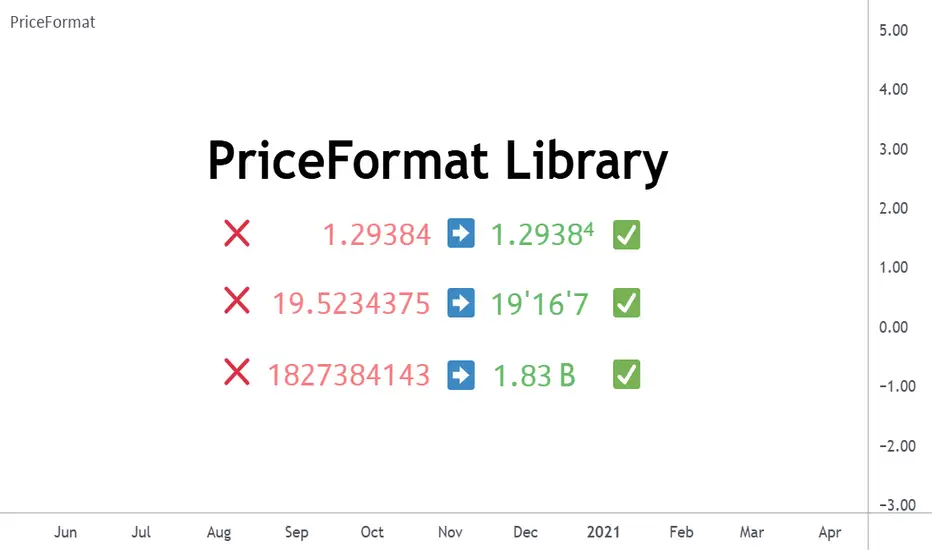
PriceFormatLibrary for automatically converting price values to formatted strings matching the same format that TradingView uses to display open/high/low/close prices on the chart. █ OVERVIEW This library is intended for Pine Coders who are authors of scripts that display numbers onto a user's charts. Typically, 𝚜𝚝𝚛.𝚝𝚘𝚜𝚝𝚛𝚒𝚗𝚐() would be used to convert a number into a string which can be displayed in a label / box / table, but this only works well for values that are formatted as a simple decimal number. The purpose of this library is to provide an easy way to create a formatted string for values which use other types of formats besides the decimal format. The main functions exported by this library are: 𝚏𝚘𝚛𝚖𝚊𝚝𝙿𝚛𝚒𝚌𝚎() - creates a formatted string from a price value 𝚖𝚎𝚊𝚜𝚞𝚛𝚎𝙿𝚛𝚒𝚌𝚎𝙲𝚑𝚊𝚗𝚐𝚎() - creates a formatted string from the distance between two prices 𝚝𝚘𝚜𝚝𝚛𝚒𝚗𝚐() - an alternative to the built-in 𝚜𝚝𝚛.𝚝𝚘𝚜𝚝𝚛𝚒𝚗𝚐(𝚟𝚊𝚕𝚞𝚎, 𝚏𝚘𝚛𝚖𝚊𝚝) This library also exports some auxiliary functions which are used under the hood of the previously mentioned functions, but can also be useful to Pine Coders that need fine-tuned control for customized formatting of numeric values: Functions that determine information about the current chart: 𝚒𝚜𝙵𝚛𝚊𝚌𝚝𝚒𝚘𝚗𝚊𝚕𝙵𝚘𝚛𝚖𝚊𝚝(), 𝚒𝚜𝚅𝚘𝚕𝚞𝚖𝚎𝙵𝚘𝚛𝚖𝚊𝚝(), 𝚒𝚜𝙿𝚎𝚛𝚌𝚎𝚗𝚝𝚊𝚐𝚎𝙵𝚘𝚛𝚖𝚊𝚝(), 𝚒𝚜𝙳𝚎𝚌𝚒𝚖𝚊𝚕𝙵𝚘𝚛𝚖𝚊𝚝(), 𝚒𝚜𝙿𝚒𝚙𝚜𝙵𝚘𝚛𝚖𝚊𝚝() Functions that convert a 𝚏𝚕𝚘𝚊𝚝 value to a formatted string: 𝚊𝚜𝙳𝚎𝚌𝚒𝚖𝚊𝚕(), 𝚊𝚜𝙿𝚒𝚙𝚜(), 𝚊𝚜𝙵𝚛𝚊𝚌𝚝𝚒𝚘𝚗𝚊𝚕(), 𝚊𝚜𝚅𝚘𝚕𝚞𝚖𝚎() █ EXAMPLES • Simple Example This example shows the simplest way to utilize this library. //@version=6 indicator("Simple Example") import n00btraders/PriceFormat/1 var table t = table.new(position.middle_right, 2, 1, bgcolor = color.new(color.blue, 90), force_overlay = true) if barstate.isfirst table.cell(t, 0, 0, "Current Price: ", text_color = color.black, text_size = 40) table.cell(t, 1, 0, text_color = color.blue, text_size = 40) if barstate.islast string lastPrice = close.formatPrice() // Simple, easy way to format price table.cell_set_text(t, 1, 0, lastPrice) • Complex Example This example calls all of the main functions and uses their optional arguments. //@version=6 indicator("Complex Example") import n00btraders/PriceFormat/1 // Enum values that can be used as optional arguments precision = input.enum(PriceFormat.Precision.DEFAULT) language = input.enum(PriceFormat.Language.ENGLISH) // Main library functions used to create formatted strings string formattedOpen = open.formatPrice(precision, language, allowPips = true) string rawOpenPrice = PriceFormat.tostring(open, format.price) string formattedClose = close.formatPrice(precision, language, allowPips = true) string rawClosePrice = PriceFormat.tostring(close, format.price) = PriceFormat.measurePriceChange(open, close, precision, language, allowPips = true) // Labels to display formatted values on chart string prices = str.format("Open: {0} ({1}) Close: {2} ({3})", formattedOpen, rawOpenPrice, formattedClose, rawClosePrice) string change = str.format("Change (close - open): {0} / {1}", distance, ticks) label.new(chart.point.now(high), prices, yloc = yloc.abovebar, textalign = text.align_left, force_overlay = true) label.new(chart.point.now(low), change, yloc = yloc.belowbar, style = label.style_label_up, force_overlay = true) █ NOTES • Function Descriptions The library source code uses Markdown for the exported functions. Hover over a function/method call in the Pine Editor to display formatted, detailed information about the function/method. • Precision Settings The Precision option in the chart settings can change the format of how prices are displayed on the chart. Since the user's selected choice cannot be known through any Pine built-in variable, this library provides a 𝙿𝚛𝚎𝚌𝚒𝚜𝚒𝚘𝚗 enum that can be used as an optional script input for the user to specify their selected choice. • Language Settings The Language option in the user menu can change the decimal/grouping separators in the prices that are displayed on the chart. Since the user's selected choice cannot be known through any Pine built-in variable, this library provides a 𝙻𝚊𝚗𝚐𝚞𝚊𝚐𝚎 enum that can be used as an optional script input for the user to specify their selected choice. █ EXPORTED FUNCTIONS method formatPrice(price, precision, language, allowPips) Formats a price value to match how it would be displayed on the user's current chart. Namespace types: series float, simple float, input float, const float Parameters: price (float) : The value to format. precision (series Precision) : A Precision.* enum value. language (series Language) : A Language.* enum value. allowPips (simple bool) : Whether to allow decimal numbers to display as pips. Returns: Automatically formatted price string. measurePriceChange(startPrice, endPrice, precision, language, allowPips) Measures a change in price in terms of both distance and ticks. Parameters: startPrice (float) : The starting price. endPrice (float) : The ending price. precision (series Precision) : A Precision.* enum value. language (series Language) : A Language.* enum value. allowPips (simple bool) : Whether to allow decimal numbers to display as pips. Returns: A tuple of formatted strings: . method tostring(value, format) Alternative to the Pine `str.tostring(value, format)` built-in function. Namespace types: series float, simple float, input float, const float Parameters: value (float) : (series float) The value to format. format (string) : (series string) The format string. Returns: String in the specified format. isFractionalFormat() Determines if the default behavior of the chart's price scale is to use a fractional format. Returns: True if the chart can display prices in fractional format. isVolumeFormat() Determines if the default behavior of the chart's price scale is to display prices as volume. Returns: True if the chart can display prices as volume. isPercentageFormat() Determines if the default behavior of the chart's price scale is to display percentages. Returns: True if the chart can display prices as percentages. isDecimalFormat() Determines if the default behavior of the chart's price scale is to use a decimal format. Returns: True if the chart can display prices in decimal format. isPipsFormat() Determines if the current symbol's prices can be displayed as pips. Returns: True if the chart can display prices as pips. method asDecimal(value, precision, minTick, decimalSeparator, groupingSeparator, eNotation) Converts a number to a string in decimal format. Namespace types: series float, simple float, input float, const float Parameters: value (float) : The value to format. precision (int) : Number of decimal places. minTick (float) : Minimum tick size. decimalSeparator (string) : The decimal separator. groupingSeparator (string) : The thousands separator, aka digit group separator. eNotation (bool) : Whether the result should use E notation. Returns: String in decimal format. method asPips(value, priceScale, minMove, minMove2, decimalSeparator, groupingSeparator) Converts a number to a string in decimal format with the last digit replaced by a superscript. Namespace types: series float, simple float, input float, const float Parameters: value (float) : The value to format. priceScale (int) : Price scale. minMove (int) : Min move. minMove2 (int) : Min move 2. decimalSeparator (string) : The decimal separator. groupingSeparator (string) : The thousands separator, aka digit group separator. Returns: String in decimal format with an emphasis on the pip value. method asFractional(value, priceScale, minMove, minMove2, fractionalSeparator1, fractionalSeparator2) Converts a number to a string in fractional format. Namespace types: series float, simple float, input float, const float Parameters: value (float) : The value to format. priceScale (int) : Price scale. minMove (int) : Min move. minMove2 (int) : Min move 2. fractionalSeparator1 (string) : The primary fractional separator. fractionalSeparator2 (string) : The secondary fractional separator. Returns: String in fractional format. method asVolume(value, precision, minTick, decimalSeparator, groupingSeparator, spacing) Converts a number to a string in volume format. Namespace types: series float, simple float, input float, const float Parameters: value (float) : The value to format. precision (int) : Maximum number of decimal places. minTick (float) : Minimum tick size. decimalSeparator (string) : The decimal separator. groupingSeparator (string) : The thousands separator, aka digit group separator. spacing (string) : The whitespace separator. Returns: String in volume format.Biblioteka Pine Script®od n00btraders2298
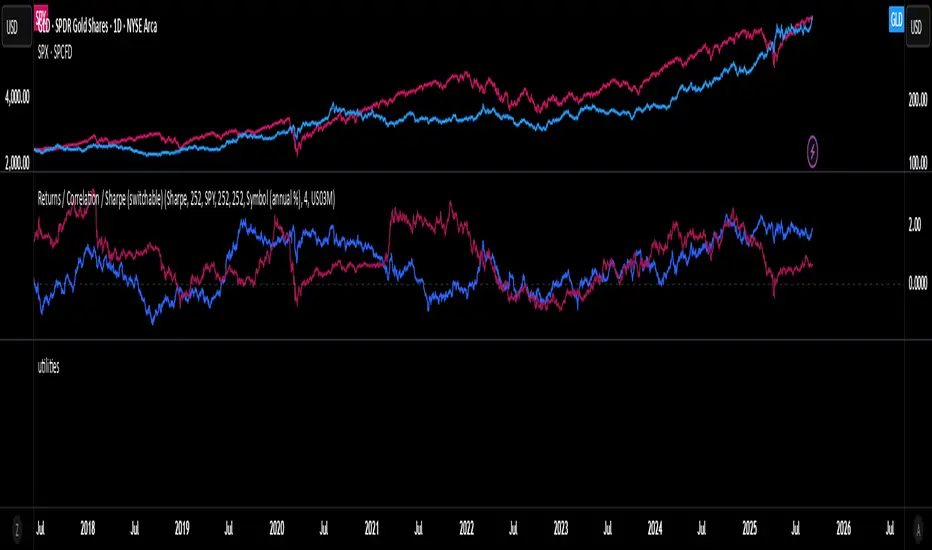
utilitiesLibrary for commonly used utilities, for visualizing rolling returns, correlations and sharpeBiblioteka Pine Script®od villia90
jsonbuilderLibrary "jsonbuilder" JsonBuilder for easiest way to generate json string JSONBuilder(pairs) Create JSONBuilder instance Parameters: pairs (array) : Pairs list, not required for users method addField(this, key, value, kind) Add Json Object Namespace types: _JSONBuilder Parameters: this (_JSONBuilder) key (string) : Field key value (string) : Field value kind (series Kind) : Kind value method execute(this) Create json string Namespace types: _JSONBuilder Parameters: this (_JSONBuilder) method addArray(this, key, value) Add Json Array Namespace types: _JSONBuilder Parameters: this (_JSONBuilder) key (string) : Field key value (array<_JSONBuilder>) : Object value array method addObject(this, key, value) Add Json Object Namespace types: _JSONBuilder Parameters: this (_JSONBuilder) key (string) : Field key value (_JSONBuilder) : Object value _JSONBuilder JSONBuilder type Fields: pairs (array) : Pairs dataBiblioteka Pine Script®od EmreKb1131
Helper Lib by tristanlee85Library "helpers" This library offers various functions and types based on the algorithmic concepts as authored by ICT. kv(key, value) Returns a string of the key/value set, suitable for debug logging Parameters: key (string) value (string) Returns: A string formatted as "{key}: {value}" kv(key, value) Parameters: key (string) value (int) kv(key, value) Parameters: key (string) value (float) kv(key, value) Parameters: key (string) value (bool) method enable(this, enable) Enable/Disable debug logging Namespace types: Debugger Parameters: this (Debugger) enable (bool) : Set to `true` by default. method group(this, label) Creates a group label for nested debug() invocations Namespace types: Debugger Parameters: this (Debugger) label (string) method groupEnd(this, label) Ends the specified debug group Namespace types: Debugger Parameters: this (Debugger) label (string) method log(this, s, arg1, arg2, arg3, arg4, arg5) Logs the param values if debug mode is enabled Namespace types: Debugger Parameters: this (Debugger) s (string) : Title of the log message arg1 (string) arg2 (string) arg3 (string) arg4 (string) arg5 (string) method logIf(this, expr, s, arg1, arg2, arg3, arg4, arg5) Same behavior as debug() except will only log if the passed expression is true Namespace types: Debugger Parameters: this (Debugger) expr (bool) : Boolean expression to determine if debug logs should be logged s (string) : Title of the log message arg1 (string) arg2 (string) arg3 (string) arg4 (string) arg5 (string) style_getLineStyleFromType(opt) Returns the corresponding line style constant for the given LineStyleType Parameters: opt (series LineStyleType) : The selected line style type Returns: The Pine Script line style constant style_getTextSizeFromType(opt) Returns the corresponding text size constant for the given TextSizeType Parameters: opt (series TextSizeType) : The selected text size type Returns: The Pine Script text size constant style_getTextHAlignFromType(t) Returns the corresponding horizontal text align constant for the given HAlignType Parameters: t (series HAlignType) : The selected text align type Returns: The Pine Script text align constant style_getTextVAlignFromType(t) Returns the corresponding vertical text align constant for the given VAlignType Parameters: t (series VAlignType) : The selected text align type Returns: The Pine Script text align constant format_sentimentType(sentiment, pd) Used to produce a string with the sentiment and PD array type (e.g., "+FVG") Parameters: sentiment (series SentimentType) : The sentiment value (e.g., SentimentType.BULLISH) pd (series PDArrayType) : The price data array (e.g., PDArrayType.FVG) Returns: A formatted string with the sentiment and PD array (e.g., "+FVG") format_timeToString(timestamp) Formats a UNIX timestamp into a date and time string based on predefined formats Parameters: timestamp (int) : The UNIX timestamp to format Returns: A formatted string as "MM-dd (E) - HH:mm" method init(this) Initializes the session and validates the configuration. This MUST be called immediately after creating a new instance. Namespace types: Session Parameters: this (Session) : The Session object reference Returns: The Session object (chainable) or throws a runtime error if invalid method isActive(this, _time) Determines if the session is active based on the current bar time Namespace types: Session Parameters: this (Session) : The Session object reference _time (int) Returns: `true` if the session is currently active; `false` otherwise method draw(this) Draws the line and optional label Namespace types: LineLabel Parameters: this (LineLabel) : The LineLabel object reference Returns: The LineLabel object (chainable) method extend(this, x) Extends the line and label right to the specified bar index Namespace types: LineLabel Parameters: this (LineLabel) : The LineLabel object reference x (int) : The bar index to extend to Returns: The LineLabel object (chainable) method destroy(this) Removes the line and label from the chart Namespace types: LineLabel Parameters: this (LineLabel) : The LineLabel object reference isFVG(includeVI, barIdx) Checks if the previous bars form a Fair Value Gap (FVG) Parameters: includeVI (bool) : If true, includes Volume Imbalance in the FVG calculation barIdx (int) : The index of the bar to check from (default is 0 for the current bar) Returns: A Gap object if a FVG is detected; otherwise, `na` isVolumeImbalance(barIdx) Checks if the previous bars form a Volume Imbalance (VI) Parameters: barIdx (int) : The index of the bar to check from (default is 0 for the current bar) Returns: A Gap object if a VI is detected; otherwise, `na` isLiquidityVoid(barIdx) Checks if the previous bars form a Liquidity Void (LV) Parameters: barIdx (int) : The index of the bar to check from (default is 0 for the current bar) Returns: A Gap object if an LV is detected; otherwise, `na` isSwingPoint(barIdx) Checks if the previous bars form a swing point Parameters: barIdx (int) : The index of the bar to check from (default is 0 for the current bar) Returns: A SwingPoint object if a swing point is detected; otherwise, `na` Debugger A debug logging utility with group support Fields: enabled (series bool) _debugGroupStack (array) Session Defines a trading session with a name and time range. When creating a new instance of this type, you MUST call init() immediately. Fields: name (series string) : A display-friendly name (e.g., "NY AM") session (series string) : A string defining the session time range (e.g., "1300-1400") enabled (series bool) : Optional flag for custom logic; defaults to false start (series int) : UNIX time representing the session start (set via isActive()) end (series int) : UNIX time representing the session end (set via isActive()) _t (series int) _start_HH (series float) _start_mm (series float) _end_HH (series float) _end_mm (series float) Gap Represents a price inefficiency (gap) with details on sentiment and price levels Fields: type (series SentimentType) : The sentiment of the gap (e.g., SentimentType.BULLISH) name (series string) : A display-friendly name (e.g., "+FVG") startTime (series int) : UNIX time value for the gap's start endTime (series int) : UNIX time value for the gap's end startIndex (series int) : Bar index where the gap starts endIndex (series int) : Bar index where the gap ends gapLow (series float) : The lowest price level of the gap gapHigh (series float) : The highest price level of the gap ce (series float) : The consequent encroachment level of the gap SwingPoint Represents a swing point with details on type and price level Fields: type (series SwingPointType) : The type of swing point (e.g., SwingPointType.HIGH) time (series int) : UNIX time value for the swing point barIdx (series int) : Bar index where the swing point occurs price (series float) : The price level of the swing point which is either the high or low of the middle bar LineLabel Combines a line and box type to produce a line with a label that is properly aligned Fields: x (series int) : The X-axis starting point as a bar index y (series float) : The Y-axis starting point as the price level color (series color) : Both the line and text color width (series int) : Thickness of the line label (series string) : Text to display showLabel (series bool) : Boolean to conditionally show/hide the label (default is false) lineStyle (series LineStyleType) : The style of the line textSize (series TextSizeType) _b (series box) _l (series line)Biblioteka Pine Script®od tristanlee85Zaktualizowano 4
TextLibrary "Text" library to format text in different fonts or cases plus a sort function. 🔸 Credits and Usage This library is inspired by the work of three authors (in chronological order of publication date): Unicode font function - JD - Duyck UnicodeReplacementFunction - wlhm font - kaigouthro 🔹 Fonts Besides extra added font options, the toFont(fromText, font) method uses a different technique. On the first runtime bar (whether it is barstate.isfirst , barstate.islast , or between) regular letters and numbers and mapped with the chosen font. After this, each character is replaced using the build-in key - value pair map function . Also an enum Efont is included. Note: Some fonts are not complete, for example there isn't a replacement for every character in Superscript/Subscript. Example of usage (besides the included table example): import fikira/Text/1 as t i_font = input.enum(t.Efont.Blocks) if barstate.islast sentence = "this sentence contains words" label.new(bar_index, 0, t.toFont(fromText = sentence, font = str.tostring(i_font)), style=label.style_label_lower_right) label.new(bar_index, 0, t.toFont(fromText = sentence, font = "Circled" ), style=label.style_label_lower_left ) label.new(bar_index, 0, t.toFont(fromText = sentence, font = "Wiggly" ), style=label.style_label_upper_right) label.new(bar_index, 0, t.toFont(fromText = sentence, font = "Upside Latin" ), style=label.style_label_upper_left ) 🔹 Cases The script includes a toCase(fromText, case) method to transform text into snake_case, UPPER SNAKE_CASE, kebab-case, camelCase or PascalCase, as well as an enum Ecase . Example of usage (besides the included table example): import fikira/Text/1 as t i_case = input.enum(t.Ecase.camel) if barstate.islast sentence = "this sentence contains words" label.new(bar_index, 0, t.toCase(fromText = sentence, case = str.tostring(i_case)), style=label.style_label_lower_right) label.new(bar_index, 0, t.toCase(fromText = sentence, case = "snake_case" ), style=label.style_label_lower_left ) label.new(bar_index, 0, t.toCase(fromText = sentence, case = "PascalCase" ), style=label.style_label_upper_right) label.new(bar_index, 0, t.toCase(fromText = sentence, case = "SNAKE_CASE" ), style=label.style_label_upper_left ) 🔹 Sort The sort(strings, order, sortByUnicodeDecimalNumbers) method returns a sorted array of strings. strings: array of strings, for example words = array.from("Aword", "beyond", "Space", "salt", "pepper", "swing", "someThing", "otherThing", "12345", "_firstWord") order: "asc" / "desc" (ascending / descending) sortByUnicodeDecimalNumbers: true/false; default = false _____ • sortByUnicodeDecimalNumbers: every Unicode character is linked to a Unicode Decimal number ( wikipedia.org/wiki/List_of_Unicode_characters ), for example: 1 49 2 50 3 51 ... A 65 B 66 ... S 83 ... _ 95 ` 96 a 97 b 98 ... o 111 p 112 q 113 r 114 s 115 ... This means, if we sort without adjusting ( sortByUnicodeDecimalNumbers = true ), in ascending order, the letter b (98 - small) would be after S (83 - Capital). By disabling sortByUnicodeDecimalNumbers , Capital letters are intermediate transformed to str.lower() after which the Unicode Decimal number is retrieved from the small number instead of the capital number. For example S (83) -> s (115), after which the number 115 is used to sort instead of 83. Example of usage (besides the included table example): import fikira/Text/1 as t if barstate.islast aWords = array.from("Aword", "beyond", "Space", "salt", "pepper", "swing", "someThing", "otherThing", "12345", "_firstWord") label.new(bar_index, 0, str.tostring(t.sort(strings= aWords, order = 'asc' , sortByUnicodeDecimalNumbers = false)), style=label.style_label_lower_right) label.new(bar_index, 0, str.tostring(t.sort(strings= aWords, order = 'desc', sortByUnicodeDecimalNumbers = false)), style=label.style_label_lower_left ) label.new(bar_index, 0, str.tostring(t.sort(strings= aWords, order = 'asc' , sortByUnicodeDecimalNumbers = true )), style=label.style_label_upper_right) label.new(bar_index, 0, str.tostring(t.sort(strings= aWords, order = 'desc', sortByUnicodeDecimalNumbers = true )), style=label.style_label_upper_left ) 🔸 Methods/functions method toFont(fromText, font) toFont : Transforms text into the selected font Namespace types: series string, simple string, input string, const string Parameters: fromText (string) font (string) Returns: `fromText` transformed to desired `font` method toCase(fromText, case) toCase : formats text to snake_case, UPPER SNAKE_CASE, kebab-case, camelCase or PascalCase Namespace types: series string, simple string, input string, const string Parameters: fromText (string) case (string) Returns: `fromText` formatted to desired `case` method sort(strings, order, sortByUnicodeDecimalNumbers) sort : sorts an array of strings, ascending/descending and by Unicode Decimal numbers or not. Namespace types: array Parameters: strings (array) order (string) sortByUnicodeDecimalNumbers (bool) Returns: Sorted array of stringsBiblioteka Pine Script®od fikira2238
TimezoneFormatIANAUTCLibrary "TimezoneFormatIANAUTC" Provides either the full IANA timezone identifier or the corresponding UTC offset for TradingView’s built-in variables and functions. tz(_tzname, _format) Parameters: _tzname (string) : "London", "New York", "Istanbul", "+1:00", "-03:00" etc. _format (string) : "IANA" or "UTC" Returns: "Europe/London", "America/New York", "UTC+1:00" Example Code import ARrowofTime/TimezoneFormatIANAUTC/1 as libtz sesTZInput = input.string(defval = "Singapore", title = "Timezone") example1 = libtz.tz("London", "IANA") // Return Europe/London example2 = libtz.tz("London", "UTC") // Return UTC+1:00 example3 = libtz.tz("UTC+5", "IANA") // Return UTC+5:00 example4 = libtz.tz("UTC+4:30", "UTC") // Return UTC+4:30 example5 = libtz.tz(sesTZInput, "IANA") // Return Asia/Singapore example6 = libtz.tz(sesTZInput, "UTC") // Return UTC+8:00 sesTime1 = time("","1300-1700", example1) // returns the UNIX time of the current bar in session time or na sesTime2 = time("","1300-1700", example2) // returns the UNIX time of the current bar in session time or na sesTime3 = time("","1300-1700", example3) // returns the UNIX time of the current bar in session time or na sesTime4 = time("","1300-1700", example4) // returns the UNIX time of the current bar in session time or na sesTime5 = time("","1300-1700", example5) // returns the UNIX time of the current bar in session time or na sesTime6 = time("","1300-1700", example6) // returns the UNIX time of the current bar in session time or na Parameter Format Guide This section explains how to properly format the parameters for the tz(_tzname, _format) function. _tzname (string) must be either; A valid timezone name exactly as it appears in the chart’s lower-right corner (e.g. New York, London). A valid UTC offset in ±H:MM or ±HH:MM format. Hours: 0–14 (zero-padded or not, e.g. +1:30, +01:30, -0:00). Minutes: Must be 00, 15, 30, or 45 examples; "New York" → ✅ Valid chart label "London" → ✅ Valid chart label "Berlin" → ✅ Valid chart label "America/New York" → ❌ Invalid chart label. (Use "New York" instead) "+1:30" → ✅ Valid offset with single-digit hour "+01:30" → ✅ Valid offset with zero-padded hour "-05:00" → ✅ Valid negative offset "-0:00" → ✅ Valid zero offset "+1:1" → ❌ Invalid (minute must be 00, 15, 30, or 45) "+2:50" → ❌ Invalid (minute must be 00, 15, 30, or 45) "+15:00" → ❌ Invalid (hour must be 14 or below) _tztype (string) must be either; "IANA" → returns full IANA timezone identifier (e.g. "Europe/London"). When a time function call uses an IANA time zone identifier for its timezone argument, its calculations adjust automatically for historical and future changes to the specified region’s observed time, such as daylight saving time (DST) and updates to time zone boundaries, instead of using a fixed offset from UTC. "UTC" → returns UTC offset string (e.g. "UTC+01:00") Biblioteka Pine Script®od ARrowofTime1
TimeframeInputToStringMaps a worded string for timeframes useful when working with the input.timeframe settings input. Use like timeframeToString("120") and the output will be "2 hour" Biblioteka Pine Script®od CryptobotnikZaktualizowano 0
light_logLight Log - A Defensive Programming Library for Pine Script Overview The Light Log library transforms Pine Script development by introducing structured logging and defensive programming patterns typically found in enterprise languages like C#. This library addresses a fundamental challenge in Pine Script: the lack of sophisticated error handling and debugging tools that developers expect when building complex trading systems. At its core, Light Log provides three transformative capabilities that work together to create more reliable and maintainable code. First, it wraps all native Pine Script types in error-aware containers, allowing values to carry validation state alongside their data. Second, it offers a comprehensive logging system with severity levels and conditional rendering. Third, it includes defensive programming utilities that catch errors early and make code self-documenting. The Philosophy of Errors as Values Traditional Pine Script error handling relies on runtime errors that halt execution, making it difficult to build resilient systems that can gracefully handle edge cases. Light Log introduces a paradigm shift by treating errors as first-class values that flow through your program alongside regular data. When you wrap a value using Light Log's type system, you're not just storing data – you're creating a container that can carry both the value and its validation state. For example, when you call myNumber.INT() , you receive an INT object that contains both the integer value and a Log object that can describe any issues with that value. This approach, inspired by functional programming languages, allows errors to propagate through calculations without causing immediate failures. Consider how this changes error handling in practice. Instead of a calculation failing catastrophically when it encounters invalid input, it can produce a result object that contains both the computed value (which might be na) and a detailed log explaining what went wrong. Subsequent operations can check has_error() to decide whether to proceed or handle the error condition gracefully. The Typed Wrapper System Light Log provides typed wrappers for every native Pine Script type: INT, FLOAT, BOOL, STRING, COLOR, LINE, LABEL, BOX, TABLE, CHART_POINT, POLYLINE, and LINEFILL. These wrappers serve multiple purposes beyond simple value storage. Each wrapper type contains two fields: the value field v holds the actual data, while the error field e contains a Log object that tracks the value's validation state. This dual nature enables powerful programming patterns. You can perform operations on wrapped values and accumulate error information along the way, creating an audit trail of how values were processed. The wrapper system includes convenient methods for converting between wrapped and unwrapped values. The extension methods like INT() , FLOAT() , etc., make it easy to wrap existing values, while the from_INT() , from_FLOAT() methods extract the underlying values when needed. The has_error() method provides a consistent interface for checking whether any wrapped value has encountered issues during processing. The Log Object: Your Debugging Companion The Log object represents the heart of Light Log's debugging capabilities. Unlike simple string concatenation for error messages, the Log object provides a structured approach to building, modifying, and rendering diagnostic information. Each Log object carries three essential pieces of information: an error type (info, warning, error, or runtime_error), a message string that can be built incrementally, and an active flag that controls conditional rendering. This structure enables sophisticated logging patterns where you can build up detailed diagnostic information throughout your script's execution and decide later whether and how to display it. The Log object's methods support fluent chaining, allowing you to build complex messages in a readable way. The write() and write_line() methods append text to the log, while new_line() adds formatting. The clear() method resets the log for reuse, and the rendering methods ( render_now() , render_condition() , and the general render() ) control when and how messages appear. Defensive Programming Made Easy Light Log's argument validation functions transform how you write defensive code. Instead of cluttering your functions with verbose validation logic, you can use concise, self-documenting calls that make your intentions clear. The argument_error() function provides strict validation that halts execution when conditions aren't met – perfect for catching programming errors early. For less critical issues, argument_log_warning() and argument_log_error() record problems without stopping execution, while argument_log_info() provides debug visibility into your function's behavior. These functions follow a consistent pattern: they take a condition to check, the function name, the argument name, and a descriptive message. This consistency makes error messages predictable and helpful, automatically formatting them to show exactly where problems occurred. Building Modular, Reusable Code Light Log encourages a modular approach to Pine Script development by providing tools that make functions more self-contained and reliable. When functions validate their inputs and return wrapped values with error information, they become true black boxes that can be safely composed into larger systems. The void_return() function addresses Pine Script's requirement that all code paths return a value, even in error handling branches. This utility function provides a clean way to satisfy the compiler while making it clear that a particular code path should never execute. The static log pattern, initialized with init_static_log() , enables module-wide error tracking. You can create a persistent Log object that accumulates information across multiple function calls, building a comprehensive diagnostic report that helps you understand complex behaviors in your indicators and strategies. Real-World Applications In practice, Light Log shines when building sophisticated trading systems. Imagine developing a complex indicator that processes multiple data streams, performs statistical calculations, and generates trading signals. With Light Log, each processing stage can validate its inputs, perform calculations, and pass along both results and diagnostic information. For example, a moving average calculation might check that the period is positive, that sufficient data exists, and that the input series contains valid values. Instead of failing silently or throwing runtime errors, it can return a FLOAT object that contains either the calculated average or a detailed explanation of why the calculation couldn't be performed. Strategy developers benefit even more from Light Log's capabilities. Complex entry and exit logic often involves multiple conditions that must all be satisfied. With Light Log, each condition check can contribute to a comprehensive log that explains exactly why a trade was or wasn't taken, making strategy debugging and optimization much more straightforward. Performance Considerations While Light Log adds a layer of abstraction over raw Pine Script values, its design minimizes performance impact. The wrapper objects are lightweight, containing only two fields. The logging operations only consume resources when actually rendered, and the conditional rendering system ensures that production code can run with logging disabled for maximum performance. The library follows Pine Script best practices for performance, using appropriate data structures and avoiding unnecessary operations. The var keyword in init_static_log() ensures that persistent logs don't create new objects on every bar, maintaining efficiency even in real-time calculations. Getting Started Adopting Light Log in your Pine Script projects is straightforward. Import the library, wrap your critical values, add validation to your functions, and use Log objects to track important events. Start small by adding logging to a single function, then expand as you see the benefits of better error visibility and code organization. Remember that Light Log is designed to grow with your needs. You can use as much or as little of its functionality as makes sense for your project. Even simple uses, like adding argument validation to key functions, can significantly improve code reliability and debugging ease. Transform your Pine Script development experience with Light Log – because professional trading systems deserve professional development tools. Light Log Technical Deep Dive: Advanced Patterns and Architecture Understanding Errors as Values The concept of "errors as values" represents a fundamental shift in how we think about error handling in Pine Script. In traditional Pine Script development, errors are events – they happen at a specific moment in time and immediately interrupt program flow. Light Log transforms errors into data – they become information that flows through your program just like any other value. This transformation has profound implications. When errors are values, they can be stored, passed between functions, accumulated, transformed, and inspected. They become part of your program's data flow rather than exceptions to it. This approach, popularized by languages like Rust with its Result type and Haskell with its Either monad, brings functional programming's elegance to Pine Script. Consider a practical example. Traditional Pine Script might calculate a momentum indicator like this: momentum = close - close If period is invalid or if there isn't enough historical data, this calculation might produce na or cause subtle bugs. With Light Log's approach: calculate_momentum(src, period)=> result = src.FLOAT() if period <= 0 result.e.write("Invalid period: must be positive", true, ErrorType.error) result.v := na else if bar_index < period result.e.write("Insufficient data: need " + str.tostring(period) + " bars", true, ErrorType.warning) result.v := na else result.v := src - src result.e.write("Momentum calculated successfully", false, ErrorType.info) result Now the function returns not just a value but a complete computational result that includes diagnostic information. Calling code can make intelligent decisions based on both the value and its associated metadata. The Monad Pattern in Pine Script While Pine Script lacks the type system features to implement true monads, Light Log brings monadic thinking to Pine Script development. The wrapped types (INT, FLOAT, etc.) act as computational contexts that carry both values and metadata through a series of transformations. The key insight of monadic programming is that you can chain operations while automatically propagating context. In Light Log, this context is the error state. When you have a FLOAT that contains an error, operations on that FLOAT can check the error state and decide whether to proceed or propagate the error. This pattern enables what functional programmers call "railway-oriented programming" – your code follows a success track when all is well but can switch to an error track when problems occur. Both tracks lead to the same destination (a result with error information), but they take different paths based on the validity of intermediate values. Composable Error Handling Light Log's design encourages composition – building complex functionality from simpler, well-tested components. Each component can validate its inputs, perform its calculation, and return a result with appropriate error information. Higher-level functions can then combine these results intelligently. Consider building a complex trading signal from multiple indicators: generate_signal(src, fast_period, slow_period, signal_period) => log = init_static_log(ErrorType.info) // Calculate components with error tracking fast_ma = calculate_ma(src, fast_period) slow_ma = calculate_ma(src, slow_period) // Check for errors in components if fast_ma.has_error() log.write_line("Fast MA error: " + fast_ma.e.message, true) if slow_ma.has_error() log.write_line("Slow MA error: " + slow_ma.e.message, true) // Proceed with calculation if no errors signal = 0.0.FLOAT() if not (fast_ma.has_error() or slow_ma.has_error()) macd_line = fast_ma.v - slow_ma.v signal_line = calculate_ma(macd_line, signal_period) if signal_line.has_error() log.write_line("Signal line error: " + signal_line.e.message, true) signal.e := log else signal.v := macd_line - signal_line.v log.write("Signal generated successfully") else signal.e := log signal.v := na signal This composable approach makes complex calculations more reliable and easier to debug. Each component is responsible for its own validation and error reporting, and the composite function orchestrates these components while maintaining comprehensive error tracking. The Static Log Pattern The init_static_log() function introduces a powerful pattern for maintaining state across function calls. In Pine Script, the var keyword creates variables that persist across bars but are initialized only once. Light Log leverages this to create logging objects that can accumulate information throughout a script's execution. This pattern is particularly valuable for debugging complex strategies where you need to understand behavior across multiple bars. You can create module-level logs that track important events: // Module-level diagnostic log diagnostics = init_static_log(ErrorType.info) // Track strategy decisions across bars check_entry_conditions() => diagnostics.clear() // Start fresh each bar diagnostics.write_line("Bar " + str.tostring(bar_index) + " analysis:") if close > sma(close, 20) diagnostics.write_line("Price above SMA20", false) else diagnostics.write_line("Price below SMA20 - no entry", true, ErrorType.warning) if volume > sma(volume, 20) * 1.5 diagnostics.write_line("Volume surge detected", false) else diagnostics.write_line("Normal volume", false) // Render diagnostics based on verbosity setting if debug_mode diagnostics.render_now() Advanced Validation Patterns Light Log's argument validation functions enable sophisticated precondition checking that goes beyond simple null checks. You can implement complex validation logic while keeping your code readable: validate_price_data(open_val, high_val, low_val, close_val) => argument_error(na(open_val) or na(high_val) or na(low_val) or na(close_val), "validate_price_data", "OHLC values", "contain na values") argument_error(high_val < low_val, "validate_price_data", "high/low", "high is less than low") argument_error(close_val > high_val or close_val < low_val, "validate_price_data", "close", "is outside high/low range") argument_log_warning(high_val == low_val, "validate_price_data", "high/low", "are equal (no range)") This validation function documents its requirements clearly and fails fast with helpful error messages when assumptions are violated. The mix of errors (which halt execution) and warnings (which allow continuation) provides fine-grained control over how strict your validation should be. Performance Optimization Strategies While Light Log adds abstraction, careful design minimizes overhead. Understanding Pine Script's execution model helps you use Light Log efficiently. Pine Script executes once per bar, so operations that seem expensive in traditional programming might have negligible impact. However, when building real-time systems, every optimization matters. Light Log provides several patterns for efficient use: Lazy Evaluation: Log messages are only built when they'll be rendered. Use conditional logging to avoid string concatenation in production: if debug_mode log.write_line("Calculated value: " + str.tostring(complex_calculation)) Selective Wrapping: Not every value needs error tracking. Wrap values at API boundaries and critical calculation points, but use raw values for simple operations: // Wrap at boundaries input_price = close.FLOAT() validated_period = validate_period(input_period).INT() // Use raw values internally sum = 0.0 for i = 0 to validated_period.v - 1 sum += close Error Propagation: When errors occur early, avoid expensive calculations: process_data(input) => validated = validate_input(input) if validated.has_error() validated // Return early with error else // Expensive processing only if valid perform_complex_calculation(validated) Integration Patterns Light Log integrates smoothly with existing Pine Script code. You can adopt it incrementally, starting with critical functions and expanding coverage as needed. Boundary Validation: Add Light Log at the boundaries of your system – where user input enters and where final outputs are produced. This catches most errors while minimizing changes to existing code. Progressive Enhancement: Start by adding argument validation to existing functions. Then wrap return values. Finally, add comprehensive logging. Each step improves reliability without requiring a complete rewrite. Testing and Debugging: Use Light Log's conditional rendering to create debug modes for your scripts. Production users see clean output while developers get detailed diagnostics: // User input for debug mode debug = input.bool(false, "Enable debug logging") // Conditional diagnostic output if debug diagnostics.render_now() else diagnostics.render_condition() // Only shows errors/warnings Future-Proofing Your Code Light Log's patterns prepare your code for Pine Script's evolution. As Pine Script adds more sophisticated features, code that uses structured error handling and defensive programming will adapt more easily than code that relies on implicit assumptions. The type wrapper system, in particular, positions your code to take advantage of potential future features or more sophisticated type inference. By thinking in terms of wrapped values and error propagation today, you're building code that will remain maintainable and extensible tomorrow. Light Log doesn't just make your Pine Script better today – it prepares it for the trading systems you'll need to build tomorrow. Library "light_log" A lightweight logging and defensive programming library for Pine Script. Designed for modular and extensible scripts, this utility provides structured runtime validation, conditional logging, and reusable `Log` objects for centralized error propagation. It also introduces a typed wrapping system for all native Pine values (e.g., `INT`, `FLOAT`, `LABEL`), allowing values to carry errors alongside data. This enables functional-style flows with built-in validation tracking, error detection (`has_error()`), and fluent chaining. Inspired by structured logging patterns found in systems like C#, it reduces boilerplate, enforces argument safety, and encourages clean, maintainable code architecture. method INT(self, error_type) Wraps an `int` value into an `INT` struct with an optional log severity. Namespace types: series int, simple int, input int, const int Parameters: self (int) : The raw `int` value to wrap. error_type (series ErrorType) : Optional severity level to associate with the log. Default is `ErrorType.error`. Returns: An `INT` object containing the value and a default Log instance. method FLOAT(self, error_type) Wraps a `float` value into a `FLOAT` struct with an optional log severity. Namespace types: series float, simple float, input float, const float Parameters: self (float) : The raw `float` value to wrap. error_type (series ErrorType) : Optional severity level to associate with the log. Default is `ErrorType.error`. Returns: A `FLOAT` object containing the value and a default Log instance. method BOOL(self, error_type) Wraps a `bool` value into a `BOOL` struct with an optional log severity. Namespace types: series bool, simple bool, input bool, const bool Parameters: self (bool) : The raw `bool` value to wrap. error_type (series ErrorType) : Optional severity level to associate with the log. Default is `ErrorType.error`. Returns: A `BOOL` object containing the value and a default Log instance. method STRING(self, error_type) Wraps a `string` value into a `STRING` struct with an optional log severity. Namespace types: series string, simple string, input string, const string Parameters: self (string) : The raw `string` value to wrap. error_type (series ErrorType) : Optional severity level to associate with the log. Default is `ErrorType.error`. Returns: A `STRING` object containing the value and a default Log instance. method COLOR(self, error_type) Wraps a `color` value into a `COLOR` struct with an optional log severity. Namespace types: series color, simple color, input color, const color Parameters: self (color) : The raw `color` value to wrap. error_type (series ErrorType) : Optional severity level to associate with the log. Default is `ErrorType.error`. Returns: A `COLOR` object containing the value and a default Log instance. method LINE(self, error_type) Wraps a `line` object into a `LINE` struct with an optional log severity. Namespace types: series line Parameters: self (line) : The raw `line` object to wrap. error_type (series ErrorType) : Optional severity level to associate with the log. Default is `ErrorType.error`. Returns: A `LINE` object containing the value and a default Log instance. method LABEL(self, error_type) Wraps a `label` object into a `LABEL` struct with an optional log severity. Namespace types: series label Parameters: self (label) : The raw `label` object to wrap. error_type (series ErrorType) : Optional severity level to associate with the log. Default is `ErrorType.error`. Returns: A `LABEL` object containing the value and a default Log instance. method BOX(self, error_type) Wraps a `box` object into a `BOX` struct with an optional log severity. Namespace types: series box Parameters: self (box) : The raw `box` object to wrap. error_type (series ErrorType) : Optional severity level to associate with the log. Default is `ErrorType.error`. Returns: A `BOX` object containing the value and a default Log instance. method TABLE(self, error_type) Wraps a `table` object into a `TABLE` struct with an optional log severity. Namespace types: series table Parameters: self (table) : The raw `table` object to wrap. error_type (series ErrorType) : Optional severity level to associate with the log. Default is `ErrorType.error`. Returns: A `TABLE` object containing the value and a default Log instance. method CHART_POINT(self, error_type) Wraps a `chart.point` value into a `CHART_POINT` struct with an optional log severity. Namespace types: chart.point Parameters: self (chart.point) : The raw `chart.point` value to wrap. error_type (series ErrorType) : Optional severity level to associate with the log. Default is `ErrorType.error`. Returns: A `CHART_POINT` object containing the value and a default Log instance. method POLYLINE(self, error_type) Wraps a `polyline` object into a `POLYLINE` struct with an optional log severity. Namespace types: series polyline, series polyline, series polyline, series polyline Parameters: self (polyline) : The raw `polyline` object to wrap. error_type (series ErrorType) : Optional severity level to associate with the log. Default is `ErrorType.error`. Returns: A `POLYLINE` object containing the value and a default Log instance. method LINEFILL(self, error_type) Wraps a `linefill` object into a `LINEFILL` struct with an optional log severity. Namespace types: series linefill Parameters: self (linefill) : The raw `linefill` object to wrap. error_type (series ErrorType) : Optional severity level to associate with the log. Default is `ErrorType.error`. Returns: A `LINEFILL` object containing the value and a default Log instance. method from_INT(self) Extracts the integer value from an INT wrapper. Namespace types: INT Parameters: self (INT) : The wrapped INT instance. Returns: The underlying `int` value. method from_FLOAT(self) Extracts the float value from a FLOAT wrapper. Namespace types: FLOAT Parameters: self (FLOAT) : The wrapped FLOAT instance. Returns: The underlying `float` value. method from_BOOL(self) Extracts the boolean value from a BOOL wrapper. Namespace types: BOOL Parameters: self (BOOL) : The wrapped BOOL instance. Returns: The underlying `bool` value. method from_STRING(self) Extracts the string value from a STRING wrapper. Namespace types: STRING Parameters: self (STRING) : The wrapped STRING instance. Returns: The underlying `string` value. method from_COLOR(self) Extracts the color value from a COLOR wrapper. Namespace types: COLOR Parameters: self (COLOR) : The wrapped COLOR instance. Returns: The underlying `color` value. method from_LINE(self) Extracts the line object from a LINE wrapper. Namespace types: LINE Parameters: self (LINE) : The wrapped LINE instance. Returns: The underlying `line` object. method from_LABEL(self) Extracts the label object from a LABEL wrapper. Namespace types: LABEL Parameters: self (LABEL) : The wrapped LABEL instance. Returns: The underlying `label` object. method from_BOX(self) Extracts the box object from a BOX wrapper. Namespace types: BOX Parameters: self (BOX) : The wrapped BOX instance. Returns: The underlying `box` object. method from_TABLE(self) Extracts the table object from a TABLE wrapper. Namespace types: TABLE Parameters: self (TABLE) : The wrapped TABLE instance. Returns: The underlying `table` object. method from_CHART_POINT(self) Extracts the chart.point from a CHART_POINT wrapper. Namespace types: CHART_POINT Parameters: self (CHART_POINT) : The wrapped CHART_POINT instance. Returns: The underlying `chart.point` value. method from_POLYLINE(self) Extracts the polyline object from a POLYLINE wrapper. Namespace types: POLYLINE Parameters: self (POLYLINE) : The wrapped POLYLINE instance. Returns: The underlying `polyline` object. method from_LINEFILL(self) Extracts the linefill object from a LINEFILL wrapper. Namespace types: LINEFILL Parameters: self (LINEFILL) : The wrapped LINEFILL instance. Returns: The underlying `linefill` object. method has_error(self) Returns true if the INT wrapper has an active log entry. Namespace types: INT Parameters: self (INT) : The INT instance to check. Returns: True if an error or message is active in the log. method has_error(self) Returns true if the FLOAT wrapper has an active log entry. Namespace types: FLOAT Parameters: self (FLOAT) : The FLOAT instance to check. Returns: True if an error or message is active in the log. method has_error(self) Returns true if the BOOL wrapper has an active log entry. Namespace types: BOOL Parameters: self (BOOL) : The BOOL instance to check. Returns: True if an error or message is active in the log. method has_error(self) Returns true if the STRING wrapper has an active log entry. Namespace types: STRING Parameters: self (STRING) : The STRING instance to check. Returns: True if an error or message is active in the log. method has_error(self) Returns true if the COLOR wrapper has an active log entry. Namespace types: COLOR Parameters: self (COLOR) : The COLOR instance to check. Returns: True if an error or message is active in the log. method has_error(self) Returns true if the LINE wrapper has an active log entry. Namespace types: LINE Parameters: self (LINE) : The LINE instance to check. Returns: True if an error or message is active in the log. method has_error(self) Returns true if the LABEL wrapper has an active log entry. Namespace types: LABEL Parameters: self (LABEL) : The LABEL instance to check. Returns: True if an error or message is active in the log. method has_error(self) Returns true if the BOX wrapper has an active log entry. Namespace types: BOX Parameters: self (BOX) : The BOX instance to check. Returns: True if an error or message is active in the log. method has_error(self) Returns true if the TABLE wrapper has an active log entry. Namespace types: TABLE Parameters: self (TABLE) : The TABLE instance to check. Returns: True if an error or message is active in the log. method has_error(self) Returns true if the CHART_POINT wrapper has an active log entry. Namespace types: CHART_POINT Parameters: self (CHART_POINT) : The CHART_POINT instance to check. Returns: True if an error or message is active in the log. method has_error(self) Returns true if the POLYLINE wrapper has an active log entry. Namespace types: POLYLINE Parameters: self (POLYLINE) : The POLYLINE instance to check. Returns: True if an error or message is active in the log. method has_error(self) Returns true if the LINEFILL wrapper has an active log entry. Namespace types: LINEFILL Parameters: self (LINEFILL) : The LINEFILL instance to check. Returns: True if an error or message is active in the log. void_return() Utility function used when a return is syntactically required but functionally unnecessary. Returns: Nothing. Function never executes its body. argument_error(condition, function, argument, message) Throws a runtime error when a condition is met. Used for strict argument validation. Parameters: condition (bool) : Boolean expression that triggers the runtime error. function (string) : Name of the calling function (for formatting). argument (string) : Name of the problematic argument. message (string) : Description of the error cause. Returns: Never returns. Halts execution if the condition is true. argument_log_info(condition, function, argument, message) Logs an informational message when a condition is met. Used for optional debug visibility. Parameters: condition (bool) : Boolean expression that triggers the log. function (string) : Name of the calling function. argument (string) : Argument name being referenced. message (string) : Informational message to log. Returns: Nothing. Logs if the condition is true. argument_log_warning(condition, function, argument, message) Logs a warning when a condition is met. Non-fatal but highlights potential issues. Parameters: condition (bool) : Boolean expression that triggers the warning. function (string) : Name of the calling function. argument (string) : Argument name being referenced. message (string) : Warning message to log. Returns: Nothing. Logs if the condition is true. argument_log_error(condition, function, argument, message) Logs an error message when a condition is met. Does not halt execution. Parameters: condition (bool) : Boolean expression that triggers the error log. function (string) : Name of the calling function. argument (string) : Argument name being referenced. message (string) : Error message to log. Returns: Nothing. Logs if the condition is true. init_static_log(error_type, message, active) Initializes a persistent (var) Log object. Ideal for global logging in scripts or modules. Parameters: error_type (series ErrorType) : Initial severity level (required). message (string) : Optional starting message string. Default value of (""). active (bool) : Whether the log should be flagged active on initialization. Default value of (false). Returns: A static Log object with the given parameters. method new_line(self) Appends a newline character to the Log message. Useful for separating entries during chained writes. Namespace types: Log Parameters: self (Log) : The Log instance to modify. Returns: The updated Log object with a newline appended. method write(self, message, flag_active, error_type) Appends a message to a Log object without a newline. Updates severity and active state if specified. Namespace types: Log Parameters: self (Log) : The Log instance being modified. message (string) : The text to append to the log. flag_active (bool) : Whether to activate the log for conditional rendering. Default value of (false). error_type (series ErrorType) : Optional override for the severity level. Default value of (na). Returns: The updated Log object. method write_line(self, message, flag_active, error_type) Appends a message to a Log object, prefixed with a newline for clarity. Namespace types: Log Parameters: self (Log) : The Log instance being modified. message (string) : The text to append to the log. flag_active (bool) : Whether to activate the log for conditional rendering. Default value of (false). error_type (series ErrorType) : Optional override for the severity level. Default value of (na). Returns: The updated Log object. method clear(self, flag_active, error_type) Clears a Log object’s message and optionally reactivates it. Can also update the error type. Namespace types: Log Parameters: self (Log) : The Log instance being cleared. flag_active (bool) : Whether to activate the log after clearing. Default value of (false). error_type (series ErrorType) : Optional new error type to assign. If not provided, the previous type is retained. Default value of (na). Returns: The cleared Log object. method render_condition(self, flag_active, error_type) Conditionally renders the log if it is active. Allows overriding error type and controlling active state afterward. Namespace types: Log Parameters: self (Log) : The Log instance to evaluate and render. flag_active (bool) : Whether to activate the log after rendering. Default value of (false). error_type (series ErrorType) : Optional error type override. Useful for contextual formatting just before rendering. Default value of (na). Returns: The updated Log object. method render_now(self, flag_active, error_type) Immediately renders the log regardless of `active` state. Allows overriding error type and active flag. Namespace types: Log Parameters: self (Log) : The Log instance to render. flag_active (bool) : Whether to activate the log after rendering. Default value of (false). error_type (series ErrorType) : Optional error type override. Allows dynamic severity adjustment at render time. Default value of (na). Returns: The updated Log object. render(self, condition, flag_active, error_type) Renders the log conditionally or unconditionally. Allows full control over render behavior. Parameters: self (Log) : The Log instance to render. condition (bool) : If true, renders only if the log is active. If false, always renders. Default value of (false). flag_active (bool) : Whether to activate the log after rendering. Default value of (false). error_type (series ErrorType) : Optional error type override passed to the render methods. Default value of (na). Returns: The updated Log object. Log A structured object used to store and render logging messages. Fields: error_type (series ErrorType) : The severity level of the message (from the ErrorType enum). message (series string) : The text of the log message. active (series bool) : Whether the log should trigger rendering when conditionally evaluated. INT A wrapped integer type with attached logging for validation or tracing. Fields: v (series int) : The underlying `int` value. e (Log) : Optional log object describing validation status or error context. FLOAT A wrapped float type with attached logging for validation or tracing. Fields: v (series float) : The underlying `float` value. e (Log) : Optional log object describing validation status or error context. BOOL A wrapped boolean type with attached logging for validation or tracing. Fields: v (series bool) : The underlying `bool` value. e (Log) : Optional log object describing validation status or error context. STRING A wrapped string type with attached logging for validation or tracing. Fields: v (series string) : The underlying `string` value. e (Log) : Optional log object describing validation status or error context. COLOR A wrapped color type with attached logging for validation or tracing. Fields: v (series color) : The underlying `color` value. e (Log) : Optional log object describing validation status or error context. LINE A wrapped line object with attached logging for validation or tracing. Fields: v (series line) : The underlying `line` value. e (Log) : Optional log object describing validation status or error context. LABEL A wrapped label object with attached logging for validation or tracing. Fields: v (series label) : The underlying `label` value. e (Log) : Optional log object describing validation status or error context. BOX A wrapped box object with attached logging for validation or tracing. Fields: v (series box) : The underlying `box` value. e (Log) : Optional log object describing validation status or error context. TABLE A wrapped table object with attached logging for validation or tracing. Fields: v (series table) : The underlying `table` value. e (Log) : Optional log object describing validation status or error context. CHART_POINT A wrapped chart point with attached logging for validation or tracing. Fields: v (chart.point) : The underlying `chart.point` value. e (Log) : Optional log object describing validation status or error context. POLYLINE A wrapped polyline object with attached logging for validation or tracing. Fields: v (series polyline) : The underlying `polyline` value. e (Log) : Optional log object describing validation status or error context. LINEFILL A wrapped linefill object with attached logging for validation or tracing. Fields: v (series linefill) : The underlying `linefill` value. e (Log) : Optional log object describing validation status or error context.Biblioteka Pine Script®od The_Peaceful_LizardZaktualizowano 3312
CommonUtils█ OVERVIEW This library is a utility tool for Pine Script™ developers. It provides a collection of helper functions designed to simplify common tasks such as mapping user-friendly string inputs to Pine Script™ constants and formatting timeframe strings for display. The primary goal is to make main scripts cleaner, more readable, and reduce repetitive boilerplate code. It is envisioned as an evolving resource, with potential for new utilities to be added over time based on community needs and feedback. █ CONCEPTS The library primarily focuses on two main concepts: Input Mapping Pine Script™ often requires specific constants for function parameters (e.g., `line.style_dashed` for line styles, `position.top_center` for table positions). However, presenting these technical constants directly to users in script inputs can be confusing. Input mapping involves: Allowing users to select options from more descriptive, human-readable strings (e.g., "Dashed", "Top Center") in the script's settings. Providing functions within this library (e.g., `mapLineStyle`, `mapTablePosition`) that take these user-friendly strings as input. Internally, these functions use switch statements or similar logic to convert (map) the input string to the corresponding Pine Script™ constant required by built-in functions. This approach enhances user experience and simplifies the main script's logic by centralizing the mapping process. Timeframe Formatting Raw timeframe strings obtained from variables like `timeframe.period` (e.g., "1", "60", "D", "W") or user inputs are not always ideal for direct display in labels or panels. The `formatTimeframe` function addresses this by: Taking a raw timeframe string as input. Parsing this string to identify its numerical part and unit (e.g., minutes, hours, days, weeks, months, seconds, milliseconds). Converting it into a more standardized and readable format (e.g., "1min", "60min", "Daily", "Weekly", "1s", "10M"). Offering an optional `customSuffix` parameter (e.g., " FVG", " Period") to append to the formatted string, making labels more descriptive, especially in multi-timeframe contexts. The function is designed to correctly interpret various common timeframe notations used in TradingView. █ NOTES Ease of Use: The library functions are designed with simple and understandable signatures. They typically take a string input and return the corresponding Pine Script™ constant or a formatted string. Default Behaviors: Mapping functions (`mapLineStyle`, `mapTablePosition`, `mapTextSize`) generally return a sensible default value (e.g., `line.style_solid` for `mapLineStyle`) in case of a non-matching input. This helps prevent errors in the main script. Extensibility of Formatting: The `formatTimeframe` function, with its `customSuffix` parameter, allows for flexible customization of timeframe labels to suit the specific descriptive needs of different indicators or contexts. Performance Considerations: These utility functions primarily use basic string operations and switch statements. For typical use cases, their impact on overall script performance is negligible. However, if a function like `formatTimeframe` were to be called excessively in a loop with dynamic inputs (which is generally not its intended use), performance should be monitored. No Dependencies: This library is self-contained and does not depend on any other external Pine Script™ libraries. █ EXPORTED FUNCTIONS mapLineStyle(styleString) Maps a user-provided line style string to its corresponding Pine Script™ line style constant. Parameters: styleString (simple string) : The input string representing the desired line style (e.g., "Solid", "Dashed", "Dotted" - typically from constants like LS1, LS2, LS3). Returns: The Pine Script™ constant for the line style (e.g., line.style_solid). Defaults to line.style_solid if no match. mapTablePosition(positionString) Maps a user-provided table position string to its corresponding Pine Script™ position constant. Parameters: positionString (simple string) : The input string representing the desired table position (e.g., "Top Right", "Top Center" - typically from constants like PP1, PP2). Returns: The Pine Script™ constant for the table position (e.g., position.top_right). Defaults to position.top_right if no match. mapTextSize(sizeString) Maps a user-provided text size string to its corresponding Pine Script™ size constant. Parameters: sizeString (simple string) : The input string representing the desired text size (e.g., "Tiny", "Small" - typically from constants like PTS1, PTS2). Returns: The Pine Script™ constant for the text size (e.g., size.tiny). Defaults to size.small if no match. formatTimeframe(tfInput, customSuffix) Formats a raw timeframe string into a more display-friendly string, optionally appending a custom suffix. Parameters: tfInput (simple string) : The raw timeframe string from user input or timeframe.period (e.g., "1", "60", "D", "W", "1S", "10M", "2H"). customSuffix (simple string) : An optional suffix to append to the formatted timeframe string (e.g., " FVG", " Period"). Defaults to an empty string. Returns: The formatted timeframe string (e.g., "1min", "60min", "Daily", "Weekly", "1s", "10min", "2h") with the custom suffix appended.Biblioteka Pine Script®od no1xZaktualizowano 5
FvgPanel█ OVERVIEW This library provides functionalities for creating and managing a display panel within a Pine Script™ indicator. Its primary purpose is to offer a structured way to present Fair Value Gap (FVG) information, specifically the nearest bullish and bearish FVG levels across different timeframes (Current, MTF, HTF), directly on the chart. The library handles the table's structure, header initialization, and dynamic cell content updates. █ CONCEPTS The core of this library revolves around presenting summarized FVG data in a clear, tabular format. Key concepts include: FVG Data Aggregation and Display The panel is designed to show at-a-glance information about the closest active FVG mitigation levels. It doesn't calculate these FVGs itself but relies on the main script to provide this data. The panel is structured with columns for timeframes (TF), Bullish FVGs, and Bearish FVGs, and rows for "Current" (LTF), "MTF" (Medium Timeframe), and "HTF" (High Timeframe). The `panelData` User-Defined Type (UDT) To facilitate the transfer of information to be displayed, the library defines a UDT named `panelData`. This structure is central to the library's operation and is designed to hold all necessary values for populating the panel's data cells for each relevant FVG. Its fields include: Price levels for the nearest bullish and bearish FVGs for LTF, MTF, and HTF (e.g., `nearestBullMitLvl`, `nearestMtfBearMitLvl`). Boolean flags to indicate if these FVGs are classified as "Large Volume" (LV) (e.g., `isNearestBullLV`, `isNearestMtfBearLV`). Color information for the background and text of each data cell, allowing for conditional styling based on the FVG's status or proximity (e.g., `ltfBullBgColor`, `mtfBearTextColor`). The design of `panelData` allows the main script to prepare all display-related data and styling cues in one object, which is then passed to the `updatePanel` function for rendering. This separation of data preparation and display logic keeps the library focused on its presentation task. Visual Cues and Formatting Price Formatting: Price levels are formatted to match the instrument's minimum tick size using an internal `formatPrice` helper function, ensuring consistent and accurate display. Large FVG Icon: If an FVG is marked as a "Large Volume" FVG in the `panelData` object, a user-specified icon (e.g., an emoji) is prepended to its price level in the panel, providing an immediate visual distinction. Conditional Styling: The background and text colors for each FVG level displayed in the panel can be individually controlled via the `panelData` object, enabling the main script to implement custom styling rules (e.g., highlighting the overall nearest FVG across all timeframes). Handling Missing Data: If no FVG data is available for a particular cell (i.e., the corresponding level in `panelData` is `na`), the panel displays "---" and uses a specified background color for "Not Available" cells. █ CALCULATIONS AND USE Using the `FvgPanel` typically involves a two-stage process: initialization and dynamic updates. Step 1: Panel Creation First, an instance of the panel table is created once, usually during the script's initial setup. This is done using the `createPanel` function. Call `createPanel()` with parameters defining its position on the chart, border color, border width, header background color, header text color, and header text size. This function initializes the table with three columns ("TF", "Bull FVG", "Bear FVG") and three data rows labeled "Current", "MTF", and "HTF", plus a header row. Store the returned `table` object in a `var` variable to persist it across bars. // Example: var table infoPanel = na if barstate.isfirst infoPanel := panel.createPanel( position.top_right, color.gray, 1, color.new(color.gray, 50), color.white, size.small ) Step 2: Panel Updates On each bar, or whenever the FVG data changes (typically on `barstate.islast` or `barstate.isrealtime` for efficiency), the panel's content needs to be refreshed. This is done using the `updatePanel` function. Populate an instance of the `panelData` UDT with the latest FVG information. This includes setting the nearest bullish/bearish mitigation levels for LTF, MTF, and HTF, their LV status, and their desired background and text colors. Call `updatePanel()`, passing the persistent `table` object (from Step 1), the populated `panelData` object, the icon string for LV FVGs, the default text color for FVG levels, the background color for "N/A" cells, and the general text size for the data cells. The `updatePanel` function will then clear previous data and fill the table cells with the new values and styles provided in the `panelData` object. // Example (inside a conditional block like 'if barstate.islast'): var panelData fvgDisplayData = panelData.new() // ... (logic to populate fvgDisplayData fields) ... // fvgDisplayData.nearestBullMitLvl = ... // fvgDisplayData.ltfBullBgColor = ... // ... etc. if not na(infoPanel) panel.updatePanel( infoPanel, fvgDisplayData, "🔥", // LV FVG Icon color.white, color.new(color.gray, 70), // NA Cell Color size.small ) This workflow ensures that the panel is drawn only once and its cells are efficiently updated as new data becomes available. █ NOTES Data Source: This library is solely responsible for the visual presentation of FVG data in a table. It does not perform any FVG detection or calculation. The calling script must compute or retrieve the FVG levels, LV status, and desired styling to populate the `panelData` object. Styling Responsibility: While `updatePanel` applies colors passed via the `panelData` object, the logic for *determining* those colors (e.g., highlighting the closest FVG to the current price) resides in the calling script. Performance: The library uses `table.cell()` to update individual cells, which is generally more efficient than deleting and recreating the table on each update. However, the frequency of `updatePanel` calls should be managed by the main script (e.g., using `barstate.islast` or `barstate.isrealtime`) to avoid excessive processing on historical bars. `series float` Handling: The price level fields within the `panelData` UDT (e.g., `nearestBullMitLvl`) can accept `series float` values, as these are typically derived from price data. The internal `formatPrice` function correctly handles `series float` for display. Dependencies: The `FvgPanel` itself is self-contained and does not import other user libraries. It uses standard Pine Script™ table and string functionalities. █ EXPORTED TYPES panelData Represents the data structure for populating the FVG information panel. Fields: nearestBullMitLvl (series float) : The price level of the nearest bullish FVG's mitigation point (bottom for bull) on the LTF. isNearestBullLV (series bool) : True if the nearest bullish FVG on the LTF is a Large Volume FVG. ltfBullBgColor (series color) : Background color for the LTF bullish FVG cell in the panel. ltfBullTextColor (series color) : Text color for the LTF bullish FVG cell in the panel. nearestBearMitLvl (series float) : The price level of the nearest bearish FVG's mitigation point (top for bear) on the LTF. isNearestBearLV (series bool) : True if the nearest bearish FVG on the LTF is a Large Volume FVG. ltfBearBgColor (series color) : Background color for the LTF bearish FVG cell in the panel. ltfBearTextColor (series color) : Text color for the LTF bearish FVG cell in the panel. nearestMtfBullMitLvl (series float) : The price level of the nearest bullish FVG's mitigation point on the MTF. isNearestMtfBullLV (series bool) : True if the nearest bullish FVG on the MTF is a Large Volume FVG. mtfBullBgColor (series color) : Background color for the MTF bullish FVG cell. mtfBullTextColor (series color) : Text color for the MTF bullish FVG cell. nearestMtfBearMitLvl (series float) : The price level of the nearest bearish FVG's mitigation point on the MTF. isNearestMtfBearLV (series bool) : True if the nearest bearish FVG on the MTF is a Large Volume FVG. mtfBearBgColor (series color) : Background color for the MTF bearish FVG cell. mtfBearTextColor (series color) : Text color for the MTF bearish FVG cell. nearestHtfBullMitLvl (series float) : The price level of the nearest bullish FVG's mitigation point on the HTF. isNearestHtfBullLV (series bool) : True if the nearest bullish FVG on the HTF is a Large Volume FVG. htfBullBgColor (series color) : Background color for the HTF bullish FVG cell. htfBullTextColor (series color) : Text color for the HTF bullish FVG cell. nearestHtfBearMitLvl (series float) : The price level of the nearest bearish FVG's mitigation point on the HTF. isNearestHtfBearLV (series bool) : True if the nearest bearish FVG on the HTF is a Large Volume FVG. htfBearBgColor (series color) : Background color for the HTF bearish FVG cell. htfBearTextColor (series color) : Text color for the HTF bearish FVG cell. █ EXPORTED FUNCTIONS createPanel(position, borderColor, borderWidth, headerBgColor, headerTextColor, headerTextSize) Creates and initializes the FVG information panel (table). Sets up the header rows and timeframe labels. Parameters: position (simple string) : The position of the panel on the chart (e.g., position.top_right). Uses position.* constants. borderColor (simple color) : The color of the panel's border. borderWidth (simple int) : The width of the panel's border. headerBgColor (simple color) : The background color for the header cells. headerTextColor (simple color) : The text color for the header cells. headerTextSize (simple string) : The text size for the header cells (e.g., size.small). Uses size.* constants. Returns: The newly created table object representing the panel. updatePanel(panelTable, data, lvIcon, defaultTextColor, naCellColor, textSize) Updates the content of the FVG information panel with the latest FVG data. Parameters: panelTable (table) : The table object representing the panel to be updated. data (panelData) : An object containing the FVG data to display. lvIcon (simple string) : The icon (e.g., emoji) to display next to Large Volume FVGs. defaultTextColor (simple color) : The default text color for FVG levels if not highlighted. naCellColor (simple color) : The background color for cells where no FVG data is available ("---"). textSize (simple string) : The text size for the FVG level data (e.g., size.small). Returns: _void Biblioteka Pine Script®od no1x3
KTUtilsLibrary "KTUtils" Utility functions for technical analysis indicators, trend detection, and volatility confirmation. MGz(close, length) MGz @description Moving average smoother used for signal processing Parameters: close (float) : float Price input (typically close) length (int) : int Length of smoothing period Returns: float Smoothed value atrConf(length) atrConf @description Calculates Average True Range (ATR) for volatility confirmation Parameters: length (simple int) : int Length for ATR calculation Returns: float ATR value f(input) f @description Simple Moving Average with fixed length Parameters: input (float) : float Input value Returns: float Smoothed average bcwSMA(s, l, m) bcwSMA @description Custom smoothing function with weight multiplier Parameters: s (float) : float Signal value l (int) : int Length of smoothing m (int) : int Weighting multiplier Returns: float Smoothed output MGxx(close, length) MGxx @description Custom Weighted Moving Average (WMA) variant Parameters: close (float) : float Price input length (int) : int Period length Returns: float MGxx smoothed output _PerChange(lengthTime) _PerChange @description Measures percentage price change over a period and range deviation Parameters: lengthTime (int) : int Period for change measurement Returns: tuple Measured change, high deviation, low deviation dirmov(len) dirmov @description Calculates directional movement components Parameters: len (simple int) : int Lookback period Returns: tuple Plus and Minus DI values adx(dilen, adxlen) adx @description Calculates Average Directional Index (ADX) Parameters: dilen (simple int) : int Length for DI calculation adxlen (simple int) : int Length for ADX smoothing Returns: float ADX value trChopAnalysis() trChopAnalysis @description Identifies chop and trend phases based on True Range Bollinger Bands Returns: tuple TR SMA, chop state, trending state wtiAnalysis(haclose, close, filterValue) wtiAnalysis @description Wave Trend Indicator (WTI) with signal crossover logic Parameters: haclose (float) : float Heikin-Ashi close close (float) : float Standard close filterValue (simple int) : int Smoothing length Returns: tuple WTI lines and direction states basicTrend(hahigh, halow, close, open, filterValue) basicTrend @description Determines trend direction based on HA high/low and close Parameters: hahigh (float) : float Heikin-Ashi high halow (float) : float Heikin-Ashi low close (float) : float Standard close open (float) : float Standard open filterValue (simple int) : int Smoothing period Returns: tuple Uptrend, downtrend flags metrics(close, filterValue) metrics @description Common market metrics Parameters: close (float) : float Price input filterValue (int) : int RSI smoothing length Returns: tuple VWMA, SMA10, RSI, smoothed RSI piff(close, trend_change) piff @description Price-Informed Forward Forecasting (PIFF) model for trend strength Parameters: close (float) : float Price input trend_change (float) : float Change in trend Returns: tuple Percent change, flags for trend direction getMACD() getMACD @description Returns MACD, signal line, and histogram Returns: tuple MACD line, Signal line, Histogram getStoch() getStoch @description Returns K and D lines of Stochastic Oscillator Returns: tuple K and D lines getKDJ() getKDJ @description KDJ momentum oscillator Returns: tuple K, D, J, Average getBBRatio() getBBRatio @description Bollinger Band Ratio (BBR) and signal flags Returns: tuple Basis, Upper, Lower, BBR, BBR Up, BBR Down getSupertrend() getSupertrend @description Supertrend values and direction flags Returns: tuple Supertrend, Direction, Up, DownBiblioteka Pine Script®od kingthiesZaktualizowano 0
visualizationLibrary "visualization" method tagLine(message, priceLevel, showCondition, labelPosition, labelSize, offsetX, textColor, bgColor, lineWidth, lineStyle) Creates a textLabel with line at specified price level Namespace types: series string, simple string, input string, const string Parameters: message (string) : Text to display in the textLabel. If starts with '$', price included. Empty = no textLabel priceLevel (float) : Price level for textLabel and line positioning showCondition (bool) : Condition to display the textLabel and line labelPosition (string) : Label position ("above", "below") labelSize (string) : Label size offsetX (int) : X-axis offset for textLabel and line textColor (color) : Text color bgColor (color) : Background color lineWidth (int) : Line width lineStyle (string) : Line style Returns: void textLabel(message, showCondition, position, textColor) Creates dynamic labels with optional arrows Parameters: message (string) : Message to show (prefix with "!" to hide arrow) showCondition (bool) : Display condition position (string) : Label position ("above", "below") textColor (color) : Text color Returns: void box(showCondition, topValue, bottomValue, barsBack, borderColor, bgColor) Creates a box around price range Parameters: showCondition (bool) : Condition to draw the box topValue (float) : Optional custom top value bottomValue (float) : Optional custom bottom value barsBack (int) : Number of bars to look back borderColor (color) : Box border color bgColor (color) : Box background color Returns: box Box objectBiblioteka Pine Script®od bunuluZaktualizowano 3
jsonBuilderLibrary "jsonBuilder" jsonBuilder is a lightweight Pine Script utility library for building JSON strings manually. It includes functions to convert key-value pairs into JSON format and to combine multiple pairs into a complete JSON object. jsonString(key, value) – Converts a string key and string value into a valid JSON key-value pair. jsonObject(pair1, ..., pair20) – Merges up to 20 key-value pairs into a complete JSON object string. Empty arguments are skipped automatically. This is useful when sending structured JSON data via webhooks or external integrations from Pine Script.Biblioteka Pine Script®od xprophetxZaktualizowano 8