Lot Size CalculatorSimple indicator that calculating how many shares you can buy based on your deposit.Wskaźnik Pine Script®od sotroshZaktualizowano 11
NTA Directional Price Pressure (DPP)NTA Directional Pressure Bar by NexTrade Academy NTA Directional Pressure Bar is a contextual market analysis tool developed by NexTrade Academy, designed to quantify real-time directional price pressure by measuring the efficiency and dominance of bullish versus bearish price movement. This script is not a trading system and does not generate buy or sell signals. Its purpose is to act as a bias confirmation and market context engine, helping traders understand who is controlling the market right now. 🔍 What does NTA Directional Pressure Bar do? This indicator analyzes pure price action to: Measure bullish vs bearish pressure using candle body efficiency Quantify directional dominance in real time Identify when one side (buyers or sellers) is in control Filter low-quality conditions and non-operable market phases The result is a clean, visual pressure bar that reflects institutional-style market control, without unnecessary noise. 📊 How to read it Green dominance → Bullish pressure is in control Red dominance → Bearish pressure is in control Balanced / flat zones → No clear dominance (range or compression) This tool does not trigger trades. It enables or disables directional bias. 🧠 Institutional Use Case NTA Directional Pressure Bar is designed to be used as: A bias confirmation layer A context filter before execution A confluence tool alongside structure, liquidity, or Wyckoff-based analysis It integrates naturally with frameworks such as: Wyckoff NTA – Institutional Context Engine NTC (NexTrade Concept) execution models ⚠️ Important Notice This script does not guarantee results, is not automated, and is not financial advice. It must be used strictly as a contextual analysis tool, always combined with a structured trading plan and proper risk management. ✅ Recommended Use Use NTA Directional Pressure Bar to: Confirm directional bias Avoid trading against dominant pressure Stay aligned with market control Improve trade selectivity and discipline Developed by NexTrade Academy Institutional Trading · Market Structure · Context FirstWskaźnik Pine Script®od NexTrade_Academy6
Options SL/TP Price Projection Sim + Day Trading/Scalping Toolwww.tradingview.com 📌 What this indicator does This indicator projects what your option contract will be worth when the stock reaches your Stop Loss or Take Profit — before price gets there. Instead of guessing: “How much will this option be worth if price hits my stop?” “Is this move actually worth the risk in option dollars?” You get instant, realistic option price estimates at your exact stock levels. ⚙️ How it works (simple but powerful) The script uses a local delta + gamma approximation to estimate option price changes: Delta → linear price sensitivity Gamma → curvature for fast moves Optional execution friction → realistic fills Automatic Call / Put detection via delta sign Enforced $0.01 minimum option price (real market behavior) This is not a slow academic options model — it’s a trader-grade approximation designed for speed and clarity. 🚀 Designed specifically for DAY TRADING This tool is optimized for: Options scalping Momentum trades Breakouts & flushes 0DTE / weekly options Holding times ~3–15 minutes Why it excels here: Delta + gamma dominate option pricing on fast moves IV and theta usually don’t have time to fully reprice You get actionable numbers, not theoretical noise This is exactly the environment most option day traders operate in. 🧠 Key Features ✅ Projects option price at BOTH SL and TP ✅ Works for calls & puts automatically ✅ Enter any two stock levels — script assigns SL/TP correctly ✅ Clean, black HUD table (no clutter, no moving drawings) ✅ Non-draggable, stable price levels ✅ Minimal inputs — no overengineering ✅ Built for speed under pressure 🎯 Why this is effective Most traders manage risk in stock points , but trade options . This indicator bridges that gap. It lets you: Judge true risk/reward in option dollars Avoid “looks good on the chart, bad on the premium” Compare setups objectively Size trades more intelligently Make faster, more confident decisions It’s especially useful when spreads, gamma, and fast tape make intuition unreliable. 🧼 Philosophy: Clean > Complicated This script intentionally avoids: Full Black-Scholes modeling IV forecasting Overloaded settings Visual clutter Instead, it focuses on what matters for day traders: “If price gets here quickly, what should my option be worth?” ⚠️ Important Notes Best accuracy for fast, clean moves Not intended for multi-hour holds or swing trading Assumes relatively stable IV over short horizons Execution friction is configurable to match real fills Used correctly, this becomes a powerful decision-support tool, not a prediction engine. ✅ Who this indicator is for Options day traders Scalpers Momentum traders Anyone trading options off stock price levels If you trade options intraday and manage risk using stock levels, this tool was built exactly for you.Wskaźnik Pine Script®od flyingfish99923
Advance SMC (Milad Tayefi)Smart money indicator which recognizes market structure and produces buy/sell signals.Wskaźnik Pine Script®od navid83moghadam38
Manipulation Candle SystemThis indicator is based on One Candle Scalping Strategy by ProRealAlgos ## **Manipulation Candle System – Simple Explanation** This indicator helps traders identify **potential market manipulation** during the **US stock market session (New York)** and highlights **key reversal signals**. --- ### **1. Daily ATR (Average True Range)** * Measures the **average price movement** of the day. * Helps determine if a move is **normal** or **abnormally large**. * The indicator calculates **daily ATR** automatically. * If 15 minute opening candle is more than 25% of Daily ATR, we can call it manipulation is happen . --- ### **2. 15-Minute Opening Candle Box** * Highlights the **first 15-minute candle** of the US session. * The box **extends for 2 hours** after the market opens. * **Color indicates market condition**: * **Red box** → the opening candle range is bigger than 25% of the daily ATR → potential **manipulation**. * **Blue box** → the opening candle range is normal → **neutral session**. * Helps traders visually spot when the market might be trying to **trap traders**. --- ### **3. 5-Minute Reversal Detection** * Looks for **reversal candle patterns** on the 5-minute chart: * Bullish engulfing or strong bullish pin → **buy reversal**. * Bearish engulfing or strong bearish pin → **sell reversal**. * Only checks during the **US session**, after 15 minute opening candle. * Helps traders **time entries** in the direction of potential market reversals. --- ### **4. Buy / Sell Signals** * Shows **triangle markers** on the chart: * **Green triangle below candle** → buy signal. * **Red triangle above candle** → sell signal. * The signal text also indicates: * `"BUY (Trap Reversal)"` → if the reversal occurs during manipulation. * `"BUY (Normal Reversal)"` → if the reversal occurs during a neutral session. * `"SELL (Trap Reversal)"` → if a sell reversal occurs during manipulation. * `"SELL (Normal Reversal)"` → otherwise. --- ### **5. Info Table** * Appears at the **top-right** of the chart. * Shows: 1. Daily ATR value. 2. 15-minute opening candle range. 3. Session condition → `"MANIPULATION"` or `"NEUTRAL"`. 4. Current reversal signal text. --- ### **How a New Trader Can Use It** 1. Look at the **color of the opening box**: * Red → be cautious, price may trap traders. * Blue → normal market behavior. 2. Watch for **reversal signals** on the 5-minute chart. 3. Use the **info table** to confirm ATR, session bias, and signals. 4. Combine this with **risk management** before entering trades. Wskaźnik Pine Script®od tnumar22108
Advance SMC (Navid)Advanced SMC Indicator Based on smart money concepts, showing buy/sell signals.Wskaźnik Pine Script®od navid83moghadam1170
GARCH Adaptive Volatility & Momentum Predictor 💡 I. Indicator Concept: GARCH Adaptive Volatility & Momentum Predictor ----------------------------------------------------------------------------- The GARCH Adaptive Momentum Speed indicator provides a powerful, forward-looking view on market risk and momentum. Unlike standard moving averages or static volatility indicators (like ATR), GARCH forecasts the Conditional Volatility (σ_t) for the next bar, based on the principle of volatility clustering. The indicator consists of two essential components: 1. GARCH Volatility (Level): The primary forecast of the expected magnitude of price movement (risk). 2. Vol. Speed (Momentum): The first derivative of the GARCH forecast, showing whether market risk is accelerating or decelerating. This component is the main visual signal, displayed as a dynamic histogram. ⚙️ II. Key Features and Adaptive Logic ----------------------------------------------------------------------------- * Dynamic Coefficient Adaptation: The indicator automatically adjusts the GARCH coefficients (α and β) based on the chart's timeframe (TF): - Intraday TFs (M1-H4): Uses higher α and lower β for quicker reaction to recent shocks. - Daily/Weekly TFs (D, W): Uses lower α and higher β for a smoother, more persistent long-term forecast. * Momentum Visualization: The Vol. Speed component is plotted as a dynamic histogram (fill) that automatically changes color based on the direction of acceleration (Green for up, Red for down). 📊 III. Interpretation Guide ----------------------------------------------------------------------------- - GARCH Volatility (Blue Line): The predicted level of market risk. Use this to gauge overall position sizing and stop loss width. - Vol. Speed (Green Histogram): Momentum is ACCELERATING (Risk is increasing rapidly). A strong signal that momentum is building, often preceding a breakout. - Vol. Speed (Red Histogram): Momentum is DECELERATING (Risk is contracting). Indicates momentum is fading, often associated with market consolidation. 🎯 IV. Trading Application ----------------------------------------------------------------------------- - Breakout Timing: Look for a strong, high GREEN histogram bar. This suggests the volatility pressure is increasing rapidly, and a breakout may be imminent. - Consolidation: Small, shrinking RED histogram bars signal that market energy is draining, ideal for tight consolidation patterns. Wskaźnik Pine Script®od s_d_t18
CT Market Fragility & Systemic Risk Monitor v1.0CT ⊕ Market Fragility & Systemic Risk Monitor v1.0 Systemic Stress & Market Regime Monitor OVERVIEW Wall Street-grade structural monitoring now open-source. CT ⊕ Market Fragility & Systemic Risk Monitor v1.0 is a real-time systemic risk tool designed to detect fragility before it hits price. Built by former institutional traders, it delivers structural insight typically reserved for desks inside hedge funds and global macro desks. This isn’t about finding entries or exits, it’s about understanding the environment you're trading in, and recognizing when it's shifting. WHAT IT DOES • Monitors six key market domains: Equities, Rates/Credit, FX (USD stress), Commodities, Crypto, and Macro • Detects volatility stress, cross-domain coupling, and regime synchronization • Classifies market structure into Normal → Fragile → Critical • Shows a live dashboard with scores, coupling levels, and structural state • Plots event markers (T1, T2, T3) for structural transitions • Implements hysteresis logic to model post-stress 'memory • Supports both single-domain ("Local Mode") and system-wide monitoring HOW IT WORKS This engine does not rely on traditional TA. No moving averages. No MACD. No patterns. No guesswork. Instead, it measures how markets are behaving beneath price detecting when stress is: • Building internally • Spreading across domains • Synchronizing into systemic fragility T1 (🟠) — Early instability: acceleration in market coupling T2 (🔵) — Fragile regime: multiple domains simultaneously stressed T3 (🔴) — Critical regime: synchronized, system-wide stress These are not buy/sell signals. They are structural regime alerts, the same kind used by institutions to cut risk before stress cascades. WHY IT MATTERS Most retail tools are reactive. They interpret surface-level patterns after the move. This tool is different. It’s proactive – measuring pressure before it breaks structure. Institutions have used structural fragility models like this for years. This script helps close that gap, giving everyday traders the same early warnings that pros use to reduce exposure and sidestep systemic blowups. It’s not about finding the edge. It’s about not getting crushed when the system breaks. Whether you trade crypto, stocks, FX, or macro, this engine helps answer: • Is the system stable right now? • Are stress levels rising across markets? • Is it time to tighten risk? Institutions don’t wait for breakouts. They monitor structure. Now, you can too. KEY FEATURES • Works on any asset class and any timeframe • Fully customizable domain selection • Three-tier structural alert system (T1–T3) • Real-time dashboard: stress scores, states, and coupling levels • Hysteresis modeling: post-stress “memory” detection • Supports single-domain (local) or multi-domain (systemic) monitoring • PineScript alerts built-in RECOMMENDED USE Active traders - all asset classes Use the dashboard and T1–T3 alerts to stay aware of structural risk in real time. Track multi-timeframe alignment to detect where risk originates and how it spreads across markets. Crypto trader s Monitor upstream domains (Equities, FX, Rates, Macro) to detect pressure before it reaches crypto. Identify reflexive stress before Bitcoin reacts — and stay ahead of contagion events. Macro & systematic traders Use T1–T3 transitions as volatility filters, exposure governors, or dynamic risk overlays. Build regime-aware models that adapt to shifting systemic conditions. Examples & Visuals Question: Would it have helped to know that at 9:30 on October 9th and again at 10:00 on October 10th that critical states were detected in the structural behavior of Bitcoin? Take a look: 30 min chart BTC shows two distinct T3 (critical) regime detections October 9th and 10:30 October 10th 5m BTC chart reveals high frequency instability for the same period, identifying instability, fragility, criticality The 30minute BTC chart at 16:30 Friday October 10th,, a few hours after first detecting critical systemic risk RISK DISCLAIMER This is a structural analysis tool, not a predictive signal. It does not provide financial advice, trade entries, or forecasts. Use at your own risk. Full disclaimer embedded in the script. Complexity Trading - From Wall St to Main St No patterns. No repainting. No mysticism. Just logic, math, science and market structure - now made accessible to everyone. Developer of LPPL Critical Pulse (LPPLCP), the Temporal Phase Model (TPM) and other other advanced structural and attractor based systems inspired by Sornette’s LPPL framework and other differentiated thinkers. Note on Methodology This tool is not predictive, and not designed for academic publication. It is a real-time structural monitoring system inspired by academically established concepts, including LPPL attractor dynamics, cross-asset coupling, reflexivity, and phase regime transitions, implemented within the real-time constraints of PineScript, and intended for visual, exploratory, and diagnostic use. Wskaźnik Pine Script®od ComplexityTrading141475
E V C HC Notes BoxEasy use notes which can easily be hidden from view and not clutter up the charts Wskaźnik Pine Script®od Sctkoiuk0
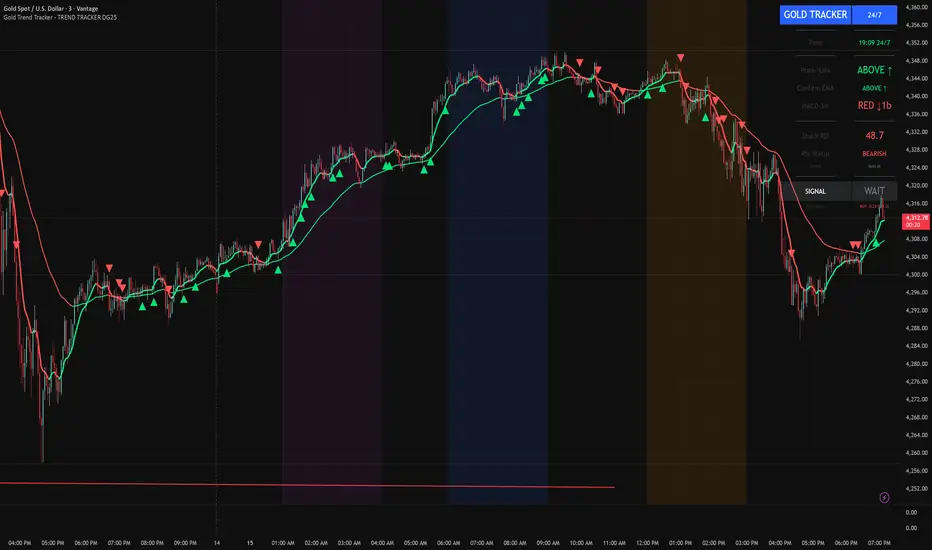
Gold Trend Tracker - TREND TRACKER DG25Gold Trend Tracker - Complete All-In-One Trading System A professional, institutional-grade trading system specifically optimized for Gold (XAU/USD) that combines multiple technical indicators with session-based filtering and real-time performance tracking. No external indicators required - everything you need is built right in! 🎯 CORE FEATURES Multi-Layered Confirmation System: Dynamic EMA trend filter (default 10-period) with color-coded visualization Optional secondary confirmation EMA (21-period) for stronger validation 3-minute MACD analysis with histogram tracking and direction monitoring MACD bounce detection for high-probability continuation entries Built-in Stochastic RSI (K=3, D=3, RSI Length=14, Stochastic Length=14) Option to connect external Stochastic RSI if preferred Intelligent Signal Generation: Clear BUY/SELL triangles plotted directly on price chart Minimum bars filter to eliminate signal spam and overtrading Higher timeframe signal overlay (optional) - see 3min signals on 15min chart Visual Stochastic RSI threshold cross markers (customizable shapes & sizes) "Show Only First Cross" option to reduce visual clutter Comprehensive alert system for all signal types Advanced Session Management: Pre-configured trading sessions: Asian (1-4am), London (6-9am), NY (12-3pm) Timezone-aware filtering supporting major financial centers: Europe/London America/New_York America/Chicago Europe/Paris Asia/Tokyo Asia/Dubai Color-coded session backgrounds (purple/blue/orange) Individual session toggle switches 24/7 mode for continuous trading (crypto/forex) Signals only generate during active sessions Real-Time Performance Tracking: Live P/L calculation since last signal entry Customizable lot size for accurate dollar calculations Pip movement tracking with automatic conversion Last signal type and duration display Performance color-coding (green profits, red losses) Professional Dashboard: Clean, scalable interface (Small/Medium/Large sizing) Current time and active session display Trading status indicator (TRADING/PAUSED/24/7) Price position relative to Main EMA (ABOVE ↑ / BELOW ↓) Confirmation EMA status (when enabled) 3-minute MACD color, direction arrow, and bar count Stochastic RSI value with color-coded status RSI status: BULLISH/BEARISH/NEUTRAL Source type indicator (Built-in/External) Large, clear SIGNAL display: BUY NOW / SELL NOW / WAIT Performance summary: signal type + price change + dollar value 📊 HOW THE SYSTEM WORKS BUY Signal Requirements: ✓ Price trading ABOVE main EMA (bullish trend confirmation) ✓ 3-minute MACD crosses above zero OR bounces higher after crossover ✓ Stochastic RSI K-line above bullish threshold (default 50) ✓ Within an active trading session (if session filter enabled) ✓ Confirmation EMA aligned (if secondary EMA enabled) ✓ Minimum bars since last signal met (prevents overtrading) SELL Signal Requirements: ✓ Price trading BELOW main EMA (bearish trend confirmation) ✓ 3-minute MACD crosses below zero OR bounces lower after crossover ✓ Stochastic RSI K-line below bearish threshold (default 50) ✓ Within an active trading session (if session filter enabled) ✓ Confirmation EMA aligned (if secondary EMA enabled) ✓ Minimum bars since last signal met (prevents overtrading) Multi-Confirmation Philosophy: This system requires ALL conditions to align before generating a signal. This drastically reduces false signals and increases win rate by only trading the highest-probability setups where trend, momentum, and volume all confirm direction. ⚙️ BUILT-IN STOCHASTIC RSI No External Dependencies: The indicator includes a fully functional Stochastic RSI calculation based on the standard TradingView formula. No need to hunt for compatible indicators or worry about settings mismatches. Default Settings (Optimized for Gold): K Smoothing: 3 D Smoothing: 3 RSI Length: 14 Stochastic Length: 14 Bullish Threshold: 50 Bearish Threshold: 50 How It Works: Calculates RSI on price data Applies Stochastic formula to RSI values Smooths result with K-period SMA Uses K-line (not D-line) for cleaner, faster signals Compares to your bullish/bearish thresholds Generates visual cross markers when thresholds breached Visual Markers: Multiple shape options: Circle, Diamond, Square, Cross Four size options: Tiny, Small, Normal, Large Customizable colors for bullish/bearish crosses "Show Only First Cross" prevents repetitive markers Appears below bars (bullish) or above bars (bearish) Flexibility: Switch to "External" mode to connect your own Stochastic RSI indicator Adjust all calculation parameters to match your trading style Completely disable the filter if you prefer trend + MACD only 🎨 CUSTOMIZATION OPTIONS Indicators: Adjust Main EMA length (default 10) Enable/disable Confirmation EMA (default OFF) Set Confirmation EMA length (default 21) Modify MACD parameters (Fast 5, Slow 14, Signal 9) Enable/disable MACD bounces (default ON) Set max bounces per trend (1-10, default 2) Stochastic RSI: Choose Built-in or External source Adjust K/D smoothing periods Modify RSI and Stochastic lengths Set custom bullish/bearish thresholds Configure cross marker appearance Toggle dashboard display Signals: Show/hide signal triangles Set minimum bars between signals (0-50, default 5) Enable higher timeframe signal overlay Choose HTF timeframe (e.g., 3min on 15min chart) Sessions: Enable/disable session filtering Select your timezone Toggle individual sessions (Asian/London/NY) Customize session start/end hours Show/hide session background colors Display: Choose dashboard size (Small/Medium/Large) Adjust all visual elements Customize colors and styling 💡 PRO TRADING TIPS Session Optimization: London Session (6-9am): Highest volatility, best for breakout trades NY Session (12-3pm): Strong trends, ideal for momentum continuation Avoid Asian Session (1-4am): Lower liquidity, choppier price action Overlap Period (12-3pm London time): Peak volume, clearest signals Signal Filtering: Set 3-5 bars minimum between signals to avoid overtrading Higher values (7-10 bars) for more conservative, swing-style entries Lower values (1-3 bars) for aggressive scalping during high volatility Confirmation EMA Usage: Enable in choppy/ranging markets for extra validation Disable during strong trending conditions (adds lag) Set to 21 for short-term trends, 50 for medium-term MACD Bounce Strategy: Bounces occur when MACD histogram changes direction after crossover Max 2 bounces = optimal (catches first continuation) Max 1 bounce = conservative (only initial momentum shift) Max 3-5 bounces = aggressive (catches multiple waves) Stochastic RSI Thresholds: 50/50 = Balanced (default, works for most conditions) 30/70 = Conservative (fewer but stronger signals) 60/40 = Aggressive (more signals, requires tighter stops) Adjust based on current market volatility Risk Management: Use the performance tracker to trail stops Exit when dashboard shows opposite signal forming Monitor MACD direction arrows for momentum shifts Set profit targets based on average session ranges 🚀 QUICK START GUIDE For Beginners: Add indicator to 3-minute Gold (XAU/USD) chart Leave all default settings (everything is pre-optimized) Enable London session (6-9am) and NY session (12-3pm) Set your timezone to your location Wait for BUY/SELL triangle + "BUY NOW"/"SELL NOW" on dashboard Enter trade when ALL conditions align Exit on opposite signal or dashboard status change For Advanced Traders: Optimize EMA lengths for your preferred timeframe Adjust Stochastic RSI thresholds based on backtesting Fine-tune MACD bounce count for your risk tolerance Enable Confirmation EMA for extra validation Use HTF signal overlay for multi-timeframe confluence Set signal filter to match your trading frequency Customize session times for your specific market focus 📈 BEST TIMEFRAMES Primary: 3-minute chart (system is MACD-optimized for 3min) Alternative: 5-minute, 15-minute (adjust signal filter accordingly) NOT Recommended: 1-minute (too noisy), 1-hour+ (signals too infrequent) Chart Setup: Main Chart: Your preferred timeframe (3min recommended) MACD: Always references 3-minute data internally Stochastic RSI: Calculates on current chart timeframe Session Filter: Works on any timeframe ✅ WHAT MAKES THIS SYSTEM UNIQUE All-In-One Solution: ✓ No hunting for compatible external indicators ✓ No configuration headaches or version conflicts ✓ One indicator = complete trading system Session Intelligence: ✓ Only trades during optimal liquidity periods ✓ Automatically pauses during low-volume sessions ✓ Timezone-aware for global traders Multi-Confirmation: ✓ Trend (EMA) + Momentum (MACD) + Volume (Stochastic RSI) ✓ Drastically reduces false signals ✓ Higher win rate through layered validation Performance Transparency: ✓ Real-time P/L tracking on every trade ✓ Know your performance immediately ✓ Data-driven decision making Professional Grade: ✓ Clean, institutional-style dashboard ✓ Customizable for any trading style ✓ Comprehensive alert system ⚠️ IMPORTANT NOTES This is NOT a "Holy Grail": No indicator is 100% accurate Requires proper risk management Works best during trending conditions May produce whipsaws in choppy/ranging markets Risk Disclosure: Always use stop losses Never risk more than 1-2% per trade Past performance doesn't guarantee future results Practice on demo account first Optimization: Default settings are optimized for Gold (XAU/USD) May require adjustment for other instruments Backtest on your specific market before live trading Different session times may work better for your timezone 🔔 ALERTS INCLUDED BUY Signal Alert SELL Signal Alert Stochastic RSI Cross Above Threshold Stochastic RSI Cross Below Threshold Alert Setup: Click "Create Alert" button Select desired alert condition Choose notification method (popup/email/SMS/webhook) Never miss a high-probability setup! 💬 SUPPORT & UPDATES This indicator is actively maintained and updated based on user feedback. Future updates may include: Additional timeframe options More session presets Enhanced performance analytics Multi-asset optimization Tags: Gold Trading, XAU/USD, Trend Following, MACD Strategy, Stochastic RSI, Session Trading, Day Trading, Scalping, London Session, New York Session, EMA System, Multi-Timeframe Analysis, Trading Dashboard, Performance TrackingWskaźnik Pine Script®od DJG9911441
EM Levelsstdv levels for you using VIX and VXN for ES and NQ so hopefully it helps you try it out and have fun Wskaźnik Pine Script®od arnlatk9
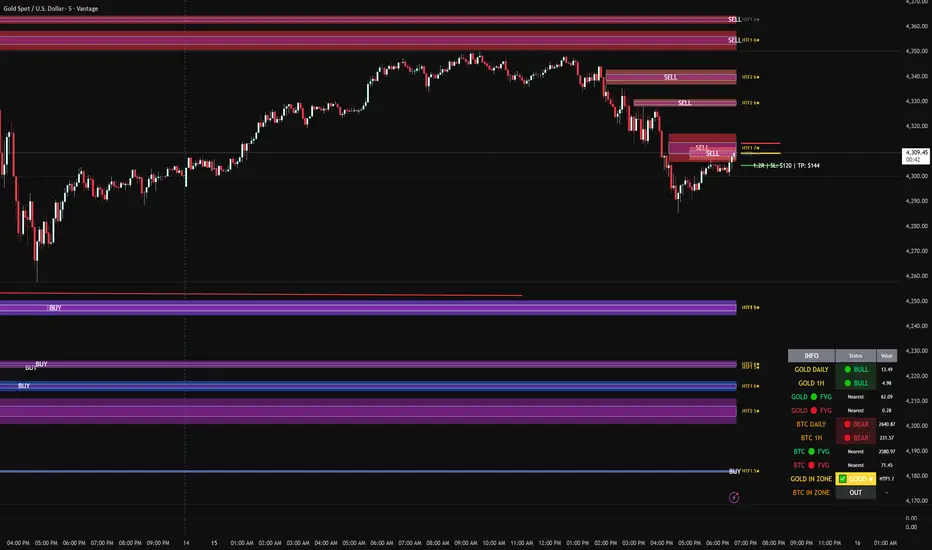
FVG DUAL HTF ALERTS - DG - FVG Dual HTF ALERTS DG - Confluence & Strength Professional Fair Value Gap (FVG) Trading Indicator with Advanced HTF Analysis This powerful indicator identifies and tracks Fair Value Gaps across two customizable higher timeframes (HTF), providing traders with precise entry zones, strength ratings, and real-time alerts for high-probability trading setups. 🎯 KEY FEATURES Dual HTF Analysis Two independent HTF settings - Analyze FVGs from any timeframe (1min to Daily) Works on ALL timeframes - View 15min and 60min FVGs on your 1min chart HTF confluence detection - Automatically highlights when both HTFs align Customizable colors - Distinct colors for HTF1 and HTF2 zones Intelligent Strength Scoring (0-10) Each FVG receives a comprehensive strength rating based on: Gap size relative to ATR Volume analysis vs 20-period average Current timeframe FVG confluence (★ indicator) Trading session timing (London/NY sessions) Large gap bonus HTF confluence bonus Rating System: 8-10 = 🔥 PREMIUM (Green) - Highest probability setups 5-7 = ✅ GOOD (Yellow) - Quality opportunities 0-4 = ⚠️ WEAK (Gray) - Lower confidence zones Sweet Spot Inner Boxes Precision entry zones - 10% inner box (customizable 1-50%) BUY/SELL labels - Clear directional indicators Customizable styling - Colors, borders, and text size Entry optimization - Target the highest probability area within each FVG Advanced Trading Tools Automatic Entry/Stop/Target Lines - Up to 3 closest FVGs displayed simultaneously Risk/Reward calculator - Shows R multiples and dollar values Customizable position sizing - Micro, mini, or standard lots Entry offset adjustment - Fine-tune entries ±50 pips from sweet spot center Smart Fill Detection HTF candle-based fills - Only checks for fills on HTF candle closes (not every lower TF bar) Multiple fill methods: Any Touch - Most sensitive Midpoint Reached - Balanced Wick Sweep - Conservative (default) Body Beyond - Most strict Touched tracking - Visual feedback when zones are tested Comprehensive Alert System 8 Individual Alerts: HTF1: Bullish/Bearish Zone Entry HTF1: BUY/SELL Sweet Spot Entry HTF2: Bullish/Bearish Zone Entry HTF2: BUY/SELL Sweet Spot Entry 4 Combined Alerts: ANY HTF: Bullish/Bearish Zone Entry ANY HTF: BUY/SELL Sweet Spot Entry Plus: Optional alerts for high-strength FVGs (8+) Information Dashboard Real-time market context display: Gold Daily & 1H - Bullish/bearish bias with range in pips Distance to nearest FVGs - Bull and bear zones IN ZONE indicator - Shows when price enters sweet spots with strength rating Optional BTC tracking - Monitor Bitcoin FVGs and bias simultaneously ⚙️ CUSTOMIZATION OPTIONS Display Settings Max FVGs to show per type (1-100) Show only untouched FVGs option Center line styling (solid/dashed/dotted) Label visibility and colors Strength color coding Trading Parameters Stop loss (1-100 pips) Take profit (1-200 pips) Entry offset adjustment Lot size (0.01-100) Dollar value display toggle Advanced Options Min strength filter (0-10) Current TF confluence check Lookback period (20-200 bars) Max bars back (1-5000) Require body close through gap Test mode: Disable fill removal 💡 IDEAL FOR Scalpers - 1min/3min charts viewing 5min/15min FVGs Day Traders - 5min/15min charts viewing 15min/60min FVGs Swing Traders - 1H/4H charts viewing 4H/Daily FVGs Gold (XAU/USD) traders - Built-in gold bias indicators Multi-timeframe analysis - See the bigger picture while trading lower TFs 🎓 HOW TO USE Add to chart - Works best on 1-5min charts for intraday trading Set your HTFs - Recommended: 15min + 60min for scalping Watch for confluence - Green/orange borders indicate HTF alignment Filter by strength - Focus on 8+ rated zones for best probability Enter at sweet spots - Wait for price to reach inner boxes Set alerts - Get notified when price enters high-quality zones Manage risk - Use provided entry/stop/target lines 📊 BEST PRACTICES ✅ DO: Focus on 8+ strength FVGs during London/NY sessions Look for HTF confluence (lime/orange borders) Wait for sweet spot entries (inner boxes) Trade in the direction of HTF bias Use multiple timeframe confirmation ❌ DON'T: Trade low-strength FVGs (below 5) unless confirmed Ignore the HTF bias indicators Chase price - let it come to the zones Trade without stops Overtrade - quality over quantity 🔧 TECHNICAL NOTES Max 500 boxes/lines/labels - Optimized for performance Lookahead enabled - Accurate HTF data on lower timeframes No repainting - All signals confirmed on bar close Compatible with all brokers - Works on any instrument with FVGs Mobile friendly - Clean display on all devices 📈 PERFORMANCE TIPS For best results on lower timeframes (1min/3min): Set "Max Bars Back" to 2000-3000 Set "Max FVGs Per Type" to 20-50 Use "Body Beyond" fill method for longer zone visibility Enable "Check Current TF FVGs" for additional confluence 🎨 COLOR RECOMMENDATIONS HTF1 (15min): Bull: Blue (#2962FF80) Bear: Red (#f2364580) HTF2 (60min): Bull: Purple (#9C27B080) Bear: Light Red (#FF6B6B80) Confluence: Bull: Green (#00FF0060) Bear: Orange (#FF6B0060) 💬 SUPPORT Created by DJG9911 For questions, feature requests, or bug reports, please use the TradingView comments section. Version: 6.0 License: Mozilla Public License 2.0 Last Updated: December 2024 Disclaimer: This indicator is for educational and informational purposes only. Always practice proper risk management and never risk more than you can afford to lose. Past performance does not guarantee future results.Wskaźnik Pine Script®od DJG99113
BTC - ALSI: Altcoin Season Index (Dynamic Eras)Title: BTC - ALSI: Altcoin Season Index (Dynamic Eras) Overview & Philosophy The Altcoin Season Index (ALSI) is a quantitative tool designed to answer the most critical question in crypto capital rotation: "Is it time to hold Bitcoin, or is it time to take risks on Altcoins?" Most "Altseason" indicators suffer from Survivor Bias or Obsolescence. They either track a static list of coins that includes "dead" assets from previous cycles (ghosts of 2017), or they break completely when major tokens collapse (like LUNA or FTT). This indicator solves this by using a Time-Varying Basket. The indicator automatically adjusts its reference list of Top 20 coins based on historical eras. This ensures the index tracks the winners of the moment—capturing the DeFi summer of 2020, the NFT craze of 2021, and the AI/Meme narratives of 2024/2025. Methodology The indicator calculates the percentage of the Top 20 Altcoins that are outperforming Bitcoin over a rolling window (Default: 90 Days). The "Win" Count: For every major Altcoin performing better than BTC, the index adds a point. Dynamic Eras: The basket of coins changes depending on the date: 2020 Era (DeFi Summer): Tracks the "Blue Chips" of the DeFi revolution like UNI, LINK, DOT, and early movers like VET and FIL. 2021 Era (Layer 1 Wars): Tracks the explosion of alternative smart contract platforms, adding winners like SOL, AVAX, MATIC, and ALGO. 2022 Era (The Survivors): Filters for resilience during the Bear Market, solidifying the status of established assets like SHIB and ATOM. 2023 Era (Infrastructure & Scale): Captures the rise of "Next-Gen" tech leading into the pre-halving year, introducing TON, APT (Aptos), and ARB (Arbitrum). 2024/25 Era (AI & Speed): Tracks the current Super-Cycle leaders, focusing on the AI narrative (TAO, RNDR), High-Performance L1s (SUI), and modern Memes (PEPE). Chart Analysis & Strategy ( The "Alpha" ) As seen in the chart above, there is a strong correlation between ALSI Peaks and local tops in TOTAL3 (The Crypto Market Cap excluding BTC & ETH). The Entry (Rotation): When the indicator rises above the neutral 50 line, it signals that capital is beginning to rotate out of Bitcoin and into Altcoins. This has historically been a strong confirmation signal to increase exposure to high-beta assets. The Exit (Saturation): When the indicator hits 100 (or sustains in the Red Zone > 75), it means every single Altcoin is beating Bitcoin. Historically, this extreme exuberance often marks a local top in the TOTAL3 chart. This is the zone where smart money typically sells into strength, rather than opening new positions. How to Read the Visuals 🚀 Altcoin Season (Red Zone > 75): Strong Altcoin dominance. The market is "Risk On." 🛡️ Bitcoin Season (Blue Zone < 25): Bitcoin dominance. Alts are bleeding against BTC. Historically, this is a defensive zone to hold BTC or Stablecoins. Data Dashboard: A status table in the bottom-right corner displays the live Index Value, current Regime, and a System Check to ensure all 20 data feeds are active. Settings Lookback Period: Default 90 Days. Lowering this (e.g., to 30) makes the index faster but noisier. Thresholds: Adjustable zones for Altcoin Season (Default: 75) and Bitcoin Season (Default: 25). Credits & Attribution This open-source indicator is built on the shoulders of giants. I acknowledge the original creators of the concept and the pioneers of its implementation on TradingView: Original Concept: BlockchainCenter.net. - They established the industry standard definition: 75% of the Top 50 coins outperforming Bitcoin over 90 days = Altseason.. TradingView Implementation: Adam_Nguyen - He implemented the "Dynamic Era" logic (updating the coin list annually) on TradingView. Our code structure for the time-based switching is inspired by his methodology. See also his implementation in the chart. ( Altcoin Season Index - Adam) . Comparison: Why use ALSI | RM? While inspired by the above, ALSI introduces three key improvements: Open Source: Unlike other popular TradingView versions (which are closed-source), this script is fully transparent. You can see exactly which coins are triggering the signal. Sanitized History (Anti-Fragile): Historical Top 20 snapshots are not blindly used. "Dead" coins (like LUNA and FTT) from previous eras are manually filtered out. A raw index would crash during the Terra/FTX collapses, giving a false "Bitcoin Season" signal purely due to bad actors. The curated list preserves the integrity of the market structure signal. Narrative Relevance: The 2024/25 basket was updated to include TAO (Bittensor) and RNDR, ensuring the index captures the dominant AI narrative, rather than tracking fading assets from the previous cycle. You can compare the ALSI indicator with other available tradingview indicators in the chart: Different indicators for the same idea are shown in the 3 Pane window below the BTC and Total3 chart, whereas ALSI is the top pane indicator. Important Note on Coin Selection Baskets are highly curated: Dead/irrelevant coins (FTT, LUNA, BSV) are excluded for clean signals. This prevents historical breaks and ensures Era T5 captures current narratives (AI, Memes) via TAO/RNDR. See above. Users are free to adjust the source code to test their own baskets. Disclaimer This script is for research and educational purposes only. Past correlations between ALSI and TOTAL3 do not guarantee future results. Market regimes can change, and "Altseasons" can be cut short by macro events. Tags bitcoin, btc, altseason, dominance, total3, rotation, cycle, index, alsi, Rob MathsWskaźnik Pine Script®od Rob_Maths17
Bollinger Bands Forecast with Signals (Zeiierman)█ Overview Bollinger Bands Forecast with Signals (Zeiierman) extends classic Bollinger Bands into a forward-looking framework. Instead of only showing where volatility has been, it projects where the basis (midline) and band width are likely to drift next, based on recent trend and volatility behavior. The projection is built from the measured slopes of the Bollinger basis, the standard deviation (or ATR, depending on the mode), and a volatility “breathing” component. On top of that, the script includes an optional projected price path that can be blended with a deterministic random walk, plus rejection signals to highlight failed band breaks. █ How It Works ⚪ Bollinger Core The script first computes standard Bollinger Bands using the selected Source, Length, and Multiplier: Basis = SMA(Source, Length) Band width = Multiplier × StDev(Source, Length) Upper/Lower = Basis ± Width This remains the “live” (non-forecast) structure on the chart. ⚪ Trend & Volatility Slope Estimation To project forward, the indicator measures directional drift and volatility drift using linear regression differences: Basis slope from the Bollinger basis StDev slope from the Bollinger deviation ATR slope for ATR-based projection mode These slopes drive the forecast bands forward, reflecting the market’s recent directional and volatility regime. ⚪ Projection Engine (Forecast Bands) At the last bar, the indicator draws projected basis, upper, and lower lines out to Forecast Bars. The projected basis can be: Trend (straight linear projection) Curved (ease-in/out transition toward projected endpoints) Smoothed (extra smoothing on projected basis/width) ⚪ Price Path Projection + Optional Random Walk In addition to projecting the bands, the script can draw a price forecast path made of a small number of zigzag swings. Each swing targets a point offset from the projected basis by a multiple of the projected half-width (“width units”). Decay gradually reduces swing size as the forecast deepens. The Optional Random Walk Blend adds a deterministic drift component to the zigzag path. It’s not true randomness; it’s a stable pseudo-random sequence, so the drawing doesn’t jump around on refresh, while still adding “natural” variation. ⚪ Rejection Signals Signals are based on failed attempts to break a band: Bear Signal (Down): price tries to push above the upper band, then falls back inside, while still closing above the basis. Bull Signal (Up): price tries to push below the lower band, then returns back inside, while still closing below the basis. █ How to Use ⚪ Forward Support/Resistance Corridors Treat the projected upper/lower bands as a future volatility envelope, not a guarantee: The upper projection ≈ is likely a resistance level if the regime persists The lower projection ≈ is likely a support level if the regime persists Best used for trade planning, targets, and “where price could travel” under similar conditions. ⚪ Regime Read: Trend + Volatility The projection shape is informative: Rising basis + expanding width → trend with increasing volatility (needs wider stops / more caution) Flat basis + compressing width → contraction regime (often precedes expansion) ⚪ Signals for Mean-Reversion / Failed Breakouts The rejection markers are useful for fade-style setups: A Down signal near/after upper-band failure can imply rotation back toward the basis. An Up signal near/after lower-band failure can imply snap-back toward the basis. With MA filtering enabled, signals are constrained to align with the broader bias, helping reduce chop-driven noise. █ Related Publications Donchian Predictive Channel (Zeiierman) █ Settings ⚪ Bollinger Band Controls the live Bollinger Bands on the chart. Source – Price used for calculations. Length – Lookback period; higher = smoother, lower = more reactive. Multiplier – Bandwidth; higher = wider bands, lower = tighter bands. ⚪ Forecast Controls the forward projection of the Bollinger Bands. Forecast Bars – How far into the future the bands are projected. Trend Length – Lookback used to estimate trend and volatility slopes. Forecast Band Mode – Defines projection behavior (linear, curved, breathing, ATR-based, or smoothed). ⚪ Price Forecast Controls the projected price path inside the bands. ZigZag Swings – Number of projected oscillations. Amplitude – Distance from basis, measured in bandwidth units. Decay – Shrinks swings further into the forecast. ⚪ Random-Walk Adds controlled randomness to the price path. Enable – Toggle random-walk influence. Blend – Strength of randomness vs. zigzag. Step Size – Size of random steps (band-width units). Decay – Reduces randomness as the forecast deepens. Seed – Changes the (stable) random sequence. ⚪ Signals Controls rejection/mean-reversion signals. Show Signals – Enable/disable signal markers. MA Filter (Type/Length) – Filters signals by trend direction. ----------------- Disclaimer The content provided in my scripts, indicators, ideas, algorithms, and systems is for educational and informational purposes only. It does not constitute financial advice, investment recommendations, or a solicitation to buy or sell any financial instruments. I will not accept liability for any loss or damage, including without limitation any loss of profit, which may arise directly or indirectly from the use of or reliance on such information. All investments involve risk, and the past performance of a security, industry, sector, market, financial product, trading strategy, backtest, or individual's trading does not guarantee future results or returns. Investors are fully responsible for any investment decisions they make. Such decisions should be based solely on an evaluation of their financial circumstances, investment objectives, risk tolerance, and liquidity needs. Wskaźnik Pine Script®od Zeiierman1010 1.4 K
Chartology Strategy+🔍 Chartology Strategy+ This tool provides a comprehensive way for users to analyze trend levels and access other Matrix features across selected tickers and timeframes. Results can be tailored by strategy, with the option to filter displayed tickers based on custom user‑defined rules. Bullish & Bearish Entry Signal (Safe & Scalping). Entry Level, SL, T-SL & Two TP Levels (Based on Possible Movement). Dashboard Table for Easy Presentation of All Levels. Timeframe Scanner for Current Signal (Trend) on Different Timeframes. Gap Up & Gap Down for Untraded Price Marking. Institutional Candles for High Volume and Big Price Movement. Neutral Candle for Low Volume and Small Price Movement. Supply Demand (Based on Swing High & Low). Mega Trend Band (Based on HMA) for Overall Trend. 🟢 Bullish & Bearish Entry Signals Shows the expected direction of the symbol. It shows Bullish and Bearish direction mark on Chart. Entry Level is Closing of the Candle. Input Settings Signal Type: Safe Appears after a proper trend confirmation. Low frequency, fewer signals, but more reliable. Best for swing traders who want strong confirmation before entering. Signal Type: Scalping Appears frequently during small downward moves. High frequency, quick signals for short-term trades. Best for intraday Traders who want multiple opportunities in small movements. 🎯 Entry Level, SL, T-SL & TP Levels Generated based on price movement and trend range. Levels on Chart Entry Level: Closing price of the candle where the signal appears. SL (Stop Loss): Maximum risk allowed for the trade. TSL (Trailing SL): Dynamic SL to reduce risk and lock profits. Level 01: First TP level with 1:1 risk-reward ratio. Used for partial booking. Level 02: Final TP level for full exit. Input Settings Levels: You can Increase or Decrease Level Amount for the Level 2. Risk: You can Increase or Decrease Stop Loss (SL). 📊 Dashboard Table for Easy Presentation of All Levels. Displays all key levels and metrics in one place: Metrics Symbol Name Shows the name of the current chart (e.g., NIFTY, BANKNIFTY). Bar Age Displays the How many candles (Bars) before Latest signal appears. Entry Shows the entry level where the latest bullish or bearish signal was generated. Level 1 (TP1) First target level, based on 1:1 risk-reward ratio. Used for partial booking to secure profits. Level 2 (TP2) Final target level where you can exit the remaining position. SL (Stop Loss) Shows the maximum risk limit for the trade. Helps you control losses. MTM (Mark to Market) Shows the difference between CMP and Entry Level. Helps track how far price has moved since entry. P&L (Profit & Loss) Shows the difference between Entry and Target Level achieved. Helps measure actual gain or loss. Date & Time Displays when the latest bullish or bearish signal was generated. Helps check how old or fresh the signal is. Timeframe Scanner or Current Signal (Trend) on Different Timeframes. Shows the current signal across multiple timeframes. Row 1 Fixed signals for 1M and 3M. Row 2 Any 2 Custom Timeframes chosen in input settings. Traders use this to confirm signals across different timeframes before entering trades. Example If the Day trend is bullish but the 15M chart shows bearish, many traders avoid that trade. 🚦 Gap Up & Gap Down for Untraded Price Marking. Marks untraded price zones where price may react. Gap Up & Down Flag Mark Gap Up: Bullish Bias, Marked Green flag, plotted when candle opens above previous high. Gap Down: Bearish Bias, Marked as Red flag, plotted when candle opens below previous low. Input Settings Enable / Disable from Chart Threshold: Minimum gap size Threshold to detect 🟡 Institutional Candles for High Volume and Big Price Movement Indicate strong price movement with high volume. Marking Displayed as Yellow Body Candles Helps identify zones where big players are active. Input Settings Enable / Disable from Chart Body %: Compare of Open & Close with High & Low Size %: Compare Total Candle Size from Past Range Volume %: Compare Total Candle Volume from Past Range ⚪ Neutral Candle for Low Volume and Small Price Movement Shows low volume and minimal price movement. Marking Displayed as Hollow Body Candles Traders usually avoid trading during these candles. Input Settings Enable / Disable from Chart. Candle %: Compare Size of candles. Volume %: Compare Volume of Candles from Previous Range. 🟥🟩 Supply Demand Zones (Based on Swing High & Low). Based on swing highs and lows to identify possible reversals. Zones 🟥Supply Zone: Near swing high, marked with Light Red Zone. 🟩Demand Zone: Near swing low, marked with Light Green Zone. Input Settings: Bars Left: How many past Bars Swing will Calculate. Bars Right: After How many Bars, Zone will plot. Max Zones: Number of Supply or Demand Zone want to plot on Chart Delete Breaked Zones: Want to see Disappeared Zone, Uncheck it. Extend Right: Want to see till End of the Chart, Uncheck it. 📈 Mega Trend Band (Based on HMA) for Overall Trend Based on HMA (Hull Moving Average) to show overall trend and Help in Filters out trades against the main trend. Working Price above band → Bullish trend Price below band → Bearish trend Input Setting Enable / Disable from Chart HMA Period Setting: 45 👓 How to Use All together for Better Confidence. 🔍Watch for the New Entry icon on the chart. Find New Signals with help of Automated Alerts. Check Entry Level, SL, Level 1 and Level 2 (TP2). Verify Date & Time → how fresh the signal is. Signal not too old. 🧭 Signal is not Self Sufficient for Good Accuracy. So, we suggest a few rules. Cross‑Check Current Signal with Timeframe Scanner. Trade only when smaller timeframe aligns with bigger trend. (e.g., If Day = Bullish ▲ but 15M = Bearish ▼, avoid entry. Trend may not be stronger.) Validate with Market Context of Gap. (e.g., If new signal came on Gap Up / Gap Down, avoid entry. Price may reverse.) Zone Awareness Use Supply Demand zones to refine entries/exits and avoid false signals. (e.g., Entry: If any zone is available between Entry and Level 01, Avoid trade until Zone breaked, Exit: If Zone create between the trade, modify SL according to T-SL and wait. Trend Filter of overall direction. (e.g., If Mega Trend Band Bullish and Trend is Bearish, Avoid the Trade.) 🕵🏻 Quick Checklist Before Trade Bullish or Bearish signal? Dashboard Table shows fresh entry? SL defined and acceptable risk? Timeframe Scanner aligned? No Neutral candle interference? Institutional candle or Gap supports move? Supply/Demand zone not against trade? ✅ All Okay - Go for the ENTRY Set a Proper Entry Point Always respect SL, Good Trader Never avoid it. Book partial profits at Level 1, It secure your Trade. Keep Modifying your SL, According to T-SL Level. On Level 2, Exit remaining All position for full profit. 📊 Healthy Trading Tips Risk Small: Never risk more than 1–2% per trade. Size Smart: Adjust position size to volatility and account size. Diversify: Don’t put all money in one asset/sector. Plan Ahead: Set entry, exit, and stop‑loss before trading. Trade Less: Focus on quality setups, avoid overtrading. Use Both Analyses: Combine technical charts with fundamental news/events. Control Emotions: Stick to strategy, avoid fear/greed. Journal Trades: Record reasons, outcomes, and lessons. Stay Informed: Track economic calendars and global events. Take Breaks: Step away after wins/losses to reset. 🎯 Advanced Discipline Partial Exit: Book profits in stages (e.g., 50% at 1:1, 50% at Final Level). Check News: Avoid trading during major announcements. No Tweaks: Don’t change plan mid‑trade; wait for SL/TP. Fixed Rules: Trade with fixed risk, fixed gains. No Averaging Losses: Close bad trades, don’t add more. Keep Learning: Evolve strategy with market changes. Believe: Trust your plan and process. Backtest: Practice setups until they’re second nature. Daily Routine: Pre‑market Preparation, post‑market review. Optimize Setup: Clean workspace, fast platform, no distractions. Track Metrics: Win rate, average reward, expectancy, time of day, setup performance. Trader Identity: Follow rules; money is a byproduct. Liquidity Check: Avoid low‑volume instruments. Respect Trend: Trade with momentum, not against it. Avoid Over‑Leverage: Keep leverage low, avoid margin unless planned. Risk Disclaimer This content, including any tools, software, datafeeds, indicators, or scanners, is provided strictly for charting, educational, informational, and paper‑trading purposes only. It does not constitute investment advice, buy/sell recommendations, or real‑money trading strategies. Not Advisors: We are not registered as investment advisors or research analysts. Charting Only: Use is limited to testing strategies and evaluation; any application to real trading is at the user’s sole risk. No Liability: No liability is accepted for financial loss, trading loss, or damages arising from use of the tools or data. Data Limitations: Market data may be delayed, inaccurate, or incomplete. Past or hypothetical performance is not indicative of future results. Signals Disclaimer: Automated signals are for evaluation only and should not be treated as accurate or real trading instructions. High Risk: Trading and investing involve substantial risk and can result in losses beyond the initial capital. Independent Judgment: Users must exercise independent judgment and consult licensed professionals before making financial decisions ⚠️ Final Note: Trading is speculative and may not be suitable for all investors. Use only risk capital and never invest money you cannot afford to lose. ✅ Always remember🧠 my 3R Rule💡: If the money💰 is yours then, RISK⚖️, REWARD🏆 and REGRET😔 are solely yours. 🔥 Wskaźnik Pine Script®od Chartology-AI34
RRG 1 stockThis Pine Script combines Relative Rotation Graph (RRG) analysis with Supertrend-based trend confirmation to identify momentum shifts and potential trade entries in a single stock relative to a benchmark (e.g., NIFTY). Here’s a detailed description you can use: Description – RRG + Supertrend Indicator (1 Stock) The RRG 1 Stock indicator blends relative strength analysis with trend-following confirmation to help traders pinpoint when a stock is outperforming or underperforming its benchmark and to align entries with trend direction. Core logic: Benchmark-relative strength (RS-Ratio and RS-Momentum): Calculates relative strength (RS) of the selected stock versus a benchmark (default: NIFTY). Applies double smoothed Weighted Moving Averages (WMA) to derive normalized RS-Ratio and RS-Momentum, similar to Julius de Kempenaer’s RRG framework. Classifies each bar into one of four RRG quadrants: Leading – strong and improving relative performance Weakening – losing momentum after leadership Lagging – underperforming the benchmark Improving – rebounding from underperformance The chart background color dynamically reflects the current quadrant. Supertrend filters (Trend confirmation): Uses two Supertrend overlays with different multipliers (Factor1, Factor2) to judge trend strength. Potential long setups occur when the stock is in the Leading quadrant and price is above both Supertrends. Potential short setups occur when in the Lagging quadrant and price lies below both Supertrends. Velocity and momentum signals: Measures RRG “velocity” — the speed of movement across the RS-Ratio/RS-Momentum plane. Flags unusually strong rotations (high velocity) with a diamond marker when momentum accelerates. Statistical bands & entry modes: Standard-deviation bands on RS-Ratio (±2σ by default) can be used for mean-reversion entries if you select STDDEV mode instead of QUADRANT. Shows fast RS moving average (9-period) as a smoother for momentum confirmation. Custom time markers: You can define a specific date (day, month, year) to analyze RRG values at that time and display the difference in bar count since that point. Visualization: Plots RS-Ratio (green) and RS-Momentum (blue) with a 100 baseline. Benchmark and stock closing prices appear in the status line. Chart background colors shift to reflect RRG quadrant and trend direction. Usage: Ideal for relative strength rotation analysis or as a systematic entry trigger in momentum-based strategies. It helps confirm trend continuation or reversals based on both relative momentum and technical trend strength.Wskaźnik Pine Script®od deepaknesarikarZaktualizowano 11
Future Ichimoku Cloud - HorizonIchimoku Horizon is an advanced Ichimoku indicator that projects future cloud formations and component lines, giving traders unprecedented visibility into potential support/resistance zones before they form. 1. Future Ichimoku Projections Project Ichimoku components forward in time using simulated price evolution based on rolling Tenkan/Kijun windows Manual forecast periods up to 125 bars (all 4 components) or 500 bars (cloud only) Smart limit management automatically adjusts to TradingView's drawing object limits while maximizing visible projections 2. Preset & Custom Ichimoku Configurations Choose from multiple common Ichimoku presets or fully customize your own 3. Multi-Timeframe Display & Projections Display Ichimoku from higher/lower timeframes directly on your current timeframe chart Automatic scaling adjusts Ichimoku periods correctly across timeframes Intelligent handling of 24/7 markets (crypto/forex) vs traditional session-based markets Built-in detection of problematic timeframe combinations with optional MTF cloud fetching for accuracy Automatic notifications when future projections are unavailable due to MTF constraints 4. Tenkan & Kijun Range Windows Visual range windows that display the exact high/low range used for Tenkan and Kijun calculations Optional High/Low markers placed at the exact bars they occur Optional countdown labels show how many bars remain until the current High/Low expires from the rolling window Range windows scale up and down dynamically to match display timeframe 5. Comprehensive Alert Suite Built-in alerts for all major Ichimoku events: TK crosses, E2E entires, Kumo breakouts, etc. All alerts are cloud-aware and displacement-correct. How It Works The indicator uses the traditional Donchian channel method to calculate Ichimoku components, then extends this logic forward by simulating future price action within the calculation windows (no new highs or lows). This creates a forward-looking projection of where support and resistance zones will form. The range display feature helps traders understand why the lines are where they are by showing the exact high/low points and countdown timers for when these points will expire from the calculation. Who This Indicator Is For: Ichimoku traders who want future-aware context Multi-timeframe analysts seeking correctly aligned clouds Traders who want to understand Tenkan/Kijun mechanics Users who need precision without manual recalculation Notes: Maximum 500 drawing objects limit managed automatically Due to Pinescript/TradingView limitations, future Tenkan/Kijun line width is only modifiable in the source code. Wskaźnik Pine Script®od CryptoPl3beZaktualizowano 161
CD + NX (with CD Bottom Alert)It combines custom bands with optional buy & sell signals, making it easier to spot potential entry and exit opportunities across multiple timeframes. 梯子NX指标,显示长短周期趋势 the buy & sell signals is no repaint or using the future functionality. cd指标,无未来函数 repaint的抄底卖出指标 after buying, I will provide a PDF and more information for how to use this one. 添加抄底警报,详细用法/打法付费后会有详细教程Wskaźnik Pine Script®od alexliyuxin1999Zaktualizowano 119
Multi-Confirmation Fib Zones This indicator combines **dynamic Fibonacci-style price zones** with a **multi-signal confirmation layer** to highlight areas where reactions are more likely to matter. Core purpose * Map out **contextual price areas** derived from recent market ranges. * Provide a structured way to read potential **reaction / continuation zones** without relying on a single input. Zone framework * The tool continuously tracks the market’s recent extremes and builds **adaptive reference zones** around them. * It can display both **bullish-context** and **bearish-context** zones, depending on the current market behavior. Confirmation layer (confluence concept) Instead of treating any zone touch as a signal, it evaluates **multiple market perspectives**, such as: * momentum pressure, * momentum shifts, * short-term oscillation balance, * participation / activity confirmation. Signals are intended to be interpreted only when **several views align**, helping reduce false positives. Practical use * Useful for traders who want **structured levels + confirmation** in one visual workflow. * Can support both **trend continuation** and **reaction-based setups**, depending on broader context. * Best treated as a **decision support system** (a “dashboard”), not a standalone trade trigger. Best conditions * Works best when markets are **respecting ranges and reacting at obvious areas**. * In extremely noisy, thin, or news-driven spikes, confirmations may desync and require more discretion. *For educational and analytical purposes only. Always validate across different instruments and timeframes.* Wskaźnik Pine Script®od alblanz6
Seasonality Scanner by thedatalayers.comThe Seasonality Scanner automatically detects seasonal patterns by scanning a user-defined number of past years (e.g., the last 10 years). Based on this historical window, the indicator identifies the strongest seasonal tendency for the currently selected date range. The scanner evaluates all valid seasonal windows using two filters: • Hit Rate - the percentage of profitable years • Average Return - the highest mean performance across the analyzed period The best-scoring seasonal setup is displayed directly on the chart, including the exact start and end dates of the identified pattern for the chosen time range. Users can define the period they want to analyze, and the indicator will automatically determine which seasonal window performed best over the selected history. Recommended Settings (Standard Use) For optimal and consistent results, the following settings are recommended: • Search Window: 20-30 • Minimum Length: 5 • Time Period: from 2015 onward • US Election Cycle: All Years These settings provide a balanced and reliable baseline to detect meaningful seasonal tendencies across markets. This indicator helps traders understand when recurring seasonal patterns typically occur and how they may align with ongoing market conditions. This indicator is intended to be used exclusively on the daily timeframe, as all calculations are based on daily candles. Using it on lower timeframes may result in inaccurate or misleading seasonal readings.Wskaźnik Pine Script®od TheDataLayersZaktualizowano 14
COT Index by thedatalayers.comThe COT Index transforms the weekly COT net positions of Commercial traders into a normalized mathematical model. Instead of displaying raw net positioning, the COT Index processes the data through a cyclical normalization algorithm (commonly using a 26-week or alternatively a 52-week cycle). This makes it easier to identify bullish or bearish extremes in Commercial activity. The index is plotted as a color-coded line: • Green Zone - Commercials are mathematically classified as bullish. Historically, bullish Commercial positioning often aligns with upward market pressure. • Red Zone - Commercials are mathematically classified as bearish. This typically corresponds with increased downward pressure in the underlying market. • Neutral Zone - Neither bull nor bear dominance; positioning is mid-range. Since COT data is published only once per week and the COT Index is built on cyclical multi-week analysis, the indicator is intended to be used exclusively on the weekly timeframe. Using lower timeframes will not reflect the structure of the data accurately. The selected cycle length (typically 26 weeks, optionally 52 weeks) determines how net positions are compared and normalized, and can influence how quickly extreme zones appear. The COT Index provides an objective way to interpret Commercial trader sentiment and to identify potential directional bias in the market.Wskaźnik Pine Script®od TheDataLayers6
COT Net Positions by thedatalayers.comCOT Net Positions by thedatalayers.com visualizes the net positioning of different trader groups based on the weekly Commitments of Traders (COT) reports published by the CFTC every Friday. The indicator processes the raw COT data by calculating Long positions minus Short positions for each trader category. This results in the net position of every group per report. The script then plots these net positions continuously over time, based on every available COT release. This creates a clear and easy-to-read visualization of how different market participants are positioned. The indicator displays the three primary COT categories: • Commercials • Non-Commercials • Non-Reportables By observing how these trader groups shift their positioning, traders can better understand market sentiment and identify potential directional biases or changes in underlying market pressure. This tool is designed to help traders incorporate positioning data into their analysis and to better interpret how institutional and speculative flows evolve over time. This indicator is intended to be used exclusively on the weekly timeframe. COT data is published once per week by the CFTC and therefore only updates weekly. Using this script on lower timeframes may result in misleading visualization or irregular spacing between data points. For correct interpretation, please apply it on 1W charts only.Wskaźnik Pine Script®od TheDataLayers10
Numanti - FairRate EUR/USD Fair ValueFairRate | EUR/USD Fair Value Indicator Know When EUR/USD Is Overpriced or Underpriced Price tells you where the market *is*. Fair value tells you where it *should be*. EUR/USD doesn't move randomly. Interest rates, yield curves, risk appetite, and equity flows drive where the pair trades over time. When price strays too far from these fundamentals, it tends to snap back. FairRate shows you exactly how far price has strayed. How It Works The indicator calculates a fair value for EUR/USD based on macroeconomic variables updated weekly. It then measures the deviation between current price and fair value in standard deviations (the z-score). > +2σ --> EUR significantly overvalued — watch for pullback +1σ to +2σ --> EUR above fair value -1σ to +1σ --> Near equilibrium -1σ to -2σ --> EUR below fair value < -2σ --> EUR significantly undervalued — watch for bounce The bigger the deviation, the stronger the fundamental pressure for mean reversion. What You See on the Chart - Fair Value Line — Where EUR/USD "should" be trading - ±1σ and ±2σ Bands — Normal and extreme deviation zones - Info Panel — Current fair value, z-score, and signal status When price pushes into the outer bands, fundamentals are stretched. That's where opportunities often emerge. Model Quality This isn't a typical indicator or curve-fitted approach. It's a proper econometric model: - R² > 80% — Fundamentals explain most of EUR/USD movement - Out-of-sample validated — Works on data the model never saw - Updated weekly — Fresh estimates every Friday - Research-backed — Methodology documented in white paper How Traders Use It Mean Reversion When z-score hits extreme levels (±2σ), look for reversal setups. Combine with your technical analysis for entries. Trend Confirmation If price is trending AND fundamentals support it (z-score moving in trend direction), that's a stronger move. Risk Filter Avoid counter-trend trades when z-score is near zero — there's no fundamental reason to expect a reversal. Context Layer Add fundamental context to pure price action. Know whether you're trading with or against the macro backdrop. ### What This Is NOT - Not a buy/sell signal generator - Not a timing indicator - Not a substitute for technical analysis FairRate is a fundamental layer — one piece of the puzzle that tells you whether EUR/USD is cheap, expensive, or fairly priced right now. The Model Built on peer-reviewed econometric methodology. The model captures the fundamental drivers that institutional desks use to assess currency valuation — not a black-box indicator or curve-fitted pattern. Add FairRate to your EUR/USD analysis. Know where fundamentals stand. © 2025 Numanti. All rights reserved. Wskaźnik Pine Script®od Numanti-Investment-Partners0